It is currently Tue Jun 09, 2026 10:00 am


All times are UTC - 5 hours [ DST ]


Post new topic Reply to topic  [ 30 posts ]  Go to page 1, 2  Next
Author Message
 Post subject: Animation Puzzle Challenge.
PostPosted: Mon Feb 25, 2013 11:06 pm  (#1) 
Offline
GimpChat Member
User avatar

Joined: Dec 11, 2011
Posts: 532
i sometimes like making animations with gimp. i thought of something that i think would take time to make. so i thought this would make a good thread and challenge others to see how they would pull this off. here is my idea: to take a photo(any photo) and turn it into a puzzle using gimp. once you have made the puzzle make a animation showing the puzzle being put together in front of your eyes. how many pieces you use to make your puzzle is up to you, but i don't think a puzzle with ten pieces would be all that hard. i have started on mine already. and i think i have 27 pieces in mine. but that may change. anyways i think this may be fun to see others animations on this one. so i hope you will do one. it may be harder then you think. i hope others will give it a try. thanks for viewing my thread and good luck on your puzzle :) :)

_________________
Image


Share on Facebook Share on Twitter Share on Orkut Share on Digg Share on MySpace Share on Delicious Share on Technorati
Top
 Post subject: Re: Animation Puzzle Challenge.
PostPosted: Mon Feb 25, 2013 11:42 pm  (#2) 
Offline
Script Coder
User avatar

Joined: Feb 18, 2011
Posts: 4826
Location: Bendigo Vic. Australia
This is definitely an interesting Idea and I'm sure if you get a good result we would all love a tutorial on how it was achieved

_________________
Image
No matter how much you push the envelope, it'll still be stationery.


Top
 Post subject: Re: Animation Puzzle Challenge.
PostPosted: Tue Feb 26, 2013 12:04 am  (#3) 
Offline
GimpChat Member
User avatar

Joined: Dec 11, 2011
Posts: 532
Graechan wrote:
This is definitely an interesting Idea and I'm sure if you get a good result we would all love a tutorial on how it was achieved


i am working on it. but i work 40 hours a week so it may take a while. :)

_________________
Image


Top
 Post subject: Re: Animation Puzzle Challenge.
PostPosted: Tue Feb 26, 2013 12:30 am  (#4) 
Offline
Script Coder
User avatar

Joined: Feb 18, 2011
Posts: 4826
Location: Bendigo Vic. Australia
Using the right steps it does not take long

Image

_________________
Image
No matter how much you push the envelope, it'll still be stationery.


Top
 Post subject: Re: Animation Puzzle Challenge.
PostPosted: Tue Feb 26, 2013 1:02 am  (#5) 
Offline
GimpChat Member
User avatar

Joined: Dec 11, 2011
Posts: 532
Graechan wrote:
Using the right steps it does not take long

Image


thats nice but i was gonna show all the pieces in each frame. so it looks like a puzzle took a part and then being put together. but nice job.

_________________
Image


Top
 Post subject: Re: Animation Puzzle Challenge.
PostPosted: Tue Feb 26, 2013 2:47 am  (#6) 
Offline
Script Coder
User avatar

Joined: Feb 18, 2011
Posts: 4826
Location: Bendigo Vic. Australia
Rdgracer71 I also cheated by writing a quick script to do mine I'm not sure what you mean so I'll have to wait to see what you come up with

_________________
Image
No matter how much you push the envelope, it'll still be stationery.


Top
 Post subject: Re: Animation Puzzle Challenge.
PostPosted: Tue Feb 26, 2013 3:24 am  (#7) 
Offline
Script Coder
User avatar

Joined: Feb 18, 2011
Posts: 4826
Location: Bendigo Vic. Australia
Here's one with 16 pieces

Image

_________________
Image
No matter how much you push the envelope, it'll still be stationery.


Top
 Post subject: Re: Animation Puzzle Challenge.
PostPosted: Tue Feb 26, 2013 5:25 am  (#8) 
Offline
GimpChat Member
User avatar

Joined: Apr 07, 2010
Posts: 14182
Nice job Graechan.

_________________
Image


Top
 Post subject: Re: Animation Puzzle Challenge.
PostPosted: Tue Feb 26, 2013 5:24 pm  (#9) 
Offline
Script Coder
User avatar

Joined: Feb 18, 2011
Posts: 4826
Location: Bendigo Vic. Australia
I used the fuzzy select tool on the channel because it works

_________________
Image
No matter how much you push the envelope, it'll still be stationery.


Top
 Post subject: Re: Animation Puzzle Challenge.
PostPosted: Tue Feb 26, 2013 6:58 pm  (#10) 
Offline
GimpChat Member
User avatar

Joined: Apr 07, 2010
Posts: 14182
Jeepers Graechan, you make everythang look so easy.

_________________
Image


Top
 Post subject: Re: Animation Puzzle Challenge.
PostPosted: Tue Feb 26, 2013 7:14 pm  (#11) 
Offline
GimpChat Member
User avatar

Joined: Dec 11, 2011
Posts: 532
I am glad to see others giving this a try. i really think that doing things like this, works the mind and from what i have read, that can keep your mind working right for years to come. i have seen where people that do puzzles or mind games through there life can keep Alzheimer's disease from taking effect during there old age. at some point i will post mine. and from what i have seen, mine will be different from what has been already posted.

_________________
Image


Top
 Post subject: Re: Animation Puzzle Challenge.
PostPosted: Tue Feb 26, 2013 8:08 pm  (#12) 
Offline
Script Coder
User avatar

Joined: Feb 18, 2011
Posts: 4826
Location: Bendigo Vic. Australia
Molly it was not difficult as I used puzzler
Attachment:
Puzzler.scm [4.66 KiB]
Downloaded 236 times

_________________
Image
No matter how much you push the envelope, it'll still be stationery.


Last edited by Graechan on Tue Feb 26, 2013 11:33 pm, edited 3 times in total.

Top
 Post subject: Re: Animation Puzzle Challenge.
PostPosted: Tue Feb 26, 2013 10:51 pm  (#13) 
Offline
Script Coder
User avatar

Joined: Feb 18, 2011
Posts: 4826
Location: Bendigo Vic. Australia
sorry it has a dependancy 'layer via cut' sorry done for expediancy I'll get rid of it now

Download and try again now OK

_________________
Image
No matter how much you push the envelope, it'll still be stationery.


Top
 Post subject: Re: Animation Puzzle Challenge.
PostPosted: Tue Feb 26, 2013 11:50 pm  (#14) 
Offline
GimpChat Member
User avatar

Joined: Jan 10, 2013
Posts: 863
It was good fun!
Image

_________________
bbbbbbbbbbbImage
bbbbbbbbbbb Be patient, English is not my language.


Top
 Post subject: Re: Animation Puzzle Challenge.
PostPosted: Wed Feb 27, 2013 12:03 am  (#15) 
Offline
Script Coder
User avatar

Joined: Feb 18, 2011
Posts: 4826
Location: Bendigo Vic. Australia
Nicely done Akros yours was definitely different

_________________
Image
No matter how much you push the envelope, it'll still be stationery.


Top
 Post subject: Re: Animation Puzzle Challenge.
PostPosted: Wed Feb 27, 2013 4:51 am  (#16) 
Offline
GimpChat Member
User avatar

Joined: Apr 07, 2010
Posts: 14182
Very good Akros...cute picture

_________________
Image


Top
 Post subject: Re: Animation Puzzle Challenge.
PostPosted: Wed Feb 27, 2013 5:28 am  (#17) 
Offline
GimpChat Member
User avatar

Joined: Apr 07, 2010
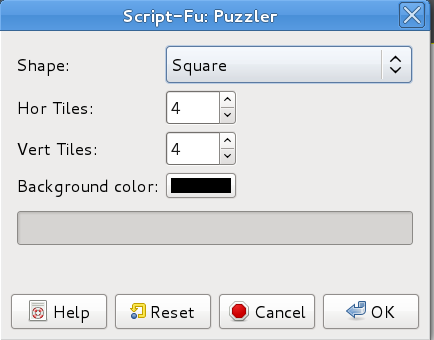
Posts: 14182
I must have downloaded the wrong script cuz I don't have any options where I can choose which pieces go in a special order.

Image

_________________
Image


Top
 Post subject: Re: Animation Puzzle Challenge.
PostPosted: Wed Feb 27, 2013 6:06 am  (#18) 
Offline
GimpChat Member
User avatar

Joined: Jan 10, 2013
Posts: 863
Graechan thx! I wanted to try something really different. I had fun putting a piece into the slot wrong, and then fixing.

Molly thx!, well ... in my case I did not use plugins. Only the Gimp and the fuzzy filter board. The choice of the order was manually.

_________________
bbbbbbbbbbbImage
bbbbbbbbbbb Be patient, English is not my language.


Top
 Post subject: Re: Animation Puzzle Challenge.
PostPosted: Wed Feb 27, 2013 6:09 am  (#19) 
Offline
GimpChat Member
User avatar

Joined: Apr 07, 2010
Posts: 14182
If you did it manually, you must have got the puzzle layout in the regular menu...then did you select them in the order you wanted them to go in?

_________________
Image


Top
 Post subject: Re: Animation Puzzle Challenge.
PostPosted: Wed Feb 27, 2013 6:52 am  (#20) 
Offline
GimpChat Member
User avatar

Joined: Jan 10, 2013
Posts: 863
Molly,
Do not know if I got it right ... :puzzled
But I used Filter> Decor> Fuzzy Border, then manually cut out the puzzle and chose the order that would be assembled, did that just ordering the layers.

Tip: This video covers the topic well http://youtu.be/KSRFFFseQZM

_________________
bbbbbbbbbbbImage
bbbbbbbbbbb Be patient, English is not my language.


Top
Post new topic Reply to topic  [ 30 posts ]  Go to page 1, 2  Next

All times are UTC - 5 hours [ DST ]


* Login  


Powered by phpBB3 © phpBB Group