It is currently Thu Nov 26, 2026 10:20 pm


All times are UTC - 5 hours [ DST ]


Post new topic Reply to topic  [ 6 posts ] 
Author Message
 Post subject: Edit Gimp.Xcf
PostPosted: Thu Feb 28, 2013 2:53 am  (#1) 
Offline
GimpChat Member
User avatar

Joined: Feb 14, 2013
Posts: 462
Location: Stockholm
Hello.
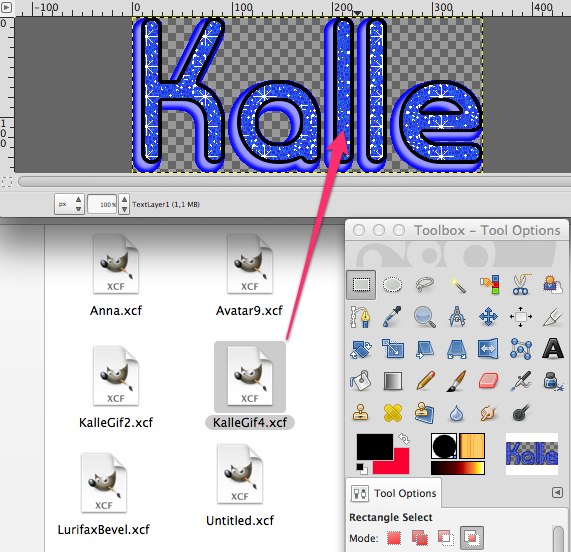
I wonder if it is possible to reopen a Gimp.xcf and change color from blue to red, without need to make a new project.
Iam lost. Do you know. Tell me. Thanks
Lurifax.
Image

_________________
Late 2017 iMac Retina 4K 21,5 inch Mac OS High Sierra version 10.13.4
3,6 GHz Intel Core i7
16 GB Ram 2400 MHz DDR4
Graphic card Radeon Pro 560 4096 MB
Affinity Photo and Affinity Designers.


Share on Facebook Share on Twitter Share on Orkut Share on Digg Share on MySpace Share on Delicious Share on Technorati
Top
 Post subject: Re: Edit Gimp.Xcf
PostPosted: Thu Feb 28, 2013 7:54 am  (#2) 
Offline
GimpChat Member
User avatar

Joined: Aug 16, 2012
Posts: 4271
Location: Göteborg, Sweden
i'm not sure i understand the problem - are you having problems opening the file or problems changing the colour of the layers? you can use any of the following: "colours" - "colourise"and pull sliders until you get the right shade, or "colours" - "hue, saturation..." and pull the slider for hue first til you get red, then fine tune with saturation and lightness sliders if needed, or "colours" - "colour balance" and pull sliders towards red, then yellow, then magenta until you get a god red (you might have to do it both for highlights, midtones and shadows). if you want to keep all the layers you will have to make the adjustments layer by layer and then you can save the values you used for the first layer as presets and use the presets on the second and third layers. if you want to flatten the image you only have to make the adjustments once. hope this helps!

_________________


Top
 Post subject: Re: Edit Gimp.Xcf
PostPosted: Thu Feb 28, 2013 7:58 am  (#3) 
Offline
GimpChat Member
User avatar

Joined: Apr 07, 2010
Posts: 14182
Adding to that, as long as you still have your xcf with all the layers then I can't see a problem changing the colors as AnMal mentioned.

_________________
Image


Top
 Post subject: Re: Edit Gimp.Xcf
PostPosted: Thu Feb 28, 2013 12:07 pm  (#4) 
Offline
GimpChat Member
User avatar

Joined: Feb 14, 2013
Posts: 462
Location: Stockholm
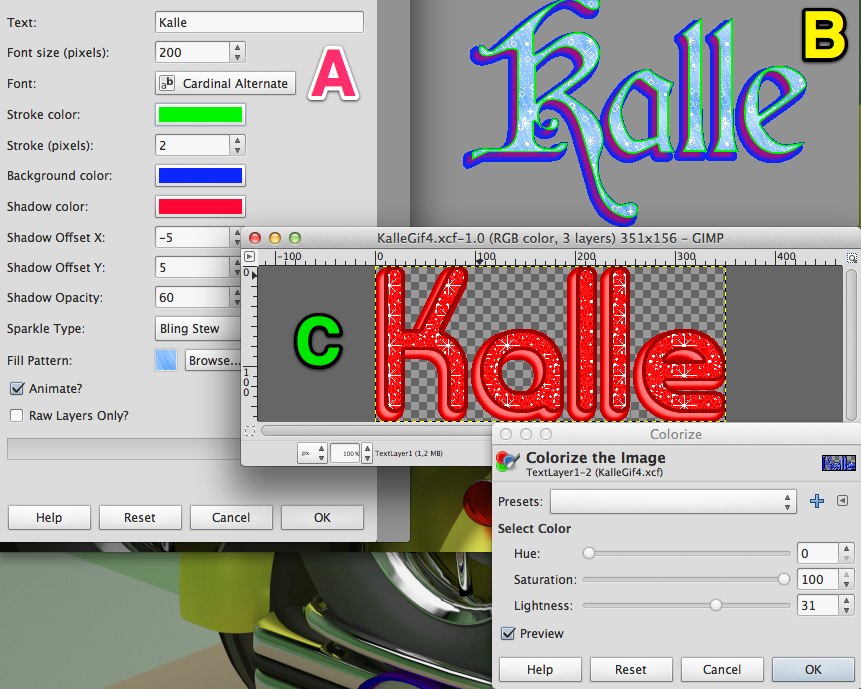
AnMal and molly thanks for reply. Yes this work perfect, (but) I only got one color on all3 layers. Maybe I am wrong, but I think all Gif-animation has 3 layer. This look poor. I thought I would bring up this window See (A)
See you.
Lurifax.
Image

_________________
Late 2017 iMac Retina 4K 21,5 inch Mac OS High Sierra version 10.13.4
3,6 GHz Intel Core i7
16 GB Ram 2400 MHz DDR4
Graphic card Radeon Pro 560 4096 MB
Affinity Photo and Affinity Designers.


Top
 Post subject: Re: Edit Gimp.Xcf
PostPosted: Thu Feb 28, 2013 12:17 pm  (#5) 
Offline
GimpChat Member
User avatar

Joined: Apr 07, 2010
Posts: 14182
If you are talking about the gif animation layers and you are working with a sparkle that has 3 separate parts to it, you would have to change it on each layer. Or go back to your layer before you animated it and redo your color before animating.

_________________
Image


Top
 Post subject: Re: Edit Gimp.Xcf
PostPosted: Thu Feb 28, 2013 12:25 pm  (#6) 
Offline
GimpChat Member
User avatar

Joined: Feb 14, 2013
Posts: 462
Location: Stockholm
OK molly, then I know.
Thanks.

_________________
Late 2017 iMac Retina 4K 21,5 inch Mac OS High Sierra version 10.13.4
3,6 GHz Intel Core i7
16 GB Ram 2400 MHz DDR4
Graphic card Radeon Pro 560 4096 MB
Affinity Photo and Affinity Designers.


Top
Post new topic Reply to topic  [ 6 posts ] 

All times are UTC - 5 hours [ DST ]


* Login  


Powered by phpBB3 © phpBB Group