It is currently Sat Jun 27, 2026 3:05 am


All times are UTC - 5 hours [ DST ]


Post new topic Reply to topic  [ 13 posts ] 
Author Message
 Post subject: map object problems
PostPosted: Thu Mar 07, 2013 12:56 am  (#1) 
Offline
GimpChat Member
User avatar

Joined: Aug 16, 2012
Posts: 4271
Location: Göteborg, Sweden
GIMP Version: 2.8.4
Operating System: Windows
OS Version: 7
GIMP Experience: Basic Level


i'm making some really simple cubes by using filters -> map -> map object on a simple square image. the first two cubes came out normal, the third came out as a mapping of the second (already mapped) image instead and no matter what i've tried that's all i seem to get now. this has happened to me once before with that filter and the problem disappeared when i restarted gimp, but i don't think i should have to do that. any idea what goes wrong and if i can do anything about it?

_________________


Share on Facebook Share on Twitter Share on Orkut Share on Digg Share on MySpace Share on Delicious Share on Technorati
Top
 Post subject: Re: map object problems
PostPosted: Thu Mar 07, 2013 1:39 am  (#2) 
Offline
Script Coder
User avatar

Joined: Apr 23, 2010
Posts: 1553
Location: not from Guildford after all
I am guessing that you did not have one of the "Create New Image" or "Create New Layer" options selected. Thus on subsequent runs, the (now modified) layer with which you started got mapped to one of the sides (though perhaps one of the hidden sides since you did not notice anything amiss in all cases).

_________________
Any sufficiently primitive technology is indistinguishable from a rock.


Top
 Post subject: Re: map object problems
PostPosted: Thu Mar 07, 2013 10:42 am  (#3) 
Offline
GimpChat Member
User avatar

Joined: Aug 16, 2012
Posts: 4271
Location: Göteborg, Sweden
saulgoode: thank you for taking the time to reply. don't think that is the problem, though - i almost always use the new layer option and certainly did so today.

_________________


Top
 Post subject: Re: map object problems
PostPosted: Thu Mar 07, 2013 4:25 pm  (#4) 
Offline
GimpChat Member
User avatar

Joined: Aug 30, 2012
Posts: 2174
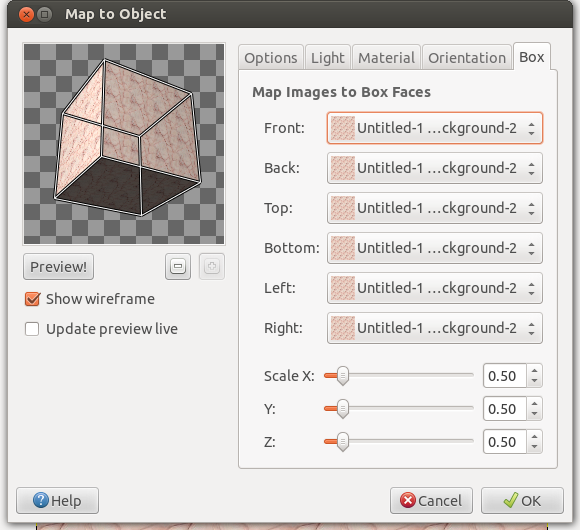
The only time I've experienced the problem you have mentioned is when the last Tab named box has the faces set to a previous box image layer.

Image

_________________
Image


Top
 Post subject: Re: map object problems
PostPosted: Fri Mar 08, 2013 1:22 am  (#5) 
Offline
GimpChat Member
User avatar

Joined: Aug 16, 2012
Posts: 4271
Location: Göteborg, Sweden
he4rty: yes, but i can't seem to do anything to change it? it's like the drop down list is stuck or something.

_________________


Top
 Post subject: Re: map object problems
PostPosted: Fri Mar 08, 2013 10:57 am  (#6) 
Offline
GimpChat Member
User avatar

Joined: Aug 30, 2012
Posts: 2174
AnMal - knowing your expertise of gimp I knew it wouldn't be anthing this simple but maybe it has helped somebody else.

_________________
Image


Top
 Post subject: Re: map object problems
PostPosted: Sat Mar 09, 2013 5:33 am  (#7) 
Offline
GimpChat Member
User avatar

Joined: Aug 16, 2012
Posts: 4271
Location: Göteborg, Sweden
he4ty: are you being sarcastic there? i don't have any kind of expertise in gimp and i know it very well :). i'm sure there's a very simple thing here that i'm missing. when you find the box sides are set to old image layers, what do you do about it? are you able to change it?

_________________


Top
 Post subject: Re: map object problems
PostPosted: Sat Mar 09, 2013 6:13 am  (#8) 
Offline
GimpChat Member
User avatar

Joined: Mar 23, 2012
Posts: 7388
Location: Göteborg at last!
Are all layers the same size? Might alpha channels have anything to do with it? These are two things that often affect mapping filters so they are worth checking. If the successful layers have an alpha channel then maybe the others should and vice-versa.


Top
 Post subject: Re: map object problems
PostPosted: Sat Mar 09, 2013 6:23 am  (#9) 
Offline
GimpChat Member
User avatar

Joined: Aug 16, 2012
Posts: 4271
Location: Göteborg, Sweden
erisian: yes, they're all made after the same template, so they all have the same size. they also all have alpha channels. do you think they shouldn't have?

_________________


Top
 Post subject: Re: map object problems
PostPosted: Sat Mar 09, 2013 6:24 am  (#10) 
Offline
GimpChat Member
User avatar

Joined: Mar 23, 2012
Posts: 7388
Location: Göteborg at last!
I don't know but it might be worth a try. Stranger things have happened.


Top
 Post subject: Re: map object problems
PostPosted: Sat Mar 09, 2013 6:42 am  (#11) 
Offline
GimpChat Member
User avatar

Joined: Aug 16, 2012
Posts: 4271
Location: Göteborg, Sweden
erisian: thank you, i'll give it a try.

_________________


Top
 Post subject: Re: map object problems
PostPosted: Sat Mar 09, 2013 7:35 am  (#12) 
Offline
GimpChat Member
User avatar

Joined: Aug 30, 2012
Posts: 2174
I was being serious AnMal, I just click on the layer in the tab and a drop down menu appears of all my layers so I can then choose the one I'm after.

_________________
Image


Top
 Post subject: Re: map object problems
PostPosted: Sat Mar 09, 2013 12:04 pm  (#13) 
Offline
GimpChat Member
User avatar

Joined: Aug 16, 2012
Posts: 4271
Location: Göteborg, Sweden
he4rty yeah, that's what i would have done too - if it had worked. like you said, though, it may very well help someone else! i still have no idea what happened yesterday, i made two cubes today without problems. i'll experiment some more later and see what happens!

_________________


Top
Post new topic Reply to topic  [ 13 posts ] 

All times are UTC - 5 hours [ DST ]


cron

* Login  


Powered by phpBB3 © phpBB Group