It is currently Mon Sep 07, 2026 3:08 pm


All times are UTC - 5 hours [ DST ]


Post new topic Reply to topic  [ 21 posts ]  Go to page 1, 2  Next
Author Message
 Post subject: Krita - natural painting test
PostPosted: Thu Mar 28, 2013 3:55 pm  (#1) 
Offline
GimpChat Member
User avatar

Joined: Apr 27, 2010
Posts: 1510
Location: Sweden
Image

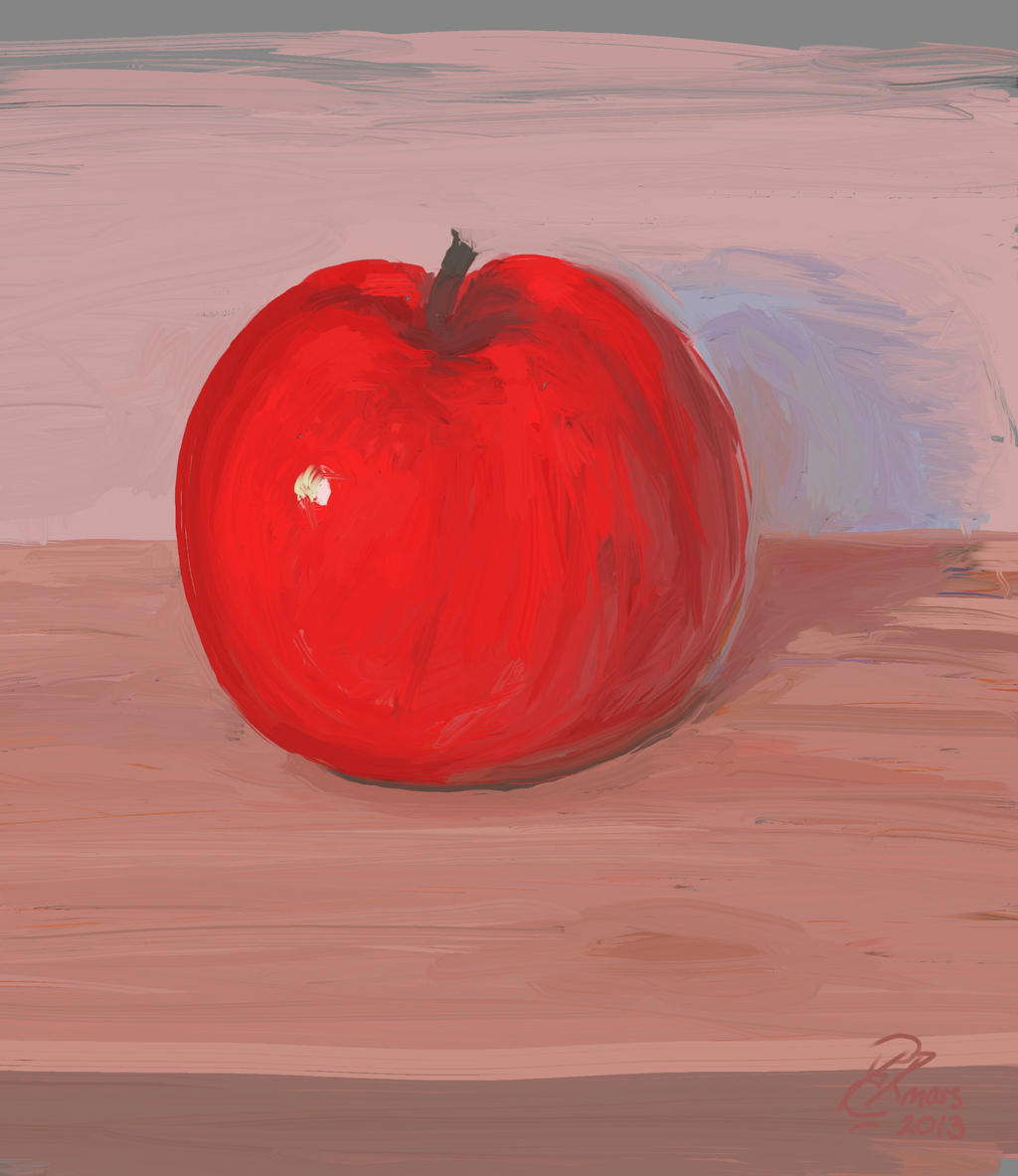
There were some discussions of emulating painting here lately, here's another take on that.

I've been testing out Krita lately (so strictly speaking this is not "Gimp Art", sorry). Krita is one of those programs I know I should like, but so far I've not really gotten into it, mainly because it was always either very slow or very unstable on my system for some reason. Anyway the GIT development version (2.7 pre-alpha) has improved dramatically from previous versions I've tried. Its brush handling is now much faster than GIMP's (In 2.8 brushes are really quite slow for me), as well as considerably more flexible. Since it (as opposed to MyPaint) has support for image-brushes and animation brushes (it can import brushes from both GIMP and PS), there are a lot of stuff you can do with it. It has a host of brush engines such as one that simulates brush hairs and another that blends colour on the canvas. Deevad (Davod Revoy) made a brush pack, and above I'm testing the hard-bristles-wet brush, which smears colour as if you used a bristled paintbrush if you push it hard enough into the canvas.

The image itself is not much to write home about, but the painted effect did work quite well I think. I'll be exploring Krita a bit in the coming weeks, if anyone is interested in a more full review down the line, let me know.

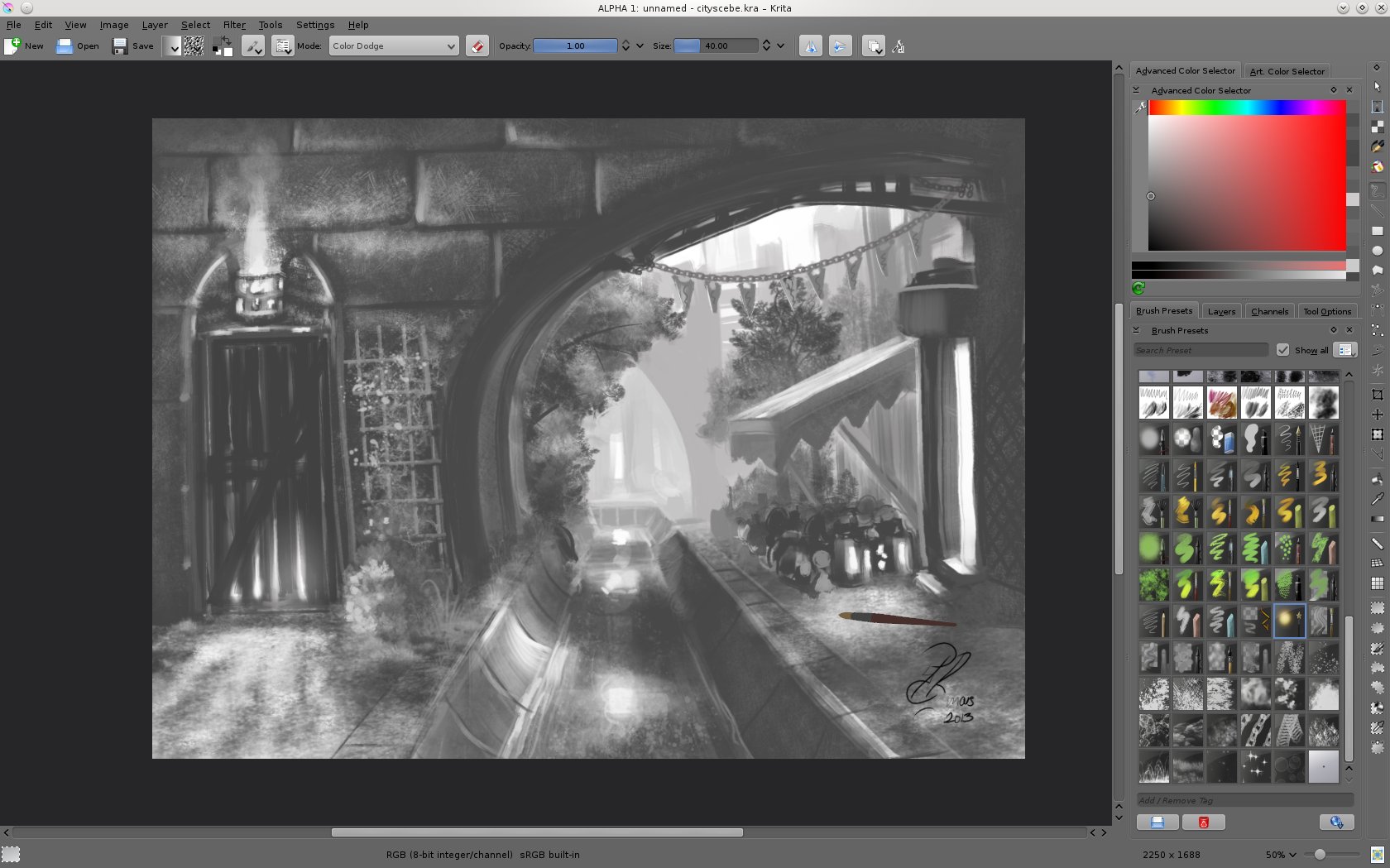
Image
(Screenshot of Krita on my machine, click for larger view. Note the nifty 3D brush cursor in the lower right of the image, it angles the same as the tablet pen (similar to Corel Painter))


.
Griatch

_________________


Share on Facebook Share on Twitter Share on Orkut Share on Digg Share on MySpace Share on Delicious Share on Technorati
Top
 Post subject: Re: Krita - natural painting test
PostPosted: Thu Mar 28, 2013 5:35 pm  (#2) 
Offline
GimpChat Member
User avatar

Joined: Aug 16, 2012
Posts: 4271
Location: Göteborg, Sweden
i think the brush effect looks very convincing, i'll definitely try krita next time i have a linux system on a computer.

_________________


Top
 Post subject: Re: Krita - natural painting test
PostPosted: Thu Mar 28, 2013 10:06 pm  (#3) 
Offline
GimpChat Member
User avatar

Joined: Apr 30, 2010
Posts: 1937
Location: Missouri
I've always wanted to give it atry but I don't have anything with Linux on it right now.

_________________
Image
The last time I kept an open mind,
my brain fell out and the dog grabbed it.
Now it's full of dirt, toothmarks, and dog slobber.
No more open minds or dogs for me.


Top
 Post subject: Re: Krita - natural painting test
PostPosted: Thu Mar 28, 2013 11:04 pm  (#4) 
Offline
GimpChat Member
User avatar

Joined: Aug 28, 2012
Posts: 3060
Location: Idk where I am.
Krita is Linux only? Gah! Oh wells, I'm yet to try my-paint as well, maybe I'll give it a shot soon.
Anyways, not the most exciting painting but I still like it, I'm hungry now! :hehe

_________________
Image
Reality is a lovely place...But I wouldn't wanna live there.


Top
 Post subject: Re: Krita - natural painting test
PostPosted: Fri Mar 29, 2013 12:09 am  (#5) 
Offline
GimpChat Member
User avatar

Joined: Apr 30, 2010
Posts: 1937
Location: Missouri
Well, there are ways to do it in windows but it's a pain and not worth the trouble.

_________________
Image
The last time I kept an open mind,
my brain fell out and the dog grabbed it.
Now it's full of dirt, toothmarks, and dog slobber.
No more open minds or dogs for me.


Top
 Post subject: Re: Krita - natural painting test
PostPosted: Fri Mar 29, 2013 12:31 am  (#6) 
Offline
GimpChat Member
User avatar

Joined: Jun 25, 2011
Posts: 914
Location: Mount Olive, North Carolina
I'd be interested in how it compares to GIMP.

I'm still using Ubuntu 11. I can't even get GIMP 2.8 until I upgrade. :(


Top
 Post subject: Re: Krita - natural painting test
PostPosted: Fri Mar 29, 2013 3:12 am  (#7) 
Offline
GimpChat Member
User avatar

Joined: Feb 17, 2011
Posts: 225
For drawing, Krita has superior toolset compared to Gimp. Canvas rotation is big plus. Vector toolset is good, also nifty toolset for things like drawing perspective and ruler. (Ruler with assistant is as good as with Sketchbook Pro). I'm still using 2.6.1 (official version), which seems to be relatively stable.

I guess for painting Krita is almost as good as in Mypaint.

For Ubuntu or Gnome users, please note that some problems you might have might be with KDE libs/env, not with Krita itself.


Top
 Post subject: Re: Krita - natural painting test
PostPosted: Fri Mar 29, 2013 3:52 am  (#8) 
Offline
GimpChat Member
User avatar

Joined: Feb 17, 2011
Posts: 225
Umm, fine brushwork, Griatch! Very neat image. (I was interrupted at least five times when I wrote the last message so of course I forgot the first thing I MEANT to write... XD )


Top
 Post subject: Re: Krita - natural painting test
PostPosted: Fri Mar 29, 2013 5:08 am  (#9) 
Offline
GimpChat Member
User avatar

Joined: Apr 27, 2010
Posts: 1510
Location: Sweden
There is a highly experimental Krita installer for Windows here, but the 2.7 version seems to not work with tablets which sort of defeats the point. Seriously, if you want to experience FOSS software in the fullest, you should really use Linux. Set up a dual-boot and run Windows and Linux on the same machine - that's what I do (I only use Windows for gaming anyway).

MyPaint is certainly a lot easier to set up and use - one of the drawbacks with Krita is that you need a truckload of dependencies, including the massive Calligra KDE library. To be fair GIMP-dev requires a lot of latest-level libraries compiled too. The boon with using powerful external libraries is of course that they get a lot of functionality for free (the damn program even supports Inkscape-like vector graphics mixed with normal bitmap graphics as well as CMYK and 32-bit colour and plenty of other really nifty stuff). It's still very much pre-alpha though and whereas Krita offers a lot of features that GIMP yet doesn't, it's also a lot less stable nor as ubiquotous as GIMP of course.

@Moko: Aye, the image is not all that exciting, but as the caption says, that was also not really the point. ;)

@merrak: A drawback of using non-rolling releases. :( I'm just in the beginning of testing out Linux Mint myself, after having used rolling-release Debian SID for many years. Will see if I can stand a fixed version system or not. That said, you can still run any version of programs, including GIMP2.8, you just need to install it yourself from some other repo than Ubuntu's official. Ubuntu is still Debian under the hood after all.

@kimppi: I'm not fully convinced about how the vector tools are presented to the user in Krita; It adds a lot of confusion to the beginner for sure. The tools for vector work is confusingly similar to those for bitmap - trying the vector tools I've found the program (without telling me) creates a vector layer - on which bitmap tools will not work. In previous versions anyway (didn't try it with 2.7), you would then remain on that vector layer also when switching back to bitmap tools - I know to separate vector from bitmap now, after having read up on things. But it does feel like the program hangs/bugs out to a casual first-time trier. Once getting that, having vector graphics in a bitmap program is pretty innovative.
I really like MyPaint for its simplicity and clean UI - I like to just have a canvas and keyboard shortcuts for everything. Krita is more involved in that regard.
.
Griatch

_________________


Top
 Post subject: Re: Krita - natural painting test
PostPosted: Fri Mar 29, 2013 5:24 am  (#10) 
Offline
GimpChat Member
User avatar

Joined: Aug 16, 2012
Posts: 4271
Location: Göteborg, Sweden
griatch: i had dual boot (with windows and open suse) on my last computer and it was great, best of both worlds. i want windows because there are programs i use a lot that only work with windows. but i had to buy a new computer in august and i'm still waiting for a friend to help me set up a dual boot, i'm no good at stuff like that myself.

_________________


Top
 Post subject: Re: Krita - natural painting test
PostPosted: Fri Mar 29, 2013 5:34 am  (#11) 
Offline
GimpChat Member
User avatar

Joined: Apr 07, 2010
Posts: 14182
@anmal. I installed another hard drive for my Linux Fedora instead of partitioning. So I can just go back and forth from windows to Linux. I just go to windows for two programs I can't get here in Fedora.
So I have the 500GB one for Linux and the 1000GB for windows (1.0TB)

_________________
Image


Top
 Post subject: Re: Krita - natural painting test
PostPosted: Fri Mar 29, 2013 10:21 am  (#12) 
Offline
Script Coder

Joined: Apr 10, 2011
Posts: 532
Griatch, try out the sketch brushes with the symmetry tool. Just a fair warning, it's a huge time waster, you'll probably end up playing with the setup so much you'll scarcely get any real work done ;)

Also, as for the speed of Krita, if you don't have high-end hardware it's best to use it in 8-bit bit-depth mode, as the higher bit depths take considerably more computing power, so unless you really need higher bit precision it's best to stick with the regular 8-bit mode. Also you can enable GPU acceleration in the settings, it can also speed it up somewhat.


Top
 Post subject: Re: Krita - natural painting test
PostPosted: Fri Mar 29, 2013 11:02 am  (#13) 
Offline
GimpChat Member
User avatar

Joined: Apr 27, 2010
Posts: 1510
Location: Sweden
@dd

Heh, yes, the symmetry tool is a fun toy; I remember it from the good old days of Deluxe Paint on the Amiga. I've never actually made anything useful with it (neither on the Amiga nor here), guess it could work to make patterns for textiles or some intricate abstract pattern. The simple mirror (2-way symmetry) is the only really useful symmetry since it makes it easy to sketch faces and characers/creatures/objects with double-sided symmetry.

I spent more time with the perspective tool actually. The fact that you can easily pull out any number of perspective planes and connect them is very interesting.

As you say the the higher-order color modes are pretty slow, also with OpenGL canvas. Interestingly enough I found the 16bit mode much slower than the 32bit one for some reason. At this point MyPaint is still considerably faster using its native 15bit mode (not 16 due to technical reasons if I remember correctly). It's interesting how much speed matters for painting, immediate response is a must for a good experience.
.
Griatch

_________________


Top
 Post subject: Re: Krita - natural painting test
PostPosted: Fri Mar 29, 2013 11:04 am  (#14) 
Offline
GimpChat Member
User avatar

Joined: Feb 17, 2011
Posts: 225
Image

Griatch, this was done with Krita's vector tools. While it's no masterpiece, I think it's good enough for me. (It's part of one panel of my comic which will be published probably during summer in a local comic society's magazine.) I couldn't produce any better with other tools.


Top
 Post subject: Re: Krita - natural painting test
PostPosted: Fri Mar 29, 2013 1:33 pm  (#15) 
Offline
Script Coder

Joined: Apr 10, 2011
Posts: 532
Griatch wrote:
@dd

Heh, yes, the symmetry tool is a fun toy; I remember it from the good old days of Deluxe Paint on the Amiga. I've never actually made anything useful with it (neither on the Amiga nor here), guess it could work to make patterns for textiles or some intricate abstract pattern. The simple mirror (2-way symmetry) is the only really useful symmetry since it makes it easy to sketch faces and characers/creatures/objects with double-sided symmetry.


Yeah, the double-sided symmetry is the most useful. But try combining it with the sketch brushes - there are some in the default brushes, the ones called "Sketch something" that use the experimental sketch brush engine. They're really fun to play with. I remember there was a web app once (still is maybe) that produces similar effect as the sketch brushes...

Also, yeah, I also remember deluxe paint. I've used both the Amiga and PC versions, I also had a copy of Deluxe Animator for PC, which could create nice animations in 320x200 256 colours mode... now that was fun to play with.

Quote:
I spent more time with the perspective tool actually. The fact that you can easily pull out any number of perspective planes and connect them is very interesting.


Hm yeah, I'll have to try it more, I haven't really gotten into using it yet.

Quote:
As you say the the higher-order color modes are pretty slow, also with OpenGL canvas. Interestingly enough I found the 16bit mode much slower than the 32bit one for some reason. At this point MyPaint is still considerably faster using its native 15bit mode (not 16 due to technical reasons if I remember correctly). It's interesting how much speed matters for painting, immediate response is a must for a good experience.
.
Griatch


Well that's not really surprising, as 32-bit floats can these days be calculated faster than 16-bit integeres in a lot of cases. But yeah, I recommend using the plain old 8-bit rgb mode, as it's unlikely you'll really need higher bit depth for casual drawing/painting.


Top
 Post subject: Re: Krita - natural painting test
PostPosted: Fri Mar 29, 2013 2:22 pm  (#16) 
Offline
Script Coder

Joined: Apr 10, 2011
Posts: 532
Here's an example of a quick drawing (well, mainly just playing around) with the sketch brush + symmetry combo. I did this literally in less than 15 minutes.

Attachment:
sketchex.png
sketchex.png [ 321.81 KiB | Viewed 4453 times ]


Top
 Post subject: Re: Krita - natural painting test
PostPosted: Fri Mar 29, 2013 2:37 pm  (#17) 
Offline
GimpChat Member
User avatar

Joined: Mar 19, 2013
Posts: 338
Location: the Netherlands
I'd say you succeeded at the natural painting test. It really looks like natural paint :D

Krita looks like a good program, maybe I'll try the experimental version for windows sometime.. Now I wish I still used linux xD


Top
 Post subject: Re: Krita - natural painting test
PostPosted: Fri Mar 29, 2013 11:06 pm  (#18) 
Offline
GimpChat Member
User avatar

Joined: Jun 25, 2011
Posts: 914
Location: Mount Olive, North Carolina
Griatch wrote:
...As you say the the higher-order color modes are pretty slow, also with OpenGL canvas. Interestingly enough I found the 16bit mode much slower than the 32bit one for some reason. At this point MyPaint is still considerably faster using its native 15bit mode (not 16 due to technical reasons if I remember correctly). It's interesting how much speed matters for painting, immediate response is a must for a good experience.
Griatch


I've been really enjoying MyPaint. It's definitely faster for large brushes. It would help if GIMP (or MyPaint every so often) would support multi-threads. Large demands will hang either program, but still only use 12.5% of the CPU.


Top
 Post subject: Re: Krita - natural painting test
PostPosted: Sat Mar 30, 2013 4:49 am  (#19) 
Offline
GimpChat Member
User avatar

Joined: Apr 27, 2010
Posts: 1510
Location: Sweden
@kimppi
Nice result! What is the comic about?

@dd
The sketch-type brush seems to be a mainstay in android smartphone painting apps. I'm thinking it's somehow a part of the android sdk toolbox since the tools in various apps are really always including a sketch tool of this type. Probably because produces decently artsy results also using a clumsy wide finger on a small screen.

I owned both Deluxe Paint IV and V. There were animation features in those as well. I remember making a really long (for the time) Syndicate-like animation with a guy being executed in a street corner. All in traditional, 400x300 pixel art with 32 (64 with halftones) colors. It's sad that Electronic Arts (EA) left the serious art world to mainly produce sports games.

Interesting point about 16 vs 32 bit, I'll have to look into that, didn't think there'd be such a big speed difference between a 16 and a 32 bit integer arithmetic on the CPU level, my first guess would have been something non-optimized at a much higher level in the program. Especially since other programs (MyPaint for one) is having little problems using less than 32-bit modes.

Nice mirror sketch! It's indeed very nice for quick character/vehicle/whatever studies. I usually use MyPaint for mirror work but the functionality is always useful in any painting application.

@merrak:
MyPaint is indeed considerably faster than GIMP for most brush work. Threading is not magical though. I imagine there are many operations that cannot be split up into multiple threads or across cores for technical reason, or which requires very difficult rewrites to work asynchronously. Many filters probably could (and as far as I know they might already be). It's interesting how potentially demanding a 2D (!) painting program really is!
.
Griatch

_________________


Top
 Post subject: Re: Krita - natural painting test
PostPosted: Sat Mar 30, 2013 5:56 am  (#20) 
Offline
Script Coder

Joined: Apr 10, 2011
Posts: 532
GIMP does have some multicore support, not sure how many plugins are optimized for multicore though.


Top
Post new topic Reply to topic  [ 21 posts ]  Go to page 1, 2  Next

All times are UTC - 5 hours [ DST ]


* Login  


Powered by phpBB3 © phpBB Group