It is currently Wed Jul 29, 2026 2:07 am


All times are UTC - 5 hours [ DST ]


Post new topic Reply to topic  [ 53 posts ]  Go to page Previous  1, 2, 3  Next
Author Message
 Post subject: Re: PhotoMaster's Christmas Ornament Tutorial
PostPosted: Fri Dec 10, 2010 12:55 pm  (#21) 
Offline
Global Moderator
User avatar

Joined: May 16, 2010
Posts: 16136
Good deal! =)

_________________
Image


Top
 Post subject: Re: PhotoMaster's Christmas Ornament Tutorial
PostPosted: Fri Dec 10, 2010 2:31 pm  (#22) 
Offline
Retired Staff
User avatar

Joined: May 22, 2008
Posts: 6946
Location: Somewhere in GIMP
Here's my ornament. I couldn't get map object to behave so I stole a ring and cap from another ornament.

Image

_________________
Image
World War IV will be fought with sticks and stones. - Albert Einstein


Top
 Post subject: Re: PhotoMaster's Christmas Ornament Tutorial
PostPosted: Fri Dec 10, 2010 3:18 pm  (#23) 
Offline
GimpChat Member
User avatar

Joined: Sep 24, 2010
Posts: 12818
Yeah; I didn't have Nadie Zenith either and going to ask, but decided for a change and not be lazy and actually read through the thread. lol

Thanks PM. :)

_________________
Lyle

Psalm 109:8

Image


Top
 Post subject: Re: PhotoMaster's Christmas Ornament Tutorial
PostPosted: Sun Dec 12, 2010 11:19 pm  (#24) 
Offline
GimpChat Member
User avatar

Joined: Oct 06, 2010
Posts: 4050
I followed PM's tutorial for the most part, and then went for a fish scale look on the cap.

Image

_________________
"In order to attain the impossible, one must attempt the absurd."
~ Miguel de Cervantes


Top
 Post subject: Re: PhotoMaster's Christmas Ornament Tutorial
PostPosted: Sun Dec 12, 2010 11:25 pm  (#25) 
Offline
GimpChat Member
User avatar

Joined: Nov 22, 2010
Posts: 42
very awesome, when i have time i will take my time to make one

_________________
Image


Top
 Post subject: Re: PhotoMaster's Christmas Ornament Tutorial
PostPosted: Mon Dec 13, 2010 7:43 am  (#26) 
Offline
GimpChat Member
User avatar

Joined: Apr 07, 2010
Posts: 14182
@mahvin, that is beautiful. How did you get your cap like that?

( good pic of you too... :mrgreen:)

_________________
Image


Top
 Post subject: Re: PhotoMaster's Christmas Ornament Tutorial
PostPosted: Mon Dec 13, 2010 11:41 am  (#27) 
Offline
GimpChat Member
User avatar

Joined: Oct 06, 2010
Posts: 4050
@Molly:

I used the paintbrush tool with a circle brush I created and just painted the pattern on a transparent layer. Then used the Color select tool to select it and then applied a metallic something gradient, before applying the map object cylinder.

Image

_________________
"In order to attain the impossible, one must attempt the absurd."
~ Miguel de Cervantes


Top
 Post subject: Re: PhotoMaster's Christmas Ornament Tutorial
PostPosted: Mon Dec 13, 2010 2:05 pm  (#28) 
Offline
GimpChat Member
User avatar

Joined: Apr 07, 2010
Posts: 14182
O Wow, thats kewl... thanks Mahvin.. I thot maybe you did it with a script.

_________________
Image


Top
 Post subject: Re: PhotoMaster's Christmas Ornament Tutorial
PostPosted: Mon Dec 13, 2010 7:34 pm  (#29) 
Offline
Former Member
User avatar

Joined: Nov 17, 2010
Posts: 618
Location: Rockford, IL
Nice Tutorial! I'm gonna give this a try once I finish restoring files, bookmarks, and that.


Top
 Post subject: Re: PhotoMaster's Christmas Ornament Tutorial
PostPosted: Mon Dec 13, 2010 10:33 pm  (#30) 
Offline
GimpChat Member

Joined: Apr 12, 2010
Posts: 5870
lylejk wrote:
Yeah; I didn't have Nadie Zenith either and going to ask, but decided for a change and not be lazy and actually read through the thread. lol
Thanks PM. :)


you don't have because is a custom filter you will find with many other cool MM filter on my resource page on Deviantart
(there i am photocomix_resources ... long time i don't update the pages, is all very messy but you will found a lot of cool script and plugin there )

_________________
My 3D Gallery on Deviantart http://photocomix2.deviantart.com/
Main gallery http://www.flickriver.com/photos/photocomix-mandala/
Mandala and simmetry http://www.flickriver.com/photos/photocomix_mandala/

Image

Mrs Wilbress


Top
 Post subject: Re: PhotoMaster's Christmas Ornament Tutorial
PostPosted: Tue Dec 14, 2010 12:57 pm  (#31) 
Offline
GimpChat Member
User avatar

Joined: Jul 04, 2010
Posts: 2253
Location: Retired Moderator Slowly Returning to the Living.
All I can say is that you are all impressing the heck out of me!!!! I love the different cap ideas!

Mahvin, that is an awesome image to start with and I like the hook you used and the pine branch!

_________________
Artists aren't crazy! We're eccentric! ~G.M. Ross

Image

My Sigs = My Photos
Check out my work at http://www.flickr.com/photos/photomastergreg.


Top
 Post subject: Re: PhotoMaster's Christmas Ornament Tutorial
PostPosted: Thu Dec 19, 2013 12:51 am  (#32) 
Offline
GimpChat Founder
User avatar

Joined: May 22, 2008
Posts: 5241
Location: Gimpville
:bump

_________________
“If you reach for the stars, you just might land on a decently sized hill.” - Stuart Hill


Top
 Post subject: Re: PhotoMaster's Christmas Ornament Tutorial
PostPosted: Thu Dec 19, 2013 5:39 am  (#33) 
Offline
GimpChat Member
User avatar

Joined: Apr 07, 2010
Posts: 14182
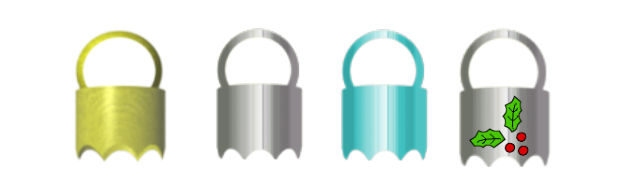
I made several ornaments from this great tutorial of PhotMaster's way back when and lost them all while switching over to Linux. However, I did make some ornament caps brushes with the nadie zenith plug-in for Mathmap which I don't have anymore. I added them below for anyone that wants to grab them. You can resize them with your brackets keys to fit your bauble.
Image


Attachments:
molly-cap-gold11.gbr [23.04 KiB]
Downloaded 216 times
molly-cap-silver9.gbr [38.33 KiB]
Downloaded 214 times
's caps.tar.gz [18.86 KiB]
Downloaded 213 times

_________________
Image
Top
 Post subject: Re: PhotoMaster's Christmas Ornament Tutorial
PostPosted: Thu Dec 19, 2013 7:25 am  (#34) 
Offline
GimpChat Member
User avatar

Joined: Jan 20, 2013
Posts: 590
Thanks Molly for share.

_________________
Image


Top
 Post subject: Re: PhotoMaster's Christmas Ornament Tutorial
PostPosted: Thu Dec 19, 2013 1:48 pm  (#35) 
Offline
GimpChat Member
User avatar

Joined: Dec 10, 2013
Posts: 1004
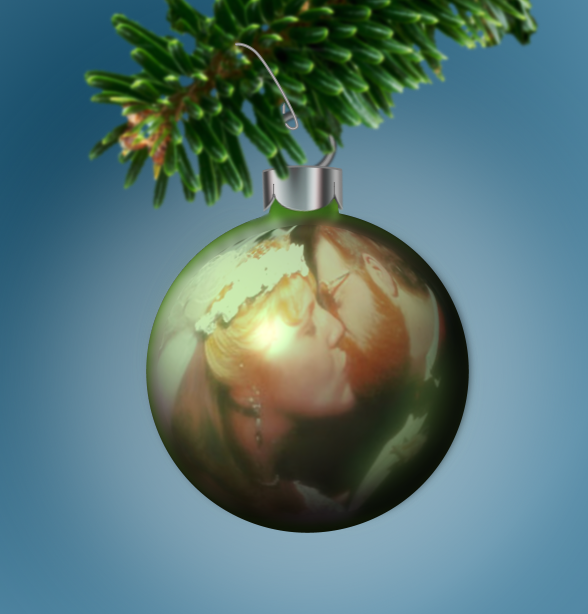
Here's my contribution.

Image

Molly! As I'm new to this, I spent a few (too ashamed to say how long actually), trying to do the cap. Finished, exported ready to post and I see your beautiful caps. Wish I'd been by sooner. I've downloaded yours. Thank you.

_________________
Image
Macbook Air - MacOS Sierra 10.12
McGimp 2.8.14
G'mic 1.6.5


Top
 Post subject: Re: PhotoMaster's Christmas Ornament Tutorial
PostPosted: Thu Dec 19, 2013 2:01 pm  (#36) 
Offline
GimpChat Member
User avatar

Joined: Apr 07, 2010
Posts: 14182
Your bauble turned out very nice.
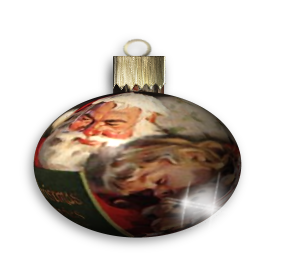
A little hint, Make sure your image is square before you do the map to object. If it isn't square the sphere will turn out oval shape.

_________________
Image


Top
 Post subject: Re: PhotoMaster's Christmas Ornament Tutorial
PostPosted: Thu Dec 19, 2013 2:06 pm  (#37) 
Offline
GimpChat Member
User avatar

Joined: Dec 10, 2013
Posts: 1004
Thank you Molly - I appreciate every bit of advice. I couldn't figure out why my sphere looked the way it did.

_________________
Image
Macbook Air - MacOS Sierra 10.12
McGimp 2.8.14
G'mic 1.6.5


Top
 Post subject: Re: PhotoMaster's Christmas Ornament Tutorial
PostPosted: Thu Dec 19, 2013 2:09 pm  (#38) 
Offline
GimpChat Member
User avatar

Joined: Apr 07, 2010
Posts: 14182
I think you are doing very well for the little time you have been using Gimp.

_________________
Image


Top
 Post subject: Re: PhotoMaster's Christmas Ornament Tutorial
PostPosted: Fri Dec 20, 2013 10:18 am  (#39) 
Offline
GimpChat Member
User avatar

Joined: Oct 06, 2010
Posts: 4050
I think it would be cool to have this whole process as a script.

_________________
"In order to attain the impossible, one must attempt the absurd."
~ Miguel de Cervantes


Top
 Post subject: Re: PhotoMaster's Christmas Ornament Tutorial
PostPosted: Fri Dec 20, 2013 2:56 pm  (#40) 
Offline
Global Moderator
User avatar

Joined: May 16, 2010
Posts: 16136
mahvin wrote:
I think it would be cool to have this whole process as a script.

Graechan wrote one a while back. :)
http://gimpchat.com/viewtopic.php?f=9&t=3219

Not sure if it will run in GIMP-2.8.10 though.

Good to hear from you again hey!

_________________
Image


Top
Post new topic Reply to topic  [ 53 posts ]  Go to page Previous  1, 2, 3  Next

All times are UTC - 5 hours [ DST ]


cron

* Login  


Powered by phpBB3 © phpBB Group