It is currently Wed Oct 28, 2026 2:35 pm


All times are UTC - 5 hours [ DST ]


Post new topic Reply to topic  [ 66 posts ]  Go to page 1, 2, 3, 4  Next
Author Message
 Post subject: Heya Gimpers! Boy do I luv Gimp but man am I frustrated
PostPosted: Thu Apr 11, 2013 4:44 am  (#1) 
Offline
GimpChat Member

Joined: Apr 10, 2013
Posts: 23
Hi Everyone.
I have been trying for days to use a gradient to stroke some lines and it doesn't seem possible. I created the gradient I want that is a modification of Rounded Edges. I want to draw with it in straight lines but can't make it happen. I want to draw lines line pipes and bars so they look rounded on all the edges with the centre part of the gradient running through the centre of the lines. Any help out there will be magical!
Thanks all! :gaah


Share on Facebook Share on Twitter Share on Orkut Share on Digg Share on MySpace Share on Delicious Share on Technorati
Top
 Post subject: Re: Heya Gimpers! Boy do I luv Gimp but man am I frustrated
PostPosted: Thu Apr 11, 2013 4:50 am  (#2) 
Offline
GimpChat Member
User avatar

Joined: Apr 07, 2010
Posts: 14182
I am not sure what you are asking. Did you go alpha to selection before you ran your gradient?

_________________
Image


Top
 Post subject: Re: Heya Gimpers! Boy do I luv Gimp but man am I frustrated
PostPosted: Thu Apr 11, 2013 7:38 am  (#3) 
Offline
GimpChat Member

Joined: Apr 10, 2013
Posts: 23
Thanks for the reply.
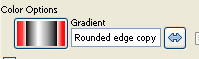
It is sort of hard to put in words as I found out trying to find a solution on Google. Let me try this. Here is a shot of my gradiant. Image.

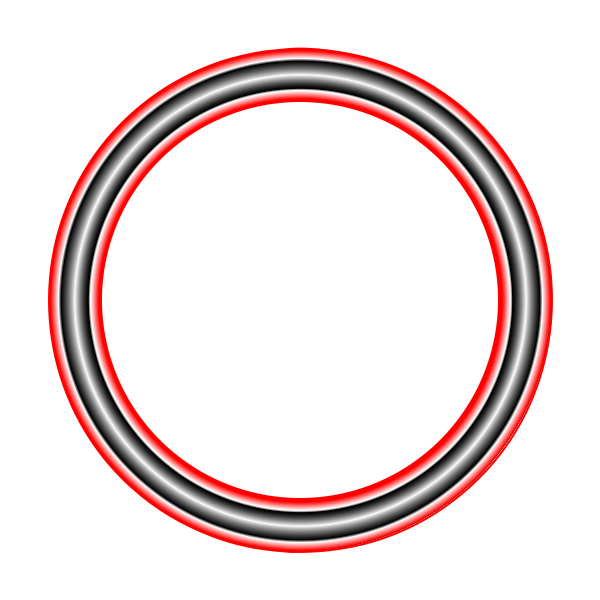
So I want to draw or paint with this gradient like a brush. So if I paint a line or create a path and stroke it: it will continue to have the centre white area through the centre of the path with the red lines on either side of the path.
So if I drew a circle there would be circle with the white running around the circumference surrounded by the other colors in the gradient so as to create a ring rather than a filled circle.
Did I do any better explaining it??


Top
 Post subject: Re: Heya Gimpers! Boy do I luv Gimp but man am I frustrated
PostPosted: Thu Apr 11, 2013 7:47 am  (#4) 
Offline
Global Moderator
User avatar

Joined: May 16, 2010
Posts: 16213
TheBikeMan wrote:
Hi Everyone.
I have been trying for days to use a gradient to stroke some lines and it doesn't seem possible. I created the gradient I want that is a modification of Rounded Edges. I want to draw with it in straight lines but can't make it happen. I want to draw lines line pipes and bars so they look rounded on all the edges with the centre part of the gradient running through the centre of the lines. Any help out there will be magical!
Thanks all! :gaah


Have you tried wrapmap by Ofnuts?
http://registry.gimp.org/node/24754

http://gimp-wrapmap.sourceforge.net/


Top
 Post subject: Re: Heya Gimpers! Boy do I luv Gimp but man am I frustrated
PostPosted: Thu Apr 11, 2013 8:00 am  (#5) 
Offline
Script Coder
User avatar

Joined: Apr 23, 2010
Posts: 1553
Location: not from Guildford after all
RobA has written a Path Blend script that produces good results, but it does not use interactive painting.

You might be able to have some success by copying your gradient to the clipboard, then choosing that as your brush and using the Airbrush Tool. It is a bit difficult to achieve smooth results but it is possible (I suspect it is easier with a graphics pad).

_________________
Any sufficiently primitive technology is indistinguishable from a rock.


Top
 Post subject: Re: Heya Gimpers! Boy do I luv Gimp but man am I frustrated
PostPosted: Thu Apr 11, 2013 8:12 am  (#6) 
Offline
Global Moderator
User avatar

Joined: May 16, 2010
Posts: 16213
Remember with wrap-map your gradient MUST be autocropped!
This will be the border size so if you create a layer 640x400 and a gradient square on the layer and do not autocrop it the border will be HUGE!

Image

Here i used a 10x10 pixel wooden gradient image for the map.


Top
 Post subject: Re: Heya Gimpers! Boy do I luv Gimp but man am I frustrated
PostPosted: Thu Apr 11, 2013 8:29 am  (#7) 
Offline
Script Coder
User avatar

Joined: Oct 25, 2010
Posts: 4812
Rod wrote:
Remember with wrap-map your gradient MUST be autocropped!
This will be the border size so if you create a layer 640x400 and a gradient square on the layer and do not autocrop it the border will be HUGE!

Image

Here i used a 10x10 pixel wooden gradient image for the map.


I think my neon-path script is more suited than wrapmap in this case: here a path "neonized" with the "incandescent" gradient:

Attachment:
Neon-Incandescent.png
Neon-Incandescent.png [ 72.32 KiB | Viewed 3316 times ]


See http://gimp-path-tools.sourceforge.net/ ... #neon-path

_________________
Image


Top
 Post subject: Re: Heya Gimpers! Boy do I luv Gimp but man am I frustrated
PostPosted: Thu Apr 11, 2013 8:55 am  (#8) 
Offline
Global Moderator
User avatar

Joined: May 16, 2010
Posts: 16213
Image


Top
 Post subject: Re: Heya Gimpers! Boy do I luv Gimp but man am I frustrated
PostPosted: Thu Apr 11, 2013 9:26 am  (#9) 
Offline
GimpChat Member
User avatar

Joined: Feb 14, 2012
Posts: 426
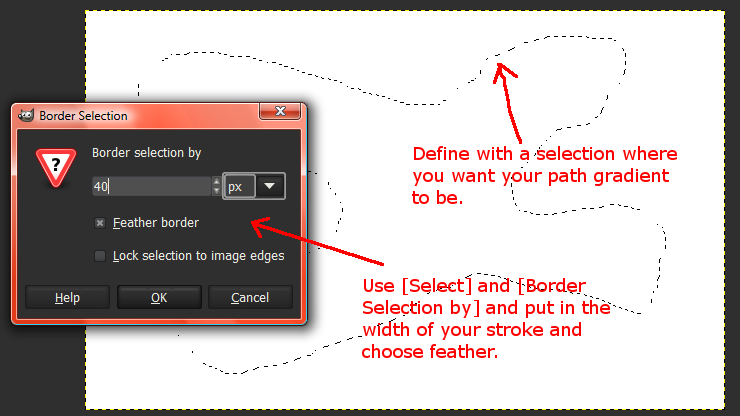
Here's another way to do it. Start off by defining where you want your stroked gradient by making a selection. Then use the border selection dialog box to define the width of your stroke and make sure to use Feather.

Image

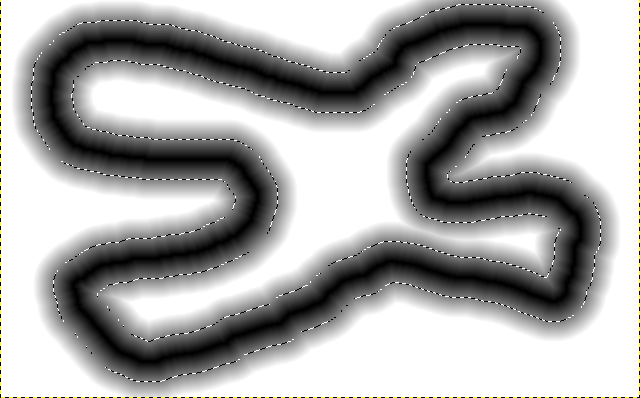
Then with the feathered selection past a forground color of black onto your white layer. Which will look like this.

Image

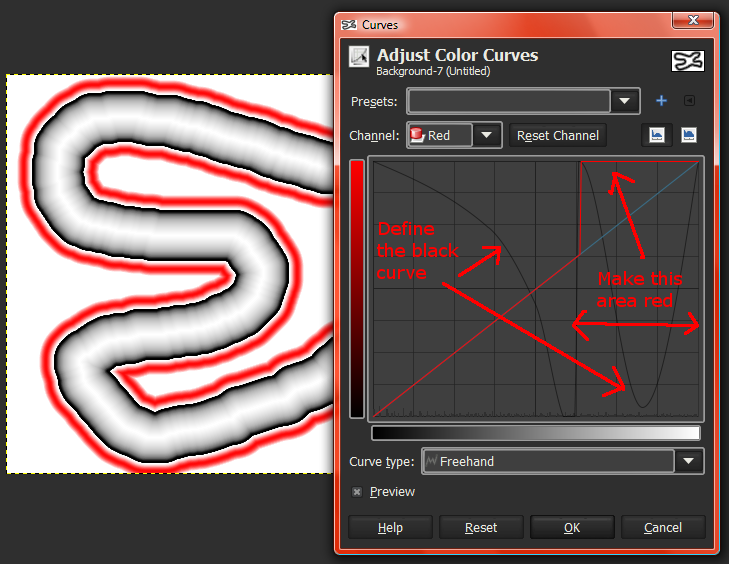
Then use the curves dialog box to 1) create the rounded stroke on the value channel. And then in the red channel use the Freehand pencil tool to flatten the line so that the outer part of the value curve turns red.

Image

Then use the Fuzzy Select tool set to no antialias and a threashold of 0 to select and delete the white area of the layer. And delete all the unwanted stroke areas.

You can also save the curve by hitting the plus + sign in the curves dialog box.

Alan


Top
 Post subject: Re: Heya Gimpers! Boy do I luv Gimp but man am I frustrated
PostPosted: Thu Apr 11, 2013 10:38 am  (#10) 
Offline
GimpChat Member

Joined: Apr 10, 2013
Posts: 23
Thanks! I installed Pathwave but no luck...

It looks like the solution but I downloaded the .py and put it in my plug ins folder but it does not appear in the right click menu of the paths dialog where I think it is supposed to show up.
Any advice?


Top
 Post subject: Re: Heya Gimpers! Boy do I luv Gimp but man am I frustrated
PostPosted: Thu Apr 11, 2013 10:39 am  (#11) 
Offline
GimpChat Member

Joined: Apr 10, 2013
Posts: 23
Thanks PegLeg but that's looks a bit out of my league....


Top
 Post subject: Re: Heya Gimpers! Boy do I luv Gimp but man am I frustrated
PostPosted: Thu Apr 11, 2013 11:35 am  (#12) 
Offline
Script Coder
User avatar

Joined: Oct 25, 2010
Posts: 4812
Path-waves? Wrong script... should be neon-path.

Normally, at the bottom, you should have "Decorate", which itself leads to "Neon"...

_________________
Image


Top
 Post subject: Re: Heya Gimpers! Boy do I luv Gimp but man am I frustrated
PostPosted: Thu Apr 11, 2013 12:04 pm  (#13) 
Offline
GimpChat Member

Joined: Apr 10, 2013
Posts: 23
ofnuts wrote:
Path-waves? Wrong script... should be neon-path.

Normally, at the bottom, you should have "Decorate", which itself leads to "Neon"...


Doh, they were both on that link and I took the top one.
Anyway. I have it in now and it's in place but whilst the result is getting closer it's still not there. This is what I get.Image


Top
 Post subject: Re: Heya Gimpers! Boy do I luv Gimp but man am I frustrated
PostPosted: Thu Apr 11, 2013 12:42 pm  (#14) 
Offline
GimpChat Member
User avatar

Joined: Feb 14, 2012
Posts: 426
TheBikeMan wrote:
Thanks PegLeg but that's looks a bit out of my league....

Sorry that didn't help, but its nice to feel like I'm in a higher league.


Top
 Post subject: Re: Heya Gimpers! Boy do I luv Gimp but man am I frustrated
PostPosted: Thu Apr 11, 2013 3:22 pm  (#15) 
Offline
Script Coder
User avatar

Joined: Oct 25, 2010
Posts: 4812
TheBikeMan wrote:
ofnuts wrote:
Path-waves? Wrong script... should be neon-path.

Normally, at the bottom, you should have "Decorate", which itself leads to "Neon"...


Doh, they were both on that link and I took the top one.
Anyway. I have it in now and it's in place but whilst the result is getting closer it's still not there. This is what I get.Image

What gradient did you use? What is the path like? (this isnt what neon-path would produce in normal conditions)

_________________
Image


Top
 Post subject: Re: Heya Gimpers! Boy do I luv Gimp but man am I frustrated
PostPosted: Thu Apr 11, 2013 6:47 pm  (#16) 
Offline
GimpChat Member
User avatar

Joined: Aug 28, 2012
Posts: 3060
Location: Idk where I am.
I'm not sure how exactly you want but if you want to stroke a path you can select what you want grow to the thickness you want and make a layer underneath the layer you are "stroking" and use the normal gradient tool.
Just a tip with that undo each time you don't like the gradient's look otherwise you'll have little dots from the colors before.
I hope that helps someplace. :D

_________________
Image
Reality is a lovely place...But I wouldn't wanna live there.


Top
 Post subject: Re: Heya Gimpers! Boy do I luv Gimp but man am I frustrated
PostPosted: Fri Apr 12, 2013 3:28 am  (#17) 
Offline
GimpChat Member

Joined: Apr 10, 2013
Posts: 23
What I did is create a circle with the ellipse tool chose path to selection then activated the neon path. The gradient is a copy of Rounded Edges gradient that I edited the colors on. before doing this I ticked the box in the paths dialog for color to Flow which is what I read needed to be done to paint with the gradient tool.

Moko: I'm not sure I'm understanding your advice. Would that produce the "ring" that I described above?

Thanks for you patience and help guys.


Top
 Post subject: Re: Heya Gimpers! Boy do I luv Gimp but man am I frustrated
PostPosted: Fri Apr 12, 2013 3:58 am  (#18) 
Offline
GimpChat Member
User avatar

Joined: Jul 17, 2012
Posts: 2769
is this what you want?

Image


Top
 Post subject: Re: Heya Gimpers! Boy do I luv Gimp but man am I frustrated
PostPosted: Fri Apr 12, 2013 4:00 am  (#19) 
Offline
GimpChat Member

Joined: Apr 10, 2013
Posts: 23
YESSSSSSS! WHOOHOOO. PLEASE TELL ME HOW!


Top
 Post subject: Re: Heya Gimpers! Boy do I luv Gimp but man am I frustrated
PostPosted: Fri Apr 12, 2013 4:13 am  (#20) 
Offline
GimpChat Member
User avatar

Joined: Jul 17, 2012
Posts: 2769
thats super easy :mrgreen:

make some guides: vertical and horizontical at 50% each
make an elliptical selection so that you get a circle that expand from the middle of the canas
set your gradient's shape to 'radial'
set the 'offset' of your gradient to approx. 80%
stroke gradient from the middle to the edge of the selection on a transparent layer
make another selection from the middle of your canvas but smaller
cut (or apply layermask if you prefer that)

and thats it


Top
Post new topic Reply to topic  [ 66 posts ]  Go to page 1, 2, 3, 4  Next

All times are UTC - 5 hours [ DST ]


* Login  


Powered by phpBB3 © phpBB Group