It is currently Thu Sep 03, 2026 6:17 am


All times are UTC - 5 hours [ DST ]


Post new topic Reply to topic  [ 11 posts ] 
Author Message
 Post subject: Font problem again
PostPosted: Mon Apr 15, 2013 8:52 am  (#1) 
Offline
GimpChat Member
User avatar

Joined: Jul 17, 2012
Posts: 2769
we had this topic already
viewtopic.php?f=26&t=5944&p=74424

i was looking for a solution to install fonts for Inkscape and Gimp without putting them in the windows folder

Graechan adviced me to put all my fonts in the IS-font-folder and link Gimp to it

this worked, but with the latest IS version 0.48.4-1 it doesnt

another advice i got from Odinbc was to use a programm called 'AMP Font Viewer' and install fonts temporarily which i did but everytime i open an IS project, that font is obviously missing and replaced with some other font so that everything looks all wrong, and sometimes i forgot which font i used

i dont even understand why IS does not display fonts other than the default ones

is there any solution to this dilemma ?

EDIT: also K1te seems to beleive putting fonts in the win font folder is not a problem (strartup time)
so is this true or not ?


Share on Facebook Share on Twitter Share on Orkut Share on Digg Share on MySpace Share on Delicious Share on Technorati
Top
 Post subject: Re: Font problem again
PostPosted: Mon Apr 15, 2013 10:29 am  (#2) 
Offline
GimpChat Member
User avatar

Joined: Sep 22, 2012
Posts: 2089
Location: US
Esper wrote:

i dont even understand why IS does not display fonts other than the default ones

is there any solution to this dilemma ?


When an application with text editing abilities scans for the font folders it also scans for legitimate fonts to display (the ones it supports).
That takes a lot of runtime on application start-up. I think that initially loading just a few fonts is a smart pattern. Users don't always use the text tool.

When you call FcFontSetList procedure in Inkscape by activating text tool and drawing a textbox on canvas,
IS makes the initial scan, the rest of the fonts are being added to the list and then IS re-scans font folders every 30 seconds or so.
TBH, I don't know if it was made intentionally or it's a bug but I sorta like it.

I wish GIMP had the same behavior and not only with fonts (brushes, patterns, etc.).
Scanning all font folders on start-up can take forever and doesn't make sense if the user isn't even going to use text tool.

In 'Lazy loading' vs 'Eager loading' of application extensions and widgets the winner is obvious.
It's been so far implemented for loading images in some programs. I know that BlenderFoundation is considering to implement this approach in the future.


Last edited by K1TesseraEna on Mon Apr 15, 2013 10:42 am, edited 1 time in total.

Top
 Post subject: Re: Font problem again
PostPosted: Mon Apr 15, 2013 10:41 am  (#3) 
Offline
GimpChat Member
User avatar

Joined: Jul 17, 2012
Posts: 2769
see and this is the reason why i rightfully call you the knowledgable K1te ;)

i noticed as well, that IS seems to load the default fonts and later somehow adds more fonts, but since i upgraded to a newer version this isnt the case anymore

so that still doesnt solve my problem

where do you have your fonts installed, K1te ?
and installing only a few fonts isnt really what i want
i mean i do that already with the temporary install via AMP Font Viewer and i already told about the problems i have with that


Top
 Post subject: Re: Font problem again
PostPosted: Mon Apr 15, 2013 11:52 am  (#4) 
Offline
GimpChat Member
User avatar

Joined: Sep 22, 2012
Posts: 2089
Location: US
I have all my fonts in one Windows/Fonts folder and to be honest have never had any problems with that
on Windows 7. Before that I had a similar font manager program to activate and deactivate my fonts but all of them were in one place.
After re-installing Windows a few months back (had to do that to get rid of a nasty rootkit) I don't use it anymore and can't remember what that program was.
I just simply got rid of like 500 out of 900 or so fonts that I thought I'd never use (it's a good habit, btw ;) )

IS scans for fonts in windows system directory and any <dir>~/.fonts</dir>. in home directory.
Unlike Linux, Windows won't allow you to create .fonts folder in home directory. Inkscape Wiki recommends you move fonts to Windows/Fonts or
to C:\Program Files (x86)\Inkscape\share\fonts but that's not what you need, right?
Did you upgrade to Inkscape 0.48.4 before or after moving fonts to other folders and using AMP fontviewer? Put them back to Win/Fonts, maybe?


Top
 Post subject: Re: Font problem again
PostPosted: Mon Apr 15, 2013 12:01 pm  (#5) 
Offline
Retired Staff
User avatar

Joined: May 22, 2008
Posts: 6946
Location: Somewhere in GIMP
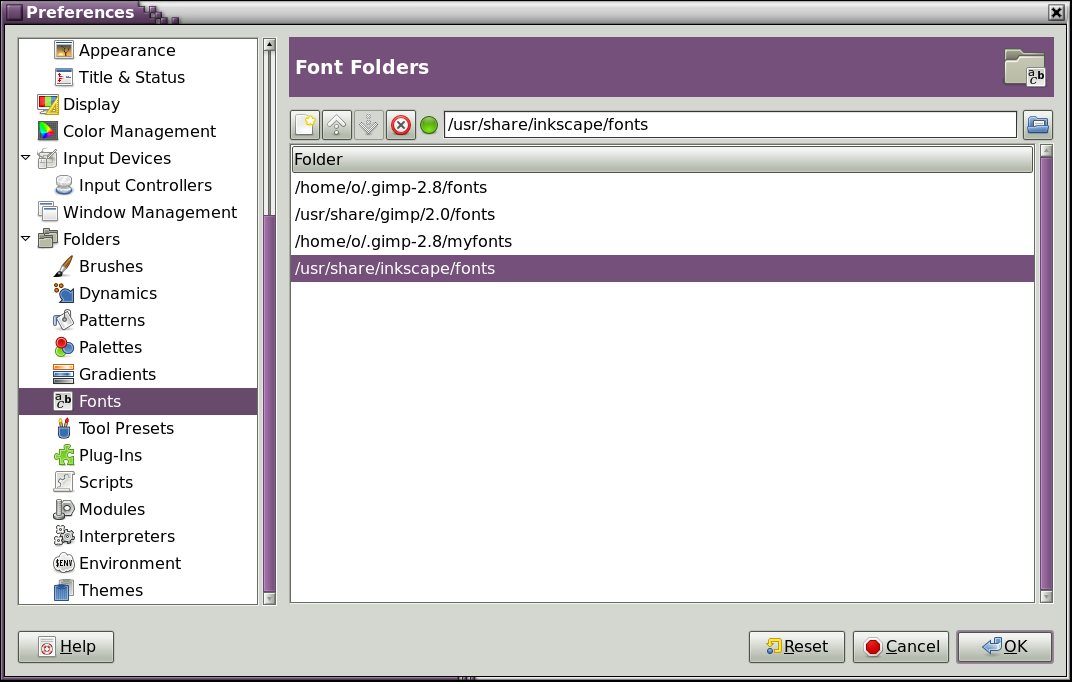
On my computer, Inkscape has a fonts folder in /usr/share/inkscape/fonts. That is my Linux path, but it is equivalent to the path to Program Files in Windows.

I think you could load fonts into that folder, go into Gimp and put the path to the Inkscape font folder and you would have Inkscape and Gimp sharing the same fonts. They wouldn't show up in other Windows programs. Here is a screen shot of the path in Gimp Preferences.

Image

_________________
Image
World War IV will be fought with sticks and stones. - Albert Einstein


Top
 Post subject: Re: Font problem again
PostPosted: Mon Apr 15, 2013 1:10 pm  (#6) 
Offline
GimpChat Member
User avatar

Joined: Sep 22, 2012
Posts: 2089
Location: US
That's a good suggestion, O!
And to answer further to Esper's question, I don't spread my fonts between folders because I'm using too many applications that I use my fonts in
(AI, GIMP, Inkscape, Blender, PS, plus all the publishing tools). Configuring paths for each and every one would be a hassle.
There is another reason to keep the number of fonts low on Windows. Each font is a registry entry(-ies). Registry is operating system's core and when you have too many fonts it gets bloated and slows down PC performance. IIRC, on Win95-98 it was a physical limit to the number of characters in Registry, so there was a limitation to the number of fonts you could install. No longer the case but still - bloated or fragmented Registry can and does hurt PC performance.


Top
 Post subject: Re: Font problem again
PostPosted: Mon Apr 15, 2013 1:23 pm  (#7) 
Offline
Global Moderator
User avatar

Joined: May 16, 2010
Posts: 16169
A python module can be written for Gimp to load fonts after it starts.(brush manager) i wonder if this could be done for Inkscape also.May be something to bring up to the Inkscape dev team.

_________________
Image


Top
 Post subject: Re: Font problem again
PostPosted: Mon Apr 15, 2013 5:39 pm  (#8) 
Offline
GimpChat Member
User avatar

Joined: Jul 17, 2012
Posts: 2769
Oregonian wrote:
On my computer, Inkscape has a fonts folder in /usr/share/inkscape/fonts. That is my Linux path, but it is equivalent to the path to Program Files in Windows.

I think you could load fonts into that folder, go into Gimp and put the path to the Inkscape font folder and you would have Inkscape and Gimp sharing the same fonts.

Esper wrote:
Graechan adviced me to put all my fonts in the IS-font-folder and link Gimp to it

this worked, but with the latest IS version 0.48.4-1 it doesnt


K1TesseraEna wrote:
to C:\Program Files (x86)\Inkscape\share\fonts but that's not what you need, right?
Did you upgrade to Inkscape 0.48.4 before or after moving fonts to other folders and using AMP fontviewer? Put them back to Win/Fonts, maybe?
after and i never had them in win/Fonts but it seems thats my only option right now

EDIT: just found out, you can install fonts in win 7 via a shortcut now
EDIT 2: they are shown in the IS font dropdown menu but dont work :gaah

putting them directly in the windows font folder doesnt work either, they are copied and then disappear.... :roll:


Top
 Post subject: Re: Font problem again
PostPosted: Mon Apr 15, 2013 8:10 pm  (#9) 
Offline
GimpChat Member
User avatar

Joined: Sep 22, 2012
Posts: 2089
Location: US
You can see missing fonts, ok. What happens when you try to set one of them as a default font in text and font editor (Shift-Ctrl-T)?


Top
 Post subject: Re: Font problem again
PostPosted: Tue Apr 16, 2013 3:15 am  (#10) 
Offline
GimpChat Member
User avatar

Joined: Jul 17, 2012
Posts: 2769
K1TesseraEna wrote:
You can see missing fonts, ok. What happens when you try to set one of them as a default font in text and font editor (Shift-Ctrl-T)?

for some reason its working now it seems

i put all my fonts in the windows folder
they disappeared but when i tried to copy them again, windows told me, they are already installed :roll:

the fonts showed up in IS, but instead of a preview i had boxes for the letters
none of the fonts worked though

then i put the fonts again in the IS-fonts-folder

for some reason it seems IS wants them in both folders....

weird.....


thanks K1te !


Top
 Post subject: Re: Font problem again
PostPosted: Tue Apr 16, 2013 5:35 am  (#11) 
Offline
GimpChat Member
User avatar

Joined: Sep 22, 2012
Posts: 2089
Location: US
No problem, Esper.
That's weird! After all, it looks like cairo 1.12.10 bug, i remember devs were complaining on gimp mailing list about it a few month back.
Heard cairo team had fixed it in 1.12.12-14 but what version is used in IS 0.48.4 i have no idea.


Top
Post new topic Reply to topic  [ 11 posts ] 

All times are UTC - 5 hours [ DST ]


* Login  


Powered by phpBB3 © phpBB Group