It is currently Sat Jun 20, 2026 9:15 pm


All times are UTC - 5 hours [ DST ]


Post new topic Reply to topic  [ 50 posts ]  Go to page 1, 2, 3  Next
Author Message
 Post subject: CarTOONize
PostPosted: Fri Dec 17, 2010 2:27 am  (#1) 
Offline
GimpChat Member
User avatar

Joined: Oct 06, 2010
Posts: 4050
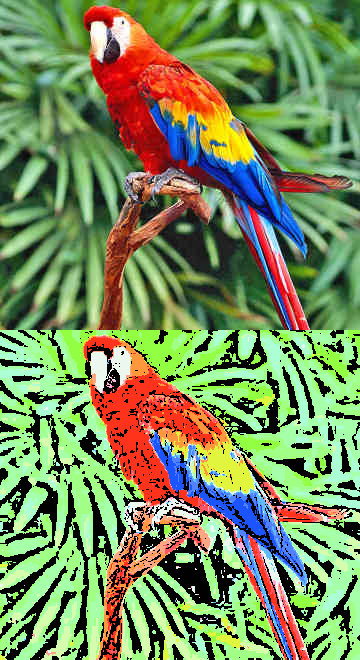
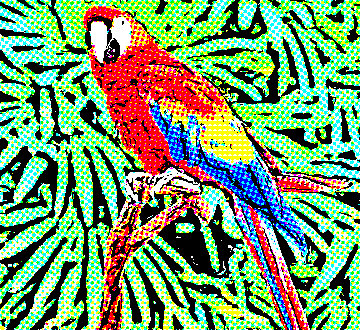
I'm always game for new scripts and plug-ins. This is one that was just added today at the Registry. Seems promising. Of course, I cheated just a little and used PC's smoothing filter to soften it. :hehe

http://registry.gimp.org/node/24930

My test example:
Image

_________________
"In order to attain the impossible, one must attempt the absurd."
~ Miguel de Cervantes


Share on Facebook Share on Twitter Share on Orkut Share on Digg Share on MySpace Share on Delicious Share on Technorati
Top
 Post subject: Re: CarTOONize
PostPosted: Fri Dec 17, 2010 2:41 am  (#2) 
Offline
GimpChat Member
User avatar

Joined: Sep 24, 2010
Posts: 12776
Thanks for the heads up Mahvin. Just downloaded it and may play soon. :)

_________________
Lyle

Psalm 109:8

Image


Top
 Post subject: Re: CarTOONize
PostPosted: Fri Dec 17, 2010 2:50 am  (#3) 
Offline
GimpChat Member
User avatar

Joined: Sep 24, 2010
Posts: 12776
Is this soon enough? lol

Definitely a keeper. Caption's of my brother and my 2 nephers. Going to have some fun with this one. :)


Attachments:
DSC00423.JPG
DSC00423.JPG [ 657.21 KiB | Viewed 7250 times ]

_________________
Lyle

Psalm 109:8

Image
Top
 Post subject: Re: CarTOONize
PostPosted: Fri Dec 17, 2010 4:00 am  (#4) 
Offline
Former Member
User avatar

Joined: Nov 17, 2010
Posts: 618
Location: Rockford, IL
ooooo I like this plugin


Top
 Post subject: Re: CarTOONize
PostPosted: Fri Dec 17, 2010 5:03 am  (#5) 
Offline
Retired Staff
User avatar

Joined: May 22, 2008
Posts: 6946
Location: Somewhere in GIMP
I'm such a sucker for scripts (... and fonts, patterns, brushes, etc.).

This is fun. Good default settings, too.

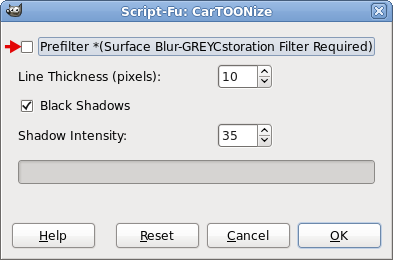
I got an error message when I didn't uncheck the grayCstoration choice.

Image

Image

_________________
Image
World War IV will be fought with sticks and stones. - Albert Einstein


Top
 Post subject: Re: CarTOONize
PostPosted: Fri Dec 17, 2010 9:59 am  (#6) 
Offline
GimpChat Member
User avatar

Joined: Oct 19, 2010
Posts: 376
Location: North Central Ohio, USA
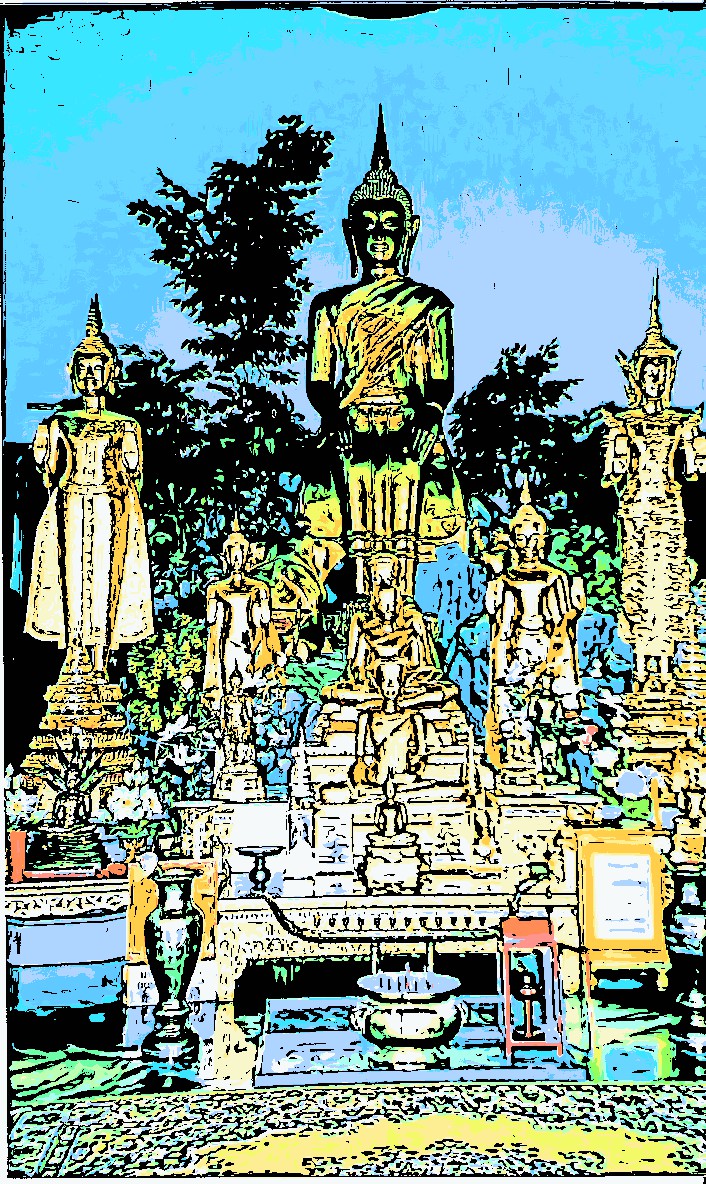
This is probably the best filter for doing "cartoons" from photos
Attachment:
Cartoonized.png
Cartoonized.png [ 60.21 KiB | Viewed 7212 times ]
Very nice presets. :kpix

Does anyone know if it is possible to pass settings from a script such as such as this to G'MIC? If so, we could suggest to Joe1GK that he modify his script to do so rather than call GREYCstoration - which I don't have and has of course been superseded by G'MIC's own Anisotropic smoothing/Patch-based smoothing. Applying a small-radius gaussian blur might work in a pinch

I know the smoothing could be run before applying the cartoon script, but I'm thinking it's more likely that a user would have G'MIC than the unmaintained GRAYCstoration, thus eliminating the need to turn something off or perform a manual step.

Or, we could tear Joe's script apart and turn it into a G'MIC preset...

Thoughts? Flames? :tomduck

_________________
Life Truth: #12
My cat is a worst typist than I am.


Top
 Post subject: Re: CarTOONize
PostPosted: Fri Dec 17, 2010 10:32 am  (#7) 
Offline
GimpChat Member
User avatar

Joined: Oct 06, 2010
Posts: 4050
Quote:
Does anyone know if it is possible to pass settings from a script such as such as this to G'MIC? If so, we could suggest to Joe1GK that he modify his script to do so rather than call GREYCstoration - which I don't have and has of course been superseded by G'MIC's own Anisotropic smoothing/Patch-based smoothing. Applying a small-radius gaussian blur might work in a pinch


It can be done. I've seen it done, somewhere.

Quote:
I know the smoothing could be run before applying the cartoon script, but I'm thinking it's more likely that a user would have G'MIC than the unmaintained GRAYCstoration, thus eliminating the need to turn something off or perform a manual step.


This is what I did, after I ran the script. But I did add GREYCstoration just to see what the difference was. It would be better off being passed to G'MIC, instead, because the smoothing preset has been upgraded since.

Quote:
Or, we could tear Joe's script apart and turn it into a G'MIC preset...

I like this idea as well. PC is getting quite good at making presets. I have a lot of catching up to do.

_________________
"In order to attain the impossible, one must attempt the absurd."
~ Miguel de Cervantes


Top
 Post subject: Re: CarTOONize
PostPosted: Fri Dec 17, 2010 10:35 am  (#8) 
Offline
Script Coder
User avatar

Joined: Jul 14, 2010
Posts: 697
Bob63 wrote:
Does anyone know if it is possible to pass settings from a script such as such as this to G'MIC?


It got added in a while back.

I can't find the request and samples, but I know one script that call gmic is here:

http://www.aljacom.com/~gmic/36motifs.scm

-Rob A>

_________________
Image
Fantasy Cartography and Mapping by RobA


Top
 Post subject: Re: CarTOONize
PostPosted: Fri Dec 17, 2010 11:27 am  (#9) 
Offline
GimpChat Member
User avatar

Joined: Oct 19, 2010
Posts: 376
Location: North Central Ohio, USA
I think found the exact section we (that could be a royal "we") need from 36motifs, lines 136-142:
            ;; Render smoothing using G'MIC.
            (plug-in-gmic 1 img motif_01 1
               (string-append
                  "-v - " ; To have a silent output. Remove it to display errors from the G'MIC interpreter on stderr.
                  "-gimp_anisotropic_smoothing 250,1,1,4,1,1,180,5,0,1,1,1,1"
               )

_________________
Life Truth: #12
My cat is a worst typist than I am.


Top
 Post subject: Re: CarTOONize
PostPosted: Fri Dec 17, 2010 11:33 am  (#10) 
Offline
GimpChat Member
User avatar

Joined: Sep 24, 2010
Posts: 12776
Oregonian wrote:
I'm such a sucker for scripts (... and fonts, patterns, brushes, etc.).

This is fun. Good default settings, too.

I got an error message when I didn't uncheck the grayCstoration choice.

Image

Image


Lucky for me, I had already installed GREYCStoration a few years back; haven't played with the new version (I installed both; I use the old version). If you use one or the other in a particular GIMP session, it will break the other, so, if I need the old version (which most of the time I do) if I run this script, then I will have to close and re-open GIMP (no biggy). :)

_________________
Lyle

Psalm 109:8

Image


Top
 Post subject: Re: CarTOONize
PostPosted: Fri Dec 17, 2010 11:52 am  (#11) 
Offline
GimpChat Member
User avatar

Joined: Sep 24, 2010
Posts: 12776
As other's have mentioned, it would be cool to modify the code so that it would use G'MIC instead of GREYCStoration. Any coders out there? Maybe even code all the code as a G'MIC plugin. This cartoon effect is the best that I've seen of this genre thus far imo. :)

_________________
Lyle

Psalm 109:8

Image


Top
 Post subject: Re: CarTOONize
PostPosted: Fri Dec 17, 2010 12:42 pm  (#12) 
Offline
GimpChat Member

Joined: Apr 12, 2010
Posts: 5870
Bob63 wrote:
This is probably the best filter for doing "cartoons" from photos
Attachment:
Cartoonized.png
Very nice presets. :kpix

Does anyone know if it is possible to pass settings from a script such as such as this to G'MIC? If so, we could suggest to Joe1GK that he modify his script to do so rather than call GREYCstoration - which I don't have and has of course been superseded by G'MIC's own Anisotropic smoothing/Patch-based smoothing. Applying a small-radius gaussian blur might work in a pinch

I know the smoothing could be run before applying the cartoon script, but I'm thinking it's more likely that a user would have G'MIC than the unmaintained GRAYCstoration, thus eliminating the need to turn something off or perform a manual step.
Or, we could tear Joe's script apart and turn it into a G'MIC preset...
Thoughts? Flames? :tomduck


It is possible there is even a sort of template...hem ...somewhere in the Gmic documentation(i always stumble on it when i look for something else, then i forgot where it is exactly but is in the gmic doc on sourceforge.

About port the script as gmic plugin not sure if may done,it depends from the manual steps used
if they may be replicated with GMIC plugin or command line then should be not obstacles.

I agree that is one of the best "Comic" script i saw (and i think i try them all)

_________________
My 3D Gallery on Deviantart http://photocomix2.deviantart.com/
Main gallery http://www.flickriver.com/photos/photocomix-mandala/
Mandala and simmetry http://www.flickriver.com/photos/photocomix_mandala/

Image

Mrs Wilbress


Top
 Post subject: Re: CarTOONize
PostPosted: Fri Dec 17, 2010 1:17 pm  (#13) 
Offline
GimpChat Member

Joined: Apr 12, 2010
Posts: 5870
Quote:
It can be done. I've seen it done, somewhere.


RobA (and other interested on Script fu and Gmic) maybe this may help ?
http://gmic.cvs.sourceforge.net/viewvc/ ... iew=markup

_________________
My 3D Gallery on Deviantart http://photocomix2.deviantart.com/
Main gallery http://www.flickriver.com/photos/photocomix-mandala/
Mandala and simmetry http://www.flickriver.com/photos/photocomix_mandala/

Image

Mrs Wilbress


Top
 Post subject: Re: CarTOONize
PostPosted: Fri Dec 17, 2010 1:38 pm  (#14) 
Offline
Global Moderator
User avatar

Joined: May 16, 2010
Posts: 16037
Pretty nifty results with this. =)
Definitely one of the better comic strip filters.

Image

_________________
Image


Top
 Post subject: Re: CarTOONize
PostPosted: Fri Dec 17, 2010 5:41 pm  (#15) 
Offline
GimpChat Member
User avatar

Joined: Oct 06, 2010
Posts: 4050
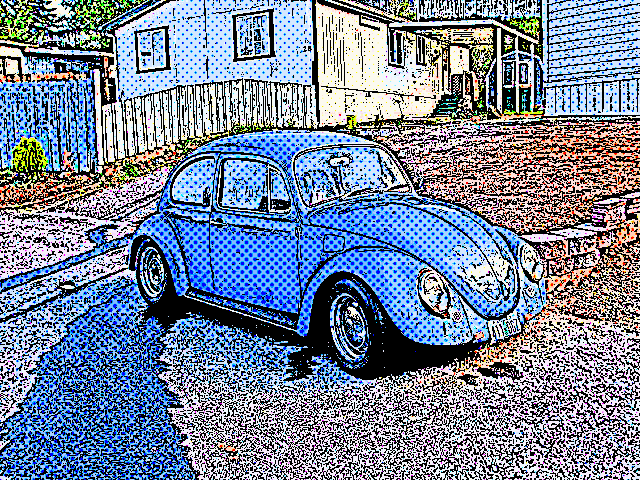
Wow, Joe tweaked out the script to accommodate both scripts and commented out posterize (which made the cartoon ugly, imo). Now you can cartoon and half-tone your image in one process. Double sweetness!

Image

We should have a National Holiday for coders. I really really need to start learning this stuff...

_________________
"In order to attain the impossible, one must attempt the absurd."
~ Miguel de Cervantes


Top
 Post subject: Re: CarTOONize
PostPosted: Fri Dec 17, 2010 6:18 pm  (#16) 
Offline
Retired Staff
User avatar

Joined: May 22, 2008
Posts: 6946
Location: Somewhere in GIMP
Wow! You guys got results fast!

Same parrot with g'mic function.

Image

_________________
Image
World War IV will be fought with sticks and stones. - Albert Einstein


Top
 Post subject: Re: CarTOONize
PostPosted: Fri Dec 17, 2010 6:29 pm  (#17) 
Offline
GimpChat Member
User avatar

Joined: Sep 24, 2010
Posts: 12776
Hey O; I actually commented out the GREYCstoration part in the code so that I can continue to use the old GREYC for fake smudges. Not sure if the G'MIC version is any faster the GREYC one, but G'MIC more currently supported. Glad you can benifit from the smoothing now. Really do like this Script, but I still actually like to run Comic-Strip separate from CarTOONize, so I just unclick the dither option and then run Comic-Stripe on a separate duplicate (it's just me of course). However you want to do to skin a cat I say. :)

_________________
Lyle

Psalm 109:8

Image


Last edited by lylejk on Fri Dec 17, 2010 6:35 pm, edited 2 times in total.

Top
 Post subject: Re: CarTOONize
PostPosted: Fri Dec 17, 2010 6:30 pm  (#18) 
Offline
GimpChat Member
User avatar

Joined: Oct 06, 2010
Posts: 4050
Definitely an improvement, O. :)

I've been waiting for a script like this for a long time.

_________________
"In order to attain the impossible, one must attempt the absurd."
~ Miguel de Cervantes


Top
 Post subject: Re: CarTOONize
PostPosted: Fri Dec 17, 2010 6:39 pm  (#19) 
Offline
Retired Staff
User avatar

Joined: May 22, 2008
Posts: 6946
Location: Somewhere in GIMP
@ Lyle ... Whoa! You customized it even more to suit your preferences. WTG! :hi5

@ Mahvin I like those little dots you made. Going to have to fiddle in there some more.

mahvin wrote:
I've been waiting for a script like this for a long time.
It was certainly worth the wait. That's a superior cartooning script.

_________________
Image
World War IV will be fought with sticks and stones. - Albert Einstein


Top
 Post subject: Re: CarTOONize
PostPosted: Fri Dec 17, 2010 6:42 pm  (#20) 
Offline
GimpChat Member
User avatar

Joined: Sep 24, 2010
Posts: 12776
Not a coder, but it's not that hard to look at a Script-fu and see what's going on. lol

:)

_________________
Lyle

Psalm 109:8

Image


Top
Post new topic Reply to topic  [ 50 posts ]  Go to page 1, 2, 3  Next

All times are UTC - 5 hours [ DST ]


cron

* Login  


Powered by phpBB3 © phpBB Group