It is currently Sat Sep 12, 2026 5:32 pm


All times are UTC - 5 hours [ DST ]


Post new topic Reply to topic  [ 50 posts ]  Go to page Previous  1, 2, 3  Next
Author Message
 Post subject: Re: CarTOONize
PostPosted: Fri Dec 17, 2010 6:48 pm  (#21) 
Offline
GimpChat Member
User avatar

Joined: Oct 06, 2010
Posts: 4050
O: the newest release has the "tweakable" newsprint coded in, you can adjust your dots within the process of running the script.

Lyle: Keep talking because you keep giving me ideas. Earlier you mentioned "dither", and my mind went, hmmmm... (see below):

Image

_________________
"In order to attain the impossible, one must attempt the absurd."
~ Miguel de Cervantes


Top
 Post subject: Re: CarTOONize
PostPosted: Fri Dec 17, 2010 6:58 pm  (#22) 
Offline
GimpChat Member
User avatar

Joined: Sep 24, 2010
Posts: 12845
Like your Stoichastic dither Mahvin. Hmmm (for me; lol). I do like Joe's Script-fu. It definitely is one of the best cartoonifiation (is that a word; lol) method that I've seen so far. I've been on sever Lichtenstein binges over the past few years. Not my work has been made child's play. Again compliments to Joe and also with your feedback to him for making it even better. :)

_________________
Lyle

Psalm 109:8

Image


Top
 Post subject: Re: CarTOONize
PostPosted: Fri Dec 17, 2010 7:08 pm  (#23) 
Offline
Retired Staff
User avatar

Joined: May 22, 2008
Posts: 6946
Location: Somewhere in GIMP
Original image here

This one I scaled the image and duplicated the image so I'd have an original.

Desaturated one of them and it came out black and white after running the filter. I copied the original image over the black and white and set the colored layer to hard light, duplicated it twice and here are my results. I think it's pretty.

Image

_________________
Image
World War IV will be fought with sticks and stones. - Albert Einstein


Top
 Post subject: Re: CarTOONize
PostPosted: Fri Dec 17, 2010 7:23 pm  (#24) 
Offline
GimpChat Member
User avatar

Joined: Sep 24, 2010
Posts: 12845
Very nice result O. This Script-fu is definitely on the hot streak now; already on page 3. :)

_________________
Lyle

Psalm 109:8

Image


Top
 Post subject: Re: CarTOONize
PostPosted: Fri Dec 17, 2010 9:53 pm  (#25) 
Offline
GimpChat Member
User avatar

Joined: Oct 19, 2010
Posts: 376
Location: North Central Ohio, USA
Yeah, now that's what I'm talkin' 'bout!
Attachment:
File comment: Niece's family: CarTOONized & Comicstripped
Cartoonize-comicstrip.png
Cartoonize-comicstrip.png [ 255.42 KiB | Viewed 2354 times ]

If you start with a grayscale image, you get what looks like output from a photocopier.

_________________
Life Truth: #12
My cat is a worst typist than I am.


Top
 Post subject: Re: CarTOONize
PostPosted: Fri Dec 17, 2010 10:31 pm  (#26) 
Offline
GimpChat Member
User avatar

Joined: Oct 06, 2010
Posts: 4050
Awesome stuff. I've been experimenting in different ways, it's all good. :)

_________________
"In order to attain the impossible, one must attempt the absurd."
~ Miguel de Cervantes


Top
 Post subject: Re: CarTOONize
PostPosted: Fri Dec 17, 2010 11:33 pm  (#27) 
Offline
Global Moderator
User avatar

Joined: May 16, 2010
Posts: 16170
Man those are awesome results everyone! =)

_________________
Image


Top
 Post subject: Re: CarTOONize
PostPosted: Sat Dec 18, 2010 11:50 am  (#28) 
Offline
GimpChat Member

Joined: Apr 12, 2010
Posts: 5870
well the last version really rocks

_________________
My 3D Gallery on Deviantart http://photocomix2.deviantart.com/
Main gallery http://www.flickriver.com/photos/photocomix-mandala/
Mandala and simmetry http://www.flickriver.com/photos/photocomix_mandala/

Image

Mrs Wilbress


Top
 Post subject: Re: CarTOONize
PostPosted: Sat Dec 18, 2010 12:49 pm  (#29) 
Offline
Retired Staff
User avatar

Joined: May 22, 2008
Posts: 6946
Location: Somewhere in GIMP
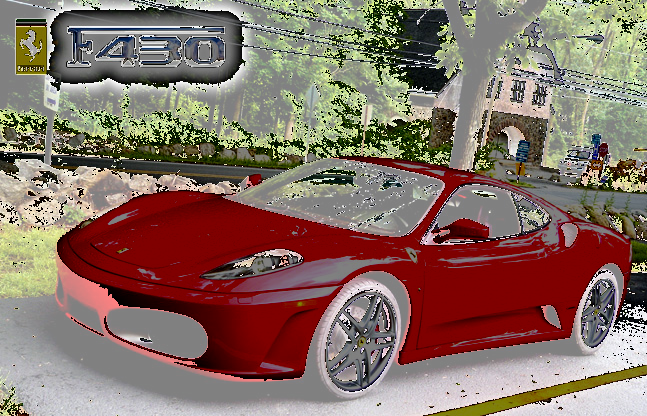
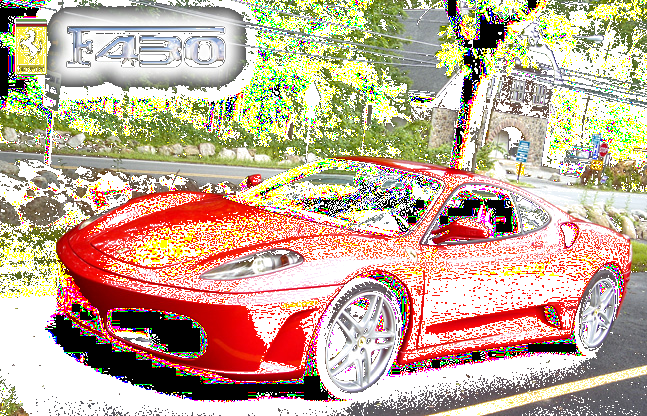
When I did the red car up above, the desaturated layer looked a lot like Threshold had been applied so I experimented with just the Threshold filter. I'll let you judge the results. I think I've missed a treasure all this time. The original image I used is here.

This is the original image set to Hard Light and the threshold layer is the bottom layer and Threshold default settings.

Image

This is the threshold (default settings) layer set to Grain Extract and the original image is the bottom layer.

Image

Threshold settings: Black = 89, White = 253 and is the top layer set to Divide.

Image

_________________
Image
World War IV will be fought with sticks and stones. - Albert Einstein


Top
 Post subject: Re: CarTOONize
PostPosted: Sat Dec 18, 2010 12:57 pm  (#30) 
Offline
GimpChat Member

Joined: Apr 12, 2010
Posts: 5870
Here may be a personal preference
I will not use Threshold the result is often dirty,and some details go blobbed other vanish
Level may do a better job , use the white eyedropper to sample what you want fully white, the black for what you wish fully black, and then play with the middle slider

Curve should be even better but i use seldom so i can't suggest how to in this case

_________________
My 3D Gallery on Deviantart http://photocomix2.deviantart.com/
Main gallery http://www.flickriver.com/photos/photocomix-mandala/
Mandala and simmetry http://www.flickriver.com/photos/photocomix_mandala/

Image

Mrs Wilbress


Top
 Post subject: Re: CarTOONize
PostPosted: Sat Dec 18, 2010 2:08 pm  (#31) 
Offline
GimpChat Member
User avatar

Joined: Nov 22, 2010
Posts: 42
where can i download this at? i saw a code but dont know where to put it.... any help is appreciated

_________________
Image


Top
 Post subject: Re: CarTOONize
PostPosted: Sat Dec 18, 2010 2:23 pm  (#32) 
Offline
GimpChat Member
User avatar

Joined: Oct 06, 2010
Posts: 4050
Quote:
I'm always game for new scripts and plug-ins. This is one that was just added today at the Registry. Seems promising. Of course, I cheated just a little and used PC's smoothing filter to soften it.

http://registry.gimp.org/node/24930


Download the latest version (I think it's 1.0.3), scm files go in .gimp-2.6/scripts

_________________
"In order to attain the impossible, one must attempt the absurd."
~ Miguel de Cervantes


Top
 Post subject: Re: CarTOONize
PostPosted: Sun Dec 19, 2010 6:42 am  (#33) 
Offline
Global Moderator
User avatar

Joined: May 16, 2010
Posts: 16170
Yes place the SCM file you download into your C:/user/Documents and Settings/gimp-2.6/scripts folder.
If Gimp is running, just go to Filters/Script-Fu/Refresh Scripts no need to restart.You will find the filter in Filters/Artistic/CarTOONize .. enjoy!

You only need to restart Gimp if you download and install an exe or Python filter. =)
Those go in the same directory but in the Plug-ins folder...ie C:/user/Documents and Settings/gimp-2.6/Plug-ins

Hope that helps.

_________________
Image


Top
 Post subject: Re: CarTOONize
PostPosted: Sun Dec 19, 2010 7:38 am  (#34) 
Offline
GimpChat Member
User avatar

Joined: Jun 24, 2010
Posts: 504
Location: Western Vic Australia
Rod wrote:
Yes place the SCM file you download into your C:/user/Documents and Settings/gimp-2.6/scripts folder.
If Gimp is running, just go to Filters/Script-Fu/Refresh Scripts no need to restart.You will find the filter in Filters/Artistic/CarTOONize .. enjoy!

You only need to restart Gimp if you download and install an exe or Python filter. =)
Those go in the same directory but in the Plug-ins folder...ie C:/user/Documents and Settings/gimp-2.6/Plug-ins

Hope that helps.


Thanks Rod , I never knew that. Well worth knowing if you are playing with scripts!
Wbool63

_________________
Image


Top
 Post subject: Re: CarTOONize
PostPosted: Sun Dec 19, 2010 11:44 am  (#35) 
Offline
GimpChat Member
User avatar

Joined: Oct 06, 2010
Posts: 4050
You will need to refresh scripts before they will show in the menus.

_________________
"In order to attain the impossible, one must attempt the absurd."
~ Miguel de Cervantes


Top
 Post subject: Re: CarTOONize
PostPosted: Mon Dec 20, 2010 9:40 pm  (#36) 
Offline
GimpChat Member
User avatar

Joined: Sep 24, 2010
Posts: 12845
Couldn't help but take Lena for a spin. :)

Image

Uploaded with ImageShack.us

_________________
Lyle

Psalm 109:8

Image


Top
 Post subject: Re: CarTOONize
PostPosted: Mon Dec 20, 2010 10:04 pm  (#37) 
Offline
GimpChat Member
User avatar

Joined: Jul 04, 2010
Posts: 2253
Location: Retired Moderator Slowly Returning to the Living.
The CarTOONize script doesn't work on an old XP machine. (My new machine is getting repaired.)

I am going to try to fix it.

_________________
Artists aren't crazy! We're eccentric! ~G.M. Ross

Image

My Sigs = My Photos
Check out my work at http://www.flickr.com/photos/photomastergreg.


Top
 Post subject: Re: CarTOONize
PostPosted: Mon Dec 20, 2010 10:16 pm  (#38) 
Offline
GimpChat Member
User avatar

Joined: Jul 04, 2010
Posts: 2253
Location: Retired Moderator Slowly Returning to the Living.
It was a file save error. Works pretty nicely!!


Attachments:
GullToon.jpg
GullToon.jpg [ 589.16 KiB | Viewed 2736 times ]

_________________
Artists aren't crazy! We're eccentric! ~G.M. Ross

Image

My Sigs = My Photos
Check out my work at http://www.flickr.com/photos/photomastergreg.
Top
 Post subject: Re: CarTOONize
PostPosted: Mon Dec 20, 2010 10:33 pm  (#39) 
Offline
GimpChat Member
User avatar

Joined: Sep 24, 2010
Posts: 12845
As a hint PM, try setting all the angles on the Newsprint plugin to 45 degrees. :)

_________________
Lyle

Psalm 109:8

Image


Top
 Post subject: Re: CarTOONize
PostPosted: Tue Dec 21, 2010 2:58 am  (#40) 
Offline
Global Moderator
User avatar

Joined: May 16, 2010
Posts: 16170
Yeah i had a problem when i downloaded carTOONize 2
So i just deleted the carTOONize 2 and it worked again.Weird though being named different it seems they both would have worked.

_________________
Image


Top
Post new topic Reply to topic  [ 50 posts ]  Go to page Previous  1, 2, 3  Next

All times are UTC - 5 hours [ DST ]


* Login  


Powered by phpBB3 © phpBB Group