It is currently Wed Nov 11, 2026 4:49 am


All times are UTC - 5 hours [ DST ]


Post new topic Reply to topic  [ 309 posts ]  Go to page Previous  1, 2, 3, 4, 5, 6, 7, 8 ... 16  Next
Author Message
 Post subject: Re: Learning MyPaint Projects
PostPosted: Mon Apr 22, 2013 3:49 pm  (#81) 
Offline
GimpChat Member
User avatar

Joined: Apr 27, 2010
Posts: 1510
Location: Sweden
I usually use an opaque background layer as "canvas" and a transparent layer on top of that to paint on. I never touch the bottom layer and it is usually completely hidden. You could paint on the bottommost layer and properly erase on it by removing its alpha channel - that's why you seem to delete to the background like you do. As for me I just prefer to do everything on layers above the "canvas".

Personally I rarely use more than two layers that I actually paint on - these days I mostly use only one for the actual painting although some compositions might be easier by creating the background on a separate layer behind the foreground one. If I use other layers they are usually multiply-mode or normal layers for applying shadows and light highlights.
.
Griatch

_________________


Top
 Post subject: Re: Learning MyPaint Projects
PostPosted: Mon Apr 22, 2013 4:19 pm  (#82) 
Offline
GimpChat Member
User avatar

Joined: Apr 07, 2010
Posts: 14182
Thank you, very informative, I will keep that in mind.

_________________
Image


Top
 Post subject: Re: Learning MyPaint Projects
PostPosted: Tue Apr 23, 2013 10:47 am  (#83) 
Offline
GimpChat Member
User avatar

Joined: Apr 07, 2010
Posts: 14182
I wanted to learn more about eyes so I used a really cute picture of a cat for colors etc. I am a long way from knowing how to do fur and whiskers but eyes are my focus right now. Here is a small exercise I tried.

Image

_________________
Image


Top
 Post subject: Re: Learning MyPaint Projects
PostPosted: Tue Apr 23, 2013 10:55 am  (#84) 
Offline
Retired Staff
User avatar

Joined: May 22, 2008
Posts: 6946
Location: Somewhere in GIMP
Great eyes. The fur is nice too. :paint

_________________
Image
World War IV will be fought with sticks and stones. - Albert Einstein


Top
 Post subject: Re: Learning MyPaint Projects
PostPosted: Tue Apr 23, 2013 11:36 am  (#85) 
Offline
GimpChat Member
User avatar

Joined: Apr 07, 2010
Posts: 14182
Thank you 0, he is up for adoption.

_________________
Image


Top
 Post subject: Re: Learning MyPaint Projects
PostPosted: Wed Apr 24, 2013 6:25 am  (#86) 
Offline
GimpChat Member
User avatar

Joined: Mar 23, 2012
Posts: 7388
Location: Göteborg at last!
That's a lovely portrait Molly.


Top
 Post subject: Re: Learning MyPaint Projects
PostPosted: Fri May 03, 2013 11:24 am  (#87) 
Offline
GimpChat Member
User avatar

Joined: Apr 07, 2010
Posts: 14182
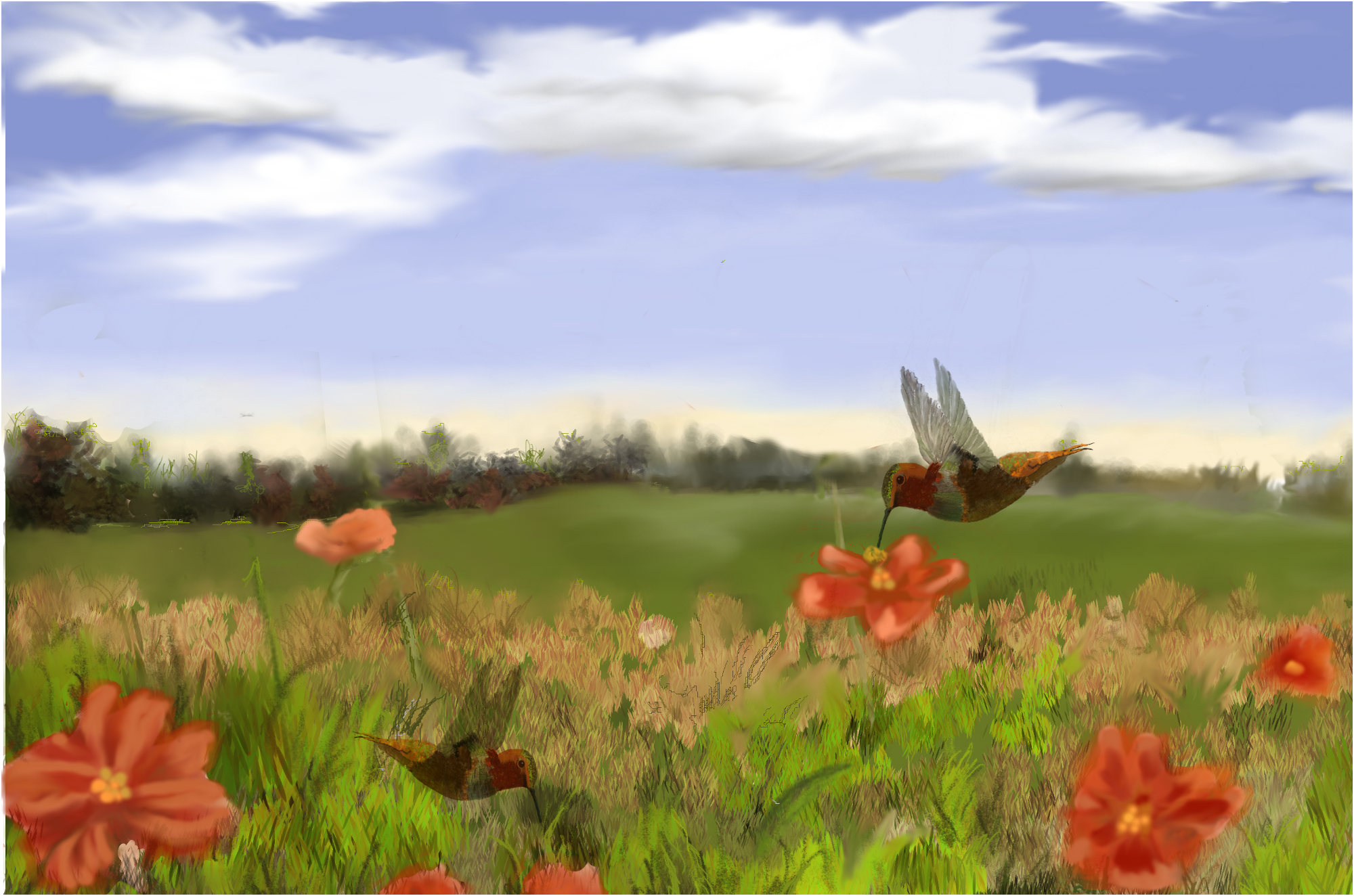
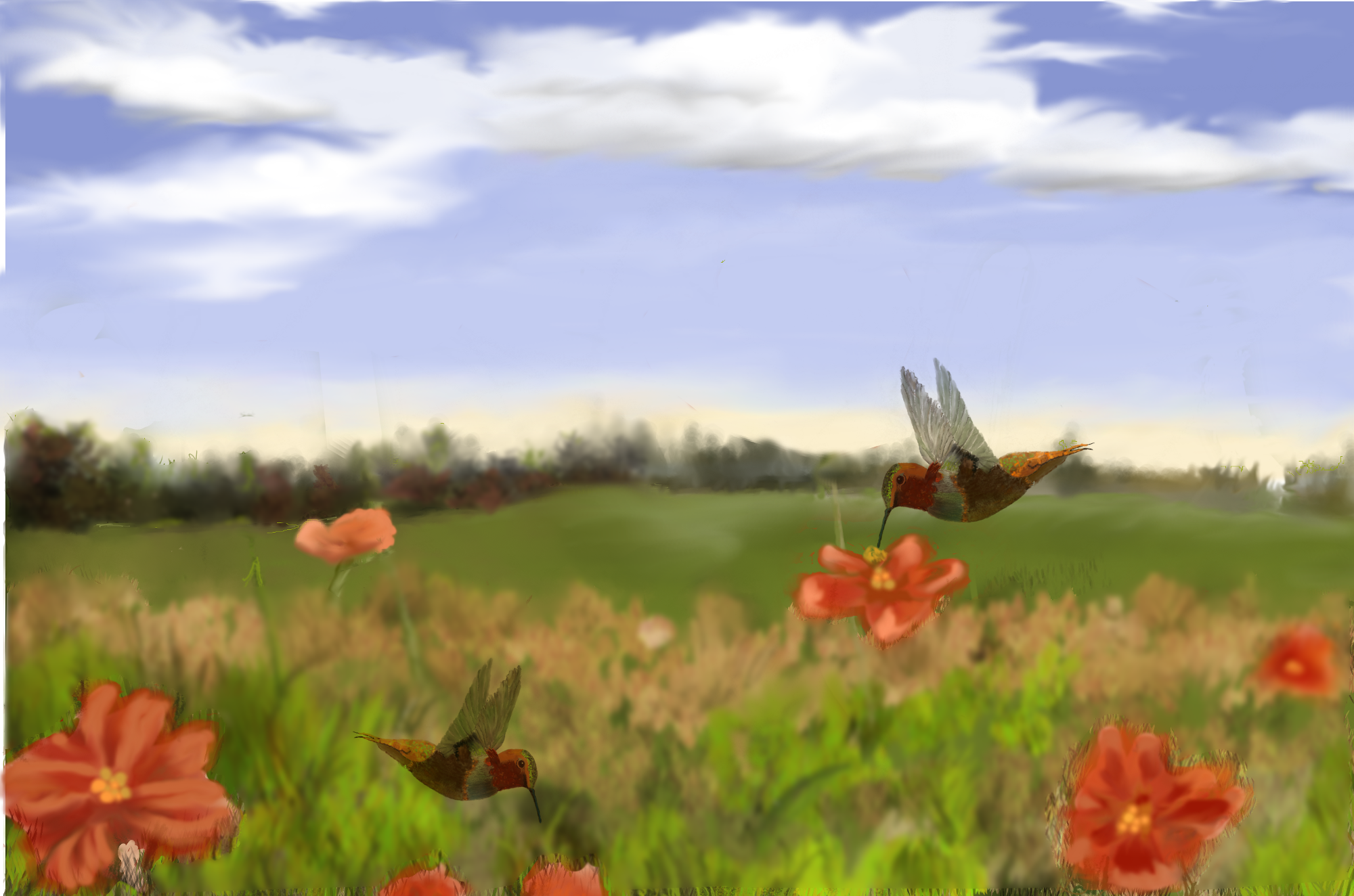
I have been working forever on this and I just wanted to draw and paint a humming bird and a flower and then I wanted a sky, then some grass and I think I over did it.
Anyway, I would appreciate some serious critique on my grass, flowers etc.

Image

_________________
Image


Top
 Post subject: Re: Learning MyPaint Projects
PostPosted: Fri May 03, 2013 12:47 pm  (#88) 
Offline
GimpChat Member
User avatar

Joined: Aug 16, 2012
Posts: 4271
Location: Göteborg, Sweden
molly: wow, i had missed that cat, it's fantastic! really beautifully done, especially the eyes.
i think the landscape is very well made too, and the humming birds are awesome! i can't say there's anything wrong with either the grass, the flowers or the lawn in the background in themselves, but i don't think they look entirely like pieces of the same picture, if you get my meaning? the lawn works with the flowers, they have the same kind of slight fuzz about them, but the grass in the foreground sticks out a bit by being so sharply drawn.

_________________


Top
 Post subject: Re: Learning MyPaint Projects
PostPosted: Fri May 03, 2013 1:02 pm  (#89) 
Offline
GimpChat Member
User avatar

Joined: Apr 07, 2010
Posts: 14182
Thank you very much AnMal. I will take that into consideration. Just thinking the more up close things are, the more detailed, but maybe this one is too much so.
I will play around with that some more.

_________________
Image


Top
 Post subject: Re: Learning MyPaint Projects
PostPosted: Fri May 03, 2013 1:20 pm  (#90) 
Offline
Retired Staff
User avatar

Joined: May 22, 2008
Posts: 6946
Location: Somewhere in GIMP
Awesome, Molly. I love it all, but agree with AnMal about the grass. Also, think your cat should be larger and more well-defined.

Your sky, it's wonderful and the birds are wonderful. A lovely work of art. You are SO talented. I'm proud to know you. :hugme

_________________
Image
World War IV will be fought with sticks and stones. - Albert Einstein


Top
 Post subject: Re: Learning MyPaint Projects
PostPosted: Fri May 03, 2013 1:24 pm  (#91) 
Offline
GimpChat Member
User avatar

Joined: Apr 07, 2010
Posts: 14182
awe, thank you "0" Are you talking about the cat I did earlier? I won't re re-doing that until I learn how to do fur better, maybe I could use Graechan's fur filter, lol

_________________
Image


Top
 Post subject: Re: Learning MyPaint Projects
PostPosted: Sat May 04, 2013 6:02 am  (#92) 
Offline
GimpChat Member
User avatar

Joined: Apr 07, 2010
Posts: 14182
@ AnMal and O...I tried doing what you suggested. I used the free select tool and selected all the foreground and used a 20 gaussian blur on it. I thinks it helps a bit. That is the only thing I could think of to do in this case.

Image

_________________
Image


Top
 Post subject: Re: Learning MyPaint Projects
PostPosted: Sat May 04, 2013 10:26 am  (#93) 
Offline
GimpChat Member
User avatar

Joined: Aug 16, 2012
Posts: 4271
Location: Göteborg, Sweden
molly: now it looks more like a unified whole to me :). of course you're right about the details being sharper the closer up they are, i don't think that was the problem, really. the grass looked fine in itself. an alternative to blurring the grass (though it would take more time unless you have everything on separate layers) would be to select the flowers and sharpen them. or maybe add a little defining contour to them. and i think it's the shading and highlighting of the lawn in the background that makes it look a bit too fuzzy compared to the grass - you could try giving it "scratchy" highlight and shading. like i said, that's an alternative to blurring, but i thought the blurring worked well too. i'm a bit jealous of your painting skills and talent, i have to admit :).

_________________


Top
 Post subject: Re: Learning MyPaint Projects
PostPosted: Sat May 04, 2013 10:43 am  (#94) 
Offline
Retired Staff
User avatar

Joined: May 22, 2008
Posts: 6946
Location: Somewhere in GIMP
I think the grass looks a lot better, Molly. :bigthup

_________________
Image
World War IV will be fought with sticks and stones. - Albert Einstein


Top
 Post subject: Re: Learning MyPaint Projects
PostPosted: Sat May 04, 2013 10:44 am  (#95) 
Offline
GimpChat Member
User avatar

Joined: Apr 07, 2010
Posts: 14182
Thank you O and AnMal.
I will try to do much better on the next project. When I get feedback, it helps a lot.

_________________
Image


Top
 Post subject: Re: Learning MyPaint Projects
PostPosted: Sun May 05, 2013 9:20 am  (#96) 
Offline
Global Moderator
User avatar

Joined: Apr 01, 2012
Posts: 8502
Location: On the other side of your screen
Sorry I can help with critiquing but to my eye that looks like a great job.

_________________
Image
Free Fun Photo Editing & resources
Poems from the Lord
Gimp Newby
Gimp version 3.2.8 and GMIC-Qt 4.0.2 OS :- Windows 10 Home 64


Top
 Post subject: Re: Learning MyPaint Projects
PostPosted: Sun May 05, 2013 12:06 pm  (#97) 
Offline
Global Moderator
User avatar

Joined: May 16, 2010
Posts: 16256
Looks real good to me Molly.Now the focus is on the humming birds and the flowers where it should be.
You are an excellent artist Molly i love your style too. :bigthup

It was fun going through this thread and watch how you are evolving with your tablet and Mypaint.
:coolthup stuff, keep it up. :)

I did want to make one comment about the lady portrait though.Her nose looks just a bit off and i think its the middle area that needs some definition.Other than that it's beautiful work in my honest opinion.

Remember the highlights are going to be on the highest part of the face.Tip of the nose, cheekbones, and forehead to name a few areas.This will give you a good estimate of shading areas.

You are really a good artist Molly.

_________________
Image


Top
 Post subject: Re: Learning MyPaint Projects
PostPosted: Sun May 05, 2013 12:10 pm  (#98) 
Offline
GimpChat Member
User avatar

Joined: Apr 07, 2010
Posts: 14182
Thank you very much Rod. I do love feedback and to me it helps more than a book or tutorial.
I am not good at drawing and never will be but I did do lots of nice water colors. Digital painting is a whole different ball game. The one good thing though is the famous redo and working in layers.

_________________
Image


Top
 Post subject: Re: Learning MyPaint Projects
PostPosted: Sun May 05, 2013 8:37 pm  (#99) 
Offline
Global Moderator
User avatar

Joined: May 16, 2010
Posts: 16256
molly wrote:
Thank you very much Rod. I do love feedback and to me it helps more than a book or tutorial.
I am not good at drawing and never will be but I did do lots of nice water colors. Digital painting is a whole different ball game. The one good thing though is the famous redo and working in layers.


Yes the only way to redo a piece that you actually paint is to paint over it.I hope to see more of your work more often. :bigthup

_________________
Image


Top
 Post subject: Re: Learning MyPaint Projects
PostPosted: Mon May 13, 2013 8:26 am  (#100) 
Offline
GimpChat Member
User avatar

Joined: Apr 07, 2010
Posts: 14182
This is my latest project on trying to get the shading, hair and expressions the way they should be.
I have a problem with the right side of her face, (her left). Something is bothering me about the chin, she hasn't got the smile I started out with.
I used MyPaint and Gimp to go back and forth.
I added the chain by using my circle brush, beveled it, then stroked it with a gold gradient. I then used my pearl brush for the end and also the earrings.
As usual, feedback would be welcomed.
Image

_________________
Image


Top
Post new topic Reply to topic  [ 309 posts ]  Go to page Previous  1, 2, 3, 4, 5, 6, 7, 8 ... 16  Next

All times are UTC - 5 hours [ DST ]


* Login  


Powered by phpBB3 © phpBB Group