It is currently Sat Oct 03, 2026 1:41 am


All times are UTC - 5 hours [ DST ]


Post new topic Reply to topic  [ 71 posts ]  Go to page Previous  1, 2, 3, 4  Next
Author Message
 Post subject: Re: GURM Discussion
PostPosted: Sun May 05, 2013 9:40 pm  (#21) 
Offline
GimpChat Member

Joined: May 23, 2012
Posts: 150
I guess I always forget something, in all of my gimp I add the font directory to gimp's bin\FontCacheDir
it seems to have increased gimp's speed at startup so I left it that way but you can set it back to gimp_data_dir\fonts
if you like.
As far as the other programs blender has a number of third plugins I keep track of.
Notepad++ has a GTK package and number of text files in plugin\config that I made for use as a web DOS tool for
writing plugins, but if you don't like them you can leave them turned off, and they are turned off by default.


Top
 Post subject: Re: GURM Discussion
PostPosted: Mon May 06, 2013 2:11 am  (#22) 
Offline
Script Coder
User avatar

Joined: Feb 18, 2011
Posts: 4826
Location: Bendigo Vic. Australia
Quote:
in all of my gimp I add the font directory to gimp's bin\FontCacheDir
it seems to have increased gimp's speed at startup

Mikechat This interests me so I would like to know more, for instance after placing the folder in the bin folder

1/how do the cache files get created?
2/do you need to change anything in preferences?
3/ is there anything else that needs to be done?

_________________
Image
No matter how much you push the envelope, it'll still be stationery.


Top
 Post subject: Re: GURM Discussion
PostPosted: Mon May 06, 2013 3:56 pm  (#23) 
Offline
Global Moderator
User avatar

Joined: May 16, 2010
Posts: 16180
That would be interesting to know as Gimp can sometimes crash loading too many fonts.
Again Mike i think you missed my question earlier.Do you need to zip resources in order for them to work? Example scm files for the script manager?

Thanks.


Top
 Post subject: Re: GURM Discussion
PostPosted: Mon May 06, 2013 4:40 pm  (#24) 
Offline
GimpChat Member

Joined: May 23, 2012
Posts: 150
I work on portables but PortableApps newer version grabs control of fonts so I use the older version 1.6
I made a small read font, write font temp list, to gimp\bin\FontCachheDir macro, to read OpenOffice truetype font
directory and Scribus share font directory that on my portable.


Top
 Post subject: Re: GURM Discussion
PostPosted: Mon May 06, 2013 4:44 pm  (#25) 
Offline
GimpChat Member

Joined: May 23, 2012
Posts: 150
Oh yes I did ad the FontCacheDir to my Preferences


Top
 Post subject: Re: GURM Discussion
PostPosted: Mon May 06, 2013 7:01 pm  (#26) 
Offline
Script Coder
User avatar

Joined: Feb 18, 2011
Posts: 4826
Location: Bendigo Vic. Australia
Mikechat can you give a complete explanation of what you do

_________________
Image
No matter how much you push the envelope, it'll still be stationery.


Top
 Post subject: Re: GURM Discussion
PostPosted: Mon May 06, 2013 7:30 pm  (#27) 
Offline
GimpChat Member
User avatar

Joined: Jul 21, 2012
Posts: 103
Hi, i tried this new version with gimp 2.8.4 winpenpack portable version but it doesn't work, someone can help me? Thanks. I changed all paths on gurm.ini but when i run the plugin i have an error :gaah , with gurm 0.8.0 i haven't problems.
_________________
Image


Top
 Post subject: Re: GURM Discussion
PostPosted: Mon May 06, 2013 8:54 pm  (#28) 
Offline
Script Coder
User avatar

Joined: Feb 18, 2011
Posts: 4826
Location: Bendigo Vic. Australia
d4rkheart can you post the error please also where did you get this 2.8.4 winpenpack from is it 32bit or 64bit

_________________
Image
No matter how much you push the envelope, it'll still be stationery.


Top
 Post subject: Re: GURM Discussion
PostPosted: Tue May 07, 2013 5:44 am  (#29) 
Offline
GimpChat Member
User avatar

Joined: Jul 21, 2012
Posts: 103
Graechan wrote:
d4rkheart can you post the error please also where did you get this 2.8.4 winpenpack from is it 32bit or 64bit

gimp 2.8.4 portable winpenpack run on windows vista 32bit


Attachments:
errore.png
errore.png [ 32.59 KiB | Viewed 2389 times ]

_________________
Image
Top
 Post subject: Re: GURM Discussion
PostPosted: Tue May 07, 2013 11:50 am  (#30) 
Offline
GimpChat Member
User avatar

Joined: Sep 22, 2012
Posts: 2089
Location: US
I did everything to the letter in the 'read me' file and the plugin wouldn't even register in my
GIMP 2.8.4 (win 7 64-bit). Am I missing something?


Top
 Post subject: Re: GURM Discussion
PostPosted: Tue May 07, 2013 1:07 pm  (#31) 
Offline
Global Moderator
User avatar

Joined: May 16, 2010
Posts: 16180
I think we all are missing something because it doesn't work for me either
gurm.py PATH = GURMINI = "c:\Users\rod\.gimp-2.8\plug-ins\gurm_v0.8.2\gurm.ini"
And my GURM.INI is indeed in that directory.

INI PATHS=
[Brush Manager]
useManager = yes
userPath = c:\Users\rod\.gimp-2.8\brushes
gimpPath = c:\Program Files\gimp-2.8\share\gimp\2.0\brushes
extensions = .*,
installedOptions =


But what i don't get other than it not initializing is the fact that this will only load from my actual program directory will it not?I have all those loaded on Gimp start up already.

I believe we need more instruction on where we place our RESOURCE files for the plugin to see them.
As i said mine are in C:\GIMP\Brushes, C:\GIMP\Gradients, ect...ect...
How do i reflect this in GURM.INI file? Is that the USER_PATH or the GIMP_PATH?

Thanks.


Top
 Post subject: Re: GURM Discussion
PostPosted: Tue May 07, 2013 1:44 pm  (#32) 
Offline
GimpChat Member

Joined: May 23, 2012
Posts: 150
I sure you guys have check your paths more than once, sorry about that.
my best suggestion is to move the gurm files out of the GRUM directory
and put directly into gimp\users\plug-ins directory, and make sure you change the path on line 3
of the gurm.py file if you do this.


Top
 Post subject: Re: GURM Discussion
PostPosted: Tue May 07, 2013 2:02 pm  (#33) 
Offline
GimpChat Member

Joined: May 23, 2012
Posts: 150
[Brush Manager]
useManager = yes
userPath = c:\Users\rod\.gimp-2.8\brushes
gimpPath = c:\Program Files\gimp-2.8\share\gimp\2.0\brushes
extensions = .*,
installedOptions =

[Blender Manager]
useManager = no
userPath = C:\Users\Owner\Blender\2.66\scripts
gimpPath = C:\Program Files (x86)\Blender
extensions = .*,
installedOptions =

[Deep Paint Manager]
useManager = no
userPath = C:\Users\Owner\Deep Paint\Resource
gimpPath = C:\Program Files (x86)\Deep Paint
extensions = .*,
installedOptions =

[Document Manager]
useManager = yes
userPath = C:\Users\Owner\.gimp-2.8\Document
gimpPath = C:\Program Files (x86)\gimp-2.8.5\Document
extensions = .*,
installedOptions =

[Inkscape Manager]
useManager = no
userPath = C:\Users\Owner\Inkscape\App\Inkscape\share
gimpPath = C:\Program Files (x86)\Inkscape\Data
extensions = .*,
installedOptions =

[MyPaint Manager]
useManager = no
userPath = C:\Users\Owner\MyPaint\brushes
gimpPath = C:\Program Files (x86)\MyPaint
extensions = .*,
installedOptions =

[FreeCad Manager]
useManager = no
userPath = C:\Users\Owner\FreeCAD0.13\data
gimpPath = C:\Program Files (x86)\FreeCAD0.13
extensions = .*,
installedOptions =

[Fonts Manager]
useManager = yes
userPath = C:\Users\Owner\.gimp-2.8\fonts
gimpPath = C:\Program Files (x86)\gimp-2.8.5\bin\FontCacheDir
extensions = .*,
installedOptions =

[Gradient Manager]
useManager = yes
userPath = C:\Users\Owner\.gimp-2.8\gradients
gimpPath = C:\Program Files (x86)\gimp-2.8.5\share\gimp\2.0\gradients
extensions = .*,
installedOptions =

[mathmap Manager]
useManager = yes
userPath = C:\Users\Owner\.gimp-2.8\mathmap\expressions
gimpPath = C:\Program Files (x86)\gimp-2.8.5\.gimp-2.8\mathmap
extensions = .*,
installedOptions =

[Notepad++ Manager]
useManager = no
userPath = C:\Users\Owner\Notepad++\plugins\Config
gimpPath = C:\Program Files (x86)\Notepad++
extensions = .*,
installedOptions =

[OpenOffice Manager]
useManager = no
userPath = C:\Users\Owner\OpenOffice\App\openoffice\Basis\program
gimpPath = C:\Program Files (x86)\OpenOfficePortable
extensions = .*,
installedOptions =

[Palette Manager]
useManager = yes
userPath = C:\Users\Owner\.gimp-2.8\palettes
gimpPath = C:\Program Files (x86)\gimp-2.8.5\share\gimp\2.0\palettes
extensions = .*,
installedOptions =

[Pattern Manager]
useManager = yes
userPath = C:\Users\Owner\.gimp-2.8\patterns
gimpPath = C:\Program Files (x86)\gimp-2.8.5\share\gimp\2.0\patterns
extensions = .*,
installedOptions =

[Plug-ins Manager]
useManager = yes
userPath = C:\Users\Owner\.gimp-2.8\plug-ins
gimpPath = C:\Program Files (x86)\gimp-2.8.5\lib\gimp\2.0\plug-ins
extensions = .*,
installedOptions =

[Scribus Manager]
useManager = no
userPath = C:\Users\Owner\Scribus\App\Scribus\share
gimpPath = C:\Program Files (x86)\Scribus
extensions = .*,
installedOptions =

[Script Manager]
useManager = yes
userPath = C:\Users\Owner\.gimp-2.8\scripts
gimpPath = C:\Program Files (x86)\gimp-2.8.5\share\gimp\2.0\scripts
extensions = .*,
installedOptions =

[Splashes Manager]
useManager = yes
userPath = C:\Users\Owner\.gimp-2.8\splashes
gimpPath = C:\Program Files (x86)\gimp-2.8.5\share\gimp\2.0\images
extensions = .*,
installedOptions =

[Textures Manager]
useManager = yes
userPath = C:\Users\Owner\.gimp-2.8\texture-border
gimpPath = C:\Program Files (x86)\gimp-2.8.5\share\gimp\2.0\scripts\images
extensions = .*,
installedOptions =

[Themes Manager]
useManager = yes
userPath = C:\Users\Owner\.gimp-2.8\themes
gimpPath = C:\Program Files (x86)\gimp-2.8.5\share\gimp\2.0\themes
extensions = .*,
installedOptions =

[XnView Manager]
useManager = no
userPath = C:\Users\Owner\XnViewMP\plugins
gimpPath = C:\Program Files (x86)\XnViewMP
extensions = .*,
installedOptions =

[Read this]
; Set the "gimpPath" and "userPath" to Your "gimpPath" and "userPath"
; Set useManager  yes or no.
; For more details please read the readme file in the GURM_V0.8 directory.


Top
 Post subject: Re: GURM Discussion
PostPosted: Tue May 07, 2013 2:07 pm  (#34) 
Offline
GimpChat Member

Joined: May 23, 2012
Posts: 150
I changed the brush to rod's here so you could see how I
would change the paths for rod's Brushes, as is posted on the website.


Top
 Post subject: Re: GURM Discussion
PostPosted: Tue May 07, 2013 2:26 pm  (#35) 
Offline
Global Moderator
User avatar

Joined: May 16, 2010
Posts: 16180
Mikechat wrote:
I changed the brush to rod's here so you could see how I
would change the paths for rod's Brushes, as is posted on the website.


Thanks Mike.
Can i direct the GimpPath to my C:\GIMP\Brushes PATH then?
Like this.
[Brush Manager]
useManager = yes
userPath = c:\Users\rod\.gimp-2.8\brushes
gimpPath = c:\GIMP\brushes
extensions = .*,
installedOptions =


Top
 Post subject: Re: GURM Discussion
PostPosted: Tue May 07, 2013 2:35 pm  (#36) 
Offline
Global Moderator
User avatar

Joined: May 16, 2010
Posts: 16180
Weird i saw it load (initialize on Gimp start), that time and it still doesn't show in menu Filters>GURM .
I placed the GURM.PY and GURM.INI files inside the plug-ins folder this time too, and changed the PATH to
GURMINI = "c:\Users\rod\.gimp-2.8\plug-ins\gurm.ini"


Top
 Post subject: Re: GURM Discussion
PostPosted: Tue May 07, 2013 2:38 pm  (#37) 
Offline
Global Moderator
User avatar

Joined: May 16, 2010
Posts: 16180
Is it possible you need double slashes for windows, and /or change the slash direction?


Top
 Post subject: Re: GURM Discussion
PostPosted: Tue May 07, 2013 2:55 pm  (#38) 
Offline
Global Moderator
User avatar

Joined: May 16, 2010
Posts: 16180
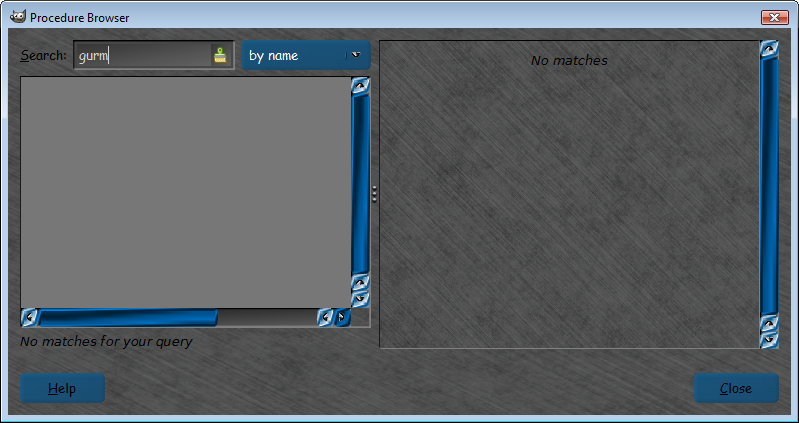
It doesn't show in plug-in-browser either even after Gimp loads it so it is loading but not initializing and their are no errors in output after Gimp is started..
Image

Just a side note the Menu location reads
      menu="<Image>/GURM")


and their are no parameters being read in the PDB either
Image


Top
 Post subject: Re: GURM Discussion
PostPosted: Tue May 07, 2013 3:08 pm  (#39) 
Offline
GimpChat Member
User avatar

Joined: Sep 22, 2012
Posts: 2089
Location: US
Rod wrote:
It doesn't show in plug-in-browser either even after Gimp loads it so it is loading but not initializing and their are no errors in output after Gimp is started..
[ Image ]

Just a side note the Menu location reads
      menu="<Image>/GURM")


The same here. Does not register in GIMP.
"<Image>/GURM" is okay menu path. GURM is supposed to show up in the main menu bar.
There is something else in the code that has to be changed (at least, for gimp 2.8 and Windows)
I've seen other Python scripts that doesn't work on Windows but fine on Linux. I'm sure ofnuts knows how to fix it.
One of his scripts didn't work and I asked him to check that script for me and he fixed it.
viewtopic.php?f=9&t=5922&hilit=density+fill+brush


Top
 Post subject: Re: GURM Discussion
PostPosted: Tue May 07, 2013 3:30 pm  (#40) 
Offline
Global Moderator
User avatar

Joined: May 16, 2010
Posts: 16180
K1TesseraEna wrote:
Rod wrote:
It doesn't show in plug-in-browser either even after Gimp loads it so it is loading but not initializing and their are no errors in output after Gimp is started..
[ Image ]

Just a side note the Menu location reads
      menu="<Image>/GURM")


The same here. Does not register in GIMP.
"<Image>/GURM" is okay menu path. GURM is supposed to show up in the main menu bar.
There is something else in the code that has to be changed (at least, for gimp 2.8 and Windows)
I've seen other Python scripts that doesn't work on Windows but fine on Linux. I'm sure ofnuts knows how to fix it.
One of his scripts didn't work and I asked him to check that script for me and he fixed it.
http://gimpchat.com/viewtopic.php?f=9&t ... fill+brush


Well it's just that it seemed to me it should be <Image>/Filters/GURM
I also tried removing all the MrQ mangers to see if their was a problem there.Still didn't work.It loads fine but doesn't initialize.
B&P's first WordArt.py (version 1.0 for Gimp-2.6), did this too.When Sam removed all the gimpfu.py scripting that was embedded it ran fine in Gimp-2.8. B&P had to actually embed the entire gimpfu.py inside the script for the interface to work. :)


Top
Post new topic Reply to topic  [ 71 posts ]  Go to page Previous  1, 2, 3, 4  Next

All times are UTC - 5 hours [ DST ]


* Login  


Powered by phpBB3 © phpBB Group