It is currently Sun Sep 20, 2026 7:47 am


All times are UTC - 5 hours [ DST ]


Post new topic Reply to topic  [ 11 posts ] 
Author Message
 Post subject: photoshop action files
PostPosted: Wed May 29, 2013 11:40 am  (#1) 
Offline
GimpChat Member

Joined: May 29, 2013
Posts: 15
GIMP Version: 2.8.4
Operating System: Windows
OS Version: vista 64
GIMP Experience: Beginner Level


I've been searching and googling for the past hour and half. All the answers I find or either outdated (ie, PSPI), for 32 bits, or gimp 2.6.

So. Before I drive myself bananas, how do I run .atn files in GIMP? Is it possible? Will I have to learn what Shell-Out is? I think I have it but I have no clue what it does.

HELP!!!!!


Share on Facebook Share on Twitter Share on Orkut Share on Digg Share on MySpace Share on Delicious Share on Technorati
Top
 Post subject: Re: photoshop action files
PostPosted: Wed May 29, 2013 12:26 pm  (#2) 
Offline
GimpChat Member
User avatar

Joined: Apr 07, 2010
Posts: 14182
Shellout is a Python plug-in developed by RobA to use Photoshop plug-ins under XNView
shellout

_________________
Image


Top
 Post subject: Re: photoshop action files
PostPosted: Wed May 29, 2013 3:33 pm  (#3) 
Offline
GimpChat Member

Joined: May 29, 2013
Posts: 15
ok

So I download XNView? Ok

Where do I place .atn files?


Top
 Post subject: Re: photoshop action files
PostPosted: Wed May 29, 2013 3:57 pm  (#4) 
Offline
GimpChat Member
User avatar

Joined: Sep 22, 2012
Posts: 2089
Location: US
Did you read this http://registry.gimp.org/node/25069
There was gimp plugin for that called Gimp #, it worked in gimp 2.4, but was broken in 2.6 and 2.8.
Plugin is not maintained for years now.
I tried it with 2.6 years ago and it didn't work.
But maybe someone here can tell you more.
One thing is certain - you don't need neither pspi nor Shellout for this.
Because, AFAIK, .atn don't work in XnView either.

IMO, it is easier to get yourself free Adobe CS2 package, I believe it's still available out there.


Top
 Post subject: Re: photoshop action files
PostPosted: Wed May 29, 2013 4:08 pm  (#5) 
Offline
GimpChat Member
User avatar

Joined: Nov 16, 2011
Posts: 5127
Location: Metro Vancouver, BC
No1KState wrote:
ok

So I download XNView? Ok

Where do I place .atn files?
As far as I know you can only use recorded action files (.atn) in Photoshop. Photoshop actions have commands specific to Photoshop.

_________________
Image
Gimp 2.8.18, Linux, median user
Gimp Chat Tutorials Index
Spirit Bear (Kermode)


Top
 Post subject: Re: photoshop action files
PostPosted: Wed May 29, 2013 5:41 pm  (#6) 
Offline
GimpChat Member

Joined: May 29, 2013
Posts: 15
Thanks everyone!


Top
 Post subject: Re: photoshop action files
PostPosted: Thu May 30, 2013 12:57 am  (#7) 
Offline
GimpChat Member
User avatar

Joined: Apr 30, 2010
Posts: 1937
Location: Missouri
I've never seen a way to run .atn files in anything other than Photoshop.

_________________
Image
The last time I kept an open mind,
my brain fell out and the dog grabbed it.
Now it's full of dirt, toothmarks, and dog slobber.
No more open minds or dogs for me.


Top
 Post subject: Re: photoshop action files
PostPosted: Thu May 30, 2013 1:59 am  (#8) 
Offline
Global Moderator
User avatar

Joined: May 16, 2010
Posts: 16173
Gimp Sharp will run only a very few. There is a trick to installing it (renaming the gimp-2.8.exe to gimp-2.4.exe), and then the Gimp Sharp installer will install all the plugins.
I have re compiled 0.18 for Gimp-2.8 but something is broken in the dynamic link files, trying to run in Gimp-2.7 - Gimp-2.8 versions.
The plugin works rather well in Gimp-2.6.12 however.

You download it here 0.15 the latest version. Anything after 0.15 will not work.
http://sourceforge.net/projects/gimp-sh ... urce=files

Then rename the download to an EXE file. When you download it it is named .e_x_e you need to change that to exe (no underscores).
Now rename the gimp-2.6.exe to gimp-2.4.exe and run the gimp sharp installer.
RENAME the gimp-2.4.exe back to gimp-2.6.exe and start Gimp-2.6.
Same for Gimp-2.8.4 version. Though it isn't really worth installing in Gimp-2.8 as many do not work and there are no images in the menus to tell where they are.

All act files must go in the C:\Users\.gimp-2.xx\scripts folder to work. Here are some samples that are supposed to work.
http://sourceforge.net/projects/gimp-sh ... 230.15-10/
You find the filters in the Gimp menus with little images next to each one (simple way to tell).
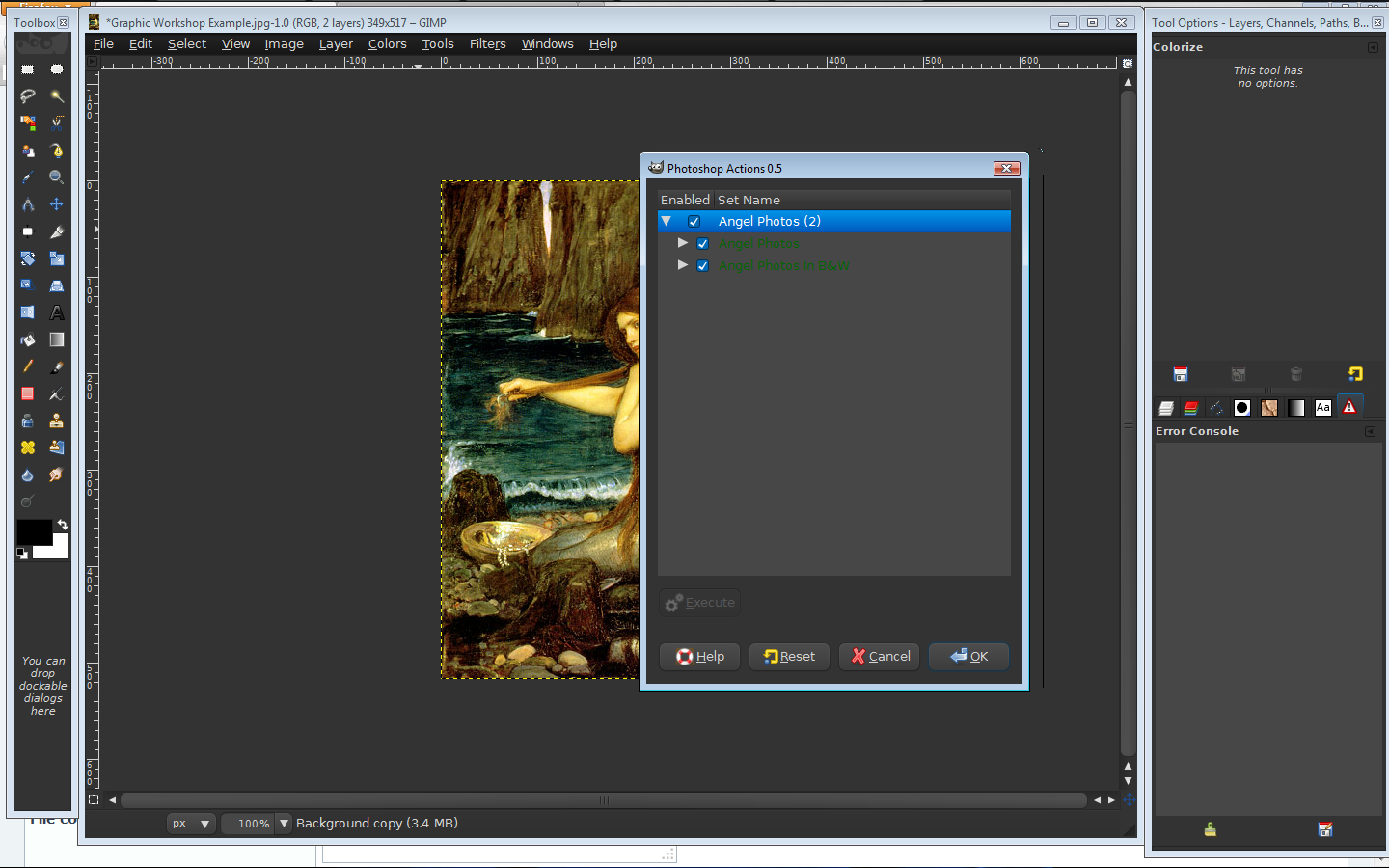
Filters>Photoshop Actions

Try only 1 ATN file at a time and see if they will run.Most will not.Every time you add one you need to restart Gimp.
There are many plugins included that are really nice though.This made it worth keeping for me.
Image example.
Gimp-2.6.12
Image

Gimp-2.8.4 ( only a couple gimp sharp plugins work)
Image

As i stated before the compiled 0.18 version could possibly be compiled with Mono libraries and work better.
I gave up on it and use only the other nice plugins like Forge, and picture package that come with it.

EDIT: I have re compiled Gimp-Sharp-0.18 again if any are interested.

_________________
Image


Top
 Post subject: Re: photoshop action files
PostPosted: Thu May 30, 2013 12:40 pm  (#9) 
Offline
GimpChat Member

Joined: May 29, 2013
Posts: 15
1 - I have gimp 2.8.4. It's the only gimp I've ever worked with. Anything that won't work with 2.8.4 won't help me. :(
2 - I run vista 64bits. Anything that won't work . . . you get the idea.
3 - What is Forge and where do I get it? Are you talking about the package of ATN files listed with the other gimp # files?
4 - Where do I get #.18? Will it work for 2.8.4 on 64bits? Yes, I'm VERY interested! :clap
5 - When you say change the name of gimp 2.8, or you talking about the .exe file I already have or a file in the # download. If you're talking about the .exe that's start in the gimp bin folder, do you mean the gimp.exe file or the gimp_console.exe file? :huh

Gimp is the major photo/illustration editor I'm (most) familiar with. I've never worked with any adobe photo/illustration products, but I keep coming across atn files even when I'm searching for a py or scm file. At this point, am I wrong to think it'd be easier to just learn how to re-write an atn file as a scm file? I know I can convert an atn file to an xml file to work on it (edit it). But my mastery of code is limited to whatever comes up when I google "html code." Though, I'm pretty comfortable with the <a ". . ."></> codes. But that's as far as that goes.

Still. A cut here and a paste there - surely it's possible to convert an atn file to a scm or py file?

But I digress.

I have shell-out. Is there any program that can run atn files that will work with shell-out? The more I think about it, would it be inconsiderate to ask gimp devs to create some native atn/abr/asl functionality? :hoh Or at least not make atn functional add-ons obsolete (re: PSPI).

I know I must sound like some ditz, but your help is GREATLY appreciated! :tyspin

PS Since I have your attention (anyone who's read this far), can someone kindly direct me to a gimp theme tutorial? I couldn't even figure out how to get the gimp theme.exe package to work. :oops:


Top
 Post subject: Re: photoshop action files
PostPosted: Thu May 30, 2013 1:34 pm  (#10) 
Offline
Global Moderator
User avatar

Joined: May 16, 2010
Posts: 16173
No1KState wrote:
1 - I have gimp 2.8.4. It's the only gimp I've ever worked with. Anything that won't work with 2.8.4 won't help me. :(
2 - I run vista 64bits. Anything that won't work . . . you get the idea.
3 - What is Forge and where do I get it? Are you talking about the package of ATN files listed with the other gimp # files?
4 - Where do I get #.18? Will it work for 2.8.4 on 64bits? Yes, I'm VERY interested! :clap
5 - When you say change the name of gimp 2.8, or you talking about the .exe file I already have or a file in the # download. If you're talking about the .exe that's start in the gimp bin folder, do you mean the gimp.exe file or the gimp_console.exe file? :huh

Gimp is the major photo/illustration editor I'm (most) familiar with. I've never worked with any adobe photo/illustration products, but I keep coming across atn files even when I'm searching for a py or scm file. At this point, am I wrong to think it'd be easier to just learn how to re-write an atn file as a scm file? I know I can convert an atn file to an xml file to work on it (edit it). But my mastery of code is limited to whatever comes up when I google "html code." Though, I'm pretty comfortable with the <a ". . ."></> codes. But that's as far as that goes.

Still. A cut here and a paste there - surely it's possible to convert an atn file to a scm or py file?

But I digress.

I have shell-out. Is there any program that can run atn files that will work with shell-out? The more I think about it, would it be inconsiderate to ask gimp devs to create some native atn/abr/asl functionality? :hoh Or at least not make atn functional add-ons obsolete (re: PSPI).

I know I must sound like some ditz, but your help is GREATLY appreciated! :tyspin

PS Since I have your attention (anyone who's read this far), can someone kindly direct me to a gimp theme tutorial? I couldn't even figure out how to get the gimp theme.exe package to work. :oops:


The theme package for Gimp-2.6 will not work in Gimp-2.7 and up versions.If you are using Parthas build he includes a default darker theme.You can also use my own theme Blue Licorice
The file that needs to be renamed is the gimp-2.6.exe file in the bin folder.
I wouldn't bother with Gimp Sharp in Gimp-2.8 though it really isn't worth it.
As far as a program to run through shellout for ATN files there is only PhotoShop.
SCM's are basically action files for Gimp.Writing a script to perform an everyday set of commands isn't very difficult.
Check out monsoonami's script-fu tutorial set here. http://www.youtube.com/watch?v=dAuJJ6P8Jxs
You can learn many of the basics for script writing from that set of 4 tutorials.Also take any scm file you find available here or elsewhere, and look at it inside Notepad ++. Once you understand the PDB calls you are halfway there. :bigthup
Forge is part of the gimp-sharp package.This plugin renders a planet scene.There are many other plugins besides Forge that come with it.Again though i would only use it in Gimp-2.6 as it seems to work the best in that version.
I think the closest thing to a scripter for actions in Gimp is GimpScripter
Gimp sharp should work in 64 bit if you can get someone to compile it for 64 bit.I do not have a 64 bit environment.
There is no other program except Photoshop that will run Adobe action files correctly.I have the -0.18 photoshop actions binary compiled for 32 bit, but i won't attach it here as you need the 64 bit version for your 64 bit Gimp.

_________________
Image


Top
 Post subject: Re: photoshop action files
PostPosted: Thu May 30, 2013 1:46 pm  (#11) 
Offline
GimpChat Member

Joined: May 29, 2013
Posts: 15
. . . okay. Thanks!


Top
Post new topic Reply to topic  [ 11 posts ] 

All times are UTC - 5 hours [ DST ]


* Login  


Powered by phpBB3 © phpBB Group