It is currently Tue Jun 23, 2026 4:52 am


All times are UTC - 5 hours [ DST ]


Post new topic Reply to topic  [ 112 posts ]  Go to page Previous  1, 2, 3, 4, 5, 6  Next
Author Message
 Post subject: Re: GC Shadow V0.5
PostPosted: Thu May 30, 2013 3:14 am  (#41) 
Offline
Script Coder
User avatar

Joined: Feb 18, 2011
Posts: 4826
Location: Bendigo Vic. Australia
GnuTux a bug that has been in the script is its inability to do an inverted glow on a layer (the same dimension as the Image) without selecting resize as well

Using a inverted glow on a background is a very nice effect as shown below

Image

the way to avoid this is that after your 'gimp-selection-layer-alpha' check your selection width and height then if either of them = your image width or height shrink you selection by 1

I proved this by on the layer doing a 'Select All' shrinking by 1 then running script(de-selting allow resize), I can wright up the procedure for you tomorrow if you like as there is not much involved and I know you are busy at the moment

_________________
Image
No matter how much you push the envelope, it'll still be stationery.


Top
 Post subject: Re: GC Shadow V0.4
PostPosted: Thu May 30, 2013 5:36 pm  (#42) 
Offline
GimpChat Founder
User avatar

Joined: May 22, 2008
Posts: 5241
Location: Gimpville
saulgoode wrote:
'gimp-image-get-layer-position' retrieves the position of the layer within its layer group (if it's in a layergroup).

Shouldn't that be 'gimp-image-get-item-position' ?

According to the PDB, 'gimp-image-get-layer-position' is a depreciated procedure, which doesn't support layer groups.

Thanks for pointing out the issues with Layer Groups. They are handled properly now.

Graechan wrote:
Saulgoode thank you for pointing out the fact that it's impossible to script effectively for 2.8 and 2.6 so I think that I'll have to leave 2.6 out for now.

Well, in this script, there are only 3 lines of code that need to be changed for GIMP 2.6.x support (see comments). I tried to keep 2.6 in mind while coding and only used procedures that were compatible with both GIMP versions. Only "layer group" specific commands are the ones that need changing. I will release two versions of the script, so as not to leave out GIMP 2.6.x users who might want to take advantage of this script.

Thanks for pointing out the issue with adding inner glow to the border of a non-resized image. I'll ensure that is handled in the next release.

Also, thanks for the contributions on layer naming. I ended up using a little different layer naming scheme in the script because of the layer positioning/merge methods I'm using.

_________________
“If you reach for the stars, you just might land on a decently sized hill.” - Stuart Hill


Top
 Post subject: Re: GC Shadow V0.6
PostPosted: Thu May 30, 2013 5:42 pm  (#43) 
Offline
GimpChat Founder
User avatar

Joined: May 22, 2008
Posts: 5241
Location: Gimpville
The new version RC 0.6 of the script has been released. See the first post of this thread and/or grab the new version from GIMP Scripts.

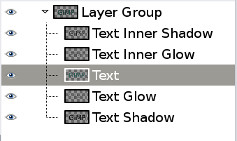
I've added support for GIMP 2.8 layer groups, as well as naming shadow layers with selected shadow options. If the shadow name is blank (default), the script uses the selected layer name. On layer merge, the script maintains the selected layer name.

Image

I've released versions for GIMP 2.6.x and GIMP 2.8.x so everyone can take advantage of the script.

Thanks to everyone who has contributed to the development of this script!

_________________
“If you reach for the stars, you just might land on a decently sized hill.” - Stuart Hill


Top
 Post subject: Re: GC Shadow V0.6
PostPosted: Thu May 30, 2013 6:21 pm  (#44) 
Offline
Script Coder
User avatar

Joined: Feb 18, 2011
Posts: 4826
Location: Bendigo Vic. Australia
GnuTux I'll test drive rel6 now I hope you don't think I'm interfering with my comments or suggestions,

I do think its a very useful script to have for GC readers

_________________
Image
No matter how much you push the envelope, it'll still be stationery.


Top
 Post subject: Re: GC Shadow V0.6
PostPosted: Thu May 30, 2013 6:27 pm  (#45) 
Offline
Retired Staff
User avatar

Joined: May 22, 2008
Posts: 6946
Location: Somewhere in GIMP
I do like the layer naming. Thanks, GnuTux! :hugme
Image

_________________
Image
World War IV will be fought with sticks and stones. - Albert Einstein


Top
 Post subject: Re: GC Shadow V0.6
PostPosted: Thu May 30, 2013 6:31 pm  (#46) 
Offline
GimpChat Founder
User avatar

Joined: May 22, 2008
Posts: 5241
Location: Gimpville
Thanks, O. I appreciate and value your input!

Graechan wrote:
GnuTux I'll test drive rel6 now I hope you don't think I'm interfering with my comments or suggestions. I do think its a very useful script to have for GC readers

Actually, I really appreciate your suggestions and contributions, Graechan. While I might not use your exact coding changes, which is simply a matter of coding style, your input has been extremely helpful, so has Saulgoode's and everyone else who has contributed and offered suggestions to improve the script.

_________________
“If you reach for the stars, you just might land on a decently sized hill.” - Stuart Hill


Top
 Post subject: Re: GC Shadow V0.6
PostPosted: Thu May 30, 2013 9:17 pm  (#47) 
Offline
Script Coder
User avatar

Joined: Feb 18, 2011
Posts: 4826
Location: Bendigo Vic. Australia
GnuTux there is a old routine I saved for getting the gimp version would this or something similiar be helpful to make the one script applicable to 2.6 and 2.8↑

;Helper function to check the gimp version
(define (gimp-version-meets? check)
  (let ((c (map string->number (strbreakup check ".")))
        (v (map string->number (strbreakup (car (gimp-version)) "."))))
  (if (> (car v) (car c)) #t
  (if (< (car c) (car v)) #f
   (if (> (cadr v) (cadr c)) #t
   (if (< (cadr v) (cadr c)) #f
     (if (>= (caddr v) (caddr c)) #t #f)))))))

_________________
Image
No matter how much you push the envelope, it'll still be stationery.


Top
 Post subject: Re: GC Shadow V0.6
PostPosted: Thu May 30, 2013 9:44 pm  (#48) 
Offline
GimpChat Founder
User avatar

Joined: May 22, 2008
Posts: 5241
Location: Gimpville
Graechan wrote:
GnuTux there is a old routine I saved for getting the gimp version would this or something similiar be helpful to make the one script applicable to 2.6 and 2.8

Well, heck yeah. I didn't realize the GIMP version could be determined from within Script-Fu. I had asking (or complained) about this before and I seem the remember the answer was that there was no reliable technique to determine the GIMP version.

If this works, it will be great and I can recombine the two shadow scripts, as well as use it on other scripts. I'll give it a test run.

Thanks so much! :yes

_________________
“If you reach for the stars, you just might land on a decently sized hill.” - Stuart Hill


Top
 Post subject: Re: GC Shadow V0.6
PostPosted: Thu May 30, 2013 10:04 pm  (#49) 
Offline
Script Coder
User avatar

Joined: Apr 23, 2010
Posts: 1553
Location: not from Guildford after all
Another option for making your 2.8 script work with GIMP 2.6 is to define the new procedures at the beginning of your script.

(if (not (defined? 'gimp-image-get-item-position))
  (define (gimp-image-get-item-position image layer)
    (gimp-image-get-layer-position image layer) ))
(if (not (defined? 'gimp-image-insert-layer))
  (define (gimp-image-insert-layer image layer ignored pos)
    (gimp-image-add-layer image layer pos) ))

_________________
Any sufficiently primitive technology is indistinguishable from a rock.


Top
 Post subject: Re: GC Shadow V0.6
PostPosted: Thu May 30, 2013 10:43 pm  (#50) 
Offline
Script Coder
User avatar

Joined: Feb 18, 2011
Posts: 4826
Location: Bendigo Vic. Australia
Saulgoode do you know how to make the procedure below work, Ive forgotten where I got I from and would like to use something similar to make my scripts applicable to 2.6 and 2.8

It's been rejecting whatever I place in 'check', maybe you remember a script that has used it

;Helper function to check the gimp version
(define (gimp-version-meets? check)
  (let ((c (map string->number (strbreakup check ".")))
        (v (map string->number (strbreakup (car (gimp-version)) "."))))
  (if (> (car v) (car c)) #t
  (if (< (car c) (car v)) #f
   (if (> (cadr v) (cadr c)) #t
   (if (< (cadr v) (cadr c)) #f
     (if (>= (caddr v) (caddr c)) #t #f)))))))

_________________
Image
No matter how much you push the envelope, it'll still be stationery.


Top
 Post subject: Re: GC Shadow V0.6
PostPosted: Thu May 30, 2013 10:46 pm  (#51) 
Offline
GimpChat Founder
User avatar

Joined: May 22, 2008
Posts: 5241
Location: Gimpville
@Graechan - Take a look at SG's code. He's checking to see if a GIMP 2.8 procedure has been defined. If it hasn't, you know that it's an earlier (or perhaps later) version of GIMP.

Very nice, SG!

I wasn't aware the "defined?" function existed. That makes it pretty easy to determine the GIMP version.

Is there a list somewhere of all the available functions?

I seem to remember now that I was inquiring about determining the OS version being used (from within Script-Fu), not the GIMP version being used.

Thanks so much. Now I don't have to maintain two versions. :hehe

_________________
“If you reach for the stars, you just might land on a decently sized hill.” - Stuart Hill


Top
 Post subject: Re: GC Shadow V0.6
PostPosted: Thu May 30, 2013 10:55 pm  (#52) 
Offline
Script Coder
User avatar

Joined: Apr 23, 2010
Posts: 1553
Location: not from Guildford after all
If you specify an outer shadow, your "Allow resizing" toggle always increases the size of the image. It appears that you are performing a 'gimp-layer-resize-to-image-size' before offsetting the shadow layer and that this necessarily places the shadow layer outside the image. In my opinion, this is undesirable behavior because there is no need to increase the image size if the resulting shadow should fall within the boundaries of the original image.

To rectify this, I would propose two modifications to your script. First, only increase the size of the shadow layer enough to ensure that the blurring will not get "chopped off" as discussed previously. Increasing the layer size on all four sides by the amount of the blur should accomplish this.
(let ((w (car (gimp-drawable-width shadow-layer)))
      (h (car (gimp-drawable-height shadow-layer))) )
  (gimp-layer-resize shadow-layer
                     (+ w (* 2 shadow-blur-radiusx))
                     (+ h (* 2 shadow-blur-radiusy))
                     shadow-blur-radiusx
                     shadow-blur-radiusy ))


Then, after you've resized, positioned, and blurred your shadow layer adjust the image size (if necessary) to accommodate the new layer. The following code fragment shows how this could be done.
(let ((x-min (min 0 (car (gimp-drawable-offsets shadow-layer))))
      (y-min (min 0 (cadr (gimp-drawable-offsets shadow-layer))))
      (x-max (max (car (gimp-image-width image))
                   (+ (car (gimp-drawable-offsets shadow-layer))
                      (car (gimp-drawable-width shadow-layer)) )))
      (y-max (max (car (gimp-image-height image))
                   (+ (cadr (gimp-drawable-offsets shadow-layer))
                      (car (gimp-drawable-height shadow-layer)) ))))
  (gimp-image-resize image (- x-max x-min)
                           (- y-max y-min)
                           (- x-min)
                           (- y-min) ))

_________________
Any sufficiently primitive technology is indistinguishable from a rock.


Top
 Post subject: Re: GC Shadow V0.6
PostPosted: Thu May 30, 2013 11:13 pm  (#53) 
Offline
Script Coder
User avatar

Joined: Apr 23, 2010
Posts: 1553
Location: not from Guildford after all
Graechan wrote:
Saulgoode do you know how to make the procedure below work, Ive forgotten where I got I from and would like to use something similar to make my scripts applicable to 2.6 and 2.8


Try the following:
(define (gimp-version-meets? check)
  (let ((c (append (map string->number (strbreakup check ".")) '(0 0 0)))
        (v (append (map string->number (strbreakup (car (gimp-version)) ".")) '(0 0 0))) )
  (if (> (car v) (car c)) #t
  (if (< (car v) (car c)) #f
   (if (> (cadr v) (cadr c)) #t
   (if (< (cadr v) (cadr c)) #f
     (if (>= (caddr v) (caddr c)) #t #f)))))))

_________________
Any sufficiently primitive technology is indistinguishable from a rock.


Top
 Post subject: Re: GC Shadow V0.6
PostPosted: Thu May 30, 2013 11:33 pm  (#54) 
Offline
Script Coder
User avatar

Joined: Feb 18, 2011
Posts: 4826
Location: Bendigo Vic. Australia
thanks Saulgoode but how does this tell me the gimp is greater than 2.6.12,
and it still leaves 'check' without a value or do I use '(2 6 12)

_________________
Image
No matter how much you push the envelope, it'll still be stationery.


Top
 Post subject: Re: GC Shadow V0.6
PostPosted: Thu May 30, 2013 11:45 pm  (#55) 
Offline
GimpChat Founder
User avatar

Joined: May 22, 2008
Posts: 5241
Location: Gimpville
@ Graechan - That's an interesting routine and it could be useful but why use it when you could just check to see if a GIMP 2.8 only procedure has been defined, as SG demonstrated? If it hasn't, you know that the version of GIMP is earlier than 2.8.x.

@SG - I recognized that there was a resizing deficiency in the script that needed to be addressed. The image just keeps getting bigger and bigger the more layers that are added. After a couple of resizes, I was just toggling off "Allow resize". :hehe

Thanks for the code snippets. I'll incorporate those into the next release. :cool

_________________
“If you reach for the stars, you just might land on a decently sized hill.” - Stuart Hill


Top
 Post subject: Re: GC Shadow V0.6
PostPosted: Thu May 30, 2013 11:58 pm  (#56) 
Offline
Script Coder
User avatar

Joined: Feb 18, 2011
Posts: 4826
Location: Bendigo Vic. Australia
GnuTux I think Saulgoode just pulls some of the commands he uses out of a hat but is good at it so I'll definitely look at it :yes

_________________
Image
No matter how much you push the envelope, it'll still be stationery.


Top
 Post subject: Re: GC Shadow V0.6
PostPosted: Fri May 31, 2013 12:05 am  (#57) 
Offline
GimpChat Founder
User avatar

Joined: May 22, 2008
Posts: 5241
Location: Gimpville
Graechan, I found a list of functions that SG had previously posted. The "defined?" function is in the list.

http://www.gimpchat.com/viewtopic.php?f=8&t=5127#p64036

You should be able to do a check like..

if (not (defined? 'gimp-image-get-item-position))

If that statement is true, you know the version of GIMP being used is earlier than V2.8.x. Actually, any procedure with "item" in it is new for GIMP 2.8.x.

_________________
“If you reach for the stars, you just might land on a decently sized hill.” - Stuart Hill


Top
 Post subject: Re: GC Shadow V0.6
PostPosted: Fri May 31, 2013 2:31 am  (#58) 
Offline
Script Coder
User avatar

Joined: Feb 18, 2011
Posts: 4826
Location: Bendigo Vic. Australia
I tried this and wilbur said 'no way' hang on I had a typo, it's very dull today and I can't see keyboard properly. got it :yes

_________________
Image
No matter how much you push the envelope, it'll still be stationery.


Top
 Post subject: Re: GC Shadow V0.6
PostPosted: Fri May 31, 2013 2:55 am  (#59) 
Offline
Script Coder
User avatar

Joined: Feb 18, 2011
Posts: 4826
Location: Bendigo Vic. Australia
working in 2.6 and 2.8 (within a layer group) Saulgoode your a superstar :jumpclap :jumpclap :jumpclap

I'll post the code I roughly put in to test below

(if (defined? 'gimp-image-get-item-position) (begin
    (gimp-image-insert-layer img shadow-layer (car (gimp-item-get-parent in-layer)) (car (gimp-image-get-layer-position img in-layer)))))
    (if (not (defined? 'gimp-image-get-item-position)) (begin
   (gimp-image-add-layer img shadow-layer (car (gimp-image-get-layer-position img in-layer))) ))

I'm Stoked that we don't have to have 2 lots of scripts or leave 2.6 out

_________________
Image
No matter how much you push the envelope, it'll still be stationery.


Top
 Post subject: Re: GC Shadow V0.6
PostPosted: Fri May 31, 2013 6:34 am  (#60) 
Offline
Script Coder
User avatar

Joined: Apr 23, 2010
Posts: 1553
Location: not from Guildford after all
GnuTux wrote:
I wasn't aware the "defined?" function existed. That makes it pretty easy to determine the GIMP version.

Is there a list somewhere of all the available functions?

Script-fu is for the most part an implementation of version 5 of the Revised Report on the Algorithmic Language Scheme (AKA R5RS). It implements almost all of the functions described in that report -- except that it does not implement either complex arithmetic or the syntax rules macro facility (Script-fu implements macros in a manner similar to the older R4RS-based Schemes).

Script-fu also has two additional procedures, 'strbreakup' and 'unbreakupstr', that are holdovers from earlier versions of Scheme and that are very useful for dividing up strings (one example is Graechan's 'gimp-version-meets?' procedure discussed earlier).

_________________
Any sufficiently primitive technology is indistinguishable from a rock.


Top
Post new topic Reply to topic  [ 112 posts ]  Go to page Previous  1, 2, 3, 4, 5, 6  Next

All times are UTC - 5 hours [ DST ]


* Login  


Powered by phpBB3 © phpBB Group