It is currently Sat Sep 05, 2026 2:05 am


All times are UTC - 5 hours [ DST ]


Post new topic Reply to topic  [ 17 posts ] 
Author Message
 Post subject: Candy Canes Animated Brush
PostPosted: Sat Dec 25, 2010 12:21 am  (#1) 
Offline
GimpChat Member
User avatar

Joined: Oct 06, 2010
Posts: 4050
Another brush converted from PSP picture tubes.


Attachments:
candycane.gih [2.06 MiB]
Downloaded 324 times

_________________
"In order to attain the impossible, one must attempt the absurd."
~ Miguel de Cervantes
Share on Facebook Share on Twitter Share on Orkut Share on Digg Share on MySpace Share on Delicious Share on Technorati
Top
 Post subject: Re: Candy Canes Animated Brush
PostPosted: Sat Dec 25, 2010 4:47 am  (#2) 
Offline
GimpChat Member
User avatar

Joined: Apr 07, 2010
Posts: 14182
thanks again Santa....

_________________
Image


Top
 Post subject: Re: Candy Canes Animated Brush
PostPosted: Sat Dec 25, 2010 10:01 am  (#3) 
Offline
GimpChat Member

Joined: Oct 28, 2010
Posts: 166
Stupid ?..what do I do with these and how and where would I save them?

M


Top
 Post subject: Re: Candy Canes Animated Brush
PostPosted: Sat Dec 25, 2010 11:39 am  (#4) 
Offline
GimpChat Member
User avatar

Joined: Apr 07, 2010
Posts: 14182
right click on the scm file and Save link as: go to your gimp 2.6 and go to scripts and EDIT > paste.....

If you don't know how to get there, in windows XP, I right click on start > left click explorer > find Gimp 2.6 > scroll down to scripts.

_________________
Image


Top
 Post subject: Re: Candy Canes Animated Brush
PostPosted: Sat Dec 25, 2010 11:56 am  (#5) 
Offline
GimpChat Member

Joined: Oct 28, 2010
Posts: 166
oh ok..I know how to do that..you taught me that one...:) now once in gimp what do I do with them?


Top
 Post subject: Re: Candy Canes Animated Brush
PostPosted: Sat Dec 25, 2010 12:28 pm  (#6) 
Offline
GimpChat Member
User avatar

Joined: Apr 07, 2010
Posts: 14182
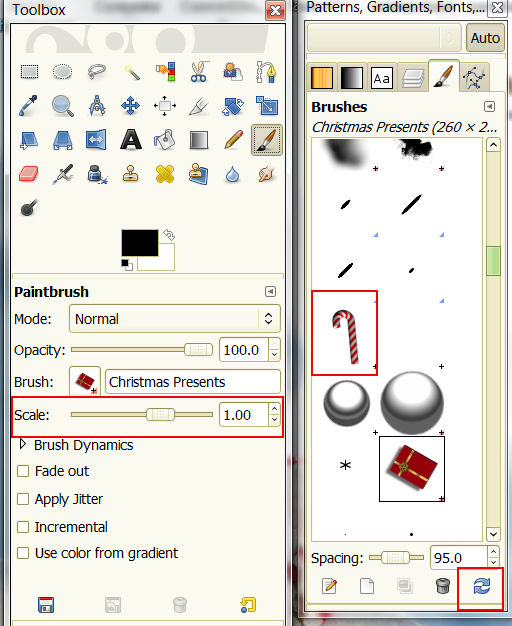
close gimp and open it OR click brushes, on the gimp dialogs, go to bottom of window, you will see two blue arrows which are your refresh buttons. click that and it will refresh your brushes then You find your new ones and just paint with them.
At the bottom of that box is also spacing with a slide bar, If you want your brushes spaced further apart, slide to a higher number. If you want your brushes smaller go to the toolbox and scale them the size you want...
Image

_________________
Image


Last edited by molly on Sat Dec 25, 2010 12:38 pm, edited 1 time in total.

Top
 Post subject: Re: Candy Canes Animated Brush
PostPosted: Sat Dec 25, 2010 12:32 pm  (#7) 
Offline
GimpChat Member

Joined: Oct 28, 2010
Posts: 166
ohhhhhhhhh ok cool..I will do this now.

thank you


Top
 Post subject: Re: Candy Canes Animated Brush
PostPosted: Sat Dec 25, 2010 12:45 pm  (#8) 
Offline
GimpChat Member

Joined: Oct 28, 2010
Posts: 166
well that didn't work..when I right click and save as....it's opening it up in gimp


Top
 Post subject: Re: Candy Canes Animated Brush
PostPosted: Sat Dec 25, 2010 12:59 pm  (#9) 
Offline
GimpChat Member
User avatar

Joined: Apr 07, 2010
Posts: 14182
you should click save link as: and there should be two choices. one is open with gimp and the other probably goes to your download folder or where ever you save stuff.

_________________
Image


Top
 Post subject: Re: Candy Canes Animated Brush
PostPosted: Sat Dec 25, 2010 1:11 pm  (#10) 
Offline
GimpChat Member
User avatar

Joined: Oct 06, 2010
Posts: 4050
These are brushes, not scripts. They go in your .gimp-2.6/brushes folder, then refresh your brushes dialog.

_________________
"In order to attain the impossible, one must attempt the absurd."
~ Miguel de Cervantes


Top
 Post subject: Re: Candy Canes Animated Brush
PostPosted: Sat Dec 25, 2010 1:18 pm  (#11) 
Offline
GimpChat Member

Joined: Oct 28, 2010
Posts: 166
well now maybe thats why its not working...lol


Top
 Post subject: Re: Candy Canes Animated Brush
PostPosted: Sat Dec 25, 2010 2:02 pm  (#12) 
Offline
Global Moderator
User avatar

Joined: May 16, 2010
Posts: 16169
lol

_________________
Image


Top
 Post subject: Re: Candy Canes Animated Brush
PostPosted: Sat Dec 25, 2010 2:28 pm  (#13) 
Offline
GimpChat Member
User avatar

Joined: Apr 07, 2010
Posts: 14182
Sorry, I went back up to my post. I downloaded so many scripts today that I guess I had scripts on the brain. I meant brushes not scripts, but it is taken care of now. thanks mav...

_________________
Image


Top
 Post subject: Re: Candy Canes Animated Brush
PostPosted: Sat Dec 25, 2010 2:30 pm  (#14) 
Offline
GimpChat Member
User avatar

Joined: Oct 06, 2010
Posts: 4050
No problem, Molly. It happens to all of us. :)

_________________
"In order to attain the impossible, one must attempt the absurd."
~ Miguel de Cervantes


Top
 Post subject: Re: Candy Canes Animated Brush
PostPosted: Sat Dec 25, 2010 2:50 pm  (#15) 
Offline
GimpChat Member
User avatar

Joined: Apr 07, 2010
Posts: 14182
must have been that Grinch that was behind the tree, he put a curse on me

_________________
Image


Top
 Post subject: Re: Candy Canes Animated Brush
PostPosted: Tue Oct 25, 2011 12:20 am  (#16) 
Offline
New Member
User avatar

Joined: May 18, 2011
Posts: 1
1. Is it possible to just have one color Candy Cane each time?
2. The Candy Canes keep rotating, I only want one direction,
is it possible to get only one direction all of the time?


Top
 Post subject: Re: Candy Canes Animated Brush
PostPosted: Tue Oct 25, 2011 1:54 am  (#17) 
Offline
GimpChat Member
User avatar

Joined: Sep 24, 2010
Posts: 12844
You can always open brush as image (right click on the brush gives you this option) and then copy the positioned brush that you like to the clip board then choose the clipboard brush (very first block in brushes dialogue box is the clipboard brush). :)

_________________
Lyle

Psalm 109:8

Image


Top
Post new topic Reply to topic  [ 17 posts ] 

All times are UTC - 5 hours [ DST ]


cron

* Login  


Powered by phpBB3 © phpBB Group