It is currently Wed Nov 25, 2026 1:30 pm


All times are UTC - 5 hours [ DST ]


Post new topic Reply to topic  [ 122 posts ]  Go to page Previous  1, 2, 3, 4, 5, 6, 7  Next
Author Message
 Post subject: Re: GIMP feature wishlist
PostPosted: Mon Jun 03, 2013 6:21 am  (#61) 
Offline
Global Moderator
User avatar

Joined: May 16, 2010
Posts: 16314
K1TesseraEna wrote:
Oregonian wrote:
Perhaps I'm missing something here but snap to guides, grid, canvas edges and active path are available in the View menu. I successfully moved a selection around, snapping it to various elements - also with a path.

I don't know if there's a way to make those settings permanent in Prefs or not.


It is configurable from the View menu, but not in Preferences.
It is so unreliable and buggy (especially snapping to active path and nodes and snapping while using transform tools)
I wouldn't call it a real feature. No snapping distance/sensitivity control.
Who used Inkscape, Blender or A$$be products know what I mean.


I hear you there. Sometimes snapping with transformations to guides is impossible.This should be fixed.
The square anchors are so big i wish there was a way to size those to user preferences.

_________________
Image


Top
 Post subject: Re: GIMP feature wishlist
PostPosted: Tue Jun 04, 2013 7:28 am  (#62) 
Offline
GimpChat Member
User avatar

Joined: Mar 23, 2012
Posts: 7388
Location: Göteborg at last!
I had another thought. In Fractal Explorer I would like to be able to find a nice shape on a Mandelbrot and use its coordinates as Julia seeds.


Top
 Post subject: Dynamics - set minimum and maximum size of a brush
PostPosted: Thu Jun 06, 2013 4:32 pm  (#63) 
Offline
Retired Staff
User avatar

Joined: May 22, 2008
Posts: 6946
Location: Somewhere in GIMP
Dynamics - set minimum and maximum size of a brush.

Choosing Random Size in Dynamics makes the maximum brush size that is set in the Paintbrush size, but the minimum size is so tiny that it looks like just a dot sometimes.

It would be nice if a minimum size could be set, too.
Image

_________________
Image
World War IV will be fought with sticks and stones. - Albert Einstein


Top
 Post subject: Re: Dynamics - set minimum and maximum size of a brush
PostPosted: Fri Jun 07, 2013 1:45 am  (#64) 
Offline
Script Coder
User avatar

Joined: Oct 25, 2010
Posts: 4812
Oregonian wrote:
Dynamics - set minimum and maximum size of a brush.

Choosing Random Size in Dynamics makes the maximum brush size that is set in the Paintbrush size, but the minimum size is so tiny that it looks like just a dot sometimes.

It would be nice if a minimum size could be set, too.
[ Image ]

You should be able to achieve this by editing the "curve" of the dynamics. By default the curves go from 0.00,0.00 to 1.00,1.00, but if you change the curve to go from 0.00,0.50 to 1.00,1.00, the minimum size should be half the full size.

_________________
Image


Top
 Post subject: Re: GIMP feature wishlist
PostPosted: Fri Jun 07, 2013 2:50 am  (#65) 
Offline
GimpChat Member
User avatar

Joined: Mar 18, 2011
Posts: 283
Location: Lusaka, Zambia
I also wish for a better way to preview image directories in GIMP

Image


Top
 Post subject: Re: GIMP feature wishlist
PostPosted: Fri Jun 07, 2013 3:17 am  (#66) 
Offline
Script Coder
User avatar

Joined: Oct 25, 2010
Posts: 4812
josephbupe wrote:
I also wish for a better way to preview image directories in GIMP

[ Image ]

It's a lot easier (less CPU intensive) to figure out the aspect of a JPG/PNG than to compute the compositing of a potentially big XCF. There are trade-offs to be made between ease of use and performance.

_________________
Image


Top
 Post subject: Re: GIMP feature wishlist
PostPosted: Fri Jun 07, 2013 6:03 am  (#67) 
Offline
GimpChat Member
User avatar

Joined: Mar 18, 2011
Posts: 283
Location: Lusaka, Zambia
Maybe a system's default file browser is the best way:

Image


Top
 Post subject: Re: GIMP feature wishlist
PostPosted: Fri Jun 07, 2013 6:24 am  (#68) 
Offline
GimpChat Member
User avatar

Joined: Mar 23, 2012
Posts: 7388
Location: Göteborg at last!
I had another idea - the ability to recover work lost because of a crash upon reboot.


Top
 Post subject: Re: GIMP feature wishlist
PostPosted: Fri Jun 07, 2013 6:34 am  (#69) 
Offline
GimpChat Member
User avatar

Joined: Mar 18, 2011
Posts: 283
Location: Lusaka, Zambia
Erisian wrote:
I had another idea - the ability to recover work lost because of a crash upon reboot.


I totally concur with you Erisian! Auto saving while working on a project...


Top
 Post subject: Re: Dynamics - set minimum and maximum size of a brush
PostPosted: Fri Jun 07, 2013 11:32 am  (#70) 
Offline
Retired Staff
User avatar

Joined: May 22, 2008
Posts: 6946
Location: Somewhere in GIMP
ofnuts wrote:
You should be able to achieve this by editing the "curve" of the dynamics. By default the curves go from 0.00,0.00 to 1.00,1.00, but if you change the curve to go from 0.00,0.50 to 1.00,1.00, the minimum size should be half the full size.
I opened the random size Dynamic and whoa! Where do I go?
Here is what was under size:
(size-output
    (use-pressure no)
    (use-velocity no)
    (use-direction no)
    (use-tilt no)
    (use-wheel no)
    (use-random yes)
    (use-fade no)
    (pressure-curve
        (curve-type smooth)
        (n-points 17)
        (points 34 0.000000 0.000000 -1.000000 -1.000000 -1.000000 -1.000000 -1.000000 -1.000000 -1.000000 -1.000000 -1.000000 -1.000000 -1.000000 -1.000000 -1.000000 -1.000000 -1.000000 -1.000000 -1.000000 -1.000000 -1.000000 -1.000000 -1.000000 -1.000000 -1.000000 -1.000000 -1.000000 -1.000000 -1.000000 -1.000000 -1.000000 -1.000000 1.000000 1.000000)
        (n-samples 256)
        (samples 256 0.000000 0.003922 0.007843 0.011765 0.015686 0.019608 0.023529 0.027451 0.031373 0.035294 0.039216 0.043137 0.047059 0.050980 0.054902 0.058824 0.062745 0.066667 0.070588 0.074510 0.078431 0.082353 0.086275 0.090196 0.094118 0.098039 0.101961 0.105882 0.109804 0.113725 0.117647 0.121569 0.125490 0.129412 0.133333 0.137255 0.141176 0.145098 0.149020 0.152941 0.156863 0.160784 0.164706 0.168627 0.172549 0.176471 0.180392 0.184314 0.188235 0.192157 0.196078 0.200000 0.203922 0.207843 0.211765 0.215686 0.219608 0.223529 0.227451 0.231373 0.235294 0.239216 0.243137 0.247059 0.250980 0.254902 0.258824 0.262745 0.266667 0.270588 0.274510 0.278431 0.282353 0.286275 0.290196 0.294118 0.298039 0.301961 0.305882 0.309804 0.313725 0.317647 0.321569 0.325490 0.329412 0.333333 0.337255 0.341176 0.345098 0.349020 0.352941 0.356863 0.360784 0.364706 0.368627 0.372549 0.376471 0.380392 0.384314 0.388235 0.392157 0.396078 0.400000 0.403922 0.407843 0.411765 0.415686 0.419608 0.423529 0.427451 0.431373 0.435294 0.439216 0.443137 0.447059 0.450980 0.454902 0.458824 0.462745 0.466667 0.470588 0.474510 0.478431 0.482353 0.486275 0.490196 0.494118 0.498039 0.501961 0.505882 0.509804 0.513725 0.517647 0.521569 0.525490 0.529412 0.533333 0.537255 0.541176 0.545098 0.549020 0.552941 0.556863 0.560784 0.564706 0.568627 0.572549 0.576471 0.580392 0.584314 0.588235 0.592157 0.596078 0.600000 0.603922 0.607843 0.611765 0.615686 0.619608 0.623529 0.627451 0.631373 0.635294 0.639216 0.643137 0.647059 0.650980 0.654902 0.658824 0.662745 0.666667 0.670588 0.674510 0.678431 0.682353 0.686275 0.690196 0.694118 0.698039 0.701961 0.705882 0.709804 0.713725 0.717647 0.721569 0.725490 0.729412 0.733333 0.737255 0.741176 0.745098 0.749020 0.752941 0.756863 0.760784 0.764706 0.768627 0.772549 0.776471 0.780392 0.784314 0.788235 0.792157 0.796078 0.800000 0.803922 0.807843 0.811765 0.815686 0.819608 0.823529 0.827451 0.831373 0.835294 0.839216 0.843137 0.847059 0.850980 0.854902 0.858824 0.862745 0.866667 0.870588 0.874510 0.878431 0.882353 0.886275 0.890196 0.894118 0.898039 0.901961 0.905882 0.909804 0.913725 0.917647 0.921569 0.925490 0.929412 0.933333 0.937255 0.941176 0.945098 0.949020 0.952941 0.956863 0.960784 0.964706 0.968627 0.972549 0.976471 0.980392 0.984314 0.988235 0.992157 0.996078 1.000000))

_________________
Image
World War IV will be fought with sticks and stones. - Albert Einstein


Top
 Post subject: Re: GIMP feature wishlist
PostPosted: Fri Jun 07, 2013 5:02 pm  (#71) 
Offline
GimpChat Member
User avatar

Joined: Feb 14, 2012
Posts: 426
I've been thinking that I wish the filters or at least most of them had a save feature. Kind of like the Color menu functions. Kind of like you can save curves or threshold and all those.

And what about making a program that can find these saved filter, and color menu files, and run them on a choosen layer or selection. That would be kind of like being able to make your own scripts for guys like me who don't know how to program stuff. It would be nice if you could make it create new layers and flatten and stuff like that.

Alan


Top
 Post subject: Re: Dynamics - set minimum and maximum size of a brush
PostPosted: Fri Jun 07, 2013 5:32 pm  (#72) 
Oregonian wrote:
ofnuts wrote:
You should be able to achieve this by editing the "curve" of the dynamics. By default the curves go from 0.00,0.00 to 1.00,1.00, but if you change the curve to go from 0.00,0.50 to 1.00,1.00, the minimum size should be half the full size.
I opened the random size Dynamic and whoa! Where do I go?
Here is what was under size:
(size-output
    (use-pressure no)
    (use-velocity no)
    (use-direction no)
    (use-tilt no)
    (use-wheel no)
    (use-random yes)
    (use-fade no)
    (pressure-curve
        (curve-type smooth)
        (n-points 17)
        (points 34 0.000000 0.000000 -1.000000 -1.000000 -1.000000 -1.000000 -1.000000 -1.000000 -1.000000 -1.000000 -1.000000 -1.000000 -1.000000 -1.000000 -1.000000 -1.000000 -1.000000 -1.000000 -1.000000 -1.000000 -1.000000 -1.000000 -1.000000 -1.000000 -1.000000 -1.000000 -1.000000 -1.000000 -1.000000 -1.000000 -1.000000 -1.000000 1.000000 1.000000)
        (n-samples 256)
        (samples 256 0.000000 0.003922 0.007843 0.011765 0.015686 0.019608 0.023529 0.027451 0.031373 0.035294 0.039216 0.043137 0.047059 0.050980 0.054902 0.058824 0.062745 0.066667 0.070588 0.074510 0.078431 0.082353 0.086275 0.090196 0.094118 0.098039 0.101961 0.105882 0.109804 0.113725 0.117647 0.121569 0.125490 0.129412 0.133333 0.137255 0.141176 0.145098 0.149020 0.152941 0.156863 0.160784 0.164706 0.168627 0.172549 0.176471 0.180392 0.184314 0.188235 0.192157 0.196078 0.200000 0.203922 0.207843 0.211765 0.215686 0.219608 0.223529 0.227451 0.231373 0.235294 0.239216 0.243137 0.247059 0.250980 0.254902 0.258824 0.262745 0.266667 0.270588 0.274510 0.278431 0.282353 0.286275 0.290196 0.294118 0.298039 0.301961 0.305882 0.309804 0.313725 0.317647 0.321569 0.325490 0.329412 0.333333 0.337255 0.341176 0.345098 0.349020 0.352941 0.356863 0.360784 0.364706 0.368627 0.372549 0.376471 0.380392 0.384314 0.388235 0.392157 0.396078 0.400000 0.403922 0.407843 0.411765 0.415686 0.419608 0.423529 0.427451 0.431373 0.435294 0.439216 0.443137 0.447059 0.450980 0.454902 0.458824 0.462745 0.466667 0.470588 0.474510 0.478431 0.482353 0.486275 0.490196 0.494118 0.498039 0.501961 0.505882 0.509804 0.513725 0.517647 0.521569 0.525490 0.529412 0.533333 0.537255 0.541176 0.545098 0.549020 0.552941 0.556863 0.560784 0.564706 0.568627 0.572549 0.576471 0.580392 0.584314 0.588235 0.592157 0.596078 0.600000 0.603922 0.607843 0.611765 0.615686 0.619608 0.623529 0.627451 0.631373 0.635294 0.639216 0.643137 0.647059 0.650980 0.654902 0.658824 0.662745 0.666667 0.670588 0.674510 0.678431 0.682353 0.686275 0.690196 0.694118 0.698039 0.701961 0.705882 0.709804 0.713725 0.717647 0.721569 0.725490 0.729412 0.733333 0.737255 0.741176 0.745098 0.749020 0.752941 0.756863 0.760784 0.764706 0.768627 0.772549 0.776471 0.780392 0.784314 0.788235 0.792157 0.796078 0.800000 0.803922 0.807843 0.811765 0.815686 0.819608 0.823529 0.827451 0.831373 0.835294 0.839216 0.843137 0.847059 0.850980 0.854902 0.858824 0.862745 0.866667 0.870588 0.874510 0.878431 0.882353 0.886275 0.890196 0.894118 0.898039 0.901961 0.905882 0.909804 0.913725 0.917647 0.921569 0.925490 0.929412 0.933333 0.937255 0.941176 0.945098 0.949020 0.952941 0.956863 0.960784 0.964706 0.968627 0.972549 0.976471 0.980392 0.984314 0.988235 0.992157 0.996078 1.000000))

Hi O, I don't know what you have opened, but I think ofnuts was referring to editing the dynamic here... I tried it and it worked for me.
Image


Top
 Post subject: Re: Dynamics - set minimum and maximum size of a brush
PostPosted: Fri Jun 07, 2013 5:45 pm  (#73) 
Offline
Script Coder
User avatar

Joined: Oct 25, 2010
Posts: 4812
fluffybunny wrote:
Hi O, I don't know what you have opened, but I think ofnuts was referring to editing the dynamic here... I tried it and it worked for me.
Indeed.

_________________
Image


Top
 Post subject: Re: GIMP feature wishlist
PostPosted: Fri Jun 07, 2013 6:14 pm  (#74) 
Offline
Retired Staff
User avatar

Joined: May 22, 2008
Posts: 6946
Location: Somewhere in GIMP
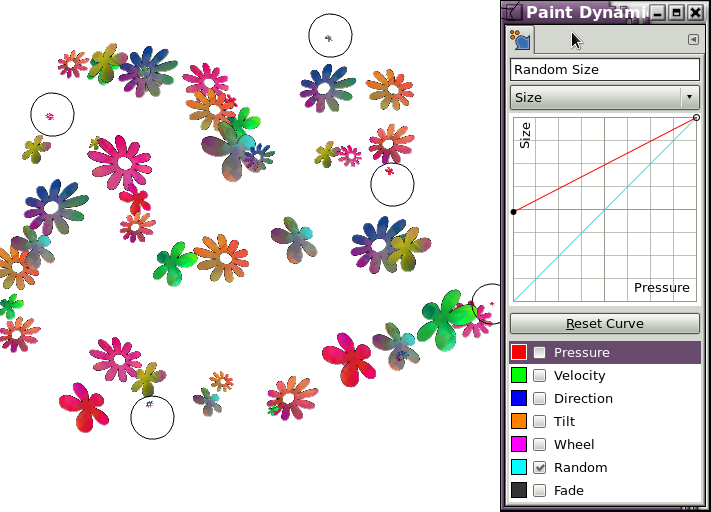
:rofl Leave it to me to make something simple complicated. I opened the Size Dynamic in .gimp-2.8/Dynamics
_________________
Image
World War IV will be fought with sticks and stones. - Albert Einstein


Top
 Post subject: Re: GIMP feature wishlist
PostPosted: Fri Jun 07, 2013 6:55 pm  (#75) 
Offline
Retired Staff
User avatar

Joined: May 22, 2008
Posts: 6946
Location: Somewhere in GIMP
I'm still getting some puny little brush strokes with the curves set like fluffybunny's.
Image

_________________
Image
World War IV will be fought with sticks and stones. - Albert Einstein


Top
 Post subject: Re: GIMP feature wishlist
PostPosted: Fri Jun 07, 2013 7:45 pm  (#76) 
Hi O,
Sorry O, my mistake in the image above. The correct solution explained below.
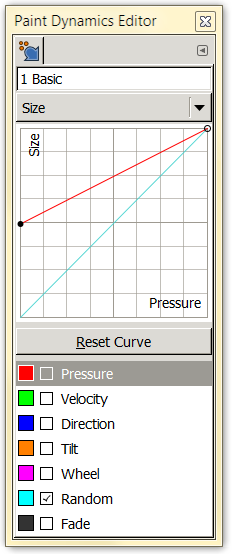
In your image below, it still shows 'Pressure' in the bottom right of the graph window. (meaning you have adjusted the 'Pressure' curve.
Image

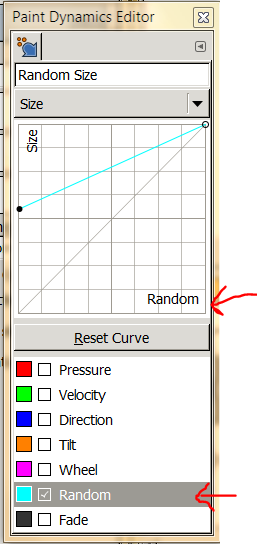
Highlight the checked 'Random' option. It should now say 'random' in the window.
Then adjust that curve as shown below and it should work. :)
Image


Top
 Post subject: Re: GIMP feature wishlist
PostPosted: Fri Jun 07, 2013 9:44 pm  (#77) 
Offline
Retired Staff
User avatar

Joined: May 22, 2008
Posts: 6946
Location: Somewhere in GIMP
Perfect! :bigthup

Image

_________________
Image
World War IV will be fought with sticks and stones. - Albert Einstein


Top
 Post subject: Re: GIMP feature wishlist
PostPosted: Sat Jun 08, 2013 8:31 am  (#78) 
Offline
GimpChat Member

Joined: Feb 22, 2012
Posts: 295
Location: Germany
fluffybunny wrote:
I wish upon a star...
That the dialog popup windows for all plugins, scripts etc would remember their last screen positions/sizes when opening to be the same as where I position them.
I know you can save the main Gimp window positions/sizes via the Preferences, and I have used this to position my Gimp windows at start.
But I mean all the other dialog windows that pop up during use.
I could live with them reverting back on a restart of Gimp, but surely during a session it would be possible to remember where it last was moved to....

The reason this irks me so much is I have 3 monitors.
I run them in NVidia's SLI, so Windows 7 sees them as one large monitor @ 5760 x 1080.
It is annoying that most (all?) dialog windows open in the upper left of the screen by default.
I drag the window closer to the center of screen, change settings, click OK, then next time I re-open that script, the dialog window defaults back to the left side again.

Someone please tell me that this feature exists and I am yet to stumble across the setting ;)


That feature still doesn't exist.
I realized it in my newest version (last git) on sourceforge.net/projects/gimp-packagers/
There is only the 64Bit version available. I don't know, when I will compile a 32Bit version.
It works with plugin and script-fu dialogs. It does not work with python-fu dialogs.
Maybe later.


Top
 Post subject: Re: GIMP feature wishlist
PostPosted: Mon Jun 10, 2013 10:40 pm  (#79) 
Offline
GimpChat Member
User avatar

Joined: Jun 02, 2013
Posts: 2090
For animations, I would like to see something along the lines of "Resize All Layers", or perhaps, "Sharpen All Layers", etc.

_________________
Image


Top
 Post subject: Re: GIMP feature wishlist
PostPosted: Tue Jun 11, 2013 2:57 am  (#80) 
Offline
GimpChat Member
User avatar

Joined: Sep 22, 2012
Posts: 2089
Location: US
The Warrior wrote:
For animations, I would like to see something along the lines of "Resize All Layers", or perhaps, "Sharpen All Layers", etc.


'Resize all layers' in my understanding is the same as Resize image.
'Sharpen all layers', etc. could be done with 'Filter all Layers" plugin (part of GAP package) but it would be a plugin request, not a feature.

I mentioned in one of my prev posts here that GIMP needs animation tool.
And a better player.


Top
Post new topic Reply to topic  [ 122 posts ]  Go to page Previous  1, 2, 3, 4, 5, 6, 7  Next

All times are UTC - 5 hours [ DST ]


* Login  


Powered by phpBB3 © phpBB Group