It is currently Sun Nov 15, 2026 9:44 pm


All times are UTC - 5 hours [ DST ]


Post new topic Reply to topic  [ 51 posts ]  Go to page Previous  1, 2, 3
Author Message
 Post subject: Re: Linux newbie with some questions.
PostPosted: Tue Dec 21, 2010 9:33 am  (#41) 
Offline
Global Moderator
User avatar

Joined: May 16, 2010
Posts: 16271
Did you try Start/Control Panel/Mouse and play with the settings in there?
Also if you lost a registry entry try going back to (restore), a time when you had your mouse drivers working.
You can also try cleaning your mouse wheel and /or ball.

_________________
Image


Top
 Post subject: Re: Linux newbie with some questions.
PostPosted: Tue Dec 21, 2010 10:23 am  (#42) 
Offline
GimpChat Member
User avatar

Joined: Oct 19, 2010
Posts: 376
Location: North Central Ohio, USA
Jolie,

I sometimes get the Gtk+ & Glib errors also. These libraries are involved in providing the interface widgets such as buttons, spinners and sliders and the C code building blocks behind Gnome, as well as text rendering and 2D graphics (Pango and Cairo, respectively). You may be aware that all of these libraries are necessary to correctly build Gimp from source on Linux systems.

I think either Firefox or perhaps a plug-in or add-on are making incorrect calls. Interestingly, I went to Firefox Support at Mozilla and searched for Gtk+ and Glib and the only thing I have found is that a suggestion was made that perhaps the Gtk+ and/or Glib libraries were the wrong [old] version. The Firefox system requirements are listed as:

Quote:
* Firefox will not run at all without the following libraries or packages:
o GTK+ 2.10 or higher
o GLib 2.12 or higher
o Pango 1.14 or higher
o X.Org 1.0 or higher
* For optimal functionality, we recommend the following libraries or packages:
o NetworkManager 0.7 or higher
o DBus 1.0 or higher
o HAL 0.5.8 or higher
o GNOME 2.16 or higher


You can check/verify the versions if the installed libraries through Package Manager. I did check to make sure my libraries were current, but I was sure they were as I built Gimp 2.6.11 from source and had to install all these libraries so it would compile.

A suggestion was made relating to crashes or freezes under Windows that it could be the add-on themselves causing problems. To diagnose this sort of problem you would need to use the terminal to invoke Firefox in safe mode:
firefox -safe-mode

or create a new profile with no add-ons or themes:
firefox -ProfileManager

then add various add-ons or themes until errors occur.

Also, to see if Firefox is submitting crash reports to Mozilla or the Canonical maintainer, in a new tab's address bar type:
about:crashes

clicking on the links which appear (if any) will take you to the crash report your browser submitted. For my own installation, although I do get similar errors to yours, the last crash report submitted was back in October; seems my problems don't trigger the crash reporter. Likely we may have to manually submit a bug to either the Canonical maintainer or to Mozilla.

_________________
Life Truth: #12
My cat is a worst typist than I am.


Top
 Post subject: Re: Linux newbie with some questions.
PostPosted: Tue Dec 21, 2010 3:37 pm  (#43) 
Offline
GimpChat Founder
User avatar

Joined: May 22, 2008
Posts: 5243
Location: Gimpville
Jolie wrote:
It happened again. Think we can rule out Compiz now.

Did manage to make a screenshot of the terminal of firefox.

Have you found that the crash always occurs when using Firefox?

Clearly, x-windows is crashing (being restarting x with ctr-alt-bksp fixes problem).

I also see an error message from mplayer. There is a Firefox mplayer plug-in which handles non-flash embedded videos like .avi, .mpeg, .mov, .wvm and such. At one point, I used mplayer plug-in but have moved to the gecko plug-in as a front end to mplayer.

I've seen issues where peeps have multiple media plug-ins installed in Firefox which conflict with one another. You can check to see what you have installed by entering

about:plugins

in the URL bar. Make sure you don't have multiple media plug-ins installed.

If you're certain the crash is occurring when using Firefox, your next step is to narrow down further and determine if it's flash or something else. Once you're able to duplicate the crash consistently, you can try to determine a solution, if there is one.

_________________
"If Microsoft ever does applications for Linux it means I've won." - Linus Torvalds


Top
 Post subject: Re: Linux newbie with some questions.
PostPosted: Tue Dec 21, 2010 4:15 pm  (#44) 
Offline
GimpChat Member

Joined: Apr 11, 2010
Posts: 545
Location: In the mini-chat, saying silly things
Think the mplayer error was after it was already happening for half an hour. Doubt it's the cause. In fact I had a stream open that I has stopped from running an hour ago. Think that is was caused the message.

Will look into to rest later. It's bedtime here now.

_________________
Image


Top
 Post subject: Re: Linux newbie with some questions.
PostPosted: Mon Dec 27, 2010 3:22 pm  (#45) 
Offline
GimpChat Member

Joined: Apr 11, 2010
Posts: 545
Location: In the mini-chat, saying silly things
Sorry to get back at this so late, got my own laptop back and it needed some work and then Christmas.

So far I've checked all the packages needed for firefox. I think I got them all installed but was a bit puzzled by the following
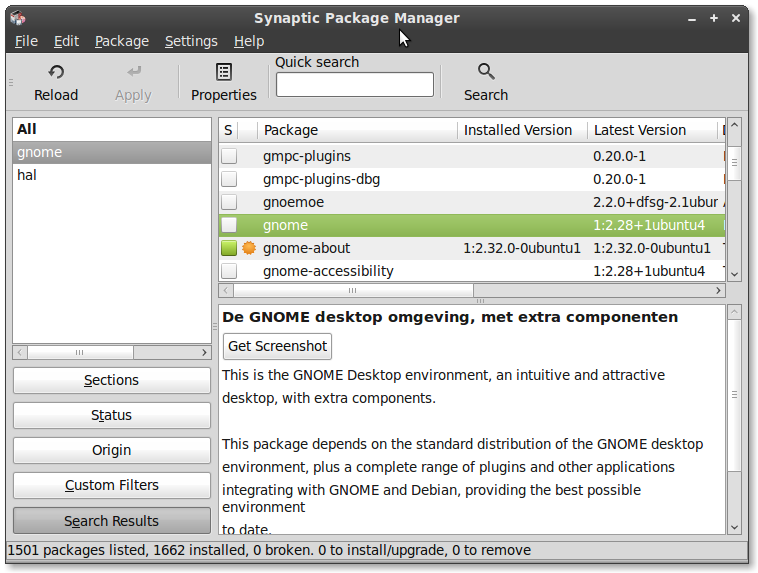
Image

All the other things installed regarding Gnome are 2.3x

Firefox did crash short after the last post in this thread a few times. All times when mplayer was streaming so I think that's the next thing to look into.

Edit,

These are my plugins that show with about:plug-ins

Silverlight Plug-In

Bestand: libmoonloaderxpi.so
Versie:
3.0.40818.0
------------
DivX Browser Plug-In

Bestand: gecko-mediaplayer-dvx.so
Versie:
Gecko Media Player 0.9.9.2

Video Player Plug-in for QuickTime, RealPlayer and Windows Media Player streams using MPlayer
-------------
QuickTime Plug-in 7.6.4

Bestand: gecko-mediaplayer-qt.so
Versie:
Gecko Media Player 0.9.9.2

Video Player Plug-in for QuickTime, RealPlayer and Windows Media Player streams using MPlayer
--------------------
RealPlayer 9

Bestand: gecko-mediaplayer-rm.so
Versie:
Gecko Media Player 0.9.9.2

Video Player Plug-in for QuickTime, RealPlayer and Windows Media Player streams using MPlayer
--------------------

Windows Media Player Plug-in

Bestand: gecko-mediaplayer-wmp.so
Versie:
Gecko Media Player 0.9.9.2

Video Player Plug-in for QuickTime, RealPlayer and Windows Media Player streams using MPlayer
------------------
mplayerplug-in is now gecko-mediaplayer 0.9.9.2

Bestand: gecko-mediaplayer.so
Versie:
Gecko Media Player 0.9.9.2

Video Player Plug-in for QuickTime, RealPlayer and Windows Media Player streams using MPlayer
--------------
Java(TM) Plug-in 1.6.0_22

Bestand: libnpjp2.so
Versie:
The next generation Java plug-in for Mozilla browsers.
----------------------
Shockwave Flash

Bestand: libflashplayer.so
Versie:
Shockwave Flash 10.2 d161
----------------------------
iTunes Application Detector

Bestand: librhythmbox-itms-detection-plugin.so
Versie:
This plug-in detects the presence of iTunes when opening iTunes Store URLs in a web page with Firefox.
----------------

That last one is interesting. I tried to get to an itunes store earlier but had no idea how to get there.

_________________
Image


Top
 Post subject: Re: Linux newbie with some questions.
PostPosted: Mon Dec 27, 2010 3:49 pm  (#46) 
Offline
GimpChat Member

Joined: Apr 11, 2010
Posts: 545
Location: In the mini-chat, saying silly things
Sorry new post because the other one is getting so long.

Firefox has two crash reports, from 22 and 23 of December.

Just wondering of Opera has minimum fontsize like firefox. Using another browsewr for a few weeks could rule out firefox...

_________________
Image


Top
 Post subject: Re: Linux newbie with some questions.
PostPosted: Mon Dec 27, 2010 3:58 pm  (#47) 
Offline
GimpChat Founder
User avatar

Joined: May 22, 2008
Posts: 5243
Location: Gimpville
My package manager shows all versions of apps or desktops that were previously installed (unless I have them filtered out). They all show up right next to one another though.

You can enter

gnome-about

on the command line to display the version of gnome you are actually running.

Do you have all the binaries codecs installed for mplayer?

_________________
"If Microsoft ever does applications for Linux it means I've won." - Linus Torvalds


Top
 Post subject: Re: Linux newbie with some questions.
PostPosted: Mon Dec 27, 2010 5:26 pm  (#48) 
Offline
GimpChat Member

Joined: Apr 11, 2010
Posts: 545
Location: In the mini-chat, saying silly things
Gnome = 2.32.0 so that's good.

I still haven't figured out my package manager completely. It was hell to find out if everything was installed.

Mplayer came with linux Mint. If there was a problem with it like this then wouldn't other people have noticed it as well? Plus mint is Ubuntu but with all codecs included.

_________________
Image


Top
 Post subject: Re: Linux newbie with some questions.
PostPosted: Mon Dec 27, 2010 8:23 pm  (#49) 
Offline
GimpChat Member
User avatar

Joined: Oct 19, 2010
Posts: 376
Location: North Central Ohio, USA
Jolie,
For comparison, I've got the same gecko-mediaplayer plug-in versions that you do, in fact the only differences I see is that I have a different Shockwave Flash plug-in (because I have the 64-bit version), and I don't have the Silverlight/Moonlight plug-in.

Yes, Package Manager can be a pain. I made a change to help myself see what was going on in Package Manager by changing the Preferences to show me the package properties in the main window. Start Package Manager; from the menu select Settings -> Preferences. On the General Tab, select Show package properties in the main window. This changes the lower half on the main window by adding a tab strip so you can quickly view things like dependencies and conflicts, etc.

For many packages, you can type keywords or partial package names in the Quick search box and the listing will change as you type. This works best if you have "All" selected in the left pane, and Sections selected of the five option buttons at the bottom.

You can filter the listing window to show only the installed packages by clicking on the Status button on the bottom left side, then select Installed from the list in the upper left pane. Quick search will work on filtered package lists. I also click on the Package column header in the upper right pane to sort the packages alphabetically (it is very annoying that they lose the alpha-sort when you begin typing in Quick search).

You probably have all this figured out by trial and error now... :oops:

I'm not sure what that gnome package is. Looking at the list of dependencies for the package, it looks like what they call a meta-package - a package that installs itself and several related packages at the same time - for the complete Gnome desktop. It is not installed on mine either. I noticed that the package "gnome-desktop-environment" has the same version number as this "gnome" package. Apparently LinuxMint (and maybe Ubuntu??) does not use the full Gnome Desktop. This may be so they can use branded versions of some of the packages. Hmm.

_________________
Life Truth: #12
My cat is a worst typist than I am.


Top
 Post subject: Re: Linux newbie with some questions.
PostPosted: Tue Dec 28, 2010 10:53 am  (#50) 
Offline
GimpChat Member

Joined: Apr 11, 2010
Posts: 545
Location: In the mini-chat, saying silly things
When I think I have the package manager all figured out I start it up again and I don't know it any more.

Last night I uninstalled a bunch of plug-ins and extensions from firefox. I realised these crashes never happened before I installed moonlight. It doesn't work 90% of the time anyway so I'll see if the problem is solved without moonlight. Might take a while before I can be sure though. The laptop is now my spare laptop so it's used much less.

_________________
Image


Top
 Post subject: Re: Linux newbie with some questions.
PostPosted: Tue Dec 28, 2010 10:57 am  (#51) 
Offline
GimpChat Member
User avatar

Joined: Oct 19, 2010
Posts: 376
Location: North Central Ohio, USA
I'll keep my fingers crossed for you. :bigthup

_________________
Life Truth: #12
My cat is a worst typist than I am.


Top
Post new topic Reply to topic  [ 51 posts ]  Go to page Previous  1, 2, 3

All times are UTC - 5 hours [ DST ]


* Login  


Powered by phpBB3 © phpBB Group