It is currently Thu Nov 12, 2026 7:45 pm


All times are UTC - 5 hours [ DST ]


Post new topic Reply to topic  [ 129 posts ]  Go to page Previous  1, 2, 3, 4, 5 ... 7  Next
Author Message
 Post subject: Re: Air Bubbles Script
PostPosted: Tue Jun 18, 2013 2:14 pm  (#21) 
Offline
GimpChat Member
User avatar

Joined: Jan 20, 2013
Posts: 14835
Location: roma, italy
Graechan,
sorry to tell you there is a problem with the interface to G'MIC.
Do the following:
Test1:
-verify that either G'MIC has not been used yet or that has been used with output mode default "in place"
-run your Bubble script (dft values)
-result is OK
Test2:
-open an image
-apply to that image any G'MIC function setting output to "new image"
-run your Bubble script (dft values)
-result is two different images, one with text, the second with background
I attach here the results:
Attachment:
TEST1-GMIC-inplace.png
TEST1-GMIC-inplace.png [ 96.36 KiB | Viewed 2282 times ]
Attachment:
Test2_GMIC-newimage-OUT1.png
Test2_GMIC-newimage-OUT1.png [ 32.69 KiB | Viewed 2282 times ]
Attachment:
Test2_GMIC-newimage-OUT2.png
Test2_GMIC-newimage-OUT2.png [ 5.68 KiB | Viewed 2282 times ]

_________________
"Where am I ?"


Top
 Post subject: Re: Air Bubbles Script
PostPosted: Tue Jun 18, 2013 7:26 pm  (#22) 
Offline
Script Coder
User avatar

Joined: Feb 18, 2011
Posts: 4826
Location: Bendigo Vic. Australia
Dinasset the command for GMIC in the gimp PDB only allows me to set the 'Input Mode' the output mode seems to take whatever has been set by the user, and if this is not the 'default(inplace)' problems always arise, maybe David could explain better

(plug-in-gmic run-mode image drawable input command)

_________________
Image
No matter how much you push the envelope, it'll still be stationery.


Top
 Post subject: Re: Air Bubbles Script
PostPosted: Tue Jun 18, 2013 11:41 pm  (#23) 
Offline
Script Coder
User avatar

Joined: Feb 18, 2011
Posts: 4826
Location: Bendigo Vic. Australia
'O' if you had selected 'keep layers' you would also find it saved a couple of channels to help modify the image with selections e.t.c.

ImageImageImage

_________________
Image
No matter how much you push the envelope, it'll still be stationery.


Top
 Post subject: Re: Air Bubbles Script
PostPosted: Wed Jun 19, 2013 1:15 am  (#24) 
Offline
GimpChat Member
User avatar

Joined: Nov 16, 2011
Posts: 5127
Location: Metro Vancouver, BC
Image
Thank you, Graechan!

_________________
Image
Gimp 2.8.18, Linux, median user
Gimp Chat Tutorials Index
Spirit Bear (Kermode)


Top
 Post subject: Re: Air Bubbles Script
PostPosted: Wed Jun 19, 2013 1:44 am  (#25) 
Offline
GimpChat Member
User avatar

Joined: Jan 03, 2011
Posts: 1656
Ha you are right Graechan, maybe I should add a new argument to specify the output mode as well...
But I'm afraid doing this will break all existing scripts that are using gmic...
Is there a way to have 'optional' arguments in script-fu ?


Top
 Post subject: Re: Air Bubbles Script
PostPosted: Wed Jun 19, 2013 2:12 am  (#26) 
Offline
Script Coder
User avatar

Joined: Feb 18, 2011
Posts: 4826
Location: Bendigo Vic. Australia
Ronounours wrote:
Ha you are right Graechan, maybe I should add a new argument to specify the output mode as well...
But I'm afraid doing this will break all existing scripts that are using gmic...
Is there a way to have 'optional' arguments in script-fu ?

David there is no way the script can change what gmic does with the output but if there was a way for any new filter to have the option to select the output mode then we could set this in scripts, this would have no effect on existing scripts that are using gmic, and would only change the plugin for the duration it is used

Or if you could enforce the plugin to always use the 'In place(default)' output mode then we could effect the output in a script e.g. if output 'New Image' was required we could create a new Image and copy the input layer to the new image then use the new image and its copied layer as the gmic input

_________________
Image
No matter how much you push the envelope, it'll still be stationery.


Top
 Post subject: Re: Air Bubbles Rel1.1 Script for 2.6 and 2.8
PostPosted: Thu Jun 20, 2013 1:29 am  (#27) 
Offline
Script Coder
User avatar

Joined: Feb 18, 2011
Posts: 4826
Location: Bendigo Vic. Australia
Just to let you all know I finally :gaah got my Gmic in 2.6 to work, so I can now say the current file I uploaded today is good for 2.6 and 2.8

; Rel 0.01.1 - Bugfix to 2.6 call whch left the varible threshold undeclared

see initial post for Rel 1.1

_________________
Image
No matter how much you push the envelope, it'll still be stationery.


Top
 Post subject: Re: Air Bubbles Script
PostPosted: Thu Jun 20, 2013 2:43 am  (#28) 
Offline
GimpChat Member
User avatar

Joined: Jan 20, 2013
Posts: 14835
Location: roma, italy
Graechan wrote:
Ronounours wrote:
Ha you are right Graechan, maybe I should add a new argument to specify the output mode as well...
But I'm afraid doing this will break all existing scripts that are using gmic...
Is there a way to have 'optional' arguments in script-fu ?

David there is no way the script can change what gmic does with the output but if there was a way for any new filter to have the option to select the output mode then we could set this in scripts, this would have no effect on existing scripts that are using gmic, and would only change the plugin for the duration it is used

Or if you could enforce the plugin to always use the 'In place(default)' output mode then we could effect the output in a script e.g. if output 'New Image' was required we could create a new Image and copy the input layer to the new image then use the new image and its copied layer as the gmic input


David,
I guess it's important to find a solution for this problem if you want G'MIC be easily callable from inside a GIMP script.
If you know there are many scripts already calling G'MIC, a new interface call to set up all G'MIC parameters before making use of the current interface call could be a solution, as well as Graechan proposal to enforce "in place" inside the current interface.
If you know (or reasonably think) that currently the GIMP scripts calling G'MIC are only a few, well, an "incompatibility" could not be a drama (also GIMP itself creates from time to time incompatibilities in script functions)

_________________
"Where am I ?"


Top
 Post subject: Re: Air Bubbles Rel1.1 Script for 2.6 and 2.8
PostPosted: Thu Jun 20, 2013 3:06 am  (#29) 
Offline
Script Coder
User avatar

Joined: Feb 18, 2011
Posts: 4826
Location: Bendigo Vic. Australia
Dinasset David has informed me that as from 1-5-6-1 the Gmic plugin will enforce the output option of 'In place(default)'

this I think is the best outcome as it should not effect any existing scripts and would allow the gimp script to set the output option

_________________
Image
No matter how much you push the envelope, it'll still be stationery.


Top
 Post subject: Re: Air Bubbles Rel1.1 Script for 2.6 and 2.8
PostPosted: Thu Jun 20, 2013 3:49 am  (#30) 
Offline
GimpChat Member
User avatar

Joined: Jan 20, 2013
Posts: 14835
Location: roma, italy
OK, very good! Thanks a lot to David for the implementation, to Graechan for the info

_________________
"Where am I ?"


Top
 Post subject: Re: Air Bubbles Rel2 [now with alpha-to-logo]
PostPosted: Thu Jun 20, 2013 9:59 pm  (#31) 
Offline
Script Coder
User avatar

Joined: Feb 18, 2011
Posts: 4826
Location: Bendigo Vic. Australia
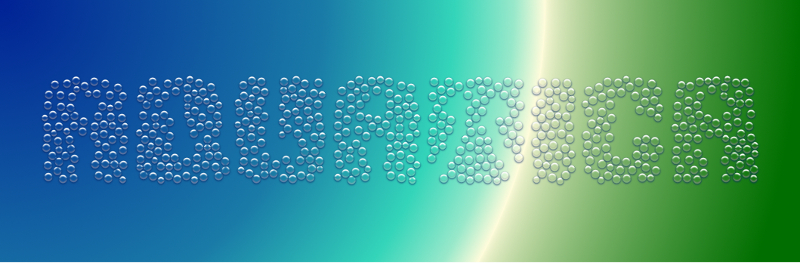
Uploaded Rel2 with alpha to Logo menu entry and lots of fun

Image

_________________
Image
No matter how much you push the envelope, it'll still be stationery.


Top
 Post subject: Re: Air Bubbles Rel2 [now with alpha-to-logo]
PostPosted: Thu Jun 20, 2013 10:06 pm  (#32) 
Offline
GimpChat Member
User avatar

Joined: Sep 24, 2010
Posts: 12856
Thanks a heap Graechen; knew you would add this feature soon enough. lol

:)


Attachments:
tithonia_bubbles.png
tithonia_bubbles.png [ 1.15 MiB | Viewed 2468 times ]

_________________
Lyle

Psalm 109:8

Image
Top
 Post subject: Re: Air Bubbles Rel2 [now with alpha-to-logo]
PostPosted: Fri Jun 21, 2013 12:01 am  (#33) 
Offline
Retired Staff
User avatar

Joined: May 22, 2008
Posts: 6946
Location: Somewhere in GIMP
Eye of newt, hair of toad, tooth of frog, heheheh.

Image

_________________
Image
World War IV will be fought with sticks and stones. - Albert Einstein


Top
 Post subject: Re: Air Bubbles Rel2 [now with alpha-to-logo]
PostPosted: Fri Jun 21, 2013 12:08 am  (#34) 
Offline
Script Coder
User avatar

Joined: Feb 18, 2011
Posts: 4826
Location: Bendigo Vic. Australia
'O' love your pot of withes brew (It didn't take you long to discover that every-time you run the script you get a slightly different arrangement of bubbles)

_________________
Image
No matter how much you push the envelope, it'll still be stationery.


Top
 Post subject: Re: Air Bubbles Rel2 [now with alpha-to-logo]
PostPosted: Fri Jun 21, 2013 12:18 am  (#35) 
Offline
Retired Staff
User avatar

Joined: May 22, 2008
Posts: 6946
Location: Somewhere in GIMP
Thanks Graechan. I always have my eye out for animation material. :blind

_________________
Image
World War IV will be fought with sticks and stones. - Albert Einstein


Top
 Post subject: Re: Air Bubbles Rel2 [now with alpha-to-logo]
PostPosted: Fri Jun 21, 2013 12:24 am  (#36) 
Offline
GimpChat Member
User avatar

Joined: Nov 16, 2011
Posts: 5127
Location: Metro Vancouver, BC
I love that one, O!

_________________
Image
Gimp 2.8.18, Linux, median user
Gimp Chat Tutorials Index
Spirit Bear (Kermode)


Top
 Post subject: Re: Air Bubbles Rel2 [now with alpha-to-logo]
PostPosted: Fri Jun 21, 2013 12:42 am  (#37) 
Offline
GimpChat Member
User avatar

Joined: Jan 10, 2013
Posts: 863
Oregonian wrote:
Eye of newt, hair of toad, tooth of frog, heheheh.

[ [url]Image[/url] ]

Oregonian, That toad was one that had hair and teeth? :shock:
Very cool! :coolthup

Graechan, thx !! :tyspin

_________________
bbbbbbbbbbbImage
bbbbbbbbbbb Be patient, English is not my language.


Top
 Post subject: Re: Air Bubbles Rel2 [now with alpha-to-logo]
PostPosted: Fri Jun 21, 2013 6:12 am  (#38) 
Offline
GimpChat Member
User avatar

Joined: Sep 24, 2010
Posts: 12856
Oregonian wrote:
Eye of newt, hair of toad, tooth of frog, heheheh.

[ Image ]


Awesome; didn't know you were a witch. Are you from Salem? lol

:)

_________________
Lyle

Psalm 109:8

Image


Top
 Post subject: Re: Air Bubbles Rel2 [now with alpha-to-logo]
PostPosted: Fri Jun 21, 2013 6:22 am  (#39) 
Offline
GimpChat Member
User avatar

Joined: Aug 16, 2012
Posts: 4271
Location: Göteborg, Sweden
graechan: thank you :)! i hardly ever need buble text, bubble paisleys is another matter...
O: love that animation! and shakespeare, if i'm not mistaken :)...

_________________


Top
 Post subject: Re: Air Bubbles Rel2 [now with alpha-to-logo]
PostPosted: Fri Jun 21, 2013 7:58 am  (#40) 
Offline
GimpChat Member
User avatar

Joined: Jul 21, 2012
Posts: 103
Graechan, thanks a lot :tyspin

_________________
Image


Top
Post new topic Reply to topic  [ 129 posts ]  Go to page Previous  1, 2, 3, 4, 5 ... 7  Next

All times are UTC - 5 hours [ DST ]


* Login  


Powered by phpBB3 © phpBB Group