It is currently Thu Jun 04, 2026 1:50 am


All times are UTC - 5 hours [ DST ]


Post new topic Reply to topic  [ 132 posts ]  Go to page Previous  1, 2, 3, 4, 5 ... 7  Next
Author Message
 Post subject: Re: Packing multiple sprites
PostPosted: Mon Jun 24, 2013 7:38 pm  (#21) 
Offline
GimpChat Member
User avatar

Joined: Jul 17, 2012
Posts: 2769
great stuff, lyle !
you wouldnt even expect, this was done with Gimp :bigthup


Top
 Post subject: Re: Packing multiple sprites
PostPosted: Mon Jun 24, 2013 8:42 pm  (#22) 
Offline
GimpChat Member
User avatar

Joined: Sep 24, 2010
Posts: 12775
Thanks Esper; still having fun. lol

Click the image for it's Flickr. :)

Image

_________________
Lyle

Psalm 109:8

Image


Top
 Post subject: Re: Packing multiple sprites
PostPosted: Mon Jun 24, 2013 9:12 pm  (#23) 
Offline
Script Coder
User avatar

Joined: Feb 18, 2011
Posts: 4826
Location: Bendigo Vic. Australia
Lyle I'm glad to see your Imagination and Davids brilliance has paid off with this update

_________________
Image
No matter how much you push the envelope, it'll still be stationery.


Top
 Post subject: Re: Packing multiple sprites
PostPosted: Mon Jun 24, 2013 9:21 pm  (#24) 
Offline
GimpChat Member
User avatar

Joined: Jul 17, 2012
Posts: 2769
Chris F wrote:
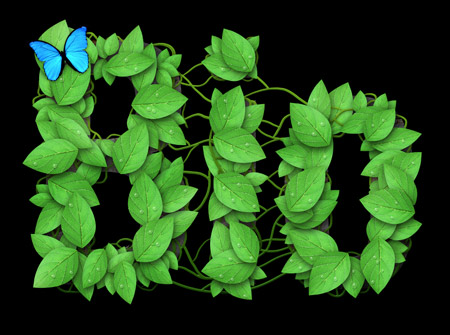
Hehe...i think i have a new playground for text effects... :mrgreen:
Chris your leaf text is really stunning
would fit in a childrens book for learning ;)


Top
 Post subject: Re: Packing multiple sprites
PostPosted: Tue Jun 25, 2013 12:04 am  (#25) 
Offline
GimpChat Member
User avatar

Joined: Aug 16, 2012
Posts: 4271
Location: Göteborg, Sweden
aaaawww, i don't want to go to work!!! i want to play with the pack sprites filter :gaah

_________________


Top
 Post subject: Re: Packing multiple sprites
PostPosted: Tue Jun 25, 2013 1:16 am  (#26) 
Offline
GimpChat Member
User avatar

Joined: Jan 11, 2013
Posts: 254
Location: Germany
Arrggh...i`m not on my own PC and i can`t update the gmic filters online. :cry
Can someone share the very actual gmic plugin-file for windows xp 32? (is it just the gmic_gimp.exe ?)
I use the portable gimp version cause i have no rights to install.

_________________


Top
 Post subject: Re: Packing multiple sprites
PostPosted: Tue Jun 25, 2013 2:22 am  (#27) 
Offline
GimpChat Member

Joined: Oct 21, 2012
Posts: 13
Hi Chris,

i managed to unpack gmic_gimp.exe, there were some files in it, I put them there:
http://ovh.to/5EYjPcV

Is that what you wanted?


Top
 Post subject: Re: Packing multiple sprites
PostPosted: Tue Jun 25, 2013 2:43 am  (#28) 
Offline
GimpChat Member
User avatar

Joined: Jan 11, 2013
Posts: 254
Location: Germany
Hey great! Ok, i see...these are the actual files for the exe?
But i dont know how to create the new gmic_gimp.exe from it. :(
Do i need a software like this: http://sourceforge.net/projects/compexe/ ?

_________________


Top
 Post subject: Re: Packing multiple sprites
PostPosted: Tue Jun 25, 2013 5:39 am  (#29) 
Offline
Global Moderator
User avatar

Joined: May 16, 2010
Posts: 16008
Nice effect David! :)
This should make creating PhotoFonts and wordclouds much easier. :bigthup

Image

_________________
Image


Top
 Post subject: Re: Packing multiple sprites
PostPosted: Tue Jun 25, 2013 6:27 am  (#30) 
Offline
GimpChat Member
User avatar

Joined: Apr 07, 2010
Posts: 14182
Chris...I love that leaf text...I don't know how you did it though... :oops:

_________________
Image


Top
 Post subject: Re: Packing multiple sprites
PostPosted: Tue Jun 25, 2013 7:30 am  (#31) 
Offline
Global Moderator
User avatar

Joined: May 16, 2010
Posts: 16008
This is pretty fun. :)
Chris how did you get the sprites to overlap? Did you use spacing at a negative number?

Image

_________________
Image


Top
 Post subject: Re: Packing multiple sprites
PostPosted: Tue Jun 25, 2013 7:34 am  (#32) 
Offline
Global Moderator
User avatar

Joined: May 16, 2010
Posts: 16008
Got it! :)

Image

_________________
Image


Top
 Post subject: Re: Packing multiple sprites
PostPosted: Tue Jun 25, 2013 7:45 am  (#33) 
Offline
GimpChat Member
User avatar

Joined: Jan 11, 2013
Posts: 254
Location: Germany
Yes, i set a negative number and i use two different layers.
Then a little bit shadow, that`s it.
The only thing what is not optimal was that some leafs are cut off.


Attachments:
sprites-spacing.jpg
sprites-spacing.jpg [ 27.57 KiB | Viewed 1499 times ]

_________________
Top
 Post subject: Re: Packing multiple sprites
PostPosted: Tue Jun 25, 2013 7:53 am  (#34) 
Offline
Global Moderator
User avatar

Joined: May 16, 2010
Posts: 16008
Thanks Chris. :)
I tried another with a -7 overlap and six layers (plus a letter mask bg).
Also added GC Shadow layer. :bigthup
Image

_________________
Image


Top
 Post subject: Re: Packing multiple sprites
PostPosted: Tue Jun 25, 2013 8:01 am  (#35) 
Offline
GimpChat Member
User avatar

Joined: Jan 11, 2013
Posts: 254
Location: Germany
The things what we can do with this filter is this:
http://blog.spoongraphics.co.uk/tutoria ... -biothemes
Image
or this:
http://www.photoshopstar.com/text-effec ... xt-effect/
Image

_________________


Top
 Post subject: Re: Packing multiple sprites
PostPosted: Tue Jun 25, 2013 8:02 am  (#36) 
Offline
GimpChat Member
User avatar

Joined: Jan 03, 2011
Posts: 1656
Fantastic Chris !
Well done too Rod !


Top
 Post subject: Re: Packing multiple sprites
PostPosted: Tue Jun 25, 2013 8:03 am  (#37) 
Offline
GimpChat Member
User avatar

Joined: Jan 11, 2013
Posts: 254
Location: Germany
These are not my own graphics. Not today.... :hehe

_________________


Top
 Post subject: Re: Packing multiple sprites
PostPosted: Tue Jun 25, 2013 11:07 am  (#38) 
Offline
Retired Staff
User avatar

Joined: May 22, 2008
Posts: 6946
Location: Somewhere in GIMP
I'm having poor luck. I end up with separate layers and they're all jammed together. I used your settings David and I still have a mess. I've attached a zipped xcf file that has copies of the original layers, the processed layers and a screenshot of the settings I used.


Attachments:
sprite-packing.xcf.zip [960.51 KiB]
Downloaded 86 times

_________________
Image
World War IV will be fought with sticks and stones. - Albert Einstein
Top
 Post subject: Re: Packing multiple sprites
PostPosted: Tue Jun 25, 2013 11:35 am  (#39) 
Offline
GimpChat Member
User avatar

Joined: Apr 07, 2010
Posts: 14182
I tried it with those settings too and mine doesn't come out right either. Must be something we are both doing wrong. I made three separate layers and put a different word in each layer and only two of the names came out and just two letters of the third name.

_________________
Image


Top
 Post subject: Re: Packing multiple sprites
PostPosted: Tue Jun 25, 2013 11:42 am  (#40) 
Offline
GimpChat Member

Joined: Aug 05, 2011
Posts: 606
Location: limestone,ny
Image


Top
Post new topic Reply to topic  [ 132 posts ]  Go to page Previous  1, 2, 3, 4, 5 ... 7  Next

All times are UTC - 5 hours [ DST ]


* Login  


Powered by phpBB3 © phpBB Group