It is currently Mon Aug 24, 2026 2:02 am


All times are UTC - 5 hours [ DST ]


Post new topic Reply to topic  [ 132 posts ]  Go to page Previous  1, 2, 3, 4, 5, 6, 7  Next
Author Message
 Post subject: Re: Packing multiple sprites
PostPosted: Tue Jun 25, 2013 11:50 am  (#41) 
Offline
GimpChat Member
User avatar

Joined: Jan 03, 2011
Posts: 1656
O : You are probably using the older version of the 'Pack Sprites filter', i.e. the one that does not manage multiple sprites at once.
So you end up with different layers, each being packed with one different sprite.
You need to refresh your filter to be able to deal with multi-sprites packing.

molly : When dealing with sprites that are composed of several distinct shapes (as each letter of a text for instance), you must find a way to 'link' these distinct components together so the algorithm can work.
Otherwise, it will do some weird things. To make such a link, just draw a stroke linking these letters together, with a quite big brush, and make this stroke very transparent (set opacity to 1 for instance). It should help.


Top
 Post subject: Re: Packing multiple sprites
PostPosted: Tue Jun 25, 2013 11:52 am  (#42) 
Offline
Global Moderator
User avatar

Joined: May 16, 2010
Posts: 16167
When i run mine i set it up like this.
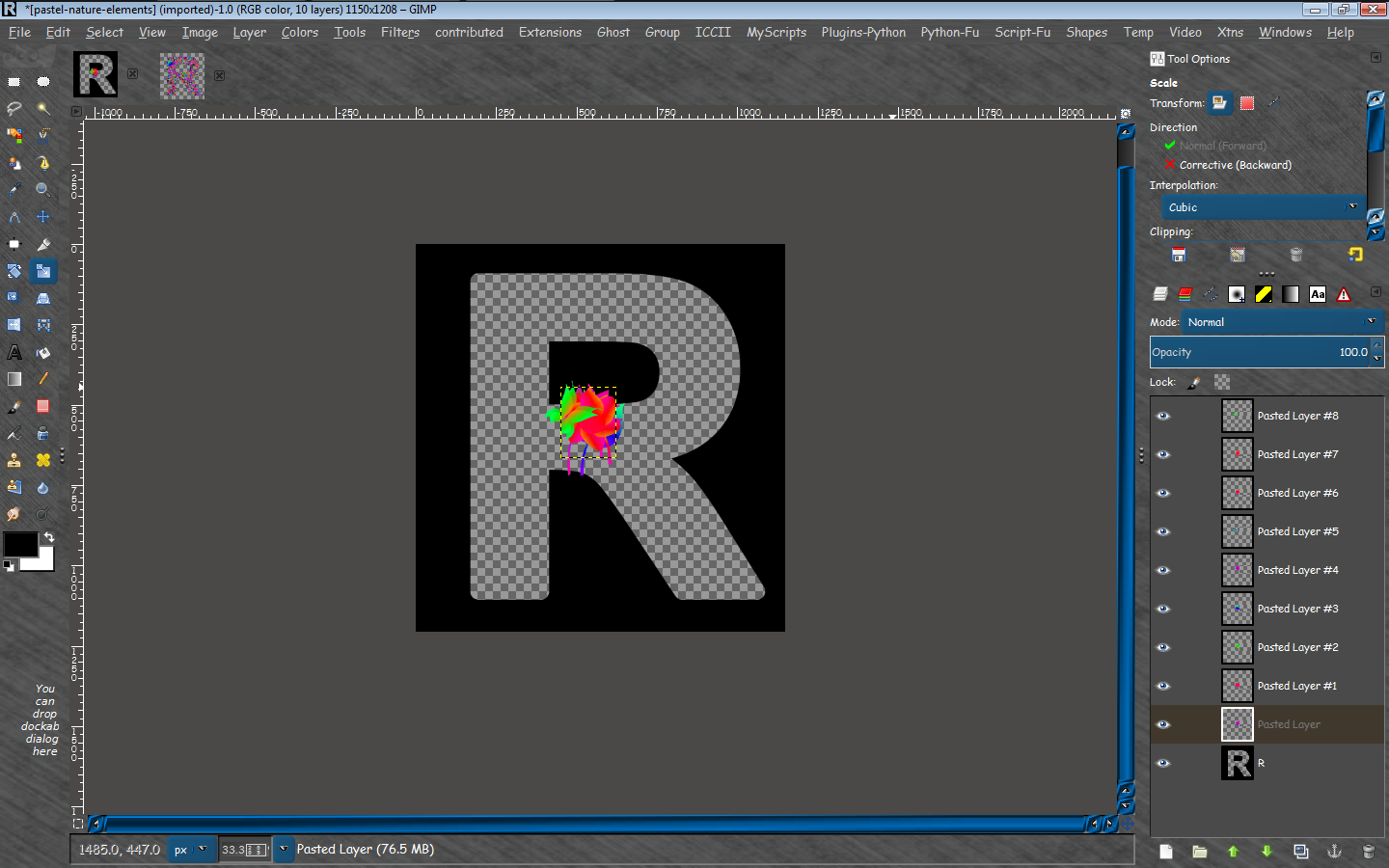
I create numerous sprite layers (shapes or text). Make sure to scale them down so they will fit inside mask area.
I create a mask. it needs to be a transparent area on a black bg.
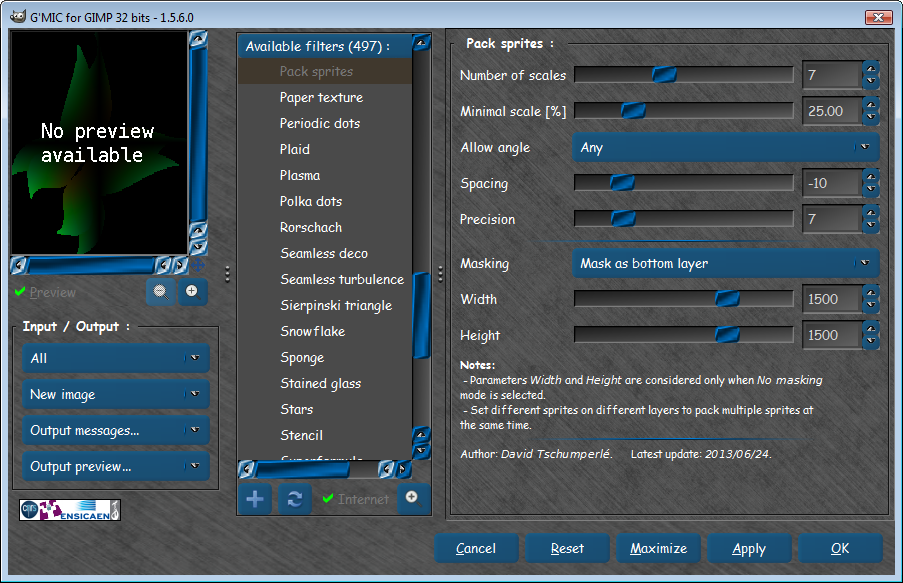
Then i run G'MIC>Patterns>pack sprites with any angle -7 to -12 for spacing, and a mask bottom bg layer for mask.
Here is a screenshot of the G'MIC interface showing my settings.
Image

Screenshot of my layers before running the G'MIC filter Pack Sprites.
Image

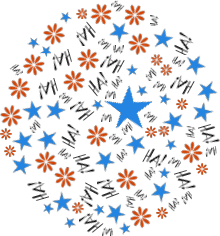
And the results of all these settings.
Image :ninja :ninja

_________________
Image


Top
 Post subject: Re: Packing multiple sprites
PostPosted: Tue Jun 25, 2013 11:54 am  (#43) 
Offline
Retired Staff
User avatar

Joined: May 22, 2008
Posts: 6946
Location: Somewhere in GIMP
:ninja by Rod.

Good help there, Rod. Thank you.

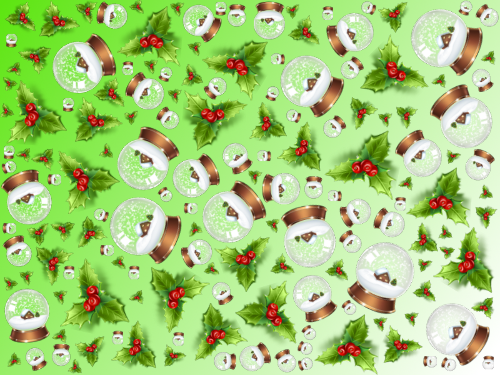
Finally got it to work. I refreshed G'MIC and used a mask.
Image

_________________
Image
World War IV will be fought with sticks and stones. - Albert Einstein


Top
 Post subject: Re: Packing multiple sprites
PostPosted: Tue Jun 25, 2013 12:37 pm  (#44) 
Offline
GimpChat Member
User avatar

Joined: Apr 07, 2010
Posts: 14182
Thanks guys, I will give it a try.

_________________
Image


Top
 Post subject: Re: Packing multiple sprites
PostPosted: Tue Jun 25, 2013 12:59 pm  (#45) 
Offline
GimpChat Member
User avatar

Joined: Jan 03, 2011
Posts: 1656
Rod, your sprites are probably too big.
At the highest scale, there has been only a single flower packed inside your mask. It looks like all the other shapes have the same size, thus being packed at the last (smallest) scale. You should try to reduce your original sprite size, to get more variety in the size of the sprites you pack.


Top
 Post subject: Re: Packing multiple sprites
PostPosted: Tue Jun 25, 2013 2:53 pm  (#46) 
Offline
Retired Staff
User avatar

Joined: May 22, 2008
Posts: 6946
Location: Somewhere in GIMP
One of my main likes is that the fill material doesn't get cut like it would if you were filling a selection with a pattern. Everything is a whole render of the original image.

Image

_________________
Image
World War IV will be fought with sticks and stones. - Albert Einstein


Top
 Post subject: Re: Packing multiple sprites
PostPosted: Tue Jun 25, 2013 3:02 pm  (#47) 
Offline
GimpChat Member

Joined: Aug 05, 2011
Posts: 606
Location: limestone,ny
Nice one O

I have to get away from the computer or i'll never get anything done today (Thanks David :hoh )

Image


Top
 Post subject: Re: Packing multiple sprites
PostPosted: Tue Jun 25, 2013 3:13 pm  (#48) 
Offline
GimpChat Member
User avatar

Joined: Apr 07, 2010
Posts: 14182
Cool O and ALC. I still didn't get around to it yet.

_________________
Image


Top
 Post subject: Re: Packing multiple sprites
PostPosted: Tue Jun 25, 2013 3:58 pm  (#49) 
Offline
GimpChat Member
User avatar

Joined: Jan 11, 2013
Posts: 254
Location: Germany
Another big one...mask with Inkscape.


Attachments:
skulls.jpg
skulls.jpg [ 1.04 MiB | Viewed 1975 times ]

_________________
Top
 Post subject: Re: Packing multiple sprites
PostPosted: Tue Jun 25, 2013 4:02 pm  (#50) 
Offline
GimpChat Member
User avatar

Joined: Jan 03, 2011
Posts: 1656
So, Chris, did you use G'MIC filter 'Pack Sprites' for this one ? :)


Top
 Post subject: Re: Packing multiple sprites
PostPosted: Tue Jun 25, 2013 4:17 pm  (#51) 
Offline
GimpChat Member
User avatar

Joined: Jul 17, 2012
Posts: 2769
holy **** Chris, this is beyond awesome !!!!!!!!!!!!!!!!!!!!!!


Top
 Post subject: Re: Packing multiple sprites
PostPosted: Tue Jun 25, 2013 4:24 pm  (#52) 
Offline
GimpChat Member
User avatar

Joined: May 27, 2011
Posts: 707
Chris

Great art !!!


Top
 Post subject: Re: Packing multiple sprites
PostPosted: Tue Jun 25, 2013 4:29 pm  (#53) 
Offline
GimpChat Member
User avatar

Joined: Jun 02, 2013
Posts: 2090
Esper wrote:
holy **** Chris, this is beyond awesome !!!!!!!!!!!!!!!!!!!!!!

This. :bigthup

_________________
Image


Top
 Post subject: Re: Packing multiple sprites
PostPosted: Tue Jun 25, 2013 4:35 pm  (#54) 
Offline
GimpChat Member
User avatar

Joined: Apr 07, 2010
Posts: 14182
Awesome Chris. What is that font?

_________________
Image


Top
 Post subject: Re: Packing multiple sprites
PostPosted: Tue Jun 25, 2013 4:50 pm  (#55) 
Offline
GimpChat Member
User avatar

Joined: Nov 09, 2011
Posts: 726
Now we need a tutorial, Chris :)

All works in this thread are very good. Thank you very much David!

_________________
Image
Be patient, English is not my language.


Top
 Post subject: Re: Packing multiple sprites
PostPosted: Tue Jun 25, 2013 4:51 pm  (#56) 
Offline
GimpChat Member
User avatar

Joined: Sep 24, 2010
Posts: 12837
Extra cool use of the skulls Chris. lol

:)

_________________
Lyle

Psalm 109:8

Image


Top
 Post subject: Re: Packing multiple sprites
PostPosted: Tue Jun 25, 2013 5:22 pm  (#57) 
Offline
GimpChat Member
User avatar

Joined: Sep 24, 2010
Posts: 12837
Though I've worked with skulls in the past, I'm better at nuts. lol

Stil like the Dark Garden font though and skulls would work nicely with this font imo. :)


Attachments:
nuts.jpg
nuts.jpg [ 415.76 KiB | Viewed 1707 times ]

_________________
Lyle

Psalm 109:8

Image
Top
 Post subject: Re: Packing multiple sprites
PostPosted: Tue Jun 25, 2013 6:15 pm  (#58) 
Offline
GimpChat Member
User avatar

Joined: May 27, 2011
Posts: 707
ok,here's mine
but it only shows 2 of the 3 layers i added.

it still is a cool effect

thank You Ronounours :tyspin

Image


Top
 Post subject: Re: Packing multiple sprites
PostPosted: Tue Jun 25, 2013 7:40 pm  (#59) 
Offline
Global Moderator
User avatar

Joined: May 16, 2010
Posts: 16167
Ronounours wrote:
Rod, your sprites are probably too big.
At the highest scale, there has been only a single flower packed inside your mask. It looks like all the other shapes have the same size, thus being packed at the last (smallest) scale. You should try to reduce your original sprite size, to get more variety in the size of the sprites you pack.


Thanks for the input David. here is another go. :) :bigthup

Image

_________________
Image


Top
 Post subject: Re: Packing multiple sprites
PostPosted: Tue Jun 25, 2013 7:56 pm  (#60) 
Offline
GimpChat Member
User avatar

Joined: Jun 02, 2013
Posts: 2090
This is awesome.

Image

_________________
Image


Top
Post new topic Reply to topic  [ 132 posts ]  Go to page Previous  1, 2, 3, 4, 5, 6, 7  Next

All times are UTC - 5 hours [ DST ]


* Login  


Powered by phpBB3 © phpBB Group