It is currently Sat Oct 03, 2026 12:07 pm


All times are UTC - 5 hours [ DST ]


Post new topic Reply to topic  [ 51 posts ]  Go to page Previous  1, 2, 3  Next
Author Message
 Post subject: Re: Create this Gradient Effect?
PostPosted: Fri Dec 31, 2010 8:12 pm  (#21) 
Offline
GimpChat Member
User avatar

Joined: Oct 06, 2010
Posts: 4050
Will this award be credited toward my MENSA score? LOL. Anything to help me look smarter, hahaha.

_________________
"In order to attain the impossible, one must attempt the absurd."
~ Miguel de Cervantes


Top
 Post subject: Re: Create this Gradient Effect?
PostPosted: Fri Dec 31, 2010 9:16 pm  (#22) 
Offline
Retired Staff
User avatar

Joined: May 22, 2008
Posts: 6946
Location: Somewhere in GIMP
mahvin wrote:
Will this award be credited toward my MENSA score? LOL. Anything to help me look smarter, hahaha.
Automatically doubles your score. :hehe

_________________
Image
World War IV will be fought with sticks and stones. - Albert Einstein


Top
 Post subject: Re: Create this Gradient Effect?
PostPosted: Fri Dec 31, 2010 9:30 pm  (#23) 
Offline
GimpChat Member
User avatar

Joined: Oct 19, 2010
Posts: 376
Location: North Central Ohio, USA
I got lost somewhere along the line. I could never get the displacement map to work similar to Saul's post. I did get some interesting-looking output by using GMICs twirl and petals filters multiple times (beyond what I had before). Once you folks come up with a method, how about sharing a simple tut?

_________________
Life Truth: #12
My cat is a worst typist than I am.


Top
 Post subject: Re: Create this Gradient Effect?
PostPosted: Fri Dec 31, 2010 10:24 pm  (#24) 
Offline
Retired Staff
User avatar

Joined: May 22, 2008
Posts: 6946
Location: Somewhere in GIMP
Bob63 wrote:
I got lost somewhere along the line. I could never get the displacement map to work similar to Saul's post.
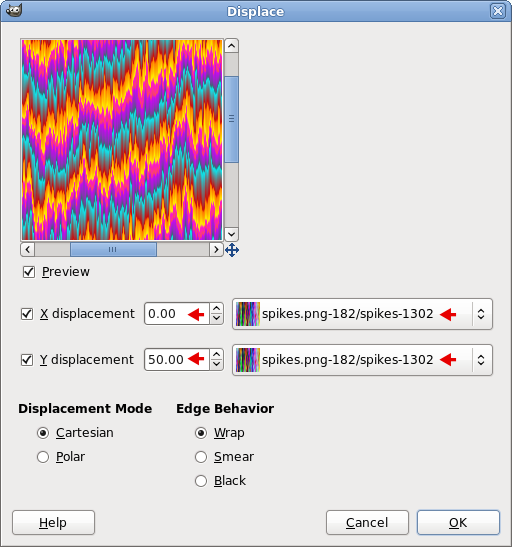
I named the layer that I stretched, spikes.

When bringing up the Displace dialog, find the spikes layer in the two dropdown buttons.

Also, I set the X displacement to zero and the Y displacement to 50 (you can make it more or less as desired) to make the vertical spikes longer.

Image

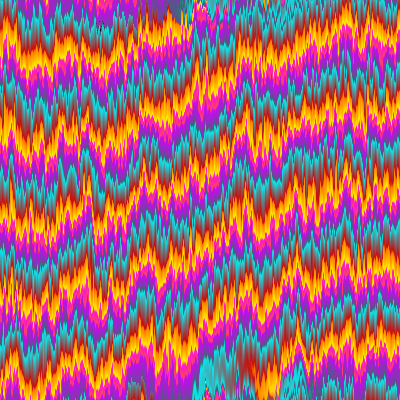
This is my displacement result.
Image

_________________
Image
World War IV will be fought with sticks and stones. - Albert Einstein


Top
 Post subject: Re: Create this Gradient Effect?
PostPosted: Fri Dec 31, 2010 10:41 pm  (#25) 
Offline
GimpChat Member
User avatar

Joined: Oct 06, 2010
Posts: 4050
Bob: At what point did it not pan out for you?

I'm guessing it might be at the same point I got stuck. After I ran my spiral gradient (you cannot center it on your image) I ran Filters- Distorts - Polar Coordinates, and only checked map backwards, with Circle Depth at 100. Then ran displace (as shown by Oregonian).

HTH

_________________
"In order to attain the impossible, one must attempt the absurd."
~ Miguel de Cervantes


Top
 Post subject: Re: Create this Gradient Effect?
PostPosted: Fri Dec 31, 2010 10:59 pm  (#26) 
Offline
GimpChat Member
User avatar

Joined: Oct 19, 2010
Posts: 376
Location: North Central Ohio, USA
Maybe I'm not doing the steps in the right order or not on the right layer. The attempt I did earlier (see page 1 of this topic) I made all on one layer using a rendered Plasma, wind & GMIC. Now, I can put a off-center spiral on a square image ;) , but I'm not sure where to go from here. If I use polar coordinates, I get some fairly smooth curves, but displacement has almost no effect on this. It definitely doesn't look like the examples Saul posted. :gaah

_________________
Life Truth: #12
My cat is a worst typist than I am.


Top
 Post subject: Re: Create this Gradient Effect?
PostPosted: Fri Dec 31, 2010 11:04 pm  (#27) 
Offline
GimpChat Member
User avatar

Joined: Oct 06, 2010
Posts: 4050
After you crop the first layer from the plasma render and scale it back to original height, then you create a new layer for the spiral, and use the previous layer (plasma render) as your displacement map.

_________________
"In order to attain the impossible, one must attempt the absurd."
~ Miguel de Cervantes


Top
 Post subject: Re: Create this Gradient Effect?
PostPosted: Fri Dec 31, 2010 11:19 pm  (#28) 
Offline
GimpChat Member
User avatar

Joined: Oct 19, 2010
Posts: 376
Location: North Central Ohio, USA
Something like this, then?
Attachment:
Spiral-gradient.png
Spiral-gradient.png [ 200.6 KiB | Viewed 2403 times ]

_________________
Life Truth: #12
My cat is a worst typist than I am.


Top
 Post subject: Re: Create this Gradient Effect?
PostPosted: Fri Dec 31, 2010 11:22 pm  (#29) 
Offline
GimpChat Member
User avatar

Joined: Oct 06, 2010
Posts: 4050
Bingo! You got it. :)

_________________
"In order to attain the impossible, one must attempt the absurd."
~ Miguel de Cervantes


Top
 Post subject: Re: Create this Gradient Effect?
PostPosted: Fri Dec 31, 2010 11:27 pm  (#30) 
Offline
GimpChat Member
User avatar

Joined: Oct 19, 2010
Posts: 376
Location: North Central Ohio, USA
My problems were I was trying to do it all on one layer as before, and I thought that Saul was demonstrating two different methods as there were two sets of intermediate images - no workee! :oops: Also, I cranked up the displacement quite a bit on the final.

Now I need a drink...of coffee. :hehe

_________________
Life Truth: #12
My cat is a worst typist than I am.


Last edited by Bob63 on Fri Dec 31, 2010 11:38 pm, edited 1 time in total.

Top
 Post subject: Re: Create this Gradient Effect?
PostPosted: Fri Dec 31, 2010 11:29 pm  (#31) 
Offline
GimpChat Member
User avatar

Joined: Oct 06, 2010
Posts: 4050
I ran my displacement result in G'MIC using sphere, and really like the way it turned out. I am still looking for a better way to feather out the round edges to fill the entire square.

_________________
"In order to attain the impossible, one must attempt the absurd."
~ Miguel de Cervantes


Top
 Post subject: Re: Create this Gradient Effect?
PostPosted: Fri Dec 31, 2010 11:49 pm  (#32) 
Offline
GimpChat Member
User avatar

Joined: Oct 19, 2010
Posts: 376
Location: North Central Ohio, USA
Try Filters > Distorts > Lens Distortion. Set main to around -65.
Attachment:
Spiral-gradient2.png
Spiral-gradient2.png [ 194.3 KiB | Viewed 2678 times ]

_________________
Life Truth: #12
My cat is a worst typist than I am.


Top
 Post subject: Re: Create this Gradient Effect?
PostPosted: Sat Jan 01, 2011 12:47 am  (#33) 
Offline
GimpChat Member
User avatar

Joined: Sep 24, 2010
Posts: 12850
AAA Good Vibrations filter and Wind Distortion after Reverse Polar Coordinates the ran Polar Coordinates. Also did some G'MIC PhotoComix Smoothing. :)


Attachments:
gv.jpg
gv.jpg [ 103.03 KiB | Viewed 2677 times ]

_________________
Lyle

Psalm 109:8

Image
Top
 Post subject: Re: Create this Gradient Effect?
PostPosted: Sat Jan 01, 2011 1:35 am  (#34) 
Offline
Retired Staff
User avatar

Joined: May 22, 2008
Posts: 6946
Location: Somewhere in GIMP
That looks like the example I put in the first post Lyle. :mrgreen:

_________________
Image
World War IV will be fought with sticks and stones. - Albert Einstein


Top
 Post subject: Re: Create this Gradient Effect?
PostPosted: Sat Jan 01, 2011 2:05 am  (#35) 
Offline
GimpChat Member
User avatar

Joined: Sep 24, 2010
Posts: 12850
I did try O. Cheated (help with Good Vibrations ) though. Did get a good result using GIMP's Ripple filter too. :)

_________________
Lyle

Psalm 109:8

Image


Top
 Post subject: Re: Create this Gradient Effect?
PostPosted: Sat Jan 01, 2011 7:29 am  (#36) 
Offline
GimpChat Member
User avatar

Joined: Apr 07, 2010
Posts: 14182
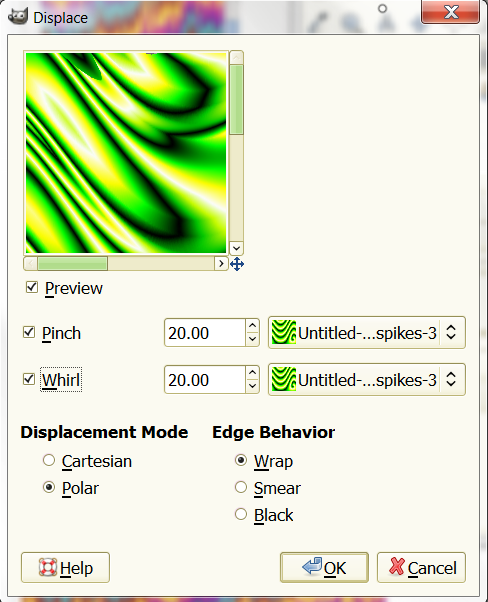
I have tried this dam thing 20 times now at least. I can't get it. First of all, my distorts > displace doesn't have the same settings so I can't make the displacement x and Y settings.
Image

Why is something so easy, so hard? :roll:

_________________
Image


Top
 Post subject: Re: Create this Gradient Effect?
PostPosted: Sat Jan 01, 2011 8:03 am  (#37) 
Offline
GimpChat Member
User avatar

Joined: Apr 07, 2010
Posts: 14182
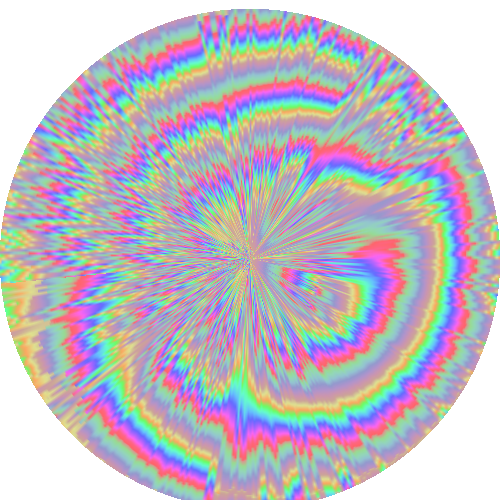
nothing is going according to Hoyle, but this is as close as I can get. everything is working the opposite to what it should.Image

_________________
Image


Top
 Post subject: Re: Create this Gradient Effect?
PostPosted: Sat Jan 01, 2011 9:31 am  (#38) 
Offline
GimpChat Member
User avatar

Joined: Oct 19, 2010
Posts: 376
Location: North Central Ohio, USA
That's pretty molly. It sort of does the "pulsing-thing" :hehe when you look at it, too.

_________________
Life Truth: #12
My cat is a worst typist than I am.


Top
 Post subject: Re: Create this Gradient Effect?
PostPosted: Sat Jan 01, 2011 9:45 am  (#39) 
Offline
GimpChat Member
User avatar

Joined: Oct 19, 2010
Posts: 376
Location: North Central Ohio, USA
Now that I've got the "knack", this is a pretty cool effect!
Attachment:
gold explosion.png
gold explosion.png [ 266.74 KiB | Viewed 2660 times ]

_________________
Life Truth: #12
My cat is a worst typist than I am.


Top
 Post subject: Re: Create this Gradient Effect?
PostPosted: Sat Jan 01, 2011 10:10 am  (#40) 
Offline
GimpChat Member
User avatar

Joined: Apr 07, 2010
Posts: 14182
I want mine to end up with the spikes like yours. that is beautiful... Bob

_________________
Image


Top
Post new topic Reply to topic  [ 51 posts ]  Go to page Previous  1, 2, 3  Next

All times are UTC - 5 hours [ DST ]


* Login  


Powered by phpBB3 © phpBB Group