It is currently Tue Sep 15, 2026 4:01 pm


All times are UTC - 5 hours [ DST ]


Post new topic Reply to topic  [ 15 posts ] 
Author Message
 Post subject: HELP???????
PostPosted: Sat Jan 01, 2011 4:21 pm  (#1) 
Offline
GimpChat Member

Joined: Jan 01, 2011
Posts: 9
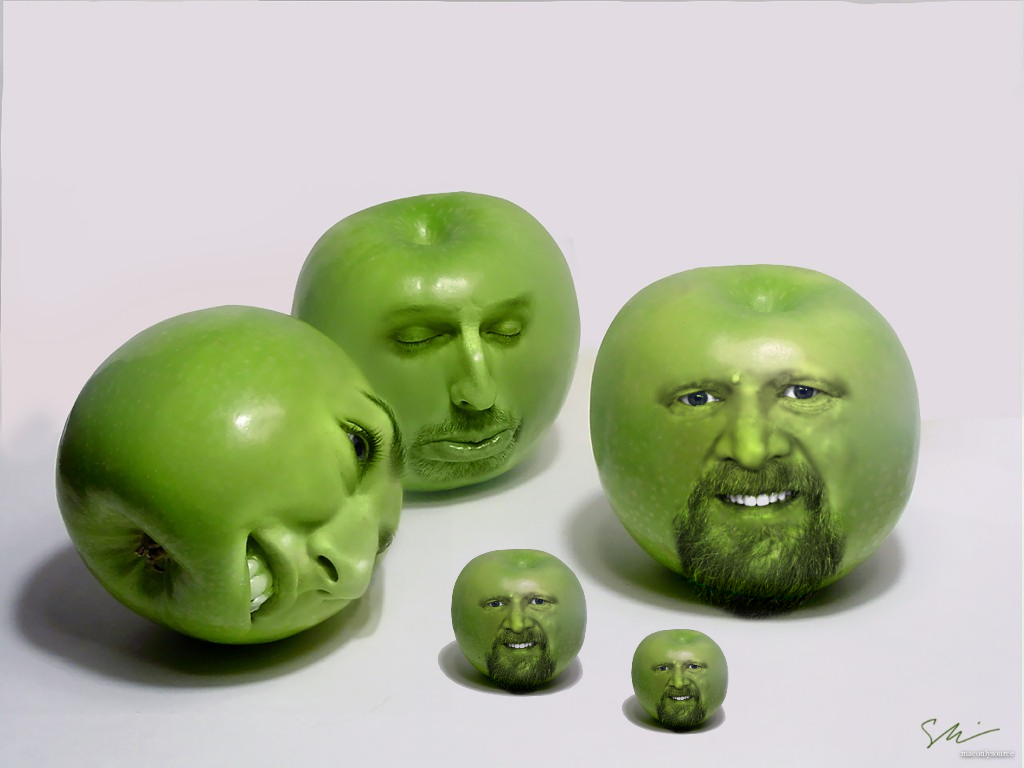
So, I want to do a minipulation like this: http://www.flickr.com/photos/lissyl/4777005453/
How did she scale those apples up so goood? I don't even know how! UGH! PLEASE HELP! Its so clear! :gaah :[[[[


Share on Facebook Share on Twitter Share on Orkut Share on Digg Share on MySpace Share on Delicious Share on Technorati
Top
 Post subject: Re: HELP???????
PostPosted: Sat Jan 01, 2011 5:08 pm  (#2) 
Offline
Global Moderator
User avatar

Joined: May 16, 2010
Posts: 16173
You can try Liquid Rescale
http://registry.gimp.org/node/144

This site may help
http://www.resizemypicture.com/

I use this program
http://www.fileheap.com/software-nonlin ... 18285.html

_________________
Image


Top
 Post subject: Re: HELP???????
PostPosted: Sat Jan 01, 2011 5:31 pm  (#3) 
Offline
GimpChat Member
User avatar

Joined: Oct 06, 2010
Posts: 4050
Rod: I've downloaded and read the instructions on the software suggested (using Wine) and I still don't understand how it helps Kaytee's desire to manipulate specific objects within a picture. Your suggested software increases or decreases the entire picture, and has no way of selecting any part of the image for manipulation. Am I missing something?

_________________
"In order to attain the impossible, one must attempt the absurd."
~ Miguel de Cervantes


Top
 Post subject: Re: HELP???????
PostPosted: Sat Jan 01, 2011 6:15 pm  (#4) 
Offline
GimpChat Member

Joined: Apr 12, 2010
Posts: 5870
maybe copy and paste
mahvin wrote:
Rod: I've downloaded and read the instructions on the software suggested (using Wine) and I still don't understand how it helps Kaytee's desire to manipulate specific objects within a picture. Your suggested software increases or decreases the entire picture, and has no way of selecting any part of the image for manipulation. Am I missing something?


maybe select a part of the output, copy and paste over the original ?

_________________
My 3D Gallery on Deviantart http://photocomix2.deviantart.com/
Main gallery http://www.flickriver.com/photos/photocomix-mandala/
Mandala and simmetry http://www.flickriver.com/photos/photocomix_mandala/

Image

Mrs Wilbress


Last edited by PhotoComix on Sat Jan 01, 2011 6:16 pm, edited 1 time in total.

Top
 Post subject: Re: HELP???????
PostPosted: Sat Jan 01, 2011 6:16 pm  (#5) 
Offline
Global Moderator
User avatar

Joined: May 16, 2010
Posts: 16173
The apples were scaled up in a dif image Mahvin, i am pretty sure.
Then they were cut out and pasted into a dif photo. (already scaled up)

What this software does is increase the size of an image usually just distorting the edges and keeping the center of the image content un distorted. hence you could say...upscale an image of a bunch of grapes and cut them out of that image and add them to another at their larger scale.The grapes would then look HUGE compared to normal grapes.

I am pretty sure that's how this effect was done.

Or maybe i am missing something?

_________________
Image


Top
 Post subject: Re: HELP???????
PostPosted: Sat Jan 01, 2011 7:26 pm  (#6) 
Offline
GimpChat Member
User avatar

Joined: Oct 06, 2010
Posts: 4050
Rod: I was expecting it to be similar to cage transformation. I did use a copy and paste method as both you and PC suggested, was sort of surprised it only saved output in .bmp format. The singular Upscale plug-in and G'MIC's Upscale preset both performed similarly with image selections. However, your suggested software wasn't as distorted. Example of your suggested software using copy and paste:

Photo I found on the internet with manipulation:
Image

_________________
"In order to attain the impossible, one must attempt the absurd."
~ Miguel de Cervantes


Top
 Post subject: Re: HELP???????
PostPosted: Sat Jan 01, 2011 7:58 pm  (#7) 
Offline
GimpChat Member

Joined: Jan 01, 2011
Posts: 9
Could you send me a step-by-step? Im new at this stuff, im just doing simple stuff.

These are the only four photos ive done miniuplation in:
(You can click on them to make them larger)
http://www.flickr.com/photos/kayteecall ... 259925211/

Thank you guys so much for jumping in and trying to help me:]


Top
 Post subject: Re: HELP???????
PostPosted: Sat Jan 01, 2011 8:02 pm  (#8) 
Offline
GimpChat Member

Joined: Jan 01, 2011
Posts: 9
Oh, wait, make sure its with GIMP please?


Top
 Post subject: Re: HELP???????
PostPosted: Sat Jan 01, 2011 8:18 pm  (#9) 
Offline
GimpChat Member
User avatar

Joined: Oct 06, 2010
Posts: 4050
Exactly what are you wanting step by step of? The scaling of the apples?

I used Rod's suggested software. I cropped one apple (far right) out of a copy of the apples. Then I ran the nonlinear software and reduced the pixels evenly:

Image

Note under resize settings, I added the pixel ranges to reduce the image more than half it's size. If the original copied image was perfectly square the input sizes would be identical.

I then saved the image in the only format it allows (.bmp) then opened it in GIMP and pasted it as a layer into the existing apple image it came from.

I changed the layer mode to Multiply, then softened the edges to blend.

_________________
"In order to attain the impossible, one must attempt the absurd."
~ Miguel de Cervantes


Top
 Post subject: Re: HELP???????
PostPosted: Sat Jan 01, 2011 8:26 pm  (#10) 
Offline
Global Moderator
User avatar

Joined: May 16, 2010
Posts: 16173
Good show Mahvin. =)

_________________
Image


Top
 Post subject: Re: HELP???????
PostPosted: Sat Jan 01, 2011 8:35 pm  (#11) 
Offline
GimpChat Member

Joined: Jan 01, 2011
Posts: 9
How would you make the edges smoother?
Could you do that in GIMP?


Top
 Post subject: Re: HELP???????
PostPosted: Sat Jan 01, 2011 8:41 pm  (#12) 
Offline
GimpChat Member

Joined: Jan 01, 2011
Posts: 9
How can I do that so the edges are smooth?


Top
 Post subject: Re: HELP???????
PostPosted: Sat Jan 01, 2011 8:49 pm  (#13) 
Offline
GimpChat Member
User avatar

Joined: Oct 06, 2010
Posts: 4050
I use the Blur tool, set to about 80, and using a circle fuzzy brush (19) and lightly apply around the edge of the new image. Keep the brush size small as to not blur too far inside from the edge. That's just one of many methods of blurring edges.

_________________
"In order to attain the impossible, one must attempt the absurd."
~ Miguel de Cervantes


Top
 Post subject: Re: HELP???????
PostPosted: Sat Jan 01, 2011 8:56 pm  (#14) 
Offline
GimpChat Member

Joined: Jan 01, 2011
Posts: 9
THANK YOU EVERYONE:] <3 :yes

:wh
:tyspin


Top
 Post subject: Re: HELP???????
PostPosted: Sat Jan 01, 2011 9:10 pm  (#15) 
Offline
Global Moderator
User avatar

Joined: May 16, 2010
Posts: 16173
Glad you got it figured out.
I would also like to welcome you to the forums Kayteee. =)

_________________
Image


Top
Post new topic Reply to topic  [ 15 posts ] 

All times are UTC - 5 hours [ DST ]


* Login  


Powered by phpBB3 © phpBB Group