It is currently Tue Jun 23, 2026 3:15 pm


All times are UTC - 5 hours [ DST ]


Post new topic Reply to topic  [ 31 posts ]  Go to page 1, 2  Next
Author Message
 Post subject: GIMP has an apng plugin!
PostPosted: Mon Apr 26, 2010 1:28 am  (#1) 
Offline
Retired Staff
User avatar

Joined: May 22, 2008
Posts: 6946
Location: Somewhere in GIMP
Here is the URL but what you do with it I don't know.

http://registry.gimp.org/node/24394

_________________
Image
World War IV will be fought with sticks and stones. - Albert Einstein


Share on Facebook Share on Twitter Share on Orkut Share on Digg Share on MySpace Share on Delicious Share on Technorati
Top
 Post subject: Re: GIMP has an apng plugin!
PostPosted: Mon Apr 26, 2010 9:32 am  (#2) 
Offline
GimpChat Founder
User avatar

Joined: May 22, 2008
Posts: 5241
Location: Gimpville
That's the source code. You'll need to compile it using the same steps you used to compile Gimp-Gap.

As normal user
1) ./configure (configure options for compiling)

2) make (compile and link)

As root
3) make install (install application and data)

Since you've already compiled Gimp-Gap, you should have all of the development tools and libs needed to compile this.

I'd really like to work with APNGs so I plan on compiling this and checking it out. :bigthup

_________________
“If you reach for the stars, you just might land on a decently sized hill.” - Stuart Hill


Top
 Post subject: Re: GIMP has an apng plugin!
PostPosted: Mon Apr 26, 2010 10:00 am  (#3) 
Offline
Retired Staff
User avatar

Joined: May 22, 2008
Posts: 6946
Location: Somewhere in GIMP
This is a message in terminal at the end of the compile ./configure attempt.

checking for png_get_acTL in -lpng... no
configure: error: PNG library doesn't have APNG support

_________________
Image
World War IV will be fought with sticks and stones. - Albert Einstein


Top
 Post subject: Re: GIMP has an apng plugin!
PostPosted: Mon Apr 26, 2010 10:03 am  (#4) 
Offline
GimpChat Founder
User avatar

Joined: May 22, 2008
Posts: 5241
Location: Gimpville
Which step gave you this message? ./configure ?

_________________
“If you reach for the stars, you just might land on a decently sized hill.” - Stuart Hill


Top
 Post subject: Re: GIMP has an apng plugin!
PostPosted: Mon Apr 26, 2010 10:03 am  (#5) 
Offline
Retired Staff
User avatar

Joined: May 22, 2008
Posts: 6946
Location: Somewhere in GIMP
Yes. Meant to say configure, not compile up there. Urg.

_________________
Image
World War IV will be fought with sticks and stones. - Albert Einstein


Top
 Post subject: Re: GIMP has an apng plugin!
PostPosted: Mon Apr 26, 2010 10:08 am  (#6) 
Offline
GimpChat Founder
User avatar

Joined: May 22, 2008
Posts: 5241
Location: Gimpville
Looks like you might need to patch or update libpng. Let me check to see what is out there..

_________________
“If you reach for the stars, you just might land on a decently sized hill.” - Stuart Hill


Top
 Post subject: Re: GIMP has an apng plugin!
PostPosted: Mon Apr 26, 2010 10:13 am  (#7) 
Offline
GimpChat Founder
User avatar

Joined: May 22, 2008
Posts: 5241
Location: Gimpville
Do you have libpng-devel-2:1.2.43-1.fc12 installed? If not, install it and run ./configure again..

_________________
“If you reach for the stars, you just might land on a decently sized hill.” - Stuart Hill


Top
 Post subject: Re: GIMP has an apng plugin!
PostPosted: Mon Apr 26, 2010 10:23 am  (#8) 
Offline
Retired Staff
User avatar

Joined: May 22, 2008
Posts: 6946
Location: Somewhere in GIMP
Setting up Install Process
No package libpng-devel-2:1.2.43-1.fc12 available.
Nothing to do

_________________
Image
World War IV will be fought with sticks and stones. - Albert Einstein


Top
 Post subject: Re: GIMP has an apng plugin!
PostPosted: Mon Apr 26, 2010 10:27 am  (#9) 
Offline
GimpChat Founder
User avatar

Joined: May 22, 2008
Posts: 5241
Location: Gimpville
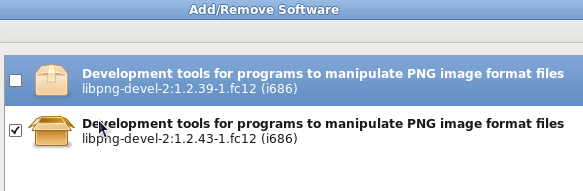
Please check under System/Administration/Add/Remove Software to see if libpng-devel is installed.

_________________
“If you reach for the stars, you just might land on a decently sized hill.” - Stuart Hill


Top
 Post subject: Re: GIMP has an apng plugin!
PostPosted: Mon Apr 26, 2010 10:31 am  (#10) 
Offline
Retired Staff
User avatar

Joined: May 22, 2008
Posts: 6946
Location: Somewhere in GIMP
Yep, it is.


Image

Strange it would say it's not available instead of already installed.

_________________
Image
World War IV will be fought with sticks and stones. - Albert Einstein


Top
 Post subject: Re: GIMP has an apng plugin!
PostPosted: Mon Apr 26, 2010 10:38 am  (#11) 
Offline
GimpChat Founder
User avatar

Joined: May 22, 2008
Posts: 5241
Location: Gimpville
Unfortunately, I don't see anything in this changelog that denotes that the libpng-devel for F12 has been patched to support APNG.

Looks like we will have to manually patch that devel lib to support apng (or find a pre-patched version).

Here's the patch.

I can follow up on this later today..

_________________
“If you reach for the stars, you just might land on a decently sized hill.” - Stuart Hill


Top
 Post subject: Re: GIMP has an apng plugin!
PostPosted: Mon Apr 26, 2010 10:53 am  (#12) 
Offline
Retired Staff
User avatar

Joined: May 22, 2008
Posts: 6946
Location: Somewhere in GIMP
OK. :tyspin

_________________
Image
World War IV will be fought with sticks and stones. - Albert Einstein


Top
 Post subject: Re: GIMP has an apng plugin!
PostPosted: Mon Apr 26, 2010 5:46 pm  (#13) 
Offline
GimpChat Founder
User avatar

Joined: May 22, 2008
Posts: 5241
Location: Gimpville
I've had a chance to delve into this a little further and there is no patch for libpng-1.2.43 on the Source Forge page. It goes from libpng-1.2.42rc3 right to libpng-1.4.0.

Looking at other distros, I see where Mandriva has incorporated some kind of patch for libpng-1.2.43 into their RPMs.

From Changelog..

* Thu Feb 25 2010 Oden Eriksson <[email protected]> 2:1.2.43-1mdv2010.1
+ Revision: 511259
- use a newer apng patch from upstream
- 1.2.43
* Wed Feb 24 2010 Oden Eriksson <[email protected]> 2:1.2.42-1mdv2010.1
+ Revision: 510653
- 1.2.42
- rediffed the apng patch

Who knows what they did or where they got this "newer apng patch"?

There are several development packages that are dependent on libpng so I'm a little leery about doing anything with it at this point. I recommend waiting for Fedora to patch libpng before using this apng plugin. Then again, it may be a long wait being they are still using this version of libpng in the upcoming release of F13.

Perhaps I'll post over on FF (for all the good it will do) and see if I can get some more info.

One would think this would be the hot new thing but there doesn't seem to be much interest in apng at this point.

_________________
“If you reach for the stars, you just might land on a decently sized hill.” - Stuart Hill


Top
 Post subject: Re: GIMP has an apng plugin!
PostPosted: Mon Apr 26, 2010 8:17 pm  (#14) 
Offline
Retired Staff
User avatar

Joined: May 22, 2008
Posts: 6946
Location: Somewhere in GIMP
GnuTux wrote:
Perhaps I'll post over on FF (for all the good it will do) and see if I can get some more info.

One would think this would be the hot new thing but there doesn't seem to be much interest in apng at this point.
Bummer. :gaah I'd think everyone would be very excited about it. I know I am.

Thanks for trying, GnuTux.

_________________
Image
World War IV will be fought with sticks and stones. - Albert Einstein


Top
 Post subject: Re: GIMP has an apng plugin!
PostPosted: Thu Apr 29, 2010 1:19 am  (#15) 
Offline
GimpChat Founder
User avatar

Joined: May 22, 2008
Posts: 5241
Location: Gimpville
Ok, I found the proper APNG patch for libpng in Fedora 12. I was able to patch, compile and install libpng.

Next, I compiled the gimp apng-plugin and installed the executable in the GIMP plugin folder.

This gave me a new extension option in the save dialog: PNG+APNG Image. Choosing this option gives me the standard PNG save dialog, with an additional "animation" check box and a "hide first frame" check box.

So far, so good, right?

However, my attempts at saving a muti-layer image always results in a flattened, single frame PNG. :(

Another odd thing is the developer didn't choose to use the APNG extension, so there is no automatic selection of this format when adding the .apng extension onto the filename. I think I read in the release notes that he was planning to correct this issue.

Anyway, there is something wrong. I'm thinking the newly patched libpng isn't being loaded at runtime and I'm still using the old libpng. I currently have both libs installed but I've set environment variables that tells the system where to find the new libpng but I'm not so sure that's happening.

I know Fedora caches libs so maybe it's still pulling libpng from cache. Removing or including the environment variables doesn't seem to matter.

I'm still missing something. :hoh

_________________
“If you reach for the stars, you just might land on a decently sized hill.” - Stuart Hill


Top
 Post subject: Re: GIMP has an apng plugin!
PostPosted: Thu Apr 29, 2010 7:50 am  (#16) 
Offline
Retired Staff
User avatar

Joined: May 22, 2008
Posts: 6946
Location: Somewhere in GIMP
GnuTux wrote:
Another odd thing is the developer didn't choose to use the APNG extension, so there is no automatic selection of this format when adding the .apng extension onto the filename. I think I read in the release notes that he was planning to correct this issue.


This is an apng I made using the Firefox apng add-on. It has a png extension, not apng.

BTW if you download the image, gimp will open it as a single layer image not an animation. Don't know if there's an application except for Ffox that will open it as a multilayered file.

Image
[img]http://www.upstateforums.com/upload3/ffpngedit.png[/img]

If you are unable to view the image, it may be that your browser does not support apngs.

Hope the developer gets it all fixed so it can be used.

If you are interested in trying out the Firefox APNG Edit add-on, here is a link to the add-on.
https://addons.mozilla.org/en-US/firefox/addon/5519

_________________
Image
World War IV will be fought with sticks and stones. - Albert Einstein


Top
 Post subject: Re: GIMP has an apng plugin!
PostPosted: Thu Apr 29, 2010 5:57 pm  (#17) 
Offline
GimpChat Member
User avatar

Joined: Apr 08, 2010
Posts: 5420
Location: Northwest Ohio
I can see it using IE, so I would imagine all browsers can see it...since IE is the lamest browser, lol.


Top
 Post subject: Re: GIMP has an apng plugin!
PostPosted: Thu Apr 29, 2010 6:40 pm  (#18) 
Offline
GimpChat Member

Joined: Apr 12, 2010
Posts: 5870
Quote:
Strange it would say it's not available instead of already installed.


You are right but Windows is not the only OS to have bugs

Quote:
I can see it using IE, so I would imagine all browsers can see it...since IE is the lamest browser, lol.


We should be fair IE is not the lamest browser
The Lamest Browser is what use who never update his browser -...i still see messages from peple that complain for png not correctly displayed from IE..that means they never update their browser not even for security fixes in the last 4 years
(because was a problem of IE 6...so long time ago )

_________________
My 3D Gallery on Deviantart http://photocomix2.deviantart.com/
Main gallery http://www.flickriver.com/photos/photocomix-mandala/
Mandala and simmetry http://www.flickriver.com/photos/photocomix_mandala/

Image

Mrs Wilbress


Top
 Post subject: Re: GIMP has an apng plugin!
PostPosted: Thu Apr 29, 2010 7:06 pm  (#19) 
Offline
GimpChat Member
User avatar

Joined: Apr 08, 2010
Posts: 5420
Location: Northwest Ohio
LOL, yes if IE was all that awful I wouldn't keep using it...but that being said, even with current updates, sometimes I have to go use my Safari to keep from getting kicked off or viewing some websites.
*must add that my ie just went into spasms trying to look at Jolie's newest vid, it must have opened more than 20 of those 'about:blank' pages and I couldn't turn them off fast enough. Had to go offline, and even that took forever! Grrrr.


Top
 Post subject: Re: GIMP has an apng plugin!
PostPosted: Thu Apr 29, 2010 8:40 pm  (#20) 
Offline
GimpChat Founder
User avatar

Joined: May 22, 2008
Posts: 5241
Location: Gimpville
PhotoComix wrote:
Quote:
Strange it would say it's not available instead of already installed.


You are right but Windows is not the only OS to have bugs

It sure isn't but that message was due to the wrong file name being used. If the filename (app) doesn't exist, the message is "not available". If the filename (app) is already installed, the message is "already installed".

Update on my progress: I installed a 3rd party patched libpng and compiled gimp-apng plugin against it but got an apng "sizing" error message when I tried to save an animated png. Doesn't appear that the version of patched libpng is corresponding to the version of gimp apng plugin.

Unless I'm just missing something obvious, it looks like this one may take some code debugging to get it to work properly.

_________________
“If you reach for the stars, you just might land on a decently sized hill.” - Stuart Hill


Top
Post new topic Reply to topic  [ 31 posts ]  Go to page 1, 2  Next

All times are UTC - 5 hours [ DST ]


* Login  


Powered by phpBB3 © phpBB Group