It is currently Fri Jun 12, 2026 9:48 am


All times are UTC - 5 hours [ DST ]


Post new topic Reply to topic  [ 13 posts ] 
Author Message
 Post subject: Can Gimp open RAW photos?
PostPosted: Thu Oct 24, 2013 12:00 am  (#1) 
Offline
Global Moderator
User avatar

Joined: Apr 01, 2012
Posts: 8364
Location: On the other side of your screen
GIMP Version: 2.8.4
Operating System: Windows
OS Version: 7 Home Premium
GIMP Experience: Beginner Level

List any relevant plug-ins or scripts:
NA

List any ERROR messages you received:
NA


If so, where do we change the type of files that can be shown on gimp? I know I did it to begin with but have forgot.

_________________
Image
Free Fun Photo Editing & resources
Poems from the Lord
Gimp Newby
Gimp version 3.2.0 and GMIC-Qt 3.7.5 OS :- Windows 10 Home 64


Share on Facebook Share on Twitter Share on Orkut Share on Digg Share on MySpace Share on Delicious Share on Technorati
Top
 Post subject: Re: Can Gimp open RAW photos?
PostPosted: Thu Oct 24, 2013 1:07 am  (#2) 
Offline
GimpChat Member
User avatar

Joined: Sep 24, 2010
Posts: 12775
Yes, there's programs that can open RAW files and port to GIMP but I do have to say I've been beyond disappointed with them. It's the only (and only) reason I keep Photoshop around. That said, below's one that can integrate with the GIMP. Again, I'm not really happy with it (and have un-installed it) but you might find it useful. :)

http://ufraw.sourceforge.net/Install.html

_________________
Lyle

Psalm 109:8

Image


Top
 Post subject: Re: Can Gimp open RAW photos?
PostPosted: Thu Oct 24, 2013 1:08 am  (#3) 
Offline
Global Moderator
User avatar

Joined: Apr 01, 2012
Posts: 8364
Location: On the other side of your screen
Thanks Lylejk

_________________
Image
Free Fun Photo Editing & resources
Poems from the Lord
Gimp Newby
Gimp version 3.2.0 and GMIC-Qt 3.7.5 OS :- Windows 10 Home 64


Top
 Post subject: Re: Can Gimp open RAW photos?
PostPosted: Thu Oct 24, 2013 1:13 am  (#4) 
Offline
GimpChat Member
User avatar

Joined: Oct 16, 2013
Posts: 9
funny you mention that.
just downloaded xnview hoping it could convert some gradients from photoshop GRD to get them into Gimp.

it can convert RAW files.

xnview.com


Top
 Post subject: Re: Can Gimp open RAW photos?
PostPosted: Thu Oct 24, 2013 1:44 am  (#5) 
Offline
Script Coder
User avatar

Joined: Oct 25, 2010
Posts: 4812
sallyanne wrote:
GIMP Version: 2.8.4
Operating System: Windows
OS Version: 7 Home Premium
GIMP Experience: Beginner Level

List any relevant plug-ins or scripts:
NA

List any ERROR messages you received:
NA


If so, where do we change the type of files that can be shown on gimp? I know I did it to begin with but have forgot.


Not alone, but with some plugins (UFRaw). Plugin installation takes care of file associations.

But I woulnd't bother... The point of raw camera files is to take time to optimize the picture (otherwise you can just use the camera JPEGs directly). All this should be done at high bit depth to preserve image quality, Gimp being usable only for the finishing touches. So you can as well use a separate software for this, for instance the one provided with your camera...

_________________
Image


Top
 Post subject: Re: Can Gimp open RAW photos?
PostPosted: Thu Oct 24, 2013 2:12 am  (#6) 
Offline
GimpChat Member
User avatar

Joined: Nov 16, 2011
Posts: 5127
Location: Metro Vancouver, BC
sallyanne wrote:
GIMP Version:
If so, where do we change the type of files that can be shown on gimp? I know I did it to begin with but have forgot.
Gimp doesn't support RAW files natively, UFRaw plugin is the easiest way to directly import. All RAW files will need to be processed and/or converted first by some type of program before you bring them into Gimp. Once in Gimp you save as a XCF and do what you like.

The idea of shooting in RAW is to maintain as much information in the final image so you can fine tune your shot non-destructively afterwards. Think of it as a JPEG (you would normally shoot), with options.

The good thing about shooting RAW is you can use all that extra information in post processing.
The bad thing about shooting RAW is you have to post process almost all of them.

Information on the RAW file format from Cambridge in Color.
Here's a post from the other day with detailed info on RAW processors.

_________________
Image
Gimp 2.8.18, Linux, median user
Gimp Chat Tutorials Index
Spirit Bear (Kermode)


Top
 Post subject: Re: Can Gimp open RAW photos?
PostPosted: Thu Oct 24, 2013 7:21 am  (#7) 
Offline
Global Moderator
User avatar

Joined: Apr 01, 2012
Posts: 8364
Location: On the other side of your screen
Thank you all for your replies. I will bookmark this page so I can check up on some of these links later.
Downloaded a RAW file before and couldn't open it.
I thought I saw a thread in here awhile back about RAW photos but couldn't find it.

_________________
Image
Free Fun Photo Editing & resources
Poems from the Lord
Gimp Newby
Gimp version 3.2.0 and GMIC-Qt 3.7.5 OS :- Windows 10 Home 64


Top
 Post subject: Re: Can Gimp open RAW photos?
PostPosted: Thu Oct 24, 2013 12:04 pm  (#8) 
Offline
GimpChat Member

Joined: Dec 27, 2012
Posts: 393
Location: England
There's another programme that can send RAW images to Gimp. Rawtherapee converts them to a TIFF file and Gimp converts them to 8bit.

_________________
Image

DeviantArt gallery


Top
 Post subject: Re: Can Gimp open RAW photos?
PostPosted: Sat Nov 23, 2013 7:25 am  (#9) 
Offline
Global Moderator
User avatar

Joined: Apr 01, 2012
Posts: 8364
Location: On the other side of your screen
Just tried xnview and it went to a page that told me to update my windows drivers :hoh

_________________
Image
Free Fun Photo Editing & resources
Poems from the Lord
Gimp Newby
Gimp version 3.2.0 and GMIC-Qt 3.7.5 OS :- Windows 10 Home 64


Top
 Post subject: Re: Can Gimp open RAW photos?
PostPosted: Sat Nov 23, 2013 9:32 am  (#10) 
Offline
GimpChat Member

Joined: Mar 04, 2011
Posts: 2603
You could try Photivo. non-destructive, 16 bit

looks like this http://i.imgur.com/yisoKFg.jpg

With the plugins installed it will send the tweaked image to Gimp. (and back although 8 to 16 bit is of dubious benefit)

http://i.imgur.com/T0ab3Vf.jpg


Top
 Post subject: Re: Can Gimp open RAW photos?
PostPosted: Tue Dec 03, 2013 3:21 am  (#11) 
Offline
Global Moderator
User avatar

Joined: Apr 01, 2012
Posts: 8364
Location: On the other side of your screen
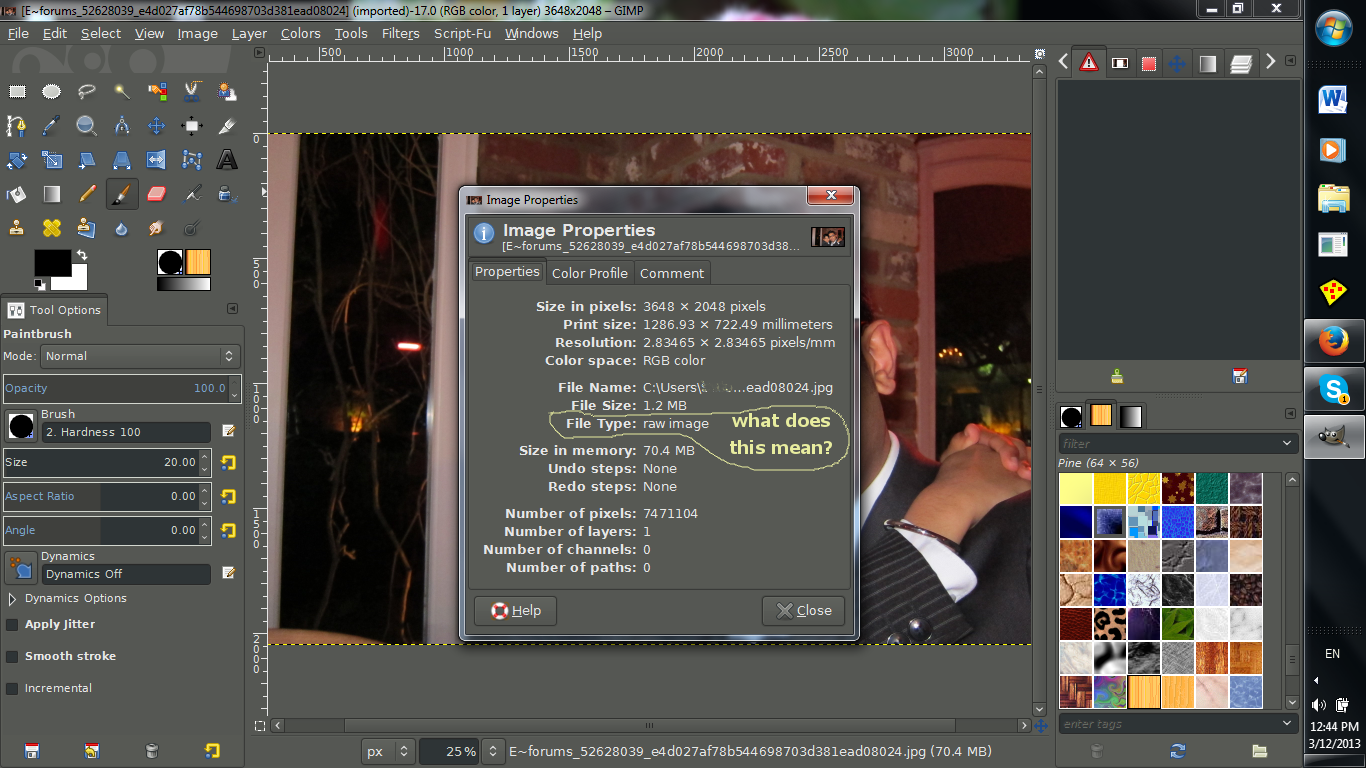
Image

Apparently where I got this photo from people can only post jpeg pics. What am I seeing here though?

_________________
Image
Free Fun Photo Editing & resources
Poems from the Lord
Gimp Newby
Gimp version 3.2.0 and GMIC-Qt 3.7.5 OS :- Windows 10 Home 64


Top
 Post subject: Re: Can Gimp open RAW photos?
PostPosted: Tue Dec 03, 2013 1:14 pm  (#12) 
Offline
GimpChat Member

Joined: Dec 27, 2012
Posts: 393
Location: England
I'm not sure what's going on there, but I just had a run through some images on my hard drive and image properties says that the file type for all of them is raw image. This also includes images that are pure Gimp design, no photos used, and have been saved as a jpeg. It's all very odd

_________________
Image

DeviantArt gallery


Top
 Post subject: Re: Can Gimp open RAW photos?
PostPosted: Wed Dec 04, 2013 2:38 am  (#13) 
Offline
Global Moderator
User avatar

Joined: Apr 01, 2012
Posts: 8364
Location: On the other side of your screen
Thanks for looking I can't remember why I opened image properties.....I think it may have been to see how big it was and noticed the file type.

_________________
Image
Free Fun Photo Editing & resources
Poems from the Lord
Gimp Newby
Gimp version 3.2.0 and GMIC-Qt 3.7.5 OS :- Windows 10 Home 64


Top
Post new topic Reply to topic  [ 13 posts ] 

All times are UTC - 5 hours [ DST ]


* Login  


Powered by phpBB3 © phpBB Group