It is currently Wed Jun 17, 2026 1:41 pm


All times are UTC - 5 hours [ DST ]


Post new topic Reply to topic  [ 25 posts ]  Go to page 1, 2  Next
Author Message
 Post subject: [G'MIC] New filter *Details / Mighty details*
PostPosted: Fri Aug 08, 2014 9:51 am  (#1) 
Offline
GimpChat Member
User avatar

Joined: Jan 03, 2011
Posts: 1656
Hello friends,

The holidays are over for me, so I've been back to work on some new G'MIC stuffs, preparing the upcoming major 1.6.0.0 version.
Today, I've coded a new filter for detail enhancement, and backported it for users of previous G'MIC versions (requires 1.5.8.0+ anyway).
So, let me present this filter a little bit. It is basically a variation of the classical Unsharp mask filter, with the following differences :

1. It does not use gaussian smoothing to find the details scale, but anisotropic smoothing.
2. It allows to have a better control on the amount of details you want to keep.
3. It allows some funny 'painting' effect.
4. It can be used for : Local Contrast Enhancement, Color boosting, Painting effects.

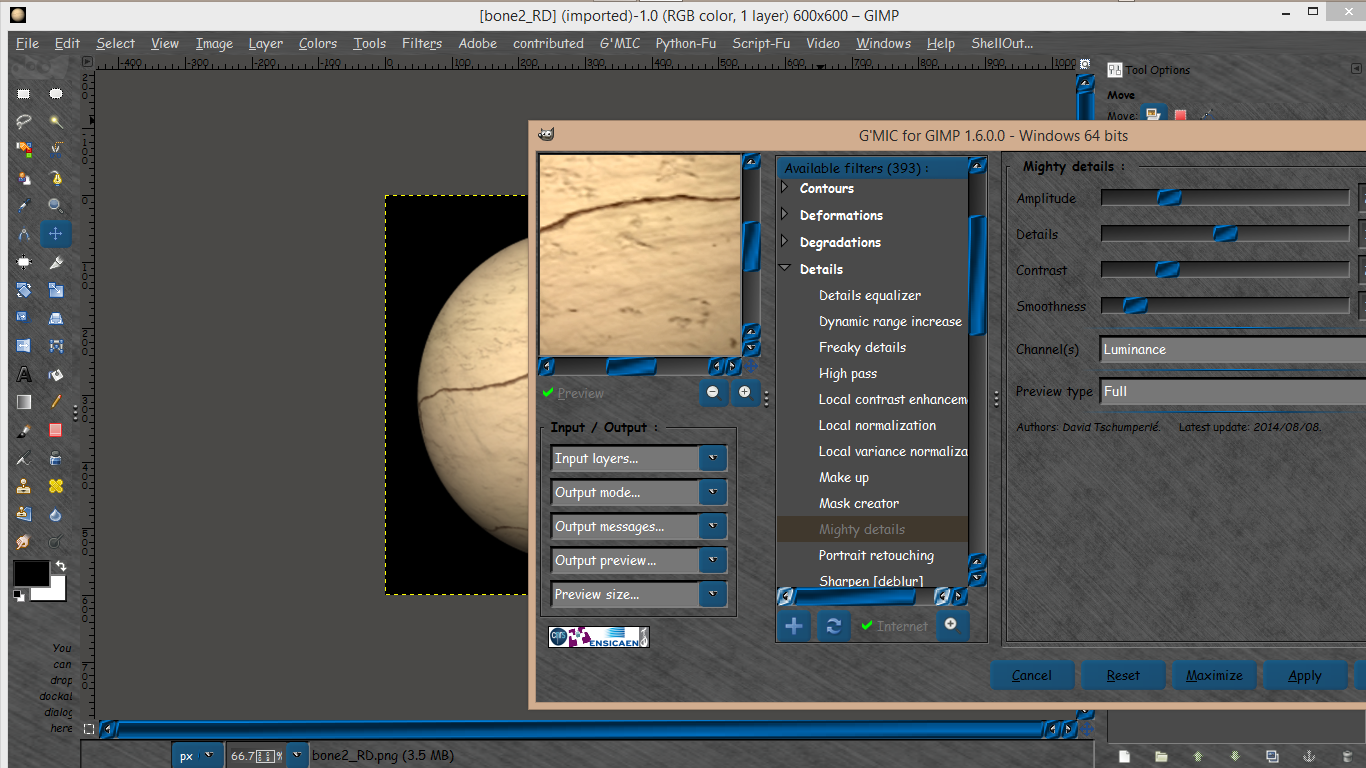
You should be able to get it, as soon you click on the Refresh button from the G'MIC plug-in interface. Once downloaded, this new filter is located at Details / Mighty details.
Let see how it works.

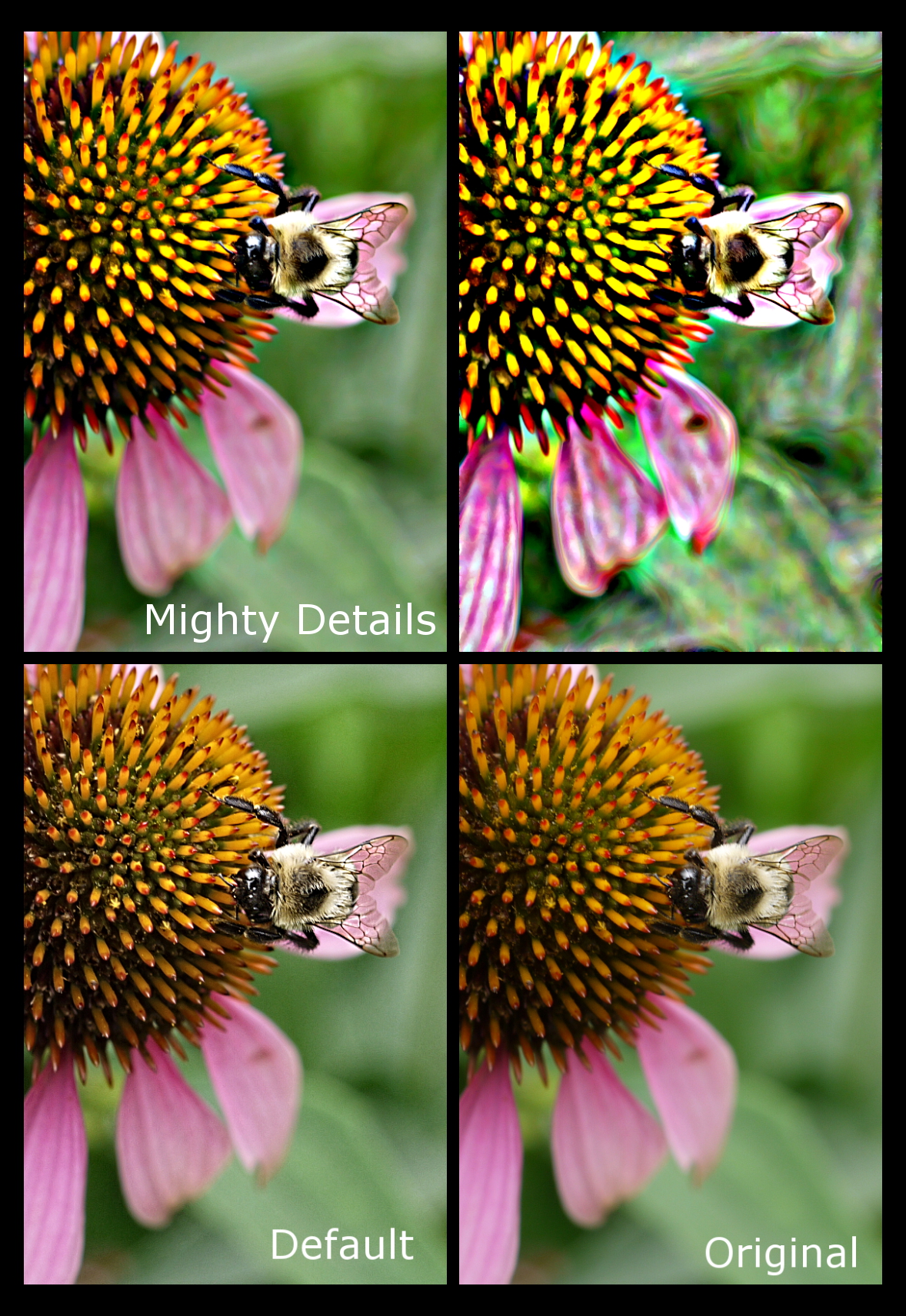
The default settings correspond to a classical Local Contrast Enhancement action :

Image

Here is another set of parameters, to boost the image contrast more globally :

Image

And another one to create painting effects :

Image

And here is an example of what you can obtain, at full size :

Image

(I'm sure PhotoComiX will love this filter :mrgreen: ).

And for curious tech people, here is the G'MIC source code of this filter :
#@gimp Mighty details : gimp_mighty_details, gimp_mighty_details_preview(0)
#@gimp : Amplitude = float(25,0,100)
#@gimp : Details = float(1,0,2)
#@gimp : Contrast = float(25,1,100)
#@gimp : Smoothness = int(1,0,10)
#@gimp : sep = separator()
#@gimp : Channel(s) = choice(3,"All","RGBA","RGB","Luminance","Blue/red chrominances","Blue chrominance","Red chrominance","Lightness","ab-components","a-component","b-component","Hue","Saturation","Value","Key","Green chrominance","ch-components","c-component","h-component","Red","Green","Blue","Alpha")
#@gimp : sep = separator(), Preview type = choice("Full","Forward horizontal","Forward vertical","Backward horizontal","Backward vertical","Duplicate horizontal","Duplicate vertical")
#@gimp : sep = separator(), note = note("<small>Authors: <i>David Tschumperl&#233;</i> and <i>Patrick David</i>.      Latest update: <i>2014/08/08</i>.</small>")
_gimp_mighty_details :
  --smooth $3,0,1,0.5,0.5 --[1] [0]
  --abs[-1] -sign[-2] M={iM} -^[-1] {2-$2} -*[-1] {$M/iM} -*[-2,-1]
  --diffusiontensors[0] 0,1,0.5,0.5
  -repeat $4 -smooth[1] [2],20 -done
  -*[1] {-$1/5} -+

gimp_mighty_details :
  -apply_channels "-_gimp_mighty_details ${1-4}",$5
  -n 0,255

gimp_mighty_details_preview :
  -gimp_split_preview "-gimp_mighty_details $*",$-1


Well that's it. I'm sure there are a lot of nice things to do with this filter, so don't hesitate to post your experiments with it.
Enjoy!


Share on Facebook Share on Twitter Share on Orkut Share on Digg Share on MySpace Share on Delicious Share on Technorati
Top
 Post subject: Re: [G'MIC] New filter *Details / Mighty details*
PostPosted: Fri Aug 08, 2014 10:02 am  (#2) 
Offline
GimpChat Member
User avatar

Joined: Sep 24, 2010
Posts: 12775
Looks cool David. Hope you had a great vacation but now it's time to work. lol

:)

_________________
Lyle

Psalm 109:8

Image


Top
 Post subject: Re: [G'MIC] New filter *Details / Mighty details*
PostPosted: Fri Aug 08, 2014 11:53 am  (#3) 
Offline
GimpChat Member

Joined: Aug 30, 2013
Posts: 63
Thanks! This will be an interesting filter to play with. Especially in combination with luminosity masks.
Image


Top
 Post subject: Re: [G'MIC] New filter *Details / Mighty details*
PostPosted: Fri Aug 08, 2014 1:05 pm  (#4) 
Offline
GimpChat Member
User avatar

Joined: Apr 08, 2010
Posts: 5420
Location: Northwest Ohio
the default looks like it will work really well to make layer masks for removing backgrounds from hair photos!


Top
 Post subject: Re: [G'MIC] New filter *Details / Mighty details*
PostPosted: Fri Aug 08, 2014 6:59 pm  (#5) 
Offline
Global Moderator
User avatar

Joined: May 16, 2010
Posts: 16029
I just wanted to say thanks for another fine filter in G'MIC David. I am using Samj's G'MIC 1.6.0.0 64 bit beta compiled version right now. By the way it works excellent Sam and David, Thanks!

Image

More info on the G'MIC 1.6.0.0 64 bit compile can be found here.
viewtopic.php?f=11&t=10804

_________________
Image


Top
 Post subject: Re: [G'MIC] New filter *Details / Mighty details*
PostPosted: Fri Aug 08, 2014 8:21 pm  (#6) 
Offline
Retired Staff
User avatar

Joined: May 22, 2008
Posts: 6946
Location: Somewhere in GIMP
Very nice, David!

_________________
Image
World War IV will be fought with sticks and stones. - Albert Einstein


Top
 Post subject: Re: [G'MIC] New filter *Details / Mighty details*
PostPosted: Sat Aug 09, 2014 3:43 am  (#7) 
Offline
GimpChat Member
User avatar

Joined: Mar 23, 2012
Posts: 7388
Location: Göteborg at last!
Another nice filter - thanks David.


Top
 Post subject: Re: [G'MIC] New filter *Details / Mighty details*
PostPosted: Sat Aug 09, 2014 11:34 am  (#8) 
Offline
Administrator
User avatar

Joined: Aug 10, 2012
Posts: 14028
Location: Native to NYC living in Arizona, Gimp 2.8 - 3.0, Win 11 PC.
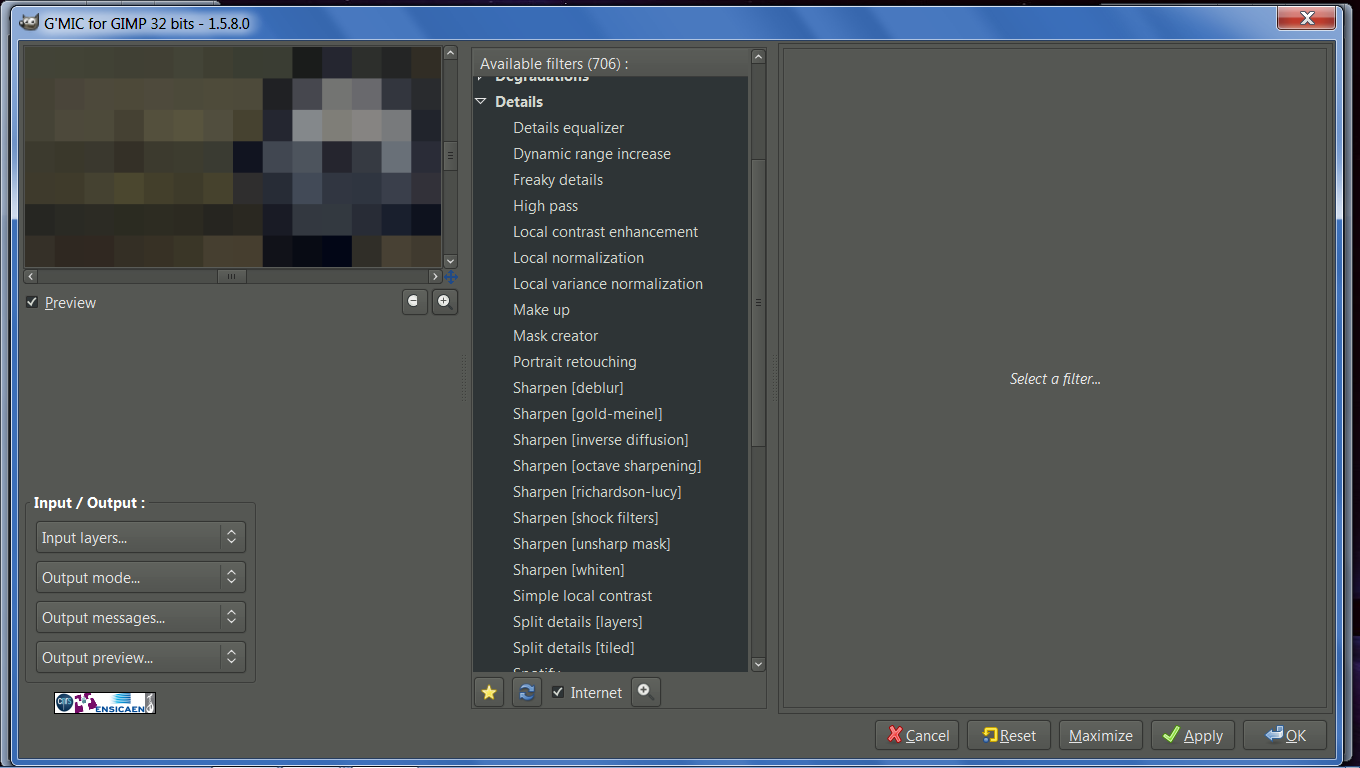
I've refreshed G'Mic, but this does not show up in the Details menu.

My G'Mic currently has over 700 filters; and from what I can see from the screenshots of the G'Mic plugin I've seen in this thread. There looks to be a little over 300 filters available that I can see.

Could something be wrong? Do I need to download a new G'Mic.exe?

_________________
Image
"A wise man learns more from a foolish question than a fool can learn from a wise answer"
Image


Last edited by Wallace on Sat Aug 09, 2014 12:09 pm, edited 1 time in total.

Top
 Post subject: Re: [G'MIC] New filter *Details / Mighty details*
PostPosted: Sat Aug 09, 2014 12:08 pm  (#9) 
Offline
GimpChat Member
User avatar

Joined: Nov 16, 2011
Posts: 5127
Location: Metro Vancouver, BC
Wallace wrote:
I've refreshed G'Mic, but this does not show up in the Details menu.
Could something be wrong? Do I need to download a new G'Mic.exe?
That's strange, David mentioned it requires 1.5.8.0+ current is 1.5.9.3.

_________________
Image
Gimp 2.8.18, Linux, median user
Gimp Chat Tutorials Index
Spirit Bear (Kermode)


Top
 Post subject: Re: [G'MIC] New filter *Details / Mighty details*
PostPosted: Sat Aug 09, 2014 12:10 pm  (#10) 
Offline
Administrator
User avatar

Joined: Aug 10, 2012
Posts: 14028
Location: Native to NYC living in Arizona, Gimp 2.8 - 3.0, Win 11 PC.
Odinbc wrote:
Wallace wrote:
I've refreshed G'Mic, but this does not show up in the Details menu.
Could something be wrong? Do I need to download a new G'Mic.exe?
That's strange, David mentioned it requires 1.5.8.0+ current is 1.5.9.3.

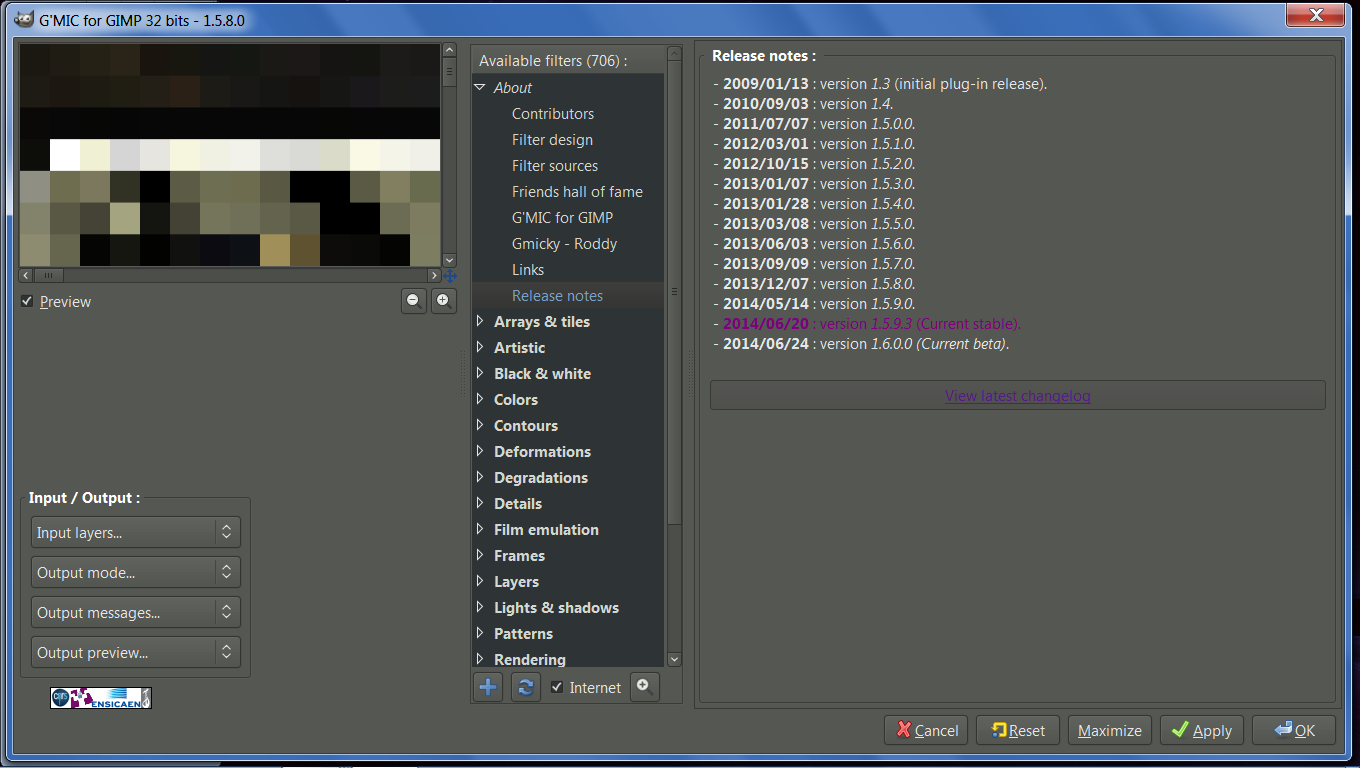
How do I know what version of G'Mic I have? Never mind, I opened G'Mic and it says I have 1.5.8.0.;
should I install a new G'Mic?
Image

_________________
Image
"A wise man learns more from a foolish question than a fool can learn from a wise answer"
Image


Top
 Post subject: Re: [G'MIC] New filter *Details / Mighty details*
PostPosted: Sat Aug 09, 2014 12:40 pm  (#11) 
Offline
GimpChat Member
User avatar

Joined: Apr 07, 2010
Posts: 14182
Wallace wrote:
I've refreshed G'Mic, but this does not show up in the Details menu.

My G'Mic currently has over 700 filters; and from what I can see from the screenshots of the G'Mic plugin I've seen in this thread. There looks to be a little over 300 filters available that I can see.

Could something be wrong? Do I need to download a new G'Mic.exe?

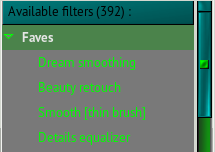
wow, are you sure you have that many? I have 392 available filters
Image

_________________
Image


Top
 Post subject: Re: [G'MIC] New filter *Details / Mighty details*
PostPosted: Sat Aug 09, 2014 12:57 pm  (#12) 
Offline
Administrator
User avatar

Joined: Aug 10, 2012
Posts: 14028
Location: Native to NYC living in Arizona, Gimp 2.8 - 3.0, Win 11 PC.
molly wrote:
wow, are you sure you have that many? I have 392 available filters
[ Image ]


You've seen my screenshot right? I have 706 filters for G'Mic.

Also I'm thinking that there's something preventing Gimp from connection to the internet. I disabled my internet security software, but still when I refresh G'Mic nothing changes.
Is there something I need to do to have Gimp/G'Mic connect to the internet to update stuff?

Also when I click on any of the links in the About G'Mic menu, nothing happens.
I'm guessing that when I click on one of those links in About G'Mic, that my web browser should open to the page linked, right?

_________________
Image
"A wise man learns more from a foolish question than a fool can learn from a wise answer"
Image


Last edited by Wallace on Sat Aug 09, 2014 1:03 pm, edited 2 times in total.

Top
 Post subject: Re: [G'MIC] New filter *Details / Mighty details*
PostPosted: Sat Aug 09, 2014 1:01 pm  (#13) 
Offline
GimpChat Member
User avatar

Joined: Nov 16, 2011
Posts: 5127
Location: Metro Vancouver, BC
Wallace wrote:
How do I know what version of G'Mic I have? Never mind, I opened G'Mic and it says I have 1.5.8.0.;
should I install a new G'Mic?
I would suggest upgrading. If your showing that many filters it probably means you're not able to refresh for some reason. He did mention 1.5.8.0+ and you have 1.5.8.0.
For more version info look under, About | Release notes.

_________________
Image
Gimp 2.8.18, Linux, median user
Gimp Chat Tutorials Index
Spirit Bear (Kermode)


Top
 Post subject: Re: [G'MIC] New filter *Details / Mighty details*
PostPosted: Sat Aug 09, 2014 1:11 pm  (#14) 
Offline
Administrator
User avatar

Joined: Aug 10, 2012
Posts: 14028
Location: Native to NYC living in Arizona, Gimp 2.8 - 3.0, Win 11 PC.
Odinbc wrote:
Wallace wrote:
How do I know what version of G'Mic I have? Never mind, I opened G'Mic and it says I have 1.5.8.0.;
should I install a new G'Mic?
I would suggest upgrading. If your showing that many filters it probably means you're not able to refresh for some reason. He did mention 1.5.8.0+ and you have 1.5.8.0.
For more version info look under, About | [ Image ]Release notes.

This is what I see...
Image

I click on View Latest Changelog and nothing happens. :help

_________________
Image
"A wise man learns more from a foolish question than a fool can learn from a wise answer"
Image


Top
 Post subject: Re: [G'MIC] New filter *Details / Mighty details*
PostPosted: Sat Aug 09, 2014 3:55 pm  (#15) 
Offline
GimpChat Member
User avatar

Joined: Jan 03, 2011
Posts: 1656
Wallace, thanks for reporting this bug. It's my fault, and it should be corrected now.
Just try to refresh again!
Let us know :)


Top
 Post subject: Re: [G'MIC] New filter *Details / Mighty details*
PostPosted: Sat Aug 09, 2014 4:16 pm  (#16) 
Offline
Administrator
User avatar

Joined: Aug 10, 2012
Posts: 14028
Location: Native to NYC living in Arizona, Gimp 2.8 - 3.0, Win 11 PC.
Ronounours wrote:
Wallace, thanks for reporting this bug. It's my fault, and it should be corrected now.
Just try to refresh again!
Let us know :)

Oh wow! Okay will do. Thanks! :bigthup


Sorry to say, but I refreshed G'Mic once again with no results. Everything is still the same. It goes through the refresh, without any effect and no errors either. G'Mic Links are also not responding when clicked.
G'Mic shows 706 filter as before.

_________________
Image
"A wise man learns more from a foolish question than a fool can learn from a wise answer"
Image


Top
 Post subject: Re: [G'MIC] New filter *Details / Mighty details*
PostPosted: Sun Aug 10, 2014 4:54 am  (#17) 
Offline
GimpChat Member
User avatar

Joined: Jan 03, 2011
Posts: 1656
Sorry Wallace, my fault again.
I'm getting old and my poor brain does not work anymore :mcof
Should be fixed now!


Top
 Post subject: Re: [G'MIC] New filter *Details / Mighty details*
PostPosted: Sun Aug 10, 2014 7:06 am  (#18) 
Offline
Administrator
User avatar

Joined: Aug 10, 2012
Posts: 14028
Location: Native to NYC living in Arizona, Gimp 2.8 - 3.0, Win 11 PC.
Ronounours wrote:
Sorry Wallace, my fault again.
I'm getting old and my poor brain does not work anymore :mcof
Should be fixed now!

I feel your pain. Image
_________________

I don't know what you did, but all is well in my little Gimp world now.
Thanks Ronounours. :bigthup

_________________
Image
"A wise man learns more from a foolish question than a fool can learn from a wise answer"
Image


Top
 Post subject: Re: [G'MIC] New filter *Details / Mighty details*
PostPosted: Sun Aug 10, 2014 7:35 am  (#19) 
Offline
Global Moderator
User avatar

Joined: Apr 01, 2012
Posts: 8377
Location: On the other side of your screen
Wallace, mine went from 393 down to 392.


What filters did you remove Ronounours?

_________________
Image
Free Fun Photo Editing & resources
Poems from the Lord
Gimp Newby
Gimp version 3.2.0 and GMIC-Qt 3.7.5 OS :- Windows 10 Home 64


Top
 Post subject: Re: [G'MIC] New filter *Details / Mighty details*
PostPosted: Sun Aug 10, 2014 8:20 am  (#20) 
Offline
Administrator
User avatar

Joined: Aug 10, 2012
Posts: 14028
Location: Native to NYC living in Arizona, Gimp 2.8 - 3.0, Win 11 PC.
sallyanne wrote:
Wallace, mine went from 393 down to 392.


What filters did you remove Ronounours?


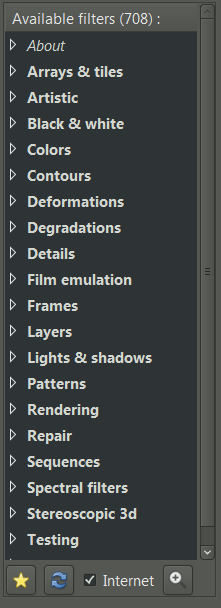
That's funny, mine went to 708. I gained 2 filters. :wh
Image

List of current filter for G'MIC as of 8/10/2014... http://gmic.eu/gimp_filters.txt

_________________
Image
"A wise man learns more from a foolish question than a fool can learn from a wise answer"
Image


Top
Post new topic Reply to topic  [ 25 posts ]  Go to page 1, 2  Next

All times are UTC - 5 hours [ DST ]


* Login  


Powered by phpBB3 © phpBB Group