It is currently Wed Sep 30, 2026 8:32 pm


All times are UTC - 5 hours [ DST ]


Post new topic Reply to topic  [ 166 posts ]  Go to page Previous  1, 2, 3, 4, 5, 6, 7 ... 9  Next
Author Message
 Post subject: Re: new script glass-frame-effect.scm
PostPosted: Fri Sep 12, 2014 9:13 pm  (#61) 
Offline
GimpChat Member
User avatar

Joined: May 27, 2011
Posts: 707
Graechan
Thank You for the info,but it is not there

Sorry,found it,i was looking under "image" and i couldn't see script fu there :oops:

Thank You :)


Top
 Post subject: Re: new script glass-frame-effect.scm
PostPosted: Wed Sep 17, 2014 8:33 am  (#62) 
Offline
Global Moderator
User avatar

Joined: Apr 01, 2012
Posts: 8473
Location: On the other side of your screen
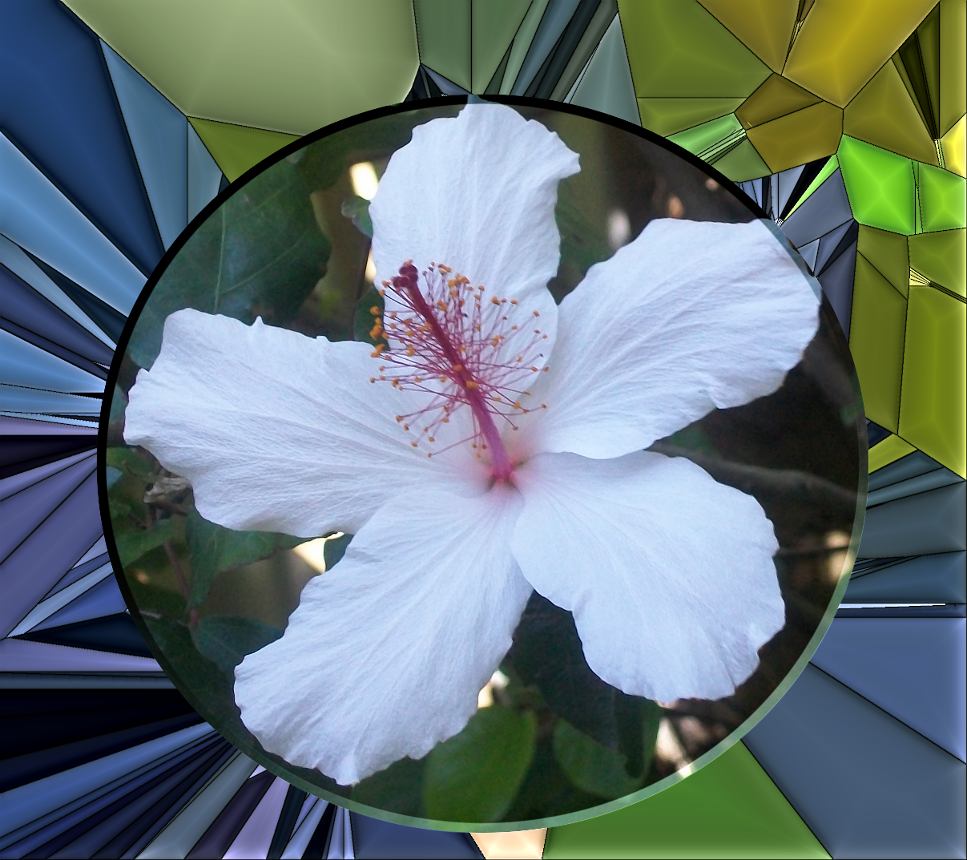
I did another
Image

Also my menu is
After I have opened an image - script-fu > frames

_________________
Image
Free Fun Photo Editing & resources
Poems from the Lord
Gimp Newby
Gimp version 3.2.4 and GMIC-Qt 4.0.2 OS :- Windows 10 Home 64


Top
 Post subject: Re: new script glass-frame-effect.scm
PostPosted: Wed Sep 17, 2014 12:51 pm  (#63) 
Offline
GimpChat Member
User avatar

Joined: Jan 20, 2013
Posts: 14835
Location: roma, italy
what a wonderful outcome,SallyAnne!
excellent choice of the image, of the selection and of the effect!

_________________
"Where am I ?"


Top
 Post subject: Re: new script glass-frame-effect.scm
PostPosted: Thu Sep 18, 2014 12:23 am  (#64) 
Offline
Script Coder
User avatar

Joined: Feb 18, 2011
Posts: 4826
Location: Bendigo Vic. Australia
Very nice Sallyanne Psychedelic Glass is my favorite effect

_________________
Image
No matter how much you push the envelope, it'll still be stationery.


Top
 Post subject: Re: new script glass-frame-effect.scm
PostPosted: Thu Sep 18, 2014 7:55 am  (#65) 
Offline
GimpChat Member
User avatar

Joined: Jan 20, 2013
Posts: 590
Wonderful work, Sallyanne.

_________________
Image


Top
 Post subject: Re: new script glass-frame-effect.scm
PostPosted: Thu Oct 02, 2014 6:50 pm  (#66) 
Offline
Global Moderator
User avatar

Joined: Oct 02, 2014
Posts: 5054
Location: Sydney Australia
Hi,

I am new to GIMP and extremely new to Gimp-Chat! Today I downloaded this glass-frame-effect script (my first!) but when I use it the following warning appears:
Error while executing script-fu-glass-frame-effect:

Error: ( : 1) eval: unbound variable: python-layerfx-bevel-emboss


I have no idea what it means - some help please.

Thankyou

_________________
Image

Respect should be offered freely but hard earned


Top
 Post subject: Re: new script glass-frame-effect.scm
PostPosted: Thu Oct 02, 2014 7:16 pm  (#67) 
Offline
Script Coder
User avatar

Joined: Feb 18, 2011
Posts: 4826
Location: Bendigo Vic. Australia
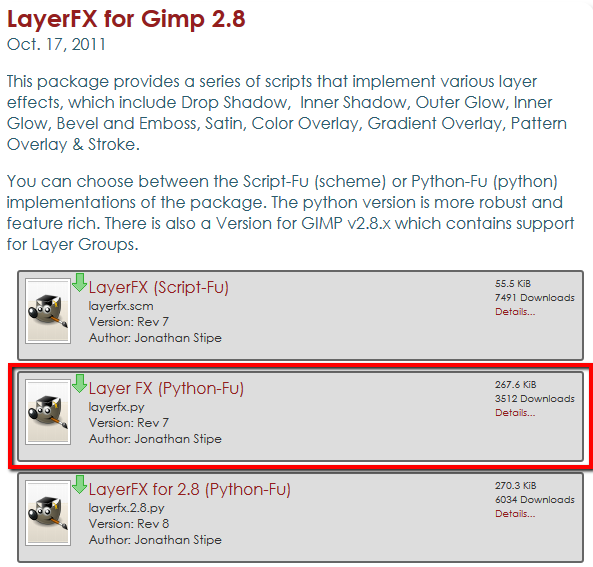
What it means is you don't have the plugin python-layerfx installed in your Gimp
Easily fixed Oldmangrumpy you need to download layerfx.py and install in your user files/plugins folder
below↓ I have marked the version you should download
Image

_________________
Image
No matter how much you push the envelope, it'll still be stationery.


Top
 Post subject: Re: new script glass-frame-effect.scm
PostPosted: Thu Oct 02, 2014 10:38 pm  (#68) 
Offline
Global Moderator
User avatar

Joined: Oct 02, 2014
Posts: 5054
Location: Sydney Australia
Well that was quick - thankyou Graechan; I followed your instructions, the problem disappeared and now I am steaming ahead with some spectacular new images.

Thanks again.

_________________
Image

Respect should be offered freely but hard earned


Top
 Post subject: Re: new script glass-frame-effect.scm
PostPosted: Fri Oct 03, 2014 12:57 am  (#69) 
Offline
Script Coder
User avatar

Joined: Feb 18, 2011
Posts: 4826
Location: Bendigo Vic. Australia
oldmangrumpy wrote:
now I am steaming ahead with some spectacular new images.

don't forget to post some of you results (from this fantastic script) here

_________________
Image
No matter how much you push the envelope, it'll still be stationery.


Top
 Post subject: Re: new script glass-frame-effect.scm
PostPosted: Fri Oct 03, 2014 3:35 am  (#70) 
Offline
GimpChat Member
User avatar

Joined: Mar 01, 2014
Posts: 14198
Location: Spain, Aragón
Playing with Dinasset's script! I love it!


Attachments:
DSCN5376_DN.JPG
DSCN5376_DN.JPG [ 1.12 MiB | Viewed 2143 times ]
DSCN5368_Nikon-Glass Tile.JPG
DSCN5368_Nikon-Glass Tile.JPG [ 944.4 KiB | Viewed 2143 times ]

_________________
Image

Gimp 2.10.36 (samj) portable _ OS Windows 10 Home_ 64bits
Don’t be afraid to start over. It’s a new chance to rebuild what you want.
Top
 Post subject: Re: new script glass-frame-effect.scm
PostPosted: Fri Oct 03, 2014 10:13 am  (#71) 
Offline
GimpChat Member
User avatar

Joined: May 17, 2014
Posts: 1572
Image

Dinasset thank you for the script and Issabella for the testing :paint

_________________
Ella's gallery - YouTube


Top
 Post subject: Re: new script glass-frame-effect.scm
PostPosted: Fri Oct 03, 2014 1:09 pm  (#72) 
Offline
GimpChat Member
User avatar

Joined: Jan 20, 2013
Posts: 14835
Location: roma, italy
Issabella: it looks like if you have fallen in love with this script! hehehe...btw it's your child!!!
Ella Louise: there is always something original and creative in your experiments!!!

Thanks a lot for continuing to enjoy yourself and making other people enjoying when looking at your outcomes.

awaiting results from new entries too (pirate541, oldmangrumpy, ...)

_________________
"Where am I ?"


Top
 Post subject: Re: new script glass-frame-effect.scm
PostPosted: Fri Oct 03, 2014 4:15 pm  (#73) 
Offline
GimpChat Member

Joined: Oct 29, 2012
Posts: 33
Location: Brisbane, Australia
Hi,

This is a great script. Thanks to all involved. Just wondering however, why it won't work with larger images. I get the attached error messages when using a larger image. I realise that dinasset put the following statement in the first post. Does this mean that you can't use this script on a larger image than 1200*800 irrespective of your computer's capabilities?

Many of the effects are G'MIC functions, so they may be slow in execution if the starting image is big
and the computer has an average power.
So it is recommended to start experimenting with images not greater than 1200*800.


Cheers,
Bob


Attachments:
Gimp Script Error.jpg
Gimp Script Error.jpg [ 37.28 KiB | Viewed 2268 times ]
Top
 Post subject: Re: new script glass-frame-effect.scm
PostPosted: Fri Oct 03, 2014 9:58 pm  (#74) 
Offline
Global Moderator
User avatar

Joined: Oct 02, 2014
Posts: 5054
Location: Sydney Australia
Well I have become very quickly 'glass frame effect script' obsessed - so thanks Dinaset for creating it, thanks Issabella for testing it and thanks Graechan for help problem solving! As you suggested Graechan I have posted my first 2 attempts below ...


Attachments:
File comment: great Aussie native tree
blueberryash.png
blueberryash.png [ 1.82 MiB | Viewed 2256 times ]
File comment: sunset from our front door + my lady
glass bh sunset 2.png
glass bh sunset 2.png [ 1.18 MiB | Viewed 2256 times ]

_________________
Image

Respect should be offered freely but hard earned
Top
 Post subject: Re: new script glass-frame-effect.scm
PostPosted: Sat Oct 04, 2014 1:22 am  (#75) 
Offline
GimpChat Member
User avatar

Joined: Jan 20, 2013
Posts: 14835
Location: roma, italy
wirra wrote:
Hi,

This is a great script. Thanks to all involved. Just wondering however, why it won't work with larger images. I get the attached error messages when using a larger image. I realise that dinasset put the following statement in the first post. Does this mean that you can't use this script on a larger image than 1200*800 irrespective of your computer's capabilities?

Many of the effects are G'MIC functions, so they may be slow in execution if the starting image is big
and the computer has an average power.
So it is recommended to start experimenting with images not greater than 1200*800.


Cheers,
Bob

the check on that parameter is performed by the python plug-in layer-fx.
But in my version it's just a warning, not an error (filter completes its job).
Please check:
1-whether you have the correct version of that plug-in (it is the one that is in the middle in the list in the download link, NOT being suffixed by 2.8: that is "Layer FX (Python-Fu)" 267 kb, NOT "Layer FX for 2.8 (Python-Fu)" 270 kb)
2-whether this occur on any big image

_________________
"Where am I ?"


Top
 Post subject: Re: new script glass-frame-effect.scm
PostPosted: Sat Oct 04, 2014 1:23 am  (#76) 
Offline
GimpChat Member
User avatar

Joined: Jan 20, 2013
Posts: 14835
Location: roma, italy
Oldman, thanks for sharing your outcomes!

_________________
"Where am I ?"


Top
 Post subject: Re: new script glass-frame-effect.scm
PostPosted: Sat Oct 04, 2014 3:10 am  (#77) 
Offline
GimpChat Member
User avatar

Joined: May 17, 2014
Posts: 1572
Image

Thanks for the nice comment, dinasset. I’m grateful for the script and next it’s a challenge to give it a personal touch. Just like all the others do here.

_________________
Ella's gallery - YouTube


Top
 Post subject: Re: new script glass-frame-effect.scm
PostPosted: Sat Oct 04, 2014 3:31 am  (#78) 
Offline
GimpChat Member

Joined: Oct 29, 2012
Posts: 33
Location: Brisbane, Australia
Hi dinasset,

Thanks for your reply.

1. I have the correct version of layerfx.py as per Graechan's post #67
2. I have tried a number of images with the same result. I have done some testing with an image where I resized the image and ran the script ie.

from my camera 3648*2736 - script did not work
rescaled to 3600*2700 - script did not work
rescaled to 3400*2550 - script did not work
rescaled to 3300*2475 - script did not work
rescaled to 3299*2474 - script worked
rescaled to 3250*2438 - script worked
smaller values all worked

It seems 3300px is the magic number where the script failed to finish.

Hope this helps.

Cheers,
Bob


Top
 Post subject: Re: new script glass-frame-effect.scm
PostPosted: Sat Oct 04, 2014 4:19 am  (#79) 
Offline
GimpChat Member
User avatar

Joined: Jan 20, 2013
Posts: 14835
Location: roma, italy
wirra wrote:
Hi dinasset,

Thanks for your reply.

1. I have the correct version of layerfx.py as per Graechan's post #67
2. I have tried a number of images with the same result. I have done some testing with an image where I resized the image and ran the script ie.

from my camera 3648*2736 - script did not work
rescaled to 3600*2700 - script did not work
rescaled to 3400*2550 - script did not work
rescaled to 3300*2475 - script did not work
rescaled to 3299*2474 - script worked
rescaled to 3250*2438 - script worked
smaller values all worked

It seems 3300px is the magic number where the script failed to finish.

Hope this helps.

Cheers,
Bob


OK, Bob.
I did some investigation.
It looks I have a version of the plug-in which is identical to the one available under Gimp-chat EXCEPT that it has the limit for that parameter set to 1000 instead of 65.
I'm sure I didn't make that change, probably at the moment when I downloaded it, that was the limit (1000).
Anyhow:
I modified my script to check that value BEFORE calling the plug-in to avoid the error.
I attach here the zipped file of this amended version.
Download, unzip and replace the one you have now.
(btw: the problem occurs whenever the value (width/50) is greater than 65, i.d. as you said when width is 3300 or grater)
Let me know


Attachments:
DIEGO_Glass-Frame-Effect.7z [3.63 KiB]
Downloaded 180 times

_________________
"Where am I ?"
Top
 Post subject: Re: new script glass-frame-effect.scm
PostPosted: Sat Oct 04, 2014 6:06 am  (#80) 
Offline
GimpChat Member

Joined: Oct 29, 2012
Posts: 33
Location: Brisbane, Australia
Thanks very much dinasset. That fixed the problem. The script now works like a charm with my larger images.

Thanks for your help.

Regards,

Bob


Top
Post new topic Reply to topic  [ 166 posts ]  Go to page Previous  1, 2, 3, 4, 5, 6, 7 ... 9  Next

All times are UTC - 5 hours [ DST ]


* Login  


Powered by phpBB3 © phpBB Group