It is currently Wed Aug 19, 2026 8:32 pm


All times are UTC - 5 hours [ DST ]


Post new topic Reply to topic  [ 256 posts ]  Go to page Previous  1 ... 8, 9, 10, 11, 12, 13  Next
Author Message
 Post subject: Re: [G'MIC] Smart foreground extraction tool
PostPosted: Sun Nov 09, 2014 10:44 am  (#201) 
Offline
GimpChat Member
User avatar

Joined: Apr 07, 2010
Posts: 14182
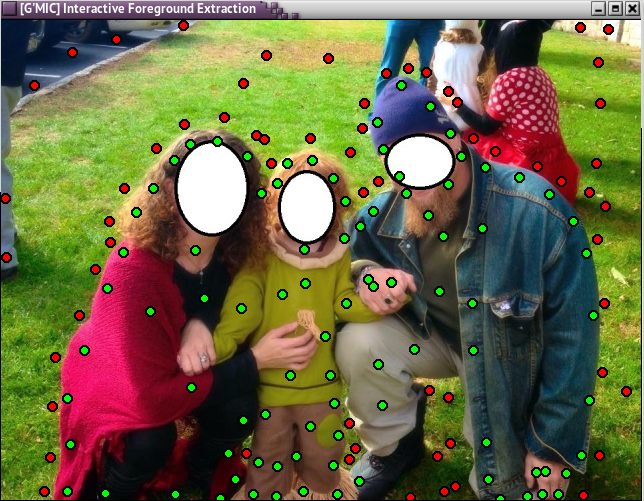
After you get your gmic installed, open your picture with Gimp, it will come up with a message to convert your image to RGB mode, click convert.
go to Filters > GMIC, In Gmic, go to Contours > click on extract foreground interactive.
When new screen comes up, click the Apply button and that will open up your working window.
This is done with all red dots and green dots. Left click for green dots (forground to save) right click for red dots (background to remove) When you think you have all your dots in place, press your space bar and it will show you that you background has been removed but it will show a shadow of what was there so you can go over the parts you missed. I missed part of his shoe so I went back and placed some more green dots there and hit space bar again. Keep doing this until you have it the way you are satisfied, then enter. Look at your picture in your layers dialogue and if you missed some of the artifacts, go back and do some more editing with the extract filter, or you can erase or use the lasso tool to clean it up.
BTW, if you should place a red dot where a green one belongs, just left click over the red dot and it will turn green.
I left some artifacts in to show what happens if you don't get them all, just go back and repair them.
Image

Image

Image

_________________
Image


Top
 Post subject: Re: [G'MIC] Smart foreground extraction tool
PostPosted: Fri Dec 05, 2014 6:09 am  (#202) 
Offline
Global Moderator
User avatar

Joined: Apr 01, 2012
Posts: 8457
Location: On the other side of your screen
I have the latest G'MIC 1.6.0.2 and have tried several times tonight to extract a foreground and get this error message after it crashes.

GIMP Error
Plug-in crashed: "gmic_gimp.exe"
(C:\Users\sallyanne\.gimp-2.8\plug-ins\gmic_gimp.exe)

Should mention, it crashed after I pressed the space bar....Shouldn't I have done that?

EDIT: would it have something to do with the size of the image? It is 1000+px wide (Although I wouldn't call that really large)

_________________
Image
Free Fun Photo Editing & resources
Poems from the Lord
Gimp Newby
Gimp version 3.2.4 and GMIC-Qt 4.0.2 OS :- Windows 10 Home 64


Top
 Post subject: Re: [G'MIC] Smart foreground extraction tool
PostPosted: Fri Dec 05, 2014 8:27 am  (#203) 
Offline
GimpChat Member

Joined: Mar 04, 2011
Posts: 2613
JustBasics wrote:
Can someone please post the actual menu commands?
The video in post #1 is fairly useless since he's going so fast and it's blurry.


You did look at my post here, did'nt you?
viewtopic.php?f=8&t=11391#p153916

and the video http://www.youtube.com/watch?v=qKSflRIaKIo&hd=1


Top
 Post subject: Re: [G'MIC] Smart foreground extraction tool
PostPosted: Mon Feb 09, 2015 11:33 am  (#204) 
Offline
Retired Staff
User avatar

Joined: May 22, 2008
Posts: 6946
Location: Somewhere in GIMP
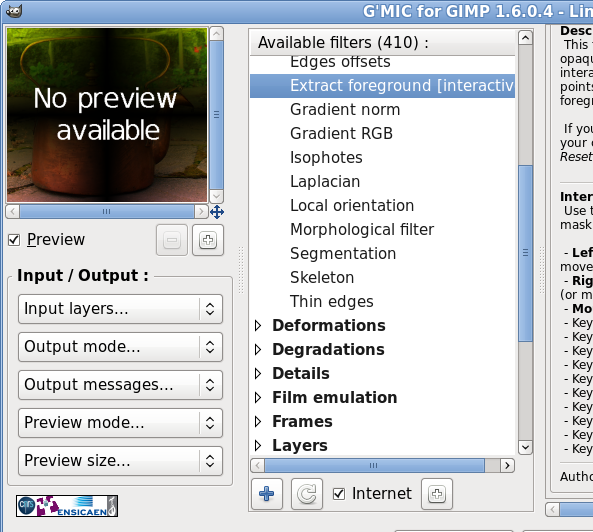
I get "No Preview Available," when I run the filter. Yes, the image is RGB. I even tried adding an alpha channel. I tried it with several pictures. G'MIC v 1.6.0.4 (most recent). Linux, 64-bit.

Image

_________________
Image
World War IV will be fought with sticks and stones. - Albert Einstein


Top
 Post subject: Re: [G'MIC] Smart foreground extraction tool
PostPosted: Mon Feb 09, 2015 11:55 am  (#205) 
Offline
GimpChat Member
User avatar

Joined: Jan 20, 2013
Posts: 14831
Location: roma, italy
Oregonian,
just read the description to know how to operate
(and also previous posts on the topic)

_________________
"Where am I ?"


Top
 Post subject: Re: [G'MIC] Smart foreground extraction tool
PostPosted: Mon Feb 09, 2015 12:10 pm  (#206) 
Offline
GimpChat Member
User avatar

Joined: Apr 07, 2010
Posts: 14182
After you open your image in GMIC, click apply to get the preview, Use green dots to mark what you want to save and red dots to extract. left click for green and right click for tred. If you put a red one by mistake, just click a green one over it. then when you are finished, press space bar, If you want to do more, you can before you you click ok, you can keep adding and removing the dots until you are satisfied. I can't finish this cuz my gmic locked up 3 times in a row.

viewtopic.php?p=153890#p153890

_________________
Image


Top
 Post subject: Re: [G'MIC] Smart foreground extraction tool
PostPosted: Mon Feb 09, 2015 12:59 pm  (#207) 
Offline
Retired Staff
User avatar

Joined: May 22, 2008
Posts: 6946
Location: Somewhere in GIMP
Thanks Molly. I'm working on it. I've crashed a couple times. I didn't see the info about pressing the space bar in the filter. I'll keep working at it.

PS: Love your new sig.

_________________
Image
World War IV will be fought with sticks and stones. - Albert Einstein


Top
 Post subject: Re: [G'MIC] Smart foreground extraction tool
PostPosted: Mon Feb 09, 2015 3:44 pm  (#208) 
Offline
GimpChat Member
User avatar

Joined: Apr 07, 2010
Posts: 14182
no it doesn't show pressing the space bar and then I saw when someone mentioned it and then it worked great. You can keep going back to the dots and keep pressing the space bar to edit it and when it is satisfactory, press ok.

Thanks about the sig. I made that two yrs ago.

_________________
Image


Top
 Post subject: Re: [G'MIC] Smart foreground extraction tool
PostPosted: Mon Feb 09, 2015 5:19 pm  (#209) 
Offline
Global Moderator
User avatar

Joined: May 16, 2010
Posts: 16164
I would like to add that you can move red and green dots also. (left mouse click and hold). If it's a red dot You will have to re color the dot after to suit your needs of course.

_________________
Image


Top
 Post subject: Re: [G'MIC] Smart foreground extraction tool
PostPosted: Mon Feb 09, 2015 5:58 pm  (#210) 
Offline
GimpChat Member
User avatar

Joined: Apr 07, 2010
Posts: 14182
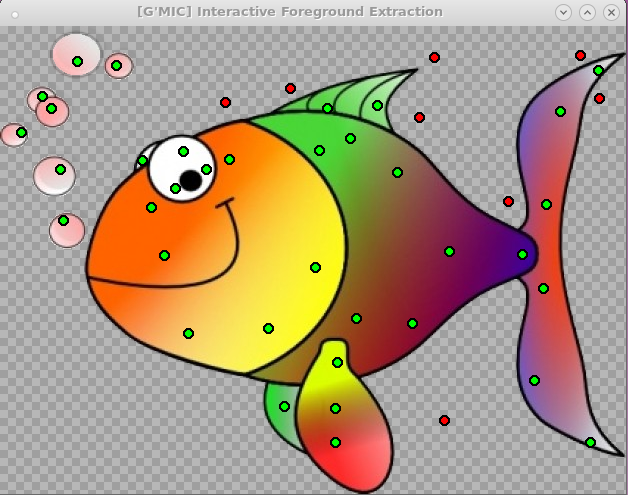
Yes, if you want to move a red dot just right click and drag. Here is an easy one to try, just one white background to remove.
Image

_________________
Image


Top
 Post subject: Re: [G'MIC] Smart foreground extraction tool
PostPosted: Tue Feb 10, 2015 12:13 am  (#211) 
Offline
Retired Staff
User avatar

Joined: May 22, 2008
Posts: 6946
Location: Somewhere in GIMP
Thanks! It was a good idea for me to start with something simple like the fish with a white bg. Gave me some practice using the filter. I see I messed up on that one large bubble. I must have hit the black border on it when I was putting red dots on the gray outside the bubbles.

Link to original image.

Now, on to something a little more complicated.
Image

_________________
Image
World War IV will be fought with sticks and stones. - Albert Einstein


Top
 Post subject: Re: [G'MIC] Smart foreground extraction tool
PostPosted: Tue Feb 10, 2015 1:12 am  (#212) 
Offline
GimpChat Member
User avatar

Joined: Nov 16, 2011
Posts: 5127
Location: Metro Vancouver, BC
Nice one O, that's a beauty. :bigthup

_________________
Image
Gimp 2.8.18, Linux, median user
Gimp Chat Tutorials Index
Spirit Bear (Kermode)


Top
 Post subject: Re: [G'MIC] Smart foreground extraction tool
PostPosted: Wed Feb 11, 2015 7:48 am  (#213) 
Offline
GimpChat Member
User avatar

Joined: Apr 07, 2010
Posts: 14182
Oregonian wrote:
Thanks! It was a good idea for me to start with something simple like the fish with a white bg. Gave me some practice using the filter. I see I messed up on that one large bubble. I must have hit the black border on it when I was putting red dots on the gray outside the bubbles.

Link to original image.

Now, on to something a little more complicated.
[ Image ]

Very good, when that happens you can go back to it if you haven't already pressed OK and put some green dots around the black border of bubble and that should bring it back.

_________________
Image


Top
 Post subject: Re: [G'MIC] Smart foreground extraction tool
PostPosted: Wed Feb 11, 2015 8:48 am  (#214) 
Offline
Retired Staff
User avatar

Joined: May 22, 2008
Posts: 6946
Location: Somewhere in GIMP
molly wrote:
Very good, when that happens you can go back to it if you haven't already pressed OK and put some green dots around the black border of bubble and that should bring it back.
Thanks, but I'd already saved and closed it in Gimp when I noticed it. I did fix it later manually but did not want to re-post it in here.

_________________
Image
World War IV will be fought with sticks and stones. - Albert Einstein


Top
 Post subject: Re: [G'MIC] Smart foreground extraction tool
PostPosted: Wed Feb 11, 2015 9:05 am  (#215) 
Offline
GimpChat Member
User avatar

Joined: Apr 07, 2010
Posts: 14182
No, I knew you had it saved, but when I watched Davids video where he was doing the geese, he did it over and over and over with the dots until he finally got i clean. The video should be in here some where.

_________________
Image


Top
 Post subject: Re: [G'MIC] Smart foreground extraction tool
PostPosted: Thu Feb 12, 2015 4:27 pm  (#216) 
Offline
GimpChat Member
User avatar

Joined: Sep 24, 2010
Posts: 12833
Just used G'MICs cool extraction tool for this one (yes, did some other things for blending, but still, the extraction tool helped a heck of a lot). :)

ref: http://cathleentarawhiti.deviantart.com ... -305623739

background: http://www.fontplay.com/freephotos/elev ... 708-41.jpg

Image

_________________
Lyle

Psalm 109:8

Image


Top
 Post subject: Re: [G'MIC] Smart foreground extraction tool
PostPosted: Thu Feb 12, 2015 4:36 pm  (#217) 
Offline
GimpChat Member
User avatar

Joined: Apr 07, 2010
Posts: 14182
Very nice Lyle. My extraction thing is broke.

_________________
Image


Top
 Post subject: Re: [G'MIC] Smart foreground extraction tool
PostPosted: Thu Feb 12, 2015 4:40 pm  (#218) 
Offline
GimpChat Member
User avatar

Joined: Sep 24, 2010
Posts: 12833
If you are using Ubuntu, then I can't help you Molly; Mac either. For Windows, if you installed the plugin in it's own directory (high; indeed required if you ask me), then all you have to do is delete the directory, create a new directory and copy the contents of the G'MIC plugin in that directory. :)

_________________
Lyle

Psalm 109:8

Image


Top
 Post subject: Re: [G'MIC] Smart foreground extraction tool
PostPosted: Fri Feb 13, 2015 2:24 am  (#219) 
Offline
GimpChat Member
User avatar

Joined: Dec 22, 2011
Posts: 399
lylejk wrote:
Just used G'MICs cool extraction tool for this one (yes, did some other things for blending, but still, the extraction tool helped a heck of a lot). :)

ref: http://cathleentarawhiti.deviantart.com ... -305623739

background: http://www.fontplay.com/freephotos/elev ... 708-41.jpg

[ Image ]

This is amazing...I really need to update GMic so I can use this :)

_________________
Image


Top
 Post subject: Re: [G'MIC] Smart foreground extraction tool
PostPosted: Fri Feb 13, 2015 5:54 am  (#220) 
Offline
Global Moderator
User avatar

Joined: Apr 01, 2012
Posts: 8457
Location: On the other side of your screen
molly wrote:
Very nice Lyle. My extraction thing is broke.

Mine is too...Not even succeeded with it once yet though and I have even tried small images.

_________________
Image
Free Fun Photo Editing & resources
Poems from the Lord
Gimp Newby
Gimp version 3.2.4 and GMIC-Qt 4.0.2 OS :- Windows 10 Home 64


Top
Post new topic Reply to topic  [ 256 posts ]  Go to page Previous  1 ... 8, 9, 10, 11, 12, 13  Next

All times are UTC - 5 hours [ DST ]


* Login  


Powered by phpBB3 © phpBB Group