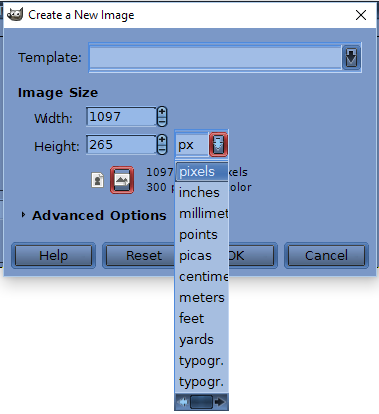
If it is going to be printed, then providing there is no other reson for a smaller canvas, (eg small photographs that will never print at high quality) Go for 3425 x 825 pix @ 300 ppi
Going back to the first post:
Quote:
...when I put the measurements in the resulting canvas at 100 percent only looks about half of what it should be. Do I need to change it somewhere else to get the proper dimensions?
Gimp uses pixels, The default setting top of the view menu is
dot-for-dot on This means each pixel on the canvas equals a pixel on your computor monitor.
Turn that off and at zoom 100% the image on your monitor equals how it will print. Try that just to see how it works, then turn dot-for-dot back on, it is the mode you need.
An actual photo of my monitor with dot-for-dot off and a ruler measuring the canvas, if you are using a laptop, you might not get 29 cm. to fit
Attachment:
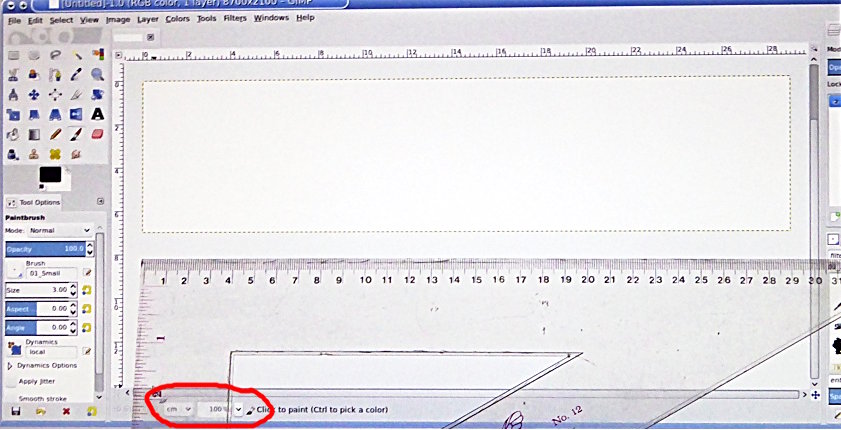 dot-for-dot-off.jpg [ 95.57 KiB | Viewed 3043 times ]
Quote:
..Don't know why feet, metres and yards are there though...
Well, some people might be making posters / banners, even billboards and because they are viewed at a distance a suitable ppi might only be 30 or 40. Gimp can do that as well

 Login
 Register
 Tweets
 FAQ
 Advanced Search