It is currently Mon Nov 09, 2026 11:48 pm


All times are UTC - 5 hours [ DST ]


Post new topic Reply to topic  [ 9 posts ] 
Author Message
 Post subject: Dimensions
PostPosted: Mon Apr 18, 2016 4:31 am  (#1) 
Offline
Global Moderator
User avatar

Joined: Apr 01, 2012
Posts: 8501
Location: On the other side of your screen
GIMP Version: 2.8.10
Operating System: Windows
OS Version: 10 Home
GIMP Experience: New User


I have to make an image of 7cm x 29cm and when I put the measurements in the resulting canvas at 100 percent only looks about half of what it should be. Do I need to change it somewhere else to get the proper dimensions?

_________________
Image
Free Fun Photo Editing & resources
Poems from the Lord
Gimp Newby
Gimp version 3.2.8 and GMIC-Qt 4.0.2 OS :- Windows 10 Home 64


Share on Facebook Share on Twitter Share on Orkut Share on Digg Share on MySpace Share on Delicious Share on Technorati
Top
 Post subject: Re: Dimensions
PostPosted: Mon Apr 18, 2016 5:01 am  (#2) 
Offline
Administrator
User avatar

Joined: Aug 10, 2012
Posts: 14268
Location: Native to NYC living in Arizona, Gimp 2.8 - 3.0, Win 11 PC.
sallyanne wrote:
GIMP Version: 2.8.10
Operating System: Windows
OS Version: 10 Home
GIMP Experience: New User


I have to make an image of 7cm x 29cm and when I put the measurements in the resulting canvas at 100 percent only looks about half of what it should be. Do I need to change it somewhere else to get the proper dimensions?

7cm in pixels= 264.566929134
29cm in pixels= 1096.062992126

Gimp doesn't count fractions of pixels and will round it to the nearest pixel.

I got the cm to pixels information here...
http://www.unitconversion.org/typograph ... rsion.html

_________________
Image
"A wise man learns more from a foolish question than a fool can learn from a wise answer"
Image


Top
 Post subject: Re: Dimensions
PostPosted: Mon Apr 18, 2016 5:09 am  (#3) 
Offline
Global Moderator
User avatar

Joined: Apr 01, 2012
Posts: 8501
Location: On the other side of your screen
Thanks Wallace. I hadn't checked google yet. was hoping someone would give me a faster answer.

_________________
Image
Free Fun Photo Editing & resources
Poems from the Lord
Gimp Newby
Gimp version 3.2.8 and GMIC-Qt 4.0.2 OS :- Windows 10 Home 64


Top
 Post subject: Re: Dimensions
PostPosted: Mon Apr 18, 2016 5:15 am  (#4) 
Offline
Administrator
User avatar

Joined: Aug 10, 2012
Posts: 14268
Location: Native to NYC living in Arizona, Gimp 2.8 - 3.0, Win 11 PC.
sallyanne wrote:
Thanks Wallace. I hadn't checked google yet. was hoping someone would give me a faster answer.

Try to create the canvas using pixels and see if that's any better.
It seems to me, that you're looking to create a tall and thin canvas, is this correct?

_________________
Image
"A wise man learns more from a foolish question than a fool can learn from a wise answer"
Image


Top
 Post subject: Re: Dimensions
PostPosted: Mon Apr 18, 2016 5:32 am  (#5) 
Offline
GimpChat Member

Joined: Mar 04, 2011
Posts: 2629
Hate to break the illusion but Gimp works in pixels not real world units.

The conversion to cms really comes in when printing is involved, where for quality, a higher pixels-per-inch (PPI - historically inches are used) is required.

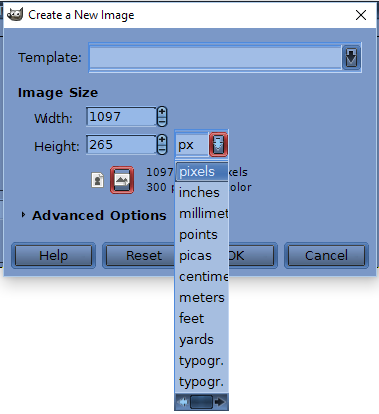
example: making a new canvas you can have anything from typically
72 ppi 199 x 822 pix to
300 ppi 827 x 3425 pix and anything in between or over.

Attachment:
newcanvas.jpg
newcanvas.jpg [ 48.43 KiB | Viewed 3111 times ]


So the real question is, What is the purpose of the image?


Top
 Post subject: Re: Dimensions
PostPosted: Mon Apr 18, 2016 5:53 am  (#6) 
Offline
Administrator
User avatar

Joined: Aug 10, 2012
Posts: 14268
Location: Native to NYC living in Arizona, Gimp 2.8 - 3.0, Win 11 PC.
rich2005 wrote:
Hate to break the illusion but Gimp works in pixels not real world units.

The conversion to cms really comes in when printing is involved, where for quality, a higher pixels-per-inch (PPI - historically inches are used) is required.

example: making a new canvas you can have anything from typically
72 ppi 199 x 822 pix to
300 ppi 827 x 3425 pix and anything in between or over.

Attachment:
newcanvas.jpg


So the real question is, What is the purpose of the image?

Thanks Rich2005. ;)

_________________
Image
"A wise man learns more from a foolish question than a fool can learn from a wise answer"
Image


Top
 Post subject: Re: Dimensions
PostPosted: Mon Apr 18, 2016 7:24 am  (#7) 
Offline
Global Moderator
User avatar

Joined: Apr 01, 2012
Posts: 8501
Location: On the other side of your screen
landscape Wallace, Not portrait.
@ rich it is to be this size when I am finished. I am to wrap it around a small tin bucket.
I figured since it gives the option when creating a new image you could do it in centimetres. Don't know why feet, metres and yards are there though.
Image

_________________
Image
Free Fun Photo Editing & resources
Poems from the Lord
Gimp Newby
Gimp version 3.2.8 and GMIC-Qt 4.0.2 OS :- Windows 10 Home 64


Top
 Post subject: Re: Dimensions
PostPosted: Mon Apr 18, 2016 9:37 am  (#8) 
Offline
GimpChat Member

Joined: Mar 04, 2011
Posts: 2629
If it is going to be printed, then providing there is no other reson for a smaller canvas, (eg small photographs that will never print at high quality) Go for 3425 x 825 pix @ 300 ppi

Going back to the first post:

Quote:
...when I put the measurements in the resulting canvas at 100 percent only looks about half of what it should be. Do I need to change it somewhere else to get the proper dimensions?


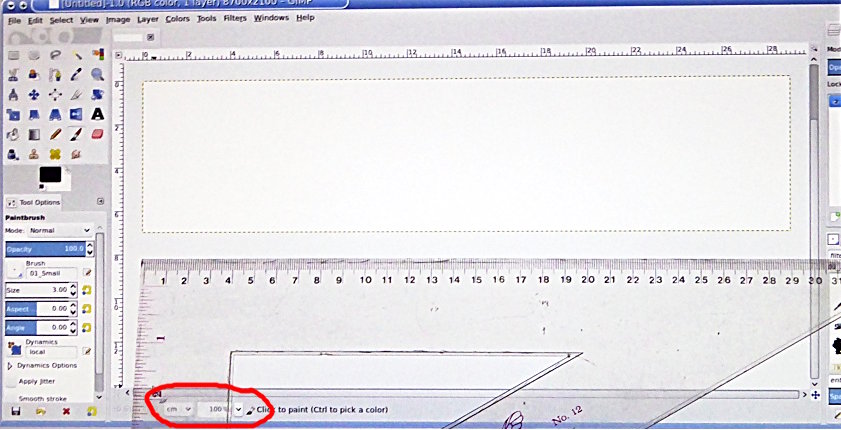
Gimp uses pixels, The default setting top of the view menu is dot-for-dot on This means each pixel on the canvas equals a pixel on your computor monitor.

Turn that off and at zoom 100% the image on your monitor equals how it will print. Try that just to see how it works, then turn dot-for-dot back on, it is the mode you need.

An actual photo of my monitor with dot-for-dot off and a ruler measuring the canvas, if you are using a laptop, you might not get 29 cm. to fit

Attachment:
dot-for-dot-off.jpg
dot-for-dot-off.jpg [ 95.57 KiB | Viewed 3050 times ]


Quote:
..Don't know why feet, metres and yards are there though...


Well, some people might be making posters / banners, even billboards and because they are viewed at a distance a suitable ppi might only be 30 or 40. Gimp can do that as well ;)


Top
 Post subject: Re: Dimensions
PostPosted: Mon Apr 18, 2016 10:15 am  (#9) 
Offline
Global Moderator
User avatar

Joined: Apr 01, 2012
Posts: 8501
Location: On the other side of your screen
I ended up doing one of just the third of the width
Can put three around then if they want.

Thanks rich :)

_________________
Image
Free Fun Photo Editing & resources
Poems from the Lord
Gimp Newby
Gimp version 3.2.8 and GMIC-Qt 4.0.2 OS :- Windows 10 Home 64


Top
Post new topic Reply to topic  [ 9 posts ] 

All times are UTC - 5 hours [ DST ]


* Login  


Powered by phpBB3 © phpBB Group