It is currently Wed Nov 11, 2026 10:52 pm


All times are UTC - 5 hours [ DST ]


Post new topic Reply to topic  [ 50 posts ]  Go to page Previous  1, 2, 3
Author Message
 Post subject: Re: SOTAChrome
PostPosted: Mon May 02, 2016 6:26 am  (#41) 
Offline
GimpChat Member

Joined: Mar 04, 2011
Posts: 2629
@RJKD

I can see the problem from your screenshot, for some reason you have lost the layer mask.
Are you filling it for some reason?

This in Win7 Gimp 2.8.16 You can see the highlight layer there circled

Attachment:
sota-1.jpg
sota-1.jpg [ 92.91 KiB | Viewed 1962 times ]


It was mentioned earlier that this script goes way back, and as it happens someone asked about old Gimp versions. This Gimp 1.2.5 in a WinXP VM. No real difference in the result.

Attachment:
sota-0.jpg
sota-0.jpg [ 124.15 KiB | Viewed 1962 times ]


I have been doing a bit more dabbling with the bush setting in the script and AFAIK it makes no difference what brush is called by the script. Old set or new. Use anything and the result is the same.


Top
 Post subject: Re: SOTAChrome
PostPosted: Mon May 02, 2016 9:31 am  (#42) 
Offline
Script Coder
User avatar

Joined: Jun 22, 2010
Posts: 1171
Location: Here and there
Well I have found where the problem happens:
    (set! layer2 (car (gimp-layer-copy layer1 TRUE)))
    (gimp-image-insert-layer img layer2 0 0)
    (gimp-context-set-brush (brush brush-size))
    (gimp-context-set-foreground '(255 255 255))
    (gimp-edit-stroke layer-mask)

It's where the script creates the layer-mask for the Highlight layer and specifically when it tries to stroke the selection to make the white area bigger.

I've made it work by doing it differently:
    (set! layer2 (car (gimp-layer-copy layer1 TRUE)))
    (gimp-image-insert-layer img layer2 0 0)
;    (gimp-context-set-brush (brush brush-size))
;    (gimp-context-set-foreground '(255 255 255))
;    (gimp-edit-stroke layer-mask)
    (gimp-selection-grow img (/ brush-size 2))
    (gimp-edit-fill layer-mask BACKGROUND-FILL)
    (gimp-selection-shrink img (/ brush-size 2))

Here I've grown the selection and filled the new selection with the current background colour, then shrunk the selection again because it's then used to create the drop shadow.

Attachment:
Untitled.png
Untitled.png [ 105.53 KiB | Viewed 1948 times ]


Kevin


Top
 Post subject: Re: SOTAChrome
PostPosted: Mon May 02, 2016 2:25 pm  (#43) 
Offline
GimpChat Member
User avatar

Joined: Mar 15, 2016
Posts: 180
Location: USA
paynekj wrote:
Well I have found where the problem happens:
    (set! layer2 (car (gimp-layer-copy layer1 TRUE)))
    (gimp-image-insert-layer img layer2 0 0)
    (gimp-context-set-brush (brush brush-size))
    (gimp-context-set-foreground '(255 255 255))
    (gimp-edit-stroke layer-mask)

It's where the script creates the layer-mask for the Highlight layer and specifically when it tries to stroke the selection to make the white area bigger.

I've made it work by doing it differently:
    (set! layer2 (car (gimp-layer-copy layer1 TRUE)))
    (gimp-image-insert-layer img layer2 0 0)
;    (gimp-context-set-brush (brush brush-size))
;    (gimp-context-set-foreground '(255 255 255))
;    (gimp-edit-stroke layer-mask)
    (gimp-selection-grow img (/ brush-size 2))
    (gimp-edit-fill layer-mask BACKGROUND-FILL)
    (gimp-selection-shrink img (/ brush-size 2))

Here I've grown the selection and filled the new selection with the current background colour, then shrunk the selection again because it's then used to create the drop shadow.
[attachment cut]
Kevin


Works for me! Thanks, paynekj!

Image

:jumpclap

_________________
Image
(Never stop learning!)


Top
 Post subject: Re: SOTAChrome
PostPosted: Mon May 02, 2016 3:06 pm  (#44) 
Offline
GimpChat Member
User avatar

Joined: Jul 06, 2013
Posts: 2666
Location: California
paynekj wrote:
Well I have found where the problem happens:
    (set! layer2 (car (gimp-layer-copy layer1 TRUE)))
    (gimp-image-insert-layer img layer2 0 0)
    (gimp-context-set-brush (brush brush-size))
    (gimp-context-set-foreground '(255 255 255))
    (gimp-edit-stroke layer-mask)

It's where the script creates the layer-mask for the Highlight layer and specifically when it tries to stroke the selection to make the white area bigger.

I've made it work by doing it differently:
    (set! layer2 (car (gimp-layer-copy layer1 TRUE)))
    (gimp-image-insert-layer img layer2 0 0)
;    (gimp-context-set-brush (brush brush-size))
;    (gimp-context-set-foreground '(255 255 255))
;    (gimp-edit-stroke layer-mask)
    (gimp-selection-grow img (/ brush-size 2))
    (gimp-edit-fill layer-mask BACKGROUND-FILL)
    (gimp-selection-shrink img (/ brush-size 2))

Here I've grown the selection and filled the new selection with the current background colour, then shrunk the selection again because it's then used to create the drop shadow.

Attachment:
Untitled.png


Kevin

Since I am not a script coder, is there a way to have an updated version of this script for 2.8.16 since Gimp 2.9 isn't even out yet?


Top
 Post subject: Re: SOTAChrome
PostPosted: Mon May 02, 2016 9:37 pm  (#45) 
Offline
GimpChat Member
User avatar

Joined: Mar 15, 2016
Posts: 180
Location: USA
Quote:
Since I am not a script coder, is there a way to have an updated version of this script for 2.8.16 since Gimp 2.9 isn't even out yet?


I just copied the changed part into the script (in the appropriate spot) and it worked for me.

:coolthup

_________________
Image
(Never stop learning!)


Top
 Post subject: Re: SOTAChrome
PostPosted: Mon May 02, 2016 10:04 pm  (#46) 
Offline
GimpChat Member
User avatar

Joined: Jul 06, 2013
Posts: 2666
Location: California
Meemaw wrote:
Quote:
Since I am not a script coder, is there a way to have an updated version of this script for 2.8.16 since Gimp 2.9 isn't even out yet?


I just copied the changed part into the script (in the appropriate spot) and it worked for me.

:coolthup


I'll try that but I'm not sure what to save it as since it opens in word pad. I'm given option formats such as Rich Text Format, Open Office XML Document, Plain Text, Text Document-MS DOS Format, Unicode Text Document, OpenDocument, and other formats.


Top
 Post subject: Re: SOTAChrome
PostPosted: Tue May 03, 2016 5:37 am  (#47) 
Offline
GimpChat Member

Joined: Mar 04, 2011
Posts: 2629
Quote:
..I'll try that but I'm not sure what to save it as since it opens in word pad. I'm given option formats such as Rich Text Format, Open Office XML Document, Plain Text, Text Document-MS DOS Format, Unicode Text Document, OpenDocument, and other formats.


Ouch, you do not want to use any of those, Windows comes with poor set of tools.

You need something like this one https://notepad-plus-plus.org/

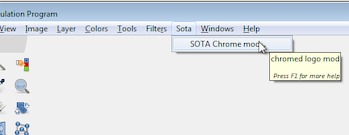
Anyway to help you along the way, this time tried and working in Win7 / Gimp 2.8.16 All thanks to Kevin.

attached: remember to unzip it. Pop it into your Gimp profile scripts folder C:\Users\your-name\.gimp-2.8\scripts

To avoid confusion with the existing script it is here:
Attachment:
sotamod.jpg
sotamod.jpg [ 8.32 KiB | Viewed 1894 times ]

Not the best of places, a new location is easily fixed.


Attachments:
sota-chrome-logo-mod.scm.zip [2.23 KiB]
Downloaded 105 times
Top
 Post subject: Re: SOTAChrome
PostPosted: Tue May 03, 2016 11:40 am  (#48) 
Offline
GimpChat Member
User avatar

Joined: Apr 09, 2016
Posts: 580
Location: Sheffield UK
Hey guys - you ROCK! I'm still getting my head round how to best post on GimpChat, however, just wanted to a huge thanx for the 'new' SOTA script - works great. I'm still a bit overwhelmed at how generous you guys are :hi5

_________________
Image


Top
 Post subject: Re: SOTAChrome
PostPosted: Tue May 03, 2016 12:11 pm  (#49) 
Offline
GimpChat Member
User avatar

Joined: Jul 06, 2013
Posts: 2666
Location: California
rich2005 wrote:
Quote:
..I'll try that but I'm not sure what to save it as since it opens in word pad. I'm given option formats such as Rich Text Format, Open Office XML Document, Plain Text, Text Document-MS DOS Format, Unicode Text Document, OpenDocument, and other formats.


Ouch, you do not want to use any of those, Windows comes with poor set of tools.

You need something like this one https://notepad-plus-plus.org/

Anyway to help you along the way, this time tried and working in Win7 / Gimp 2.8.16 All thanks to Kevin.

attached: remember to unzip it. Pop it into your Gimp profile scripts folder C:\Users\your-name\.gimp-2.8\scripts

To avoid confusion with the existing script it is here:
Attachment:
sotamod.jpg

Not the best of places, a new location is easily fixed.


Thank you Rich2005. I have notepad as well, but the script will only open in word pad.


Top
 Post subject: Re: SOTAChrome
PostPosted: Tue May 03, 2016 12:51 pm  (#50) 
Offline
GimpChat Member
User avatar

Joined: Jul 06, 2013
Posts: 2666
Location: California
Now that have it working in the new location, is it okay to delete the old plugin?


Top
Post new topic Reply to topic  [ 50 posts ]  Go to page Previous  1, 2, 3

All times are UTC - 5 hours [ DST ]


* Login  


Powered by phpBB3 © phpBB Group