Quote:
..I'll try that but I'm not sure what to save it as since it opens in word pad. I'm given option formats such as Rich Text Format, Open Office XML Document, Plain Text, Text Document-MS DOS Format, Unicode Text Document, OpenDocument, and other formats.
Ouch, you do not want to use any of those, Windows comes with poor set of tools.
You need something like this one
https://notepad-plus-plus.org/Anyway to help you along the way, this time tried and working in Win7 / Gimp 2.8.16 All thanks to Kevin.
attached: remember to unzip it. Pop it into your Gimp profile scripts folder
C:\Users\your-name\.gimp-2.8\scriptsTo avoid confusion with the existing script it is here:
Attachment:
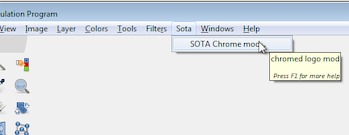 sotamod.jpg [ 8.32 KiB | Viewed 1893 times ]
Not the best of places, a new location is easily fixed.
 Login
 Register
 Tweets
 FAQ
 Advanced Search