It is currently Thu Jul 23, 2026 9:59 am


All times are UTC - 5 hours [ DST ]


Post new topic Reply to topic  [ 24 posts ]  Go to page Previous  1, 2
Author Message
 Post subject: Re: wish to learn something interesting
PostPosted: Sun May 29, 2016 8:40 pm  (#21) 
Offline
Script Coder
User avatar

Joined: May 07, 2014
Posts: 4510
Location: Canada
you should download G'MIC and try it yourself it's pretty easy.

_________________
TinT


Top
 Post subject: Re: wish to learn something interesting
PostPosted: Thu Jun 09, 2016 8:22 am  (#22) 
Offline
GimpChat Member

Joined: Dec 10, 2013
Posts: 106
trandoductin wrote:
you should download G'MIC and try it yourself it's pretty easy.


hhahahaha!!! Great!! I've finally made it!! It's really easy and your instruction is very clear and direct, thanks so much!!!!


Top
 Post subject: Re: wish to learn something interesting
PostPosted: Tue Jun 14, 2016 2:43 am  (#23) 
Offline
GimpChat Member

Joined: Dec 10, 2013
Posts: 106
trandoductin wrote:
you should download G'MIC and try it yourself it's pretty easy.


Hi I've been using the same steps you suggested with most photos it works great!!

However, for some photos it does not work very well. Any advice? I want to improve my skills!

For example, when I try to work with USD 100 cash (sample here)

See my work


The face does not mix very well. Anything I can do to improve that?
Attachment:
03-dollars-2.jpg
03-dollars-2.jpg [ 92.43 KiB | Viewed 1185 times ]


Attachments:
03-dollars.jpg
03-dollars.jpg [ 93.65 KiB | Viewed 1187 times ]
Top
 Post subject: Re: wish to learn something interesting
PostPosted: Tue Jun 14, 2016 5:22 pm  (#24) 
Offline
Script Coder
User avatar

Joined: May 07, 2014
Posts: 4510
Location: Canada
This one is hard because the money's face is pixelized with different colors of pixels if you zoom in you'll see it's different
from the source image which is smooth in colors.

The best i could do is try to match by changing the contrast a bit and desaturate it before using Layers blend seamless.
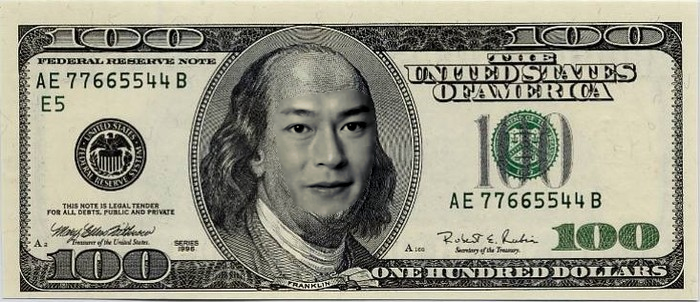
Image

UPDATE: I tried a little more, this one is done by cloning the money's forehead to fill the a new layer that cover's the source's face then used grain extract on top of source's face to get the different random pixel color texture. then hid the money layer, then new from visible and used the new from visible to blend with money's image.
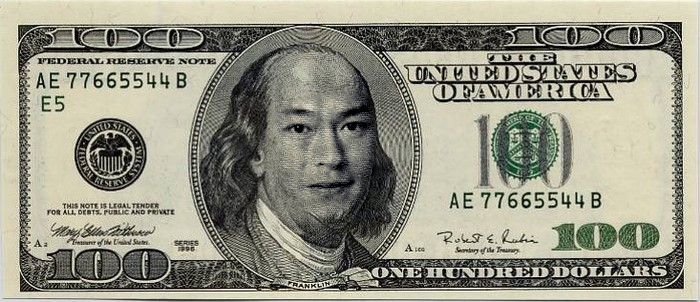
Image

_________________
TinT


Top
Post new topic Reply to topic  [ 24 posts ]  Go to page Previous  1, 2

All times are UTC - 5 hours [ DST ]


* Login  


Powered by phpBB3 © phpBB Group
