It is currently Mon Sep 21, 2026 1:52 am


All times are UTC - 5 hours [ DST ]


Post new topic Reply to topic  [ 4 posts ] 
Author Message
 Post subject: Can I add dropshadows/shadows to images?
PostPosted: Sun Jan 01, 2017 11:58 pm  (#1) 
Offline
GimpChat Member
User avatar

Joined: Dec 30, 2016
Posts: 12
GIMP Version: 2.8.14
Operating System: Windows
GIMP Experience: New User


Can I, and if so how do I add a shadow/drop shadow to images? Or do I need a plugin/script for this action?

_________________
Image


Share on Facebook Share on Twitter Share on Orkut Share on Digg Share on MySpace Share on Delicious Share on Technorati
Top
 Post subject: Re: Can I add dropshadows/shadows to images?
PostPosted: Mon Jan 02, 2017 12:13 am  (#2) 
Offline
Administrator
User avatar

Joined: Aug 10, 2012
Posts: 14206
Location: Native to NYC living in Arizona, Gimp 2.8 - 3.0, Win 11 PC.
Na11 wrote:
GIMP Version: 2.8.14
Operating System: Windows
GIMP Experience: New User


Can I, and if so how do I add a shadow/drop shadow to images? Or do I need a plugin/script for this action?

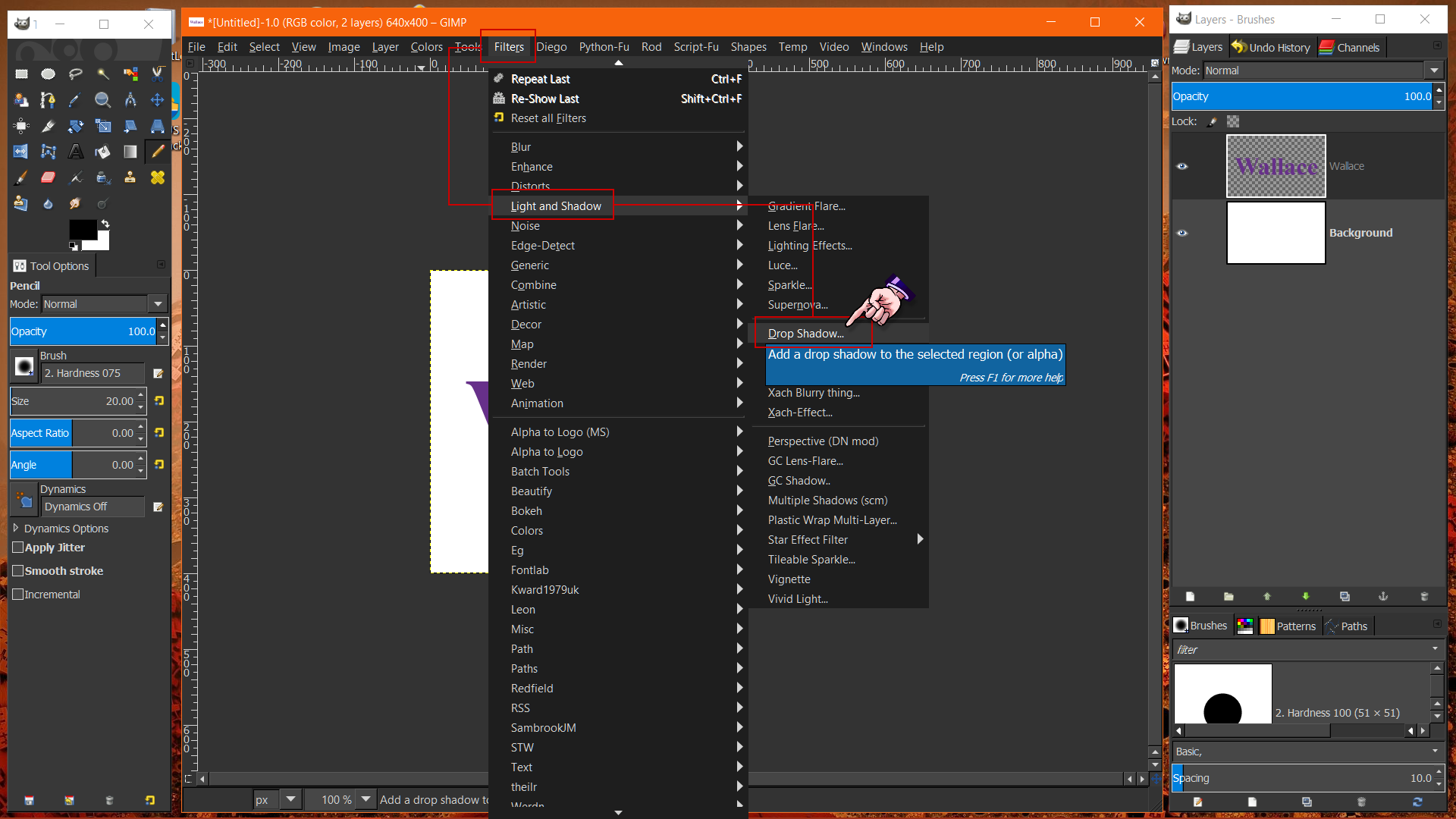
Installing a plugin/script isn't required.
You can find this filter in the image menu under,
FiltersLight and ShadowDrop Shadow.

Image

Below is an image of the Drop Shadow dialog,
and it being applied with the default settings as seen.


Image

_________________
Image
"A wise man learns more from a foolish question than a fool can learn from a wise answer"
Image


Top
 Post subject: Re: Can I add dropshadows/shadows to images?
PostPosted: Mon Jan 02, 2017 7:43 am  (#3) 
Offline
GimpChat Member

Joined: Mar 04, 2011
Posts: 2615
@Na11 Plenty how-to's if you search.

This is my take on the subject, both a regular drop shadow and creating a shadow for a graphic.

https://youtu.be/5KzRyd1BqXg 6 minutes


Top
 Post subject: Re: Can I add dropshadows/shadows to images?
PostPosted: Mon Jan 02, 2017 9:11 pm  (#4) 
Offline
GimpChat Member
User avatar

Joined: Dec 30, 2016
Posts: 12
Thanks again. I know how to add dropshadows/shadows now.

_________________
Image


Top
Post new topic Reply to topic  [ 4 posts ] 

All times are UTC - 5 hours [ DST ]


* Login  


Powered by phpBB3 © phpBB Group