It is currently Thu Sep 24, 2026 4:41 pm


All times are UTC - 5 hours [ DST ]


Post new topic Reply to topic  [ 4 posts ] 
Author Message
 Post subject: Can I add dropshadows/shadows to images?
PostPosted: Sun Jan 01, 2017 11:58 pm  (#1) 
Offline
GimpChat Member
User avatar

Joined: Dec 30, 2016
Posts: 12
GIMP Version: 2.8.14
Operating System: Windows
GIMP Experience: New User


Can I, and if so how do I add a shadow/drop shadow to images? Or do I need a plugin/script for this action?

_________________
Image


Share on Facebook Share on Twitter Share on Orkut Share on Digg Share on MySpace Share on Delicious Share on Technorati
Top
 Post subject: Re: Can I add dropshadows/shadows to images?
PostPosted: Mon Jan 02, 2017 12:13 am  (#2) 
Offline
Administrator
User avatar

Joined: Aug 10, 2012
Posts: 14207
Location: Native to NYC living in Arizona, Gimp 2.8 - 3.0, Win 11 PC.
Na11 wrote:
GIMP Version: 2.8.14
Operating System: Windows
GIMP Experience: New User


Can I, and if so how do I add a shadow/drop shadow to images? Or do I need a plugin/script for this action?

Installing a plugin/script isn't required.
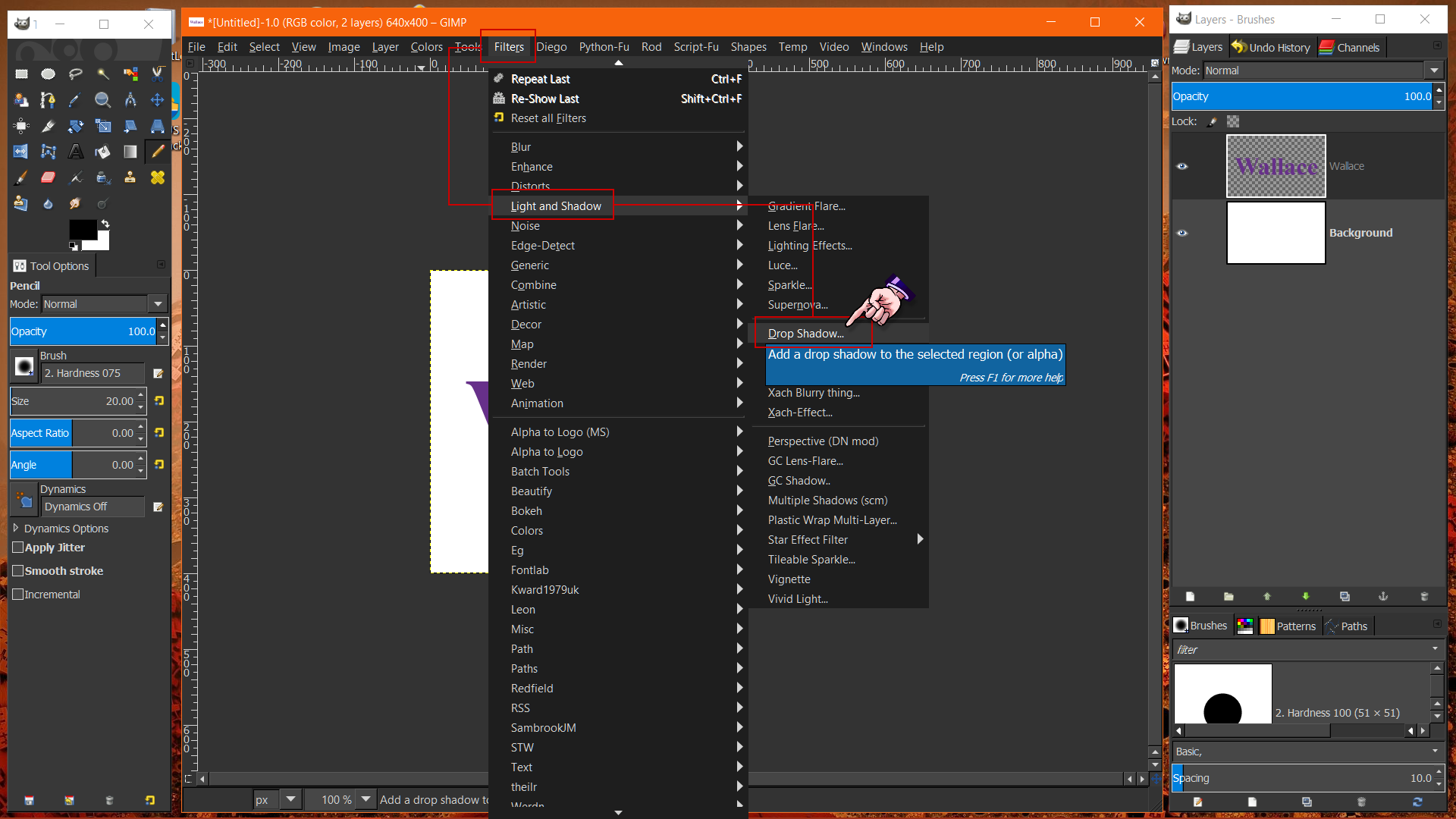
You can find this filter in the image menu under,
Filters → Light and Shadow → Drop Shadow.

Image

Below is an image of the Drop Shadow dialog,
and it being applied with the default settings as seen.


Image

_________________
Image
"A wise man learns more from a foolish question than a fool can learn from a wise answer"
Image


Top
 Post subject: Re: Can I add dropshadows/shadows to images?
PostPosted: Mon Jan 02, 2017 7:43 am  (#3) 
Offline
GimpChat Member

Joined: Mar 04, 2011
Posts: 2615
@Na11 Plenty how-to's if you search.

This is my take on the subject, both a regular drop shadow and creating a shadow for a graphic.

https://youtu.be/5KzRyd1BqXg 6 minutes


Top
 Post subject: Re: Can I add dropshadows/shadows to images?
PostPosted: Mon Jan 02, 2017 9:11 pm  (#4) 
Offline
GimpChat Member
User avatar

Joined: Dec 30, 2016
Posts: 12
Thanks again. I know how to add dropshadows/shadows now.

_________________
Image


Top
Post new topic Reply to topic  [ 4 posts ] 

All times are UTC - 5 hours [ DST ]


* Login  


Powered by phpBB3 © phpBB Group