It is currently Sun Nov 08, 2026 11:24 am


All times are UTC - 5 hours [ DST ]


Post new topic Reply to topic  [ 25 posts ]  Go to page 1, 2  Next
Author Message
 Post subject: Error Can not open JPG Files
PostPosted: Tue Oct 31, 2017 12:10 am  (#1) 
Offline
GimpChat Member

Joined: Mar 06, 2015
Posts: 308
GIMP Version: 2.8.22
Operating System: Windows
OS Version: Win 10
GIMP Experience: Basic Level

List any relevant plug-ins or scripts:
G'mic 2.1.1
G'mic 2.1.3


List any ERROR messages you received:
I add the Error message as a picture.


Hello Gimp Users

I can not open JPG files.
So i need your help.

Thanks
Doron.


Attachments:
JPG error.jpg
JPG error.jpg [ 21.55 KiB | Viewed 5770 times ]
Share on Facebook Share on Twitter Share on Orkut Share on Digg Share on MySpace Share on Delicious Share on Technorati
Top
 Post subject: Re: Error Can not open JPG Files
PostPosted: Tue Oct 31, 2017 12:55 am  (#2) 
Offline
Administrator
User avatar

Joined: Aug 10, 2012
Posts: 14265
Location: Native to NYC living in Arizona, Gimp 2.8 - 3.0, Win 11 PC.
doronf2 wrote:
GIMP Version: 2.8.22
Operating System: Windows
OS Version: Win 10
GIMP Experience: Basic Level

List any relevant plug-ins or scripts:
G'mic 2.1.1
G'mic 2.1.3


List any ERROR messages you received:
I add the Error message as a picture.


Hello Gimp Users

I can not open JPG files.
So i need your help.

Thanks
Doron.

Does this happen with every JPG image?

For instance.
Does this happen with this attached sample image below.


Attachment:
File comment: Sample Image
wallace_62.ii.jpg
wallace_62.ii.jpg [ 1.39 MiB | Viewed 5761 times ]

_________________
Image
"A wise man learns more from a foolish question than a fool can learn from a wise answer"
Image


Top
 Post subject: Re: Error Can not open JPG Files
PostPosted: Tue Oct 31, 2017 1:11 am  (#3) 
Offline
GimpChat Member

Joined: Mar 06, 2015
Posts: 308
Hello Wallace

Thank you for the quick answer.
AND Yes the error came back again.

Doron.


Attachments:
JPG error 02.jpg
JPG error 02.jpg [ 72.67 KiB | Viewed 5757 times ]
Top
 Post subject: Re: Error Can not open JPG Files
PostPosted: Tue Oct 31, 2017 1:14 am  (#4) 
Offline
Administrator
User avatar

Joined: Aug 10, 2012
Posts: 14265
Location: Native to NYC living in Arizona, Gimp 2.8 - 3.0, Win 11 PC.
doronf2 wrote:
Hello Wallace

Thank you for the quick answer.
AND Yes the error came back again.

Doron.

Can you explain exactly how you're attempting to open these JPG images?

_________________
Image
"A wise man learns more from a foolish question than a fool can learn from a wise answer"
Image


Top
 Post subject: Re: Error Can not open JPG Files
PostPosted: Tue Oct 31, 2017 2:11 am  (#5) 
Offline
GimpChat Member

Joined: Mar 06, 2015
Posts: 308
Following your question I noticed
When I go in GIMP to : FILE --> OPEN
The gimp window does not display JPG files at all. OPPS OOPS.
So I open a program that display pictures and from that program I send the file to GIMP.

Doron.


Attachments:
20171031_090129_cr.jpg
20171031_090129_cr.jpg [ 2.99 MiB | Viewed 5748 times ]
Top
 Post subject: Re: Error Can not open JPG Files
PostPosted: Tue Oct 31, 2017 2:34 am  (#6) 
Offline
Administrator
User avatar

Joined: Aug 10, 2012
Posts: 14265
Location: Native to NYC living in Arizona, Gimp 2.8 - 3.0, Win 11 PC.
Can you check in your GIMP system folder in this location: GIMP 2\lib\gimp\2.0\plug-ins

You're looking for file,
like what's seen highlighted in the attached image below.
Do you have these files?
Especially the one named: file-jpeg.exe ?


Attachment:
File comment: File Example Image
file-jpeg_example.png
file-jpeg_example.png [ 163.9 KiB | Viewed 5743 times ]

_________________
Image
"A wise man learns more from a foolish question than a fool can learn from a wise answer"
Image


Top
 Post subject: Re: Error Can not open JPG Files
PostPosted: Tue Oct 31, 2017 2:41 am  (#7) 
Offline
GimpChat Member

Joined: Mar 06, 2015
Posts: 308
Yes the file is in the Folder.


Attachments:
JPG error 03.jpg
JPG error 03.jpg [ 161.96 KiB | Viewed 5739 times ]
Top
 Post subject: Re: Error Can not open JPG Files
PostPosted: Tue Oct 31, 2017 2:49 am  (#8) 
Offline
Administrator
User avatar

Joined: Aug 10, 2012
Posts: 14265
Location: Native to NYC living in Arizona, Gimp 2.8 - 3.0, Win 11 PC.
doronf2 wrote:
Yes the file is in the Folder.

Hmm...

Often times you can correct issues with GIMP,
by creating a new profile.

Do you know how to create a new GIMP User Profile,
without losing your brushes and other stuff from your current profile?

_________________
Image
"A wise man learns more from a foolish question than a fool can learn from a wise answer"
Image


Top
 Post subject: Re: Error Can not open JPG Files
PostPosted: Tue Oct 31, 2017 2:54 am  (#9) 
Offline
GimpChat Member

Joined: Mar 06, 2015
Posts: 308
No i do not how to create a new GIMP User Profile.

Do you recommend that I will uninstall Gimp.
Turn off and then turn on the computer.
Then I'll re-install GIMP ????

Doron


Top
 Post subject: Re: Error Can not open JPG Files
PostPosted: Tue Oct 31, 2017 3:00 am  (#10) 
Offline
GimpChat Member

Joined: Mar 06, 2015
Posts: 308
Dear Wallace

I have to go out to the car and drive to my appointment.
I'll be back late at night and read your continued help.
Thanks for all the help so far.
Doron.


Top
 Post subject: Re: Error Can not open JPG Files
PostPosted: Tue Oct 31, 2017 3:04 am  (#11) 
Offline
Script Coder
User avatar

Joined: Oct 25, 2010
Posts: 4812
doronf2 wrote:
No i do not how to create a new GIMP User Profile.

Do you recommend that I will uninstall Gimp.
Turn off and then turn on the computer.
Then I'll re-install GIMP ????

Doron


No, we just recommend that your rename your Gimp profile so that Gimp recreates a "fresh" one, and then if that works you can copy things (brushes, gradients...) from the old one to the new.

I would be curious to see the contents of the "pluginrc" file in your current profile though (because this is likely where the real problem is).

_________________
Image


Top
 Post subject: Re: Error Can not open JPG Files
PostPosted: Tue Oct 31, 2017 3:06 am  (#12) 
Offline
Administrator
User avatar

Joined: Aug 10, 2012
Posts: 14265
Location: Native to NYC living in Arizona, Gimp 2.8 - 3.0, Win 11 PC.
doronf2 wrote:
No i do not how to create a new GIMP User Profile.

Do you recommend that I will uninstall Gimp.
Turn off and then turn on the computer.
Then I'll re-install GIMP ????

Doron

Not yet time for a re-installation.
That is a last resort.

_________________
Image
"A wise man learns more from a foolish question than a fool can learn from a wise answer"
Image


Top
 Post subject: Re: Error Can not open JPG Files
PostPosted: Tue Oct 31, 2017 3:20 am  (#13) 
Offline
Administrator
User avatar

Joined: Aug 10, 2012
Posts: 14265
Location: Native to NYC living in Arizona, Gimp 2.8 - 3.0, Win 11 PC.
ofnuts wrote:
doronf2 wrote:
No i do not how to create a new GIMP User Profile.

Do you recommend that I will uninstall Gimp.
Turn off and then turn on the computer.
Then I'll re-install GIMP ????

Doron


No, we just recommend that your rename your Gimp profile so that Gimp recreates a "fresh" one, and then if that works you can copy things (brushes, gradients...) from the old one to the new.

I would be curious to see the contents of the "pluginrc" file in your current profile though (because this is likely where the real problem is).

Yes exactly!,
as ofnuts suggested.
:bigthup

Open the pluginrc file using any text editing program.
I used Note Pad and look for file-jpeg.exe within the text.


Attachment:
pluginrc_file.PNG
pluginrc_file.PNG [ 54.23 KiB | Viewed 2545 times ]

_________________
Image
"A wise man learns more from a foolish question than a fool can learn from a wise answer"
Image


Top
 Post subject: Re: Error Can not open JPG Files
PostPosted: Wed Nov 01, 2017 1:42 am  (#14) 
Offline
GimpChat Member

Joined: Mar 06, 2015
Posts: 308
I did not find any file in my PC with the name PLUGINRC .

May That is the problem that there is no such file on the computer?

Doron.


Top
 Post subject: Re: Error Can not open JPG Files
PostPosted: Wed Nov 01, 2017 1:50 am  (#15) 
Offline
Administrator
User avatar

Joined: Aug 10, 2012
Posts: 14265
Location: Native to NYC living in Arizona, Gimp 2.8 - 3.0, Win 11 PC.
doronf2 wrote:
I did not find any file in my PC with the name PLUGINRC .

May That is the problem that there is no such file on the computer?

Doron.

Are you absolutely sure that this file is missing?
If it is,
then you need to create a new GIMP User Profile.

_________________
Image
"A wise man learns more from a foolish question than a fool can learn from a wise answer"
Image


Top
 Post subject: Re: Error Can not open JPG Files
PostPosted: Wed Nov 01, 2017 1:56 am  (#16) 
Offline
GimpChat Member
User avatar

Joined: Jan 20, 2013
Posts: 14835
Location: roma, italy
You SHOULD find it in your user gimp-2.8 folder
Attachment:
where-pluginrc.PNG
where-pluginrc.PNG [ 29.44 KiB | Viewed 2531 times ]

_________________
"Where am I ?"


Top
 Post subject: Re: Error Can not open JPG Files
PostPosted: Wed Nov 01, 2017 2:20 am  (#17) 
Offline
Administrator
User avatar

Joined: Aug 10, 2012
Posts: 14265
Location: Native to NYC living in Arizona, Gimp 2.8 - 3.0, Win 11 PC.
dinasset wrote:
You SHOULD find it in your user gimp-2.8 folder
Attachment:
where-pluginrc.PNG

If this file is deleted or removed somehow.
GIMP will create another one to replace it.

There may be more to this then we think.

Creating a new Gimp User Profile,
may not correct the issue.
If GIMP is not generating this file,
then a fresh install of GIMP may be necessary.

_________________
Image
"A wise man learns more from a foolish question than a fool can learn from a wise answer"
Image


Top
 Post subject: Re: Error Can not open JPG Files
PostPosted: Wed Nov 01, 2017 3:24 am  (#18) 
Offline
GimpChat Member

Joined: Mar 06, 2015
Posts: 308
I find the file.

No JPEG Line inside the file !!

Doron


Attachments:
JPEG Error 04.jpg
JPEG Error 04.jpg [ 149.95 KiB | Viewed 2526 times ]
Top
 Post subject: Re: Error Can not open JPG Files
PostPosted: Wed Nov 01, 2017 3:34 am  (#19) 
Offline
Script Coder
User avatar

Joined: Oct 25, 2010
Posts: 4812
doronf2 wrote:
I find the file.

No JPEG Line inside the file !!

Doron

Have you got lines for file-png and file-gif? (also note that the names are in lowercase...)

_________________
Image


Top
 Post subject: Re: Error Can not open JPG Files
PostPosted: Wed Nov 01, 2017 3:36 am  (#20) 
Offline
Administrator
User avatar

Joined: Aug 10, 2012
Posts: 14265
Location: Native to NYC living in Arizona, Gimp 2.8 - 3.0, Win 11 PC.
doronf2 wrote:
I find the file.

No JPEG Line inside the file !!

Doron

With this new discovery.
It looks as though a new GIMP User Profile is in order.

If you simply change the name of your current GIMP User Profile.
GIMP will create a new profile the next time it's launched.

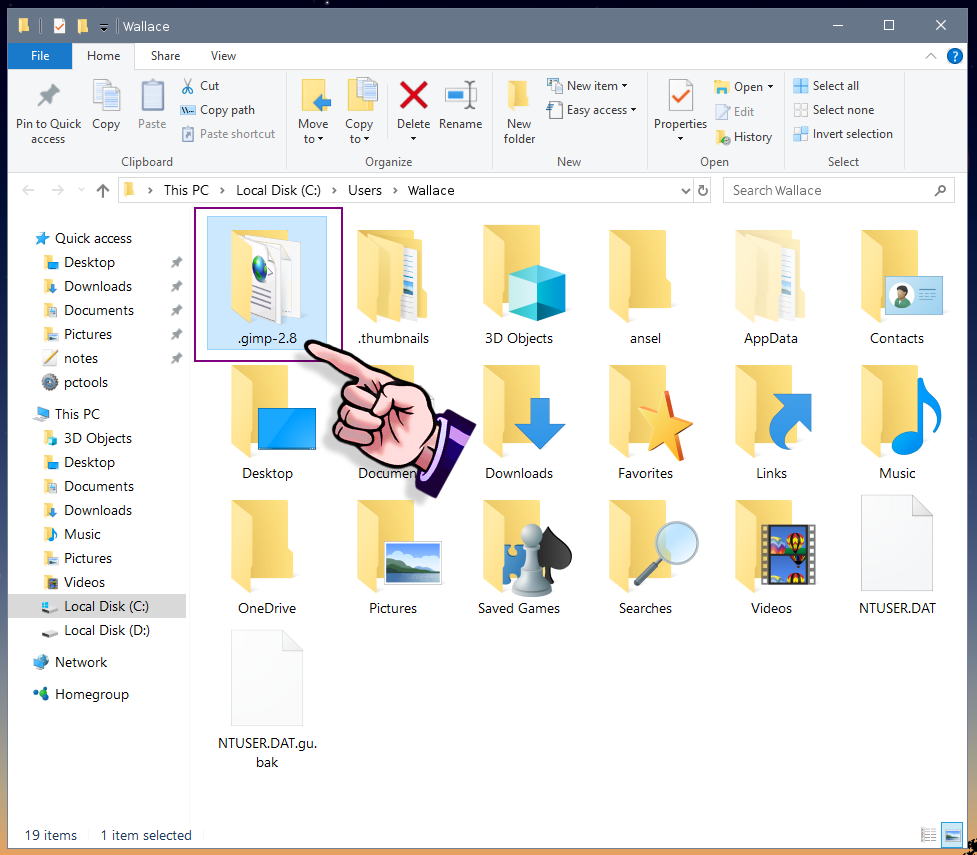
The image below shows which folder you would need to change the name of.

Image

You can just add the word "old" (without quotation marks) to the profile folder's name.
So that it would then be named .gimp-2.8old.
When you next open GIMP,
it will create a new profile,
with the name .gimp-2.8.

_________________
Image
"A wise man learns more from a foolish question than a fool can learn from a wise answer"
Image


Top
Post new topic Reply to topic  [ 25 posts ]  Go to page 1, 2  Next

All times are UTC - 5 hours [ DST ]


* Login  


Powered by phpBB3 © phpBB Group