It is currently Fri Jul 17, 2026 2:07 pm


All times are UTC - 5 hours [ DST ]


Post new topic Reply to topic  [ 20 posts ] 
Author Message
 Post subject: G'MIC in Linux
PostPosted: Sun Sep 02, 2018 10:57 am  (#1) 
Offline
GimpChat Member
User avatar

Joined: Nov 15, 2014
Posts: 875
GIMP Version: 2.10.6
Operating System: Linux
GIMP Experience: Basic Level


I have installed Gimp 2.10.6 under Ubuntu 16.04 (64 bit) on a new (well new to me!) laptop.
I downloaded gmic_gimp2.10_qt_debian_sid_amd64 from the gimp.eu website.

The file I put into: /.var/app/org.gimp.GIMP/config/GIMP/2.10/plug-ins
In preferences I set plug-ins to point to that directory. However, I can't find G'MIC in Gimp.

An .scm file which I put in the corresponding scripts folder appears in its appropriate place.

What am I doing wrong?

Any help much appreciated!

david.


Share on Facebook Share on Twitter Share on Orkut Share on Digg Share on MySpace Share on Delicious Share on Technorati
Top
 Post subject: Re: G'MIC in Linux
PostPosted: Sun Sep 02, 2018 11:33 am  (#2) 
Offline
GimpChat Member

Joined: Mar 04, 2011
Posts: 2607
The Gimp 2.10.x flatpak version does not support QT so the linux version of gmic_gimp_qt does not work. The reason, it is self-contained (sandboxed), does not see other installed files.

It is possible to get the last gmic_gimp_gtk version working by adding some (quite a few) files to the org.gnome.Platform runtime.

I bundled everything up and zipped the files. https://my.pcloud.com/publink/show?code ... CxYQKHuNEk about 8 MB

Unzip and read the 'where_the_files_go.txt' file.

That is what I use here on Kubuntu 16.04 and I do like the flatpak version.

Another way is a 'portable Gimp' I am sure racer-x will be around telling you how great it is. However it does come with a gmic_gimp_qt pre-installed.

https://github.com/aferrero2707/gimp-appimage/releases/

Get the Gimp 2.10.4 version (Gimp 2.10.6 is still in 'testing' mode)

Edit: just read your post again:

Quote:
/.var/app/org.gimp.GIMP/config/GIMP/2.10/plug-ins


Not the best place to put anything for easy access. Make your own Gimp-2-10/xxxx set of folders in home and add to the paths in Edit -> Preferences -> Folders.

The appimage makes its own Gimp profile ~/.config/GIMP-Appimage/2.10

edit more: 'buntu 16.04 is xenial


Top
 Post subject: Re: G'MIC in Linux
PostPosted: Sun Sep 02, 2018 7:13 pm  (#3) 
Offline
GimpChat Member
User avatar

Joined: Apr 15, 2017
Posts: 1837
Actually just today I decided to go with the Otto ppa instead of the appImage / flatpack. https://launchpad.net/~otto-kesselgulas ... buntu/gimp

I wanted to delete the old Gimp 2.8.22 anyway. It seams to work well so far, but for some reason I had to add a ppa for the Gimp_G'mic plugin for G'mic to work. Not sure why that is....


Top
 Post subject: Re: G'MIC in Linux
PostPosted: Mon Sep 03, 2018 4:24 am  (#4) 
Offline
GimpChat Member
User avatar

Joined: Nov 15, 2014
Posts: 875
rich,
Many thanks for your reply.
However, it looks as though there are problems with my Ubuntu installation. So I will do a re-install (will try 18.04 this time) and then start again!
david.


Top
 Post subject: Re: G'MIC in Linux
PostPosted: Mon Sep 03, 2018 4:40 am  (#5) 
Offline
GimpChat Member

Joined: Mar 04, 2011
Posts: 2607
Not a bad way to go, end-of-life for 16.04 (xenial) is 2021 but already falling behind. 'buntu 18.04 (bionic) EOL is 2023, at least has more recent libraries. Even then the PPA maintainer Thorsten Stettin has problems with the code the gimp developers produce.


Top
 Post subject: Re: G'MIC in Linux
PostPosted: Mon Sep 03, 2018 10:08 am  (#6) 
Offline
GimpChat Member
User avatar

Joined: May 10, 2013
Posts: 1430
Location: FInland
racer-x wrote:
Actually just today I decided to go with the Otto ppa instead of the appImage / flatpack. https://launchpad.net/~otto-kesselgulas ... buntu/gimp

I wanted to delete the old Gimp 2.8.22 anyway. It seams to work well so far, but for some reason I had to add a ppa for the Gimp_G'mic plugin for G'mic to work. Not sure why that is....


I'm using the Otto ppa too, no ppa for Gmic though.
The one for 2.8 works perfectly with 2.10.

Image

https://gmic.eu/files/linux/

https://gmic.eu/files/linux/gmic_gimp2. ... _amd64.zip


Top
 Post subject: Re: G'MIC in Linux
PostPosted: Mon Sep 03, 2018 10:40 am  (#7) 
Offline
GimpChat Member

Joined: Mar 04, 2011
Posts: 2607
There are gmic packages in that PPA, so there will be a gmic_gimp_qt in the repo as well.
However, not always the most up-to-date.

Image

However, I go with Nidhogg, best to install yourself.


Top
 Post subject: Re: G'MIC in Linux
PostPosted: Mon Sep 03, 2018 11:47 am  (#8) 
Offline
GimpChat Member
User avatar

Joined: Nov 15, 2014
Posts: 875
rich,

More help required - I think I am going backward!!!
Installed Ubuntu 18.04 and the flatpak Gimp. When I came to put the lib files into:
/var/lib/flatpak/runtime/org.gnome.Platform/x86_64/3.28/active/files/lib/
or
var/lib/flatpak/runtime/org.gnome.Platform/x86_64/3.28/....some-long-string.../files/lib/
I discovered that neither of these paths exist.

In ".var" I have only "app" which contains "org.gimp.GIMP", this in turn contains four folders - "cache", "config", "data" and ".ld.so."

Do I need to create one or other of these folders/paths?

Also I installed Gimp 2.8 and cannot get Gmic to appear in that!!! At least I thought that would have been easy, as I have been doing that for years.

david.


Top
 Post subject: Re: G'MIC in Linux
PostPosted: Mon Sep 03, 2018 12:23 pm  (#9) 
Offline
GimpChat Member

Joined: Mar 04, 2011
Posts: 2607
david wrote:
rich,
More help required - I think I am going backward!!!
Installed Ubuntu 18.04 and the flatpak Gimp. When I came to put the lib files into:
/var/lib/flatpak/runtime/org.gnome.Platform/x86_64/3.28/active/files/lib/ ...snip...


The flatpak files and plugins I referenced are specifically for 'buntu 16.04 (xenial) they will not work with 'buntu 18.04 (bionic)

I have a desktop where I have very recently installed kubuntu 18.04 Gimp 2.8.22 and the flatpak 2.10.6
Still not much I can do with the flatpak (it is early days)

Quote:
Also I installed Gimp 2.8 and cannot get Gmic to appear in that!!! At least I thought that would have been easy, as I have been doing that for years.


For Gimp 2.8.22 get the bionic zip from the gmic site (it is 2.3.4) AFAIK the more recent debian file does not work in ubuntu.

https://gmic.eu/files/linux/gmic_gimp2. ... _amd64.zip

That works here in kubuntu 18.04, but kubuntu comes with plenty of QT libs.

If that gmic_gimp_qt does not work, run Gimp in a terminal, usually some qt library missing. Very common with the 'light' ubuntu versions. Might be the same with ubuntu desktop.


Top
 Post subject: Re: G'MIC in Linux
PostPosted: Mon Sep 03, 2018 12:38 pm  (#10) 
Offline
GimpChat Member
User avatar

Joined: Apr 15, 2017
Posts: 1837
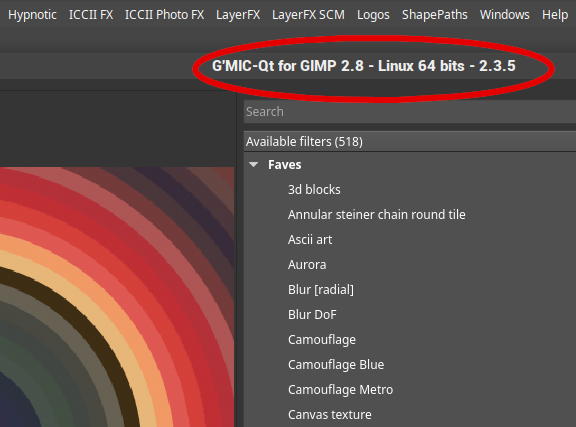
None of the G'mic standalone plugins work here in Mint 19 (ubunto 18.04 bionic) I either have to install the DEB file or this plugin via the package manager. My version of G'mic is 2.34


Attachments:
Gmic.png
Gmic.png [ 74.35 KiB | Viewed 6530 times ]
Top
 Post subject: Re: G'MIC in Linux
PostPosted: Tue Sep 04, 2018 6:07 am  (#11) 
Offline
GimpChat Member
User avatar

Joined: Nov 15, 2014
Posts: 875
rich,
Thanks for all your help. I now have Gmic working in gimp 2.8.
I ran it from the terminal. I had to install "libpng12.so.0", "canberra-gtk-module" (this to get the earlier installed version of Gmic working I assume), and "libcurl.so.4".
The next run showed that I had no qt5 - installed that (found it in the list of dependencies at gmic.eu) - now working.
As a novice in linux, I could not have achieved this without your help.
david.


Top
 Post subject: Re: G'MIC in Linux
PostPosted: Wed Sep 05, 2018 8:42 am  (#12) 
Offline
GimpChat Member
User avatar

Joined: Nov 15, 2014
Posts: 875
rich,

Latest progress on gimp flatpak.
I put the plugin files you provided into the folder at ".var/app/org.gimp.GIMP/config/GIMP/2.10/plug-ins".
Heal selection and Resynthesize are both working. I added two others I use frequently: Heal transparency and Wavelet decompose - both work.

I found the lib files at:
.local/share/flatpak/runtime/org.gnome.Platform/x86_64/3.26/"long_string"/files/lib
and
.local/share/flatpak/runtime/org.gnome.Platform/x86_64/3.26/active/files/lib

(One or two of your files appear to be in these locations already.)

Is it worth putting the lib files you provided into one of these locations?
More importantly, if it doesn't work, how do I recover the situation?
As you will gather, I am a complete novice with respect to linux!

david.


Top
 Post subject: Re: G'MIC in Linux
PostPosted: Wed Sep 05, 2018 10:49 am  (#13) 
Offline
GimpChat Member

Joined: Mar 04, 2011
Posts: 2607
I wonder why your files are in ./local - does not matter as long as it works.

There should be no harm adding the lib files, they do not overwrite anything. Probably the 'long-string' location is the one to use.

Resynth as you found works, Tested Liquid Rescale, FFT (fast fourier transform), and BIMP (batch plugin) and seem to work ok
I use my home folder for the plugins. A screenshot. The lib files can be sorted by date if you need to get rid of them. When the Gimp flatpak is updated you need to add them again. Make sure they are all executable.
This in my kubuntu 18.04 desktop
Image

EDIT:
In case you manage to get this far:
Most of those files are for the xenal version gmic_gimp_gtk in the flatpak
For Gimp 2.10.6 in ubuntu 18.04 I have compiled the last gimp_gimp_gtk (against gimp 2.10.6 libs) that came with a makefile for gtk That is ver. 2.2.3 a bit old but better than nothing.
For some reason it needs 3 additional lib files
If you want to give it a try the gmic plugin + lib files
https://my.pcloud.com/publink/show?code ... yp9mSqdmSy

looks like this: https://i.imgur.com/dipS33W.jpg

more edit: Just a reminder. If you installed the flatpak after Gimp 2.8.22 check for migrated resources in ~./config/GIMP/2.10 the standard gimp profile. The might be files in the plugins folder that interfere with Gimp 2.10 flatpak.


Top
 Post subject: Re: G'MIC in Linux
PostPosted: Thu Sep 06, 2018 5:07 am  (#14) 
Offline
GimpChat Member
User avatar

Joined: Nov 15, 2014
Posts: 875
rich,
Thanks for the latest files/libs. Unfortunately no success.
I loaded Gimp flatpak from the terminal and got the following error messages:

*WARNING* missing babl fast path(s): "R'G'B' double" to "CIE Lab double"
Skipping duplicate plug-in: '/app/lib/gimp/2.0/plug-ins/wavelet-decompose/wavelet-decompose'
/home/david/.var/app/org.gimp.GIMP/config/GIMP/2.10/plug-ins/gimp-lqr-plugin: error while loading shared libraries: liblqr-1.so.0: cannot open shared object file: No such file or directory
gimp-2.10: LibGimpBase-WARNING: gimp-2.10: gimp_wire_read(): error
/home/david/.var/app/org.gimp.GIMP/config/GIMP/2.10/plug-ins/fourierx64: error while loading shared libraries: libfftw3.so.3: cannot open shared object file: No such file or directory
gimp-2.10: LibGimpBase-WARNING: gimp-2.10: gimp_wire_read(): error
/home/david/.var/app/org.gimp.GIMP/config/GIMP/2.10/plug-ins/bimp18x64: error while loading shared libraries: libpcre.so.3: cannot open shared object file: No such file or directory
gimp-2.10: LibGimpBase-WARNING: gimp-2.10: gimp_wire_read(): error
/home/david/.var/app/org.gimp.GIMP/config/GIMP/2.10/plug-ins/gmic_gimp_gtk: error while loading shared libraries: libfftw3.so.3: cannot open shared object file: No such file or directory
gimp-2.10: LibGimpBase-WARNING: gimp-2.10: gimp_wire_read(): error
*WARNING* missing babl fast path(s): "cairo-ARGB32" to "R'G'B'A u8"
david@david-Aspire-5734Z:~$

Do I assume that this means that the plugin files are not suitable for my setup?

Thanks for all your continued help.

david.


Top
 Post subject: Re: G'MIC in Linux
PostPosted: Thu Sep 06, 2018 9:10 am  (#15) 
Offline
GimpChat Member

Joined: Mar 04, 2011
Posts: 2607
I do know they work in my (k)ubuntu 18.04

I commented before about the different install locations, still wondering about that.

However, most of those error messages refer to the library files not being seen.

Could be 1 ) they are in the wrong place 2 ) they are not executable.

You have done very well for a beginner to linux so far, get to know the system, acquire some easier tools for managing files as root and it will become easier.

Hopefully the developers will enable some additions to get round the rather sparse org.gnome runtime installation


Top
 Post subject: Re: G'MIC in Linux
PostPosted: Fri Sep 07, 2018 6:55 am  (#16) 
Offline
GimpChat Member
User avatar

Joined: Nov 15, 2014
Posts: 875
Finally success!!! Both versions of Gimp working.

My problems with 2.10 flatpak were caused because I didn't realise that there was a ".var" file in home and a var file when I looked under computer in the files menu. After I put the lib files in the correct location everything worked.

I have a lot to learn about linux and software in general.

Many thanks to rich. Without his help none of this would have been possible.

david.


Top
 Post subject: Re: G'MIC in Linux
PostPosted: Sat Oct 06, 2018 6:37 am  (#17) 
Offline
GimpChat Member
User avatar

Joined: Nov 15, 2014
Posts: 875
A little more help required if possible!

I came to use Gimp 2.10 flatpak and when I tried to use G'MIC Gtk I get the attached error message.
If I open Gimp from the terminal there is no indication of missing files.
(Running Gimp under Ubuntu 18.04.)

I have not changed anything on the machine and it was working previously.

david.


Attachments:
Screenshot.png
Screenshot.png [ 123.3 KiB | Viewed 4077 times ]
Top
 Post subject: Re: G'MIC in Linux
PostPosted: Sat Oct 06, 2018 7:02 am  (#18) 
Offline
GimpChat Member

Joined: Mar 04, 2011
Posts: 2607
Still working here (k)ubuntu 18.04, Gimp 2.10.6 flatpak, gmic_gimp_gtk https://i.imgur.com/TR9QLs2.jpg

Was working before, not working now, you did not change anything. Something must have changed.

Is your Ubuntu 18.04 doing unattended upgrades? Almost as bad as Windoze. see: https://www.omgubuntu.co.uk/2016/02/how ... ate-ubuntu

If the org.gnome runtime has been updated then those 30-something lib files will need reinstalling.

Otherwise do not know.


Top
 Post subject: Re: G'MIC in Linux
PostPosted: Sun Oct 07, 2018 3:48 am  (#19) 
Offline
GimpChat Member
User avatar

Joined: Nov 15, 2014
Posts: 875
rich,

Thanks for your quick reply. It was actually an Ubuntu problem - various other programs were not working, so yet another re-install!
I decided to drop Gimp 2.8 and just install 2.10.
Everything working, including G'MIC Qt, Liquid rescale and Resynthesize. The only thing I am missing is heal transparency (useful for not losing area when I level the horizon on landscapes).
I am sure it will work, but despite searching, I have been unable to find a copy to download.

I, and I am certain many others, would wish to thank you for the enormous help you give to users of Gimp.

david.


Top
 Post subject: Re: G'MIC in Linux
PostPosted: Sun Oct 07, 2018 4:35 am  (#20) 
Offline
GimpChat Member

Joined: Mar 04, 2011
Posts: 2607
You can get the python plugins from https://github.com/bootchk/resynthesize ... ginScripts
and plugin-heal-transparency.py downloading with the RAW option (no line numbers) Remember to make executable.

I will attach it anyway. The usual unzip, pop in ~/.config/GIMP/2.10/plug-ins

I use the Flatpak in 'buntu only because I want to keep a Gimp 2.8 but on my PClinuxOS desktop only Gimp 2.10

Going to the installed Gimp 2.10 will make things much easier for you. From what I read Gimp 2.10.8 is coming soon and will be easy to update from the ppa

Levelling horizons: Check out the measure tool in Gimp 2.10.6 which now incorporates that function. I put a note about it here: https://www.gimp-forum.net/Thread-Rotat ... 3#pid10823 - the second screenshot - that shows vertical but horizontal is automatically recognised.


Attachments:
plugin-heal-transparency.py.zip [1.67 KiB]
Downloaded 89 times
Top
Post new topic Reply to topic  [ 20 posts ] 

All times are UTC - 5 hours [ DST ]


* Login  


Powered by phpBB3 © phpBB Group