It is currently Sun Jun 14, 2026 11:56 am


All times are UTC - 5 hours [ DST ]


Post new topic Reply to topic  [ 28 posts ]  Go to page 1, 2  Next
Author Message
 Post subject: plugins Adobe photoshop
PostPosted: Thu Dec 06, 2018 4:37 am  (#1) 
Offline
GimpChat Member

Joined: Apr 09, 2018
Posts: 1888
Location: France
Hello everyone
Is it possible to follow this procedure to use Photoshop filters with Gimp 2.10.8 or 2.10.6?
http://akvis.com/en/graphic-tips/add-plugins/gimp-add-plugins.php

_________________
Les parfums, les couleurs et les sons se répondent.Baudelaire (Les fleurs du mal)
2.10.36/(Samj) Gimp 2.10.38 OS Windows 10 Home 64 bits


Share on Facebook Share on Twitter Share on Orkut Share on Digg Share on MySpace Share on Delicious Share on Technorati
Top
 Post subject: Re: plugins Adobe photoshop
PostPosted: Thu Dec 06, 2018 3:54 pm  (#2) 
Yes you can use some Photoshop plugins with Gimp 2.10. This person from the link, don't explain the whole process.

Image

Now, I only can explain to you in Windows because that is my OS.

1. Download the plugin PSPI. Open the .zip folder and place this folder inside the Gimp plugin folder in your Gimp directory: C:\Users\User\AppData\Roaming\GIMP\2.10\plug-ins.


2. Inside this folder place all the Photoshop plugins folder with the .8bf inside that are compatible. Make sure you Re-name the folder with their respective Names.

3. In the process, you are going to Start, close and Re-start gimp. Now, Start Gimp and go to: Edit/Preferences, click on the Folders dropdown and select Plug-ins.
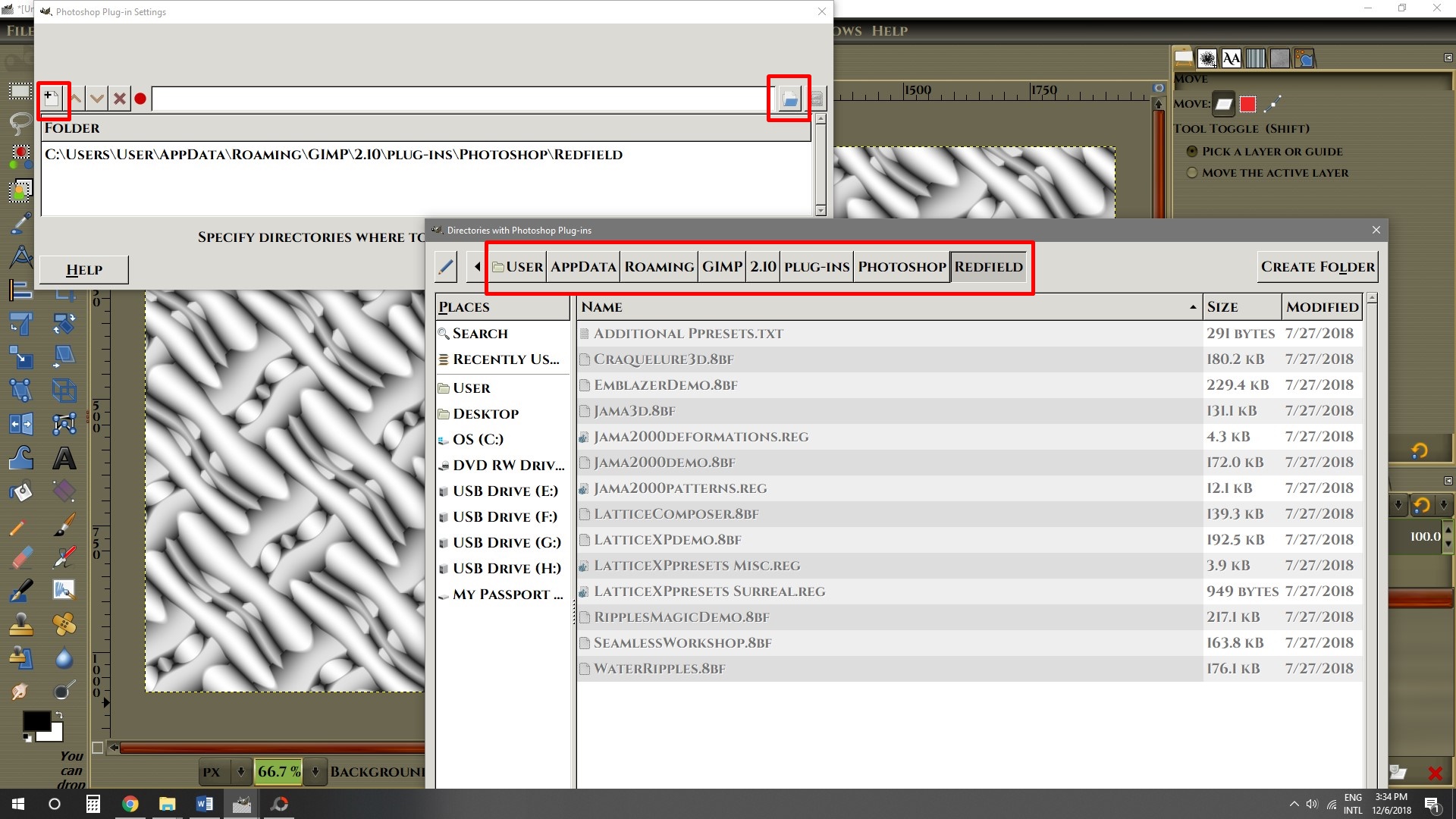
Here is where you going to direct Gimp to open the folder when gimp start. Click on the little white page icon the Click on the Folder Icon at the other end. The Click on your Gimp directory: C:\Users\User\AppData\Roaming\GIMP\2.10\plug-ins\Photoshop

Image

Image

4. Close Gimp and Re-Start Gimp. Go to Filters and go all the way down until you find “Photoshop plugins settings”. Click on it.

Image

5. Now, just like you did before in the Preferences, Click on the little White page, the on the folder across. Look for the Photoshop folder in your Gimp directory and choose the plugin you want. In this setting, you have to do the same procedure with each individual plugin.
Image

6. Start Gimp and you should have the plugin in the Filters menu.


I hope this can help you.


Top
 Post subject: Re: plugins Adobe photoshop
PostPosted: Sat Dec 08, 2018 3:57 pm  (#3) 
Offline
GimpChat Member
User avatar

Joined: Jul 06, 2013
Posts: 2661
Location: California
Where can photoshop plugins be found?


Top
 Post subject: Re: plugins Adobe photoshop
PostPosted: Sun Dec 09, 2018 7:18 am  (#4) 
Offline
GimpChat Member

Joined: Mar 04, 2011
Posts: 2603
mackenzieh wrote:
Where can photoshop plugins be found?


First a note about pspi - the very newest version is 10 years old. Made for a different era.

The same applies to the plugins. pspi.exe uses .8bf plugins, no use trying to use anything more recent. Even when they do work, often only on small images and generally there are more recent Gimp plugins that give the same effect.

This using pspi Win10 / Gimp 2.10.8 - the Redfield filter can be replaced by gmic rodillious.

Image

However, and amazed the site is still there, the place to start looking is

http://punkinstuff.tripod.com/

edit: Looks like the same as this forum, taken over for advertising purposes.
The usual for these times. Do not sign up for anything. Close the ad site and you will get back to the plugins

Do not be surprised if many of the links to other sites do not work, people move on, sites close down.


Top
 Post subject: Re: plugins Adobe photoshop
PostPosted: Sun Dec 09, 2018 9:31 am  (#5) 
Offline
GimpChat Member
User avatar

Joined: May 10, 2013
Posts: 1430
Location: FInland
Agree with rich, most of the old filters can be considered pretty much useless, you can use Gmic or Gimp plugins instead.
Got only few freeware 8bf filters, but if you like to test, here's few.

http://www.creationsylvie.net/psp/filtres_psp.html


Top
 Post subject: Re: plugins Adobe photoshop
PostPosted: Sun Dec 09, 2018 6:32 pm  (#6) 
Offline
GimpChat Member
User avatar

Joined: Jul 06, 2013
Posts: 2661
Location: California
Nidhogg wrote:
Agree with rich, most of the old filters can be considered pretty much useless, you can use Gmic or Gimp plugins instead.
Got only few freeware 8bf filters, but if you like to test, here's few.

http://www.creationsylvie.net/psp/filtres_psp.html


Thanks Nidhogg & rich2005. I've decided not to use the photoshop plugins. I will stick with gimp and the gmic plugins.


Top
 Post subject: Re: plugins Adobe photoshop
PostPosted: Sat Jan 05, 2019 6:02 am  (#7) 
Offline
GimpChat Member

Joined: Apr 09, 2018
Posts: 1888
Location: France
back ... I could not find this topic again! ;)

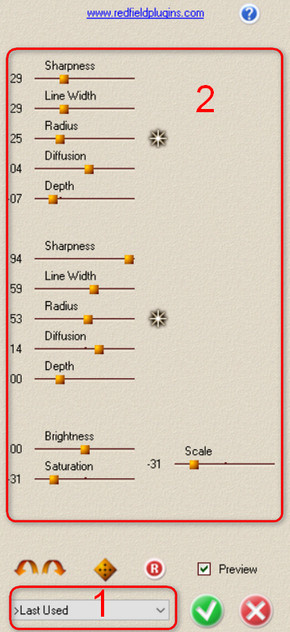
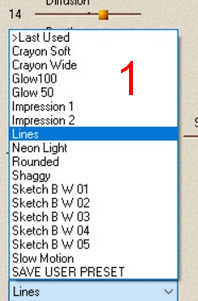
For the Fractalius filter of Redfield, I do not agree at all with rich2005 because I find it superior to Rodilius filter (but maybe it's because I do not know how to use it?)
With Fractalius, many choices for style (1) and for each of these choices, many possibilities (2)
And I do not find these effects with Rodilius.
Image Image

Thank you Pocholo, I'll wait a little longer before doing that. :)

_________________
Les parfums, les couleurs et les sons se répondent.Baudelaire (Les fleurs du mal)
2.10.36/(Samj) Gimp 2.10.38 OS Windows 10 Home 64 bits


Top
 Post subject: Re: plugins Adobe photoshop
PostPosted: Sat Jan 05, 2019 6:51 am  (#8) 
Offline
GimpChat Member

Joined: Mar 04, 2011
Posts: 2603
Quote:
For the Fractalius filter of Redfield, I do not agree at all with rich2005 because I find it superior to Rodilius filter..


Well maybe, but g'mic has one great advantage over Redfield.

G'mic is free, Current cost of Redfield $39.90 :)


Top
 Post subject: Re: plugins Adobe photoshop
PostPosted: Sat Jan 05, 2019 7:18 am  (#9) 
Offline
GimpChat Member
User avatar

Joined: Jan 20, 2013
Posts: 14831
Location: roma, italy
Level_0, did you buy Redfield? So that you can test many of those effects?
It would be interesting to get a kind of carousel of those...

_________________
"Where am I ?"


Top
 Post subject: Re: plugins Adobe photoshop
PostPosted: Sat Jan 05, 2019 8:33 am  (#10) 
Offline
GimpChat Member

Joined: Apr 09, 2018
Posts: 1888
Location: France
dinasset
The exe file is part of a Redfield folder that was on an old PC that was given to me at a time when I wanted to try to put Linux on it instead of XP.So certainly bought by the former owners of the PC.
I can try to put it on a web host for you to test it?

EDIT:
after thinking, I think it will not work on another PC because there must have been a key to the recording on the software where it works!
I can do tests, tell me which ones?

_________________
Les parfums, les couleurs et les sons se répondent.Baudelaire (Les fleurs du mal)
2.10.36/(Samj) Gimp 2.10.38 OS Windows 10 Home 64 bits


Top
 Post subject: Re: plugins Adobe photoshop
PostPosted: Sat Jan 05, 2019 11:00 am  (#11) 
Offline
GimpChat Member
User avatar

Joined: Jan 20, 2013
Posts: 14831
Location: roma, italy
The best ones you can produce using Fractalius, one for style.
Thanks.

_________________
"Where am I ?"


Top
 Post subject: Re: plugins Adobe photoshop
PostPosted: Sat Jan 05, 2019 2:38 pm  (#12) 
Offline
GimpChat Member

Joined: Apr 09, 2018
Posts: 1888
Location: France
dinasset wrote:
The best ones you can produce using Fractalius, one for style.
Thanks.


dinasset,
It's a joke ... my remaining life will not be enough!Image
I let you do the mathematical calculation of the number of screenshots ....

I prefer to continue my exploration of Gimp :)

_________________
Les parfums, les couleurs et les sons se répondent.Baudelaire (Les fleurs du mal)
2.10.36/(Samj) Gimp 2.10.38 OS Windows 10 Home 64 bits


Top
 Post subject: Re: plugins Adobe photoshop
PostPosted: Sat Jan 05, 2019 3:06 pm  (#13) 
Offline
GimpChat Member
User avatar

Joined: Jan 20, 2013
Posts: 14831
Location: roma, italy
How many styles has Fractalius? 15? 20?
I didn't say any combinations of the parameters…..
ONE for each style…
But of course you do what you decide. If none, OK none.
Thanks anyhow for offering your help

_________________
"Where am I ?"


Top
 Post subject: Re: plugins Adobe photoshop
PostPosted: Sat Jan 05, 2019 4:05 pm  (#14) 
Offline
GimpChat Member

Joined: Apr 09, 2018
Posts: 1888
Location: France
16 styles and for each 13 cursor settings (+2 corresponding to the stars).

Only one screenshot for each style would be very insufficient.

Look at the screenshot put in my previous post and imagine moving just one of the 13 sliders.
I will not go into the factorial calculation of the number of screenshots !!!! :)

_________________
Les parfums, les couleurs et les sons se répondent.Baudelaire (Les fleurs du mal)
2.10.36/(Samj) Gimp 2.10.38 OS Windows 10 Home 64 bits


Top
 Post subject: Re: plugins Adobe photoshop
PostPosted: Sun Jan 06, 2019 12:53 am  (#15) 
Offline
GimpChat Member
User avatar

Joined: Jan 20, 2013
Posts: 14831
Location: roma, italy
If you look at all possible ("factorial") combinations when you open a filter, this means that you will also never test some of the Gimp plug-ins...

_________________
"Where am I ?"


Top
 Post subject: Re: plugins Adobe photoshop
PostPosted: Sun Jan 06, 2019 2:37 am  (#16) 
Offline
Global Moderator
User avatar

Joined: Apr 01, 2012
Posts: 8364
Location: On the other side of your screen
Nidhogg wrote:
Agree with rich, most of the old filters can be considered pretty much useless, you can use Gmic or Gimp plugins instead.
Got only few freeware 8bf filters, but if you like to test, here's few.

http://www.creationsylvie.net/psp/filtres_psp.html

That's weird
When I clicked on the link to 'Creations Sylvie' at the bottom of that page it tool me to my Isp web email sign in page

_________________
Image
Free Fun Photo Editing & resources
Poems from the Lord
Gimp Newby
Gimp version 3.2.0 and GMIC-Qt 3.7.5 OS :- Windows 10 Home 64


Top
 Post subject: Re: plugins Adobe photoshop
PostPosted: Sun Jan 06, 2019 6:27 am  (#17) 
Offline
GimpChat Member
User avatar

Joined: May 10, 2013
Posts: 1430
Location: FInland
sallyanne wrote:
Nidhogg wrote:
Agree with rich, most of the old filters can be considered pretty much useless, you can use Gmic or Gimp plugins instead.
Got only few freeware 8bf filters, but if you like to test, here's few.

http://www.creationsylvie.net/psp/filtres_psp.html

That's weird
When I clicked on the link to 'Creations Sylvie' at the bottom of that page it tool me to my Isp web email sign in page

Yes it seems to be yahoo email link. I stumbled on that site long time ago, think I found the Mehdi plugins from there.


Top
 Post subject: Re: plugins Adobe photoshop
PostPosted: Sun Jan 06, 2019 7:07 am  (#18) 
Offline
GimpChat Member

Joined: Apr 09, 2018
Posts: 1888
Location: France
Redfield:
http://www.redfieldplugins.com/index.htm

http://www.redfieldplugins.com/SamplesTutorials.htm

mine ,old version ...: version 1.50 :)

Now several Fractalius:
http://www.redfieldplugins.com/samFractaliusG4sketches.htm
http://www.redfieldplugins.com/samFractaliusVsG4.htm
http://www.redfieldplugins.com/samFractalius2016.htm
http://www.redfieldplugins.com/filterFractalius.htm

_________________
Les parfums, les couleurs et les sons se répondent.Baudelaire (Les fleurs du mal)
2.10.36/(Samj) Gimp 2.10.38 OS Windows 10 Home 64 bits


Top
 Post subject: Re: plugins Adobe photoshop
PostPosted: Wed Feb 20, 2019 3:20 am  (#19) 
Offline
GimpChat Member

Joined: Apr 09, 2018
Posts: 1888
Location: France
Pocholo wrote:
1. Download the plugin PSPI. Open the .zip folder and place this folder inside the Gimp plugin folder in your Gimp directory: C:\Users\User\AppData\Roaming\GIMP\2.10\plug-ins.

Pocholo, thanks for the very precise explanations, but with Gimp portable I do not have C: \ Users \ User \ AppData \ Roaming \ GIMP \ 2.10 \ plug-ins.I remember reading somewhere that I have to go in:
D:\Documents\Gimp-2.10.8_Port\32\lib\gimp\2.0\plug-ins
but as I have 64-bit Gimp, it may be:
D:\Documents\Gimp-2.10.8_Port\lib\gimp\2.0\plug-ins
What do you think?

_________________
Les parfums, les couleurs et les sons se répondent.Baudelaire (Les fleurs du mal)
2.10.36/(Samj) Gimp 2.10.38 OS Windows 10 Home 64 bits


Top
 Post subject: Re: plugins Adobe photoshop
PostPosted: Wed Feb 20, 2019 5:34 am  (#20) 
Offline
GimpChat Member

Joined: Mar 04, 2011
Posts: 2603
Is that the Samj portable Gimp 2.10? You installed it in D:\Documents?

You were correct with the first location. The pspi.exe plugin is 32 bit and should go in the 32 bit version of samj Gimp.
However, always a however. You will have to run the 32 bit version, not the 64 bit version. It will crash in the 64 bit Gimp (unlike the regular Windows Gimp which supports both 32/64).

As a reminder:
1. pspi.exe goes in the samj ..32\Preferences\plug-ins folder
2. Make a convenient folder for your PS .8bf plugins
3. Run Gimp and set up that folder for pspi.

Image

Does it work? Some PS plugins do, most do not or only partially. This one from 2001 which shows not much is new, plugins get re-invented all the time ;)

Image


Top
Post new topic Reply to topic  [ 28 posts ]  Go to page 1, 2  Next

All times are UTC - 5 hours [ DST ]


* Login  


Powered by phpBB3 © phpBB Group