It is currently Sun Nov 08, 2026 2:09 am


All times are UTC - 5 hours [ DST ]


Post new topic Reply to topic  [ 22 posts ]  Go to page 1, 2  Next
Author Message
 Post subject: Where to install GIMP fonts in Windows 10 Professional computer?
PostPosted: Wed Feb 27, 2019 8:09 pm  (#1) 
Offline
GimpChat Member
User avatar

Joined: Sep 21, 2015
Posts: 220
Location: Itasca, Illinois
GIMP Version: 2.8.14
Operating System: Windows
GIMP Experience: New User


Hey GIMPers. I finally have a Windows 10 Professional computer (I'm usually Linux) and I have all these GIMP fonts in a folder from my Linux computer that I'd like to add to the GIMP in Windows 10 but I don't know how. Any suggestions? Thanks.

_________________
"When people agree with me I always feel that I must be wrong." --Oscar Wilde


Share on Facebook Share on Twitter Share on Orkut Share on Digg Share on MySpace Share on Delicious Share on Technorati
Top
 Post subject: Re: Where to install GIMP fonts in Windows 10 Professional computer?
PostPosted: Wed Feb 27, 2019 8:55 pm  (#2) 
Offline
GimpChat Member
User avatar

Joined: Oct 06, 2010
Posts: 4050
I'm on a Mac at the moment, I rarely use my Windows machine. Anyway, doesn't Windows have a Font folder in its Windows directory? It has always been the case since 3.1, not sure why that would change. Can you do a C drive search for "Font" and see where it leads? Let me know if you find it this way or not. Unless someone else pipes up, I can open up my Windows laptop and check. It has 10.

Check the Control Panel first.

_________________
"In order to attain the impossible, one must attempt the absurd."
~ Miguel de Cervantes


Top
 Post subject: Re: Where to install GIMP fonts in Windows 10 Professional computer?
PostPosted: Thu Feb 28, 2019 5:33 am  (#3) 
Offline
GimpChat Member
User avatar

Joined: May 10, 2013
Posts: 1443
Location: Finland
You might have had them in the home/.fonts on Linux?
If you don't want to clutter your system fonts folder or need them just for Gimp, I'd use the C:/users/yourusername/.gimp2.8/fonts folder.

Need more control?
Use the AddonCollectionManager-3.0.py

https://sourceforge.net/projects/gimp-t ... s/scripts/


Top
 Post subject: Re: Where to install GIMP fonts in Windows 10 Professional computer?
PostPosted: Thu Feb 28, 2019 5:53 pm  (#4) 
Offline
GimpChat Member
User avatar

Joined: Sep 21, 2015
Posts: 220
Location: Itasca, Illinois
mahvin wrote:
I'm on a Mac at the moment, I rarely use my Windows machine. Anyway, doesn't Windows have a Font folder in its Windows directory? It has always been the case since 3.1, not sure why that would change. Can you do a C drive search for "Font" and see where it leads? Let me know if you find it this way or not. Unless someone else pipes up, I can open up my Windows laptop and check. It has 10.

Check the Control Panel first.


Thanks Mahvin. I have GIMP and Photoshop Elements on the Windows 10 computer. I can add fonts to PE by just double clicking on the font file and then on "Install." However that doesn't add the font to GIMP. I found the Windows font folder, but none of the fonts there are in GIMP.

I found this:

Installation to GIMP

You can put new fonts on GIMP without installing them in Windows. First, open the GIMP directory, usually located in C:\Program Files. Next, open the \etc\fonts folder and open the fonts.conf file in Notepad. Locate the line and insert the path to the folder where you saved the fonts earlier (for example, path/to/Fonts/folder). Press "Ctrl-S" to save the changes and close the file. GIMP looks for and loads fonts in that folder.


from this: https://smallbusiness.chron.com/putting-new-font-gimp-47946.html

but that seemed crazy complicated. I figure there's got to be an easier way.

_________________
"When people agree with me I always feel that I must be wrong." --Oscar Wilde


Top
 Post subject: Re: Where to install GIMP fonts in Windows 10 Professional computer?
PostPosted: Thu Feb 28, 2019 5:57 pm  (#5) 
Offline
GimpChat Member
User avatar

Joined: Sep 21, 2015
Posts: 220
Location: Itasca, Illinois
Nidhogg wrote:
You might have had them in the home/.fonts on Linux?
If you don't want to clutter your system fonts folder or need them just for Gimp, I'd use the C:/users/yourusername/.gimp2.8/fonts folder.

Need more control?
Use the AddonCollectionManager-3.0.py

https://sourceforge.net/projects/gimp-t ... s/scripts/


Thanks Nidgogg. I've got the GIMP part in Linux figured out. I have all the fonts in a file and put them on my Windows computer's Desktop. But I can't figure out how to get them into GIMP (on Windows) from there.

Thanks for the ofnuts link. I bookmarked it. Wow, that will take some exploring.

_________________
"When people agree with me I always feel that I must be wrong." --Oscar Wilde


Top
 Post subject: Re: Where to install GIMP fonts in Windows 10 Professional computer?
PostPosted: Thu Feb 28, 2019 7:03 pm  (#6) 
Offline
GimpChat Member
User avatar

Joined: Oct 06, 2010
Posts: 4050
Point your fonts folder to wherever you decide to store them in GIMP Preferences. It’s the easiest way to get them active outside of dropping them GIMP’s Font folder.

_________________
"In order to attain the impossible, one must attempt the absurd."
~ Miguel de Cervantes


Top
 Post subject: Re: Where to install GIMP fonts in Windows 10 Professional computer?
PostPosted: Thu Feb 28, 2019 7:12 pm  (#7) 
You can download the "addoncollectionmanager plugin" for managing all your fonts
This a very good video tutorial well explained from a rally good knowledge guy "rich2005"

www.youtube.com Video from : www.youtube.com


Top
 Post subject: Re: Where to install GIMP fonts in Windows 10 Professional computer?
PostPosted: Thu Feb 28, 2019 7:54 pm  (#8) 
Offline
GimpChat Member
User avatar

Joined: Jun 02, 2013
Posts: 2090
C:\Users\whateveryourcomputername\.gimp-2.8\fonts

_________________
Image


Top
 Post subject: Re: Where to install GIMP fonts in Windows 10 Professional computer?
PostPosted: Fri Mar 01, 2019 12:28 pm  (#9) 
Offline
GimpChat Member
User avatar

Joined: May 10, 2013
Posts: 1443
Location: Finland
iggy wrote:
Nidhogg wrote:
You might have had them in the home/.fonts on Linux?
If you don't want to clutter your system fonts folder or need them just for Gimp, I'd use the C:/users/yourusername/.gimp2.8/fonts folder.

Need more control?
Use the AddonCollectionManager-3.0.py

https://sourceforge.net/projects/gimp-t ... s/scripts/


Thanks Nidgogg. I've got the GIMP part in Linux figured out. I have all the fonts in a file and put them on my Windows computer's Desktop. But I can't figure out how to get them into GIMP (on Windows) from there.

Thanks for the ofnuts link. I bookmarked it. Wow, that will take some exploring.


You're welcome. You will find that it's very easy to set the AddonCollectionManager if you want to use it. Takes 2 minutes.
I told you where the equivalent Gimp 2.8 user folder on Windows machine is located, if you rather dropped the fonts straight there.

If you have lot of additional fonts, and they play a major role in your editing, then I suggest the AddonCollectionManager so that you can load any themed folder instead of installing hundreds of fonts in the Windows system fonts folder.
Does not really matter in a case with lots of RAM, but I always like to organize my fonts well and load in the memory only the ones I need.
Habit from work, done vector editing and typesetting for living.

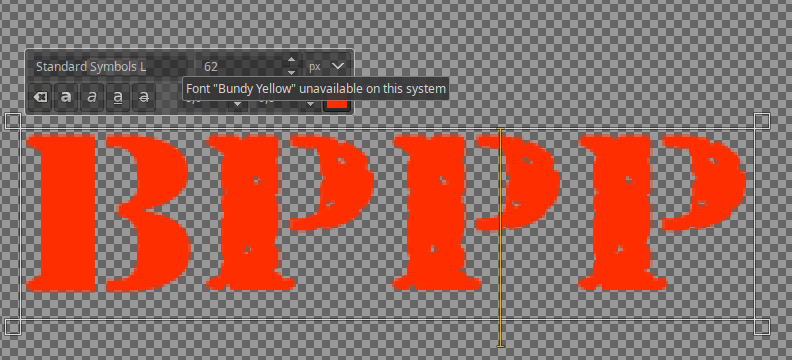
One thing I never thought, was that will Gimp remember the font in a .xcf file if you open it later without having the font anymore.
Testing this....and yes it does. When you hover mouse over the font selection field in editor, it says that my font is missing. At least on 2.10 but my guess is that this was featured already in earlier versions.
So that won't be a problem either, if you don't want to use C:/Windows/fonts.
Image

But you'll find your solution. :yesnod


Top
 Post subject: Re: Where to install GIMP fonts in Windows 10 Professional computer?
PostPosted: Fri Mar 01, 2019 2:19 pm  (#10) 
Offline
GimpChat Member

Joined: Mar 04, 2011
Posts: 2629
Ofnuts has a plugin to show the text layer information even if the font is no longer available.

Image

http://sourceforge.net/projects/gimp-to ... s/scripts/ about 28 down the list text-info-0.1.py
Right click in text layer, look bottom of dialogue for plugin entry.

Just do not use the text tool on the text layer or the font reverts to default - usually Sans ;)


Top
 Post subject: Re: Where to install GIMP fonts in Windows 10 Professional computer?
PostPosted: Fri Mar 01, 2019 7:57 pm  (#11) 
Offline
GimpChat Member
User avatar

Joined: Sep 21, 2015
Posts: 220
Location: Itasca, Illinois
mahvin wrote:
Point your fonts folder to wherever you decide to store them in GIMP Preferences. It’s the easiest way to get them active outside of dropping them GIMP’s Font folder.


Thanks mahvin. I'd like to just drop them in GIMP's Font folder but I can't find it. The closest thing I come to it is:

This PC>Windows (C:)>Program Files>GIMP 2> etc> fonts (folder)

In the fonts folder are two things.

1) conf.d folder
2) fonts.conf

I tried adding a font to the fonts folder and it didn't show up.

_________________
"When people agree with me I always feel that I must be wrong." --Oscar Wilde


Top
 Post subject: Re: Where to install GIMP fonts in Windows 10 Professional computer?
PostPosted: Fri Mar 01, 2019 8:24 pm  (#12) 
Offline
GimpChat Member
User avatar

Joined: Sep 21, 2015
Posts: 220
Location: Itasca, Illinois
I'm really sorry, guys. Watching Rich's tutorial I realized I have GIMP 2.10.8 not GIMP 2.8. <brain cramp> So following along with Rich's tutorial on finding the GIMP folder I got as far as:

(C:)>Users>mycomputername

and in the mycomputername folder there is no GIMP folder.

So the question now is, How do I add fonts to GIMP 2.10.8 in a Windows 10 computer?

Again, I'm really sorry about the mistake. I was just rushing. Still, that's no excuse.

And now searching online (and here) I find this is quite an issue for a lot of people.

Adding to the situation I have GIMP 2.10.8 on a clean install, so there is not GIMP 2.8 anywhere.

<sigh>

_________________
"When people agree with me I always feel that I must be wrong." --Oscar Wilde


Top
 Post subject: Re: Where to install GIMP fonts in Windows 10 Professional computer?
PostPosted: Fri Mar 01, 2019 9:18 pm  (#13) 
Offline
GimpChat Member
User avatar

Joined: Jun 02, 2013
Posts: 2090
C:\Users\vincent\.gimp-2.10\fonts

Only yours won't be vincent.

_________________
Image


Top
 Post subject: Re: Where to install GIMP fonts in Windows 10 Professional computer?
PostPosted: Sat Mar 02, 2019 3:05 am  (#14) 
Offline
GimpChat Member

Joined: Mar 04, 2011
Posts: 2629
iggy wrote:
...snip...So the question now is, How do I add fonts to GIMP 2.10.8 in a Windows 10 computer?


The only difference between Gimp 2.8 and 2.10 for Ofnuts collection manager is the location of the user Gimp profile.

For any Gimp installation you can find this if you look in Edit -> Preferences -> Folders -> Fonts which shows the paths that are used.

For a regular installation Gimp 2.10 it is C:\Users\"yourname"\AppData\Roaming\GIMP\2.10\...

Appdata is a 'hidden' folder in Windows so if required see: https://support.microsoft.com/en-us/hel ... windows-10

If your fonts are only going to be used by Gimp the best place is C:\Users\"yourname"\AppData\Roaming\GIMP\2.10\fonts
There are reports of some fonts installed in Windows fonts folder not showing in Gimp.
Lots of fonts to manage? then:

Using Ofnuts collection manager http://gimp-tools.sourceforge.net/managementtools.shtml the storage folder now becomes
C:\Users\"yourname"\AppData\Roaming\GIMP\2.10\fonts_storage

Everything else the same, right click in the fonts dock to bring up the selection dialogue.


Top
 Post subject: Re: Where to install GIMP fonts in Windows 10 Professional computer?
PostPosted: Sat Mar 02, 2019 8:00 pm  (#15) 
Offline
GimpChat Member
User avatar

Joined: Sep 21, 2015
Posts: 220
Location: Itasca, Illinois
The Warrior wrote:
C:\Users\vincent\.gimp-2.10\fonts

Only yours won't be vincent.


Thanks Warrior but it's not there.

For me it's:

C:\Users\gregg\

and not .gimp-2.10

all kinds of stuff is there but not that.

And I have the hidden files showing. And I did a file search. Nothing.

I think I may need to reinstall or something.

_________________
"When people agree with me I always feel that I must be wrong." --Oscar Wilde


Top
 Post subject: Re: Where to install GIMP fonts in Windows 10 Professional computer?
PostPosted: Sat Mar 02, 2019 8:30 pm  (#16) 
Offline
GimpChat Member
User avatar

Joined: Sep 21, 2015
Posts: 220
Location: Itasca, Illinois
rich2005 wrote:
iggy wrote:
...snip...So the question now is, How do I add fonts to GIMP 2.10.8 in a Windows 10 computer?


The only difference between Gimp 2.8 and 2.10 for Ofnuts collection manager is the location of the user Gimp profile.

For any Gimp installation you can find this if you look in Edit -> Preferences -> Folders -> Fonts which shows the paths that are used.

For a regular installation Gimp 2.10 it is C:\Users\"yourname"\AppData\Roaming\GIMP\2.10\...

Appdata is a 'hidden' folder in Windows so if required see: https://support.microsoft.com/en-us/hel ... windows-10

If your fonts are only going to be used by Gimp the best place is C:\Users\"yourname"\AppData\Roaming\GIMP\2.10\fonts
There are reports of some fonts installed in Windows fonts folder not showing in Gimp.
Lots of fonts to manage? then:

Using Ofnuts collection manager http://gimp-tools.sourceforge.net/managementtools.shtml the storage folder now becomes
C:\Users\"yourname"\AppData\Roaming\GIMP\2.10\fonts_storage

Everything else the same, right click in the fonts dock to bring up the selection dialogue.


Thanks so much, Rich. :tyspin This was really driving me batty. So I found the Fonts folder and was able to add to it. I was watching some of the ofnuts add-on collection video. So that allows you to add folders with font sets in them? Is there any way to delete fonts with it? (As I understand it, there is basically no way to delete fonts.) Thanks again.

_________________
"When people agree with me I always feel that I must be wrong." --Oscar Wilde


Top
 Post subject: Re: Where to install GIMP fonts in Windows 10 Professional computer?
PostPosted: Sat Mar 02, 2019 8:30 pm  (#17) 
I have Windows 10 and you should have it in the same Profile directory: C:\Users\YourName\AppData\Roaming\GIMP\2.10\fonts


Top
 Post subject: Re: Where to install GIMP fonts in Windows 10 Professional computer?
PostPosted: Sat Mar 02, 2019 8:38 pm  (#18) 
Offline
GimpChat Member
User avatar

Joined: Sep 21, 2015
Posts: 220
Location: Itasca, Illinois
Pocholo wrote:
I have Windows 10 and you should have it in the same Profile directory: C:\Users\YourName\AppData\Roaming\GIMP\2.10\fonts


Thanks Pocholo. I found it.

_________________
"When people agree with me I always feel that I must be wrong." --Oscar Wilde


Top
 Post subject: Re: Where to install GIMP fonts in Windows 10 Professional computer?
PostPosted: Sat Mar 02, 2019 8:57 pm  (#19) 
Gimp 2.8 directory was: C:\Users\YourName\.gimp-2.8

On Gimp 2.10 goes like I said before: C:\Users\YourName\AppData\Roaming\GIMP\2.10

Some windows user have the "AppData" folder Hidden. Now if you don't see the "AppData" folder, you have to "Unhide": Open Explorer or any file and click the View tab on top of the page. At your right you will see 3 boxes "Item check boxes, File name extensions and Hidden Items" Make sure that the box "hidden Items" is checked.

Image

You should see the file AppData", click and you will see a file named "Roaming. Click that file and you will see a file named Gimp. Click again and you will see the file 2.10. This is your personal Gimp preferences files, where you put all the 3rd patties "brushes, gradients patterns, plug-ins, scripts etc..."

I hope that will explain what you trying to achieve.


Top
 Post subject: Re: Where to install GIMP fonts in Windows 10 Professional computer?
PostPosted: Sun Mar 03, 2019 3:41 am  (#20) 
Offline
GimpChat Member

Joined: Mar 04, 2011
Posts: 2629
@iggy
Quote:
..I was watching some of the ofnuts add-on collection video. So that allows you to add folders with font sets in them? Is there any way to delete fonts with it? (As I understand it, there is basically no way to delete fonts.)


Bring the collection manager up tick the ones you want. Finished with the resource? Bring the collection manager up and untick to remove.

The collection manager copies selected files over from ...\fonts_storage folder to ...\fonts and refreshes the fonts for them to show in Gimp. The same happens in reverse, collection manager deletes in ...\fonts and updates Gimp.

However, for Windows, the font can be 'in use' and stops collection manager deleting it. You will have to live with the font until the next time you use Gimp. The file will then be no longer 'in use' and collection manager can delete it. Only a Windows problem, works ok in linux.

If things get totally screwed-up, delete the errant files, go into ...\fonts_storage folder delete the file .active which holds the collection manager information about what is in use.

You can do the same manually for any of the resources that have the little refresh arrows bottom of the dialogue. Copy files in, refresh. Use. Delete, refresh. Get a decent 2-pane file manager such as totalcommander (shareware) - plenty free ones around for Windows. try SE-Explorer or FreeCommander


Top
Post new topic Reply to topic  [ 22 posts ]  Go to page 1, 2  Next

All times are UTC - 5 hours [ DST ]


* Login  


Powered by phpBB3 © phpBB Group