It is currently Wed Jul 15, 2026 1:42 pm


All times are UTC - 5 hours [ DST ]


Post new topic Reply to topic  [ 7 posts ] 
Author Message
 Post subject: Custom Font Ghoster for Gimp 2.10
PostPosted: Mon Nov 10, 2025 4:05 am  (#1) 
Offline
GimpChat Member
User avatar

Joined: Aug 08, 2016
Posts: 2843
Location: East Midlands of England
This is a small plug-in for Gimp 2.10 to add scaled and rotated copies of characters to the parent character to try and give the impression of ghosted characters (not in the phantom sense).

Attachment:
Custom_Font_Ghoster_v0_3.zip [4.14 KiB]
Downloaded 75 times


Download, unzip and install into your 2.10 user folder.

A pdf of this guide...

Attachment:
Custom Font Ghoster_03.pdf [870.97 KiB]
Downloaded 76 times


Original example character look…

Image

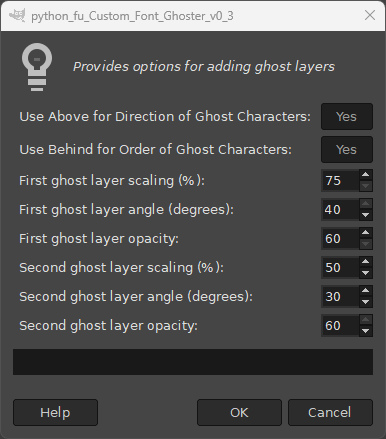
Call up the dialog from its location:

Filters>>Custom Fonts>>Decorating Tools>>Custom Font Ghoster v0.3
Image

Just hit ‘OK’ to create the ghosted characters look using the default settings…

Image

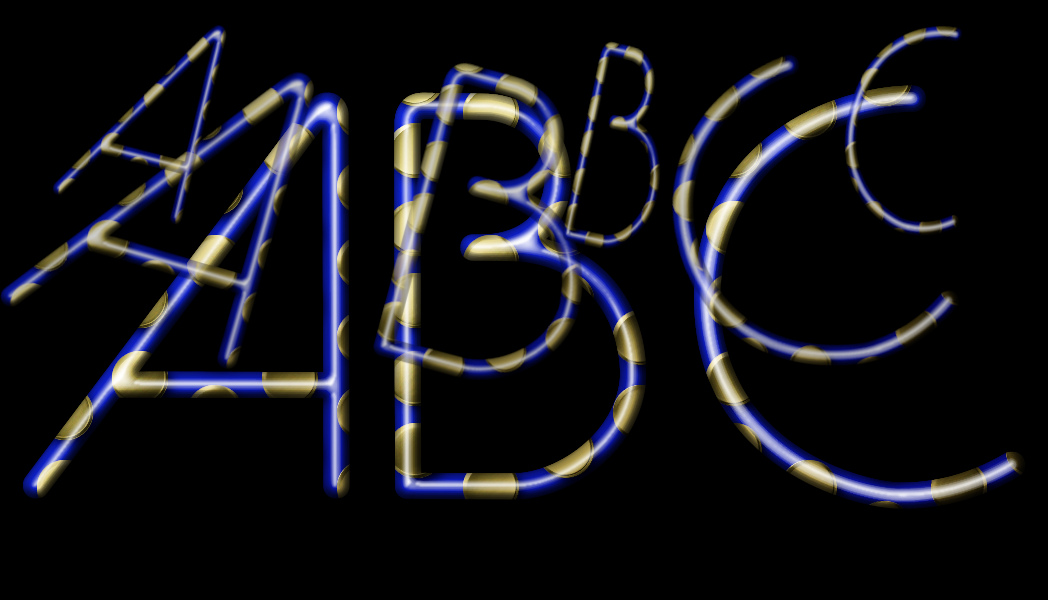
The plug-in inserts two ghost copies of each character into each character layer. The user can adjust the new size and angle of each copy (the filter will apply a certain amount of randomness to the angle) – as well as the opacity of the copy. By default the copies are placed behind the original character and appear to move towards the top edge of the character.

To make the ghost layers appear to move from the bottom edge of the character, click on the first dialog option to set the default option to ‘No’.

Image

To make the ghost copies appear in front of the character click on the second option on the dialog to set it to ‘No’.
Image

The example custom font above has a fairly generous amount of spacing above the characters, but many custom fonts are quite tight for space.

Image

This does not leave a lot of room to insert the ghost layers:

Image

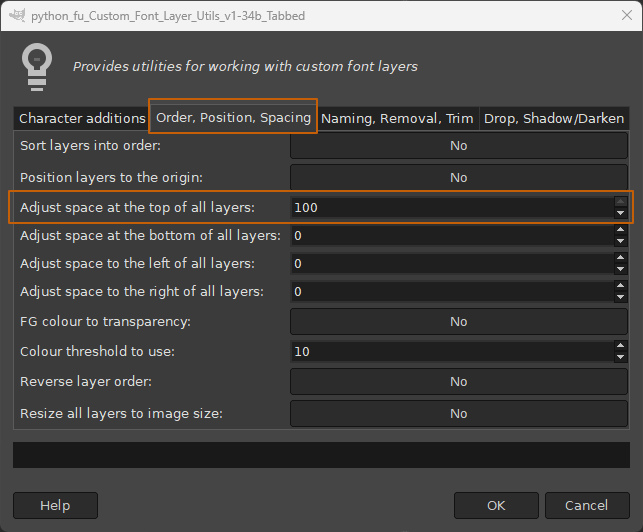
If this is the case you can quickly add space, as in the example below, to the character layers in a custom font using one of the Spacing options in the Layer Utilities Tool in my Custom Font Tools (see my signature link if you do not have this plug-in).

Image

Image

This added space provides more room to display the ‘ghosted’ characters.

Attachment:
TopSpacedBehind.jpg
TopSpacedBehind.jpg [ 256.18 KiB | Viewed 1716 times ]


Of course you could always apply the filter twice…

Image

Have fun...

_________________
Image
"Let no one steal your dreams."
Paul Cookson

Custom Font Links
2.10 Tools
Character Paths
White Bases


Share on Facebook Share on Twitter Share on Orkut Share on Digg Share on MySpace Share on Delicious Share on Technorati
Top
 Post subject: Re: Custom Font Ghoster for Gimp 2.10
PostPosted: Mon Nov 10, 2025 5:38 am  (#2) 
Offline
GimpChat Member
User avatar

Joined: Mar 01, 2014
Posts: 14061
Location: Spain, Aragón
Thank you so much, Skinnyhouse for your new effect. Also for the tutorial - guide pdf.
It's very, very interesting. :clap :coolthup

_________________
Image

Gimp 2.10.30(samj) portable _ OS Windows 10 Home_ 64bits
Don’t be afraid to start over. It’s a new chance to rebuild what you want.


Top
 Post subject: Re: Custom Font Ghoster for Gimp 2.10
PostPosted: Mon Nov 10, 2025 6:54 am  (#3) 
Offline
Global Moderator
User avatar

Joined: May 16, 2010
Posts: 16104
Oh that is so cool Skinnyhouse! :)

_________________
Image


Top
 Post subject: Re: Custom Font Ghoster for Gimp 2.10
PostPosted: Mon Nov 10, 2025 8:47 am  (#4) 
Offline
GimpChat Member
User avatar

Joined: Aug 08, 2016
Posts: 2843
Location: East Midlands of England
Thanks guys - a bit of fun anyway. :bigthup

_________________
Image
"Let no one steal your dreams."
Paul Cookson

Custom Font Links
2.10 Tools
Character Paths
White Bases


Top
 Post subject: Re: Custom Font Ghoster for Gimp 2.10
PostPosted: Mon Nov 10, 2025 12:03 pm  (#5) 
Offline
GimpChat Member
User avatar

Joined: Mar 01, 2014
Posts: 14061
Location: Spain, Aragón
Sorry, Skinnyhouse. I got this stopped working when acting the filter. Does the custom font need more space around?
Perhaps it is because my font has accents of my language?
Thank you so much.


Attachments:
Screenshot 2025-11-10 175614.jpg
Screenshot 2025-11-10 175614.jpg [ 140.6 KiB | Viewed 1679 times ]

_________________
Image

Gimp 2.10.30(samj) portable _ OS Windows 10 Home_ 64bits
Don’t be afraid to start over. It’s a new chance to rebuild what you want.
Top
 Post subject: Re: Custom Font Ghoster for Gimp 2.10
PostPosted: Mon Nov 10, 2025 1:59 pm  (#6) 
Offline
GimpChat Member
User avatar

Joined: Aug 08, 2016
Posts: 2843
Location: East Midlands of England
Thanks for the feedback Issa.

Thr short answer is 'probably yes'.
I would be curious to see the custom font you were using if that is possible.

I had to deal with this error quite a number of times when working with the filter and thought that I had fixed all occurences - obviously I was wrong!
You can try this updated version if you wish.

Attachment:
Custom_Font_Ghoster_v0_31.zip [4.17 KiB]
Downloaded 55 times

_________________
Image
"Let no one steal your dreams."
Paul Cookson

Custom Font Links
2.10 Tools
Character Paths
White Bases


Top
 Post subject: Re: Custom Font Ghoster for Gimp 2.10
PostPosted: Tue Nov 11, 2025 2:42 am  (#7) 
Offline
GimpChat Member
User avatar

Joined: Mar 01, 2014
Posts: 14061
Location: Spain, Aragón
PERFECT!!!!!! Thank you so much Skinnyhouse. Your new 31 works great. I love it. :jumpclap

_________________
Image

Gimp 2.10.30(samj) portable _ OS Windows 10 Home_ 64bits
Don’t be afraid to start over. It’s a new chance to rebuild what you want.


Top
Post new topic Reply to topic  [ 7 posts ] 

All times are UTC - 5 hours [ DST ]


* Login  


Powered by phpBB3 © phpBB Group



