It is currently Mon Sep 21, 2026 6:12 am


All times are UTC - 5 hours [ DST ]


Post new topic Reply to topic  [ 17 posts ] 
Author Message
 Post subject: animated gif to avi
PostPosted: Wed Sep 14, 2011 2:31 pm  (#1) 
Offline
GimpChat Member

Joined: Aug 05, 2011
Posts: 606
Location: limestone,ny
GIMP Version: 2.6.11
Operating System: Windows
OS Version: 7
GIMP Experience: Intermediate Level


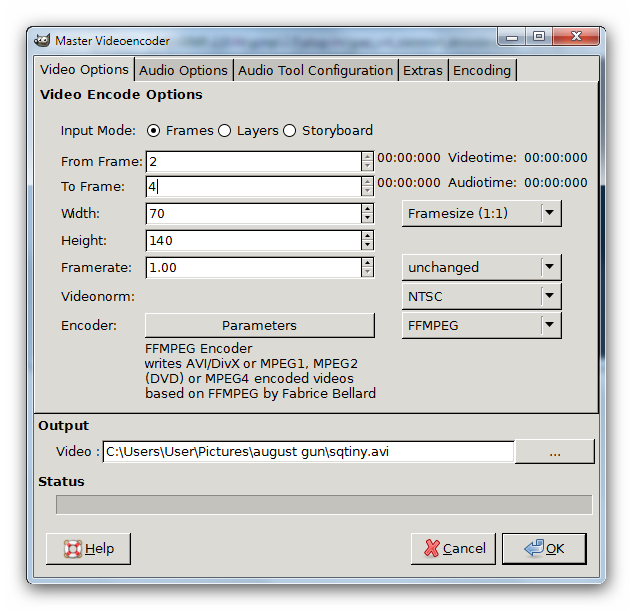
Is there a way to convert an animated gif to avi, trying to overlay it onto another video in another program
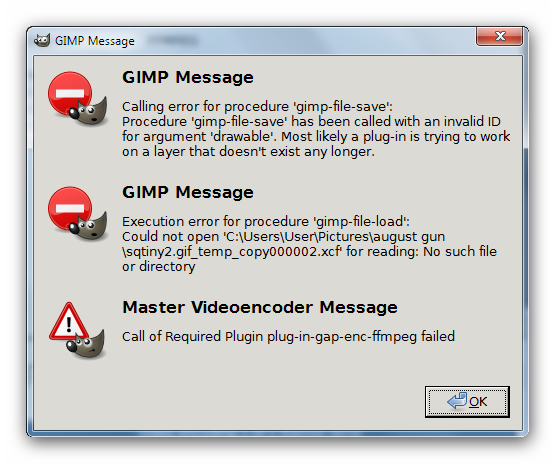
I tried using gap master video encoder but keep getting errors
Image
Image


Share on Facebook Share on Twitter Share on Orkut Share on Digg Share on MySpace Share on Delicious Share on Technorati
Top
 Post subject: Re: animated gif to avi
PostPosted: Wed Sep 14, 2011 2:53 pm  (#2) 
Offline
GimpChat Founder
User avatar

Joined: May 22, 2008
Posts: 5241
Location: Gimpville
Try selecting layers as the input mode. It appears the plug-in is looking for frames on your hard-drive that don't exist.

_________________
“If you reach for the stars, you just might land on a decently sized hill.” - Stuart Hill


Top
 Post subject: Re: animated gif to avi
PostPosted: Wed Sep 14, 2011 3:42 pm  (#3) 
Offline
GimpChat Member
User avatar

Joined: Oct 07, 2010
Posts: 439
Location: home/Nixnine/.gimp-2.0/scripts/nixnine.scm
I use a different encoder. The default encoder is AVI. Is the FFMPEG encoder your default? That's one of the errors you are getting.

_________________
I refuse to be confused, but am often confused at this refusal.


Top
 Post subject: Re: animated gif to avi
PostPosted: Thu Sep 15, 2011 4:11 am  (#4) 
Offline
GimpChat Member

Joined: Mar 04, 2011
Posts: 2615
@alc59

This is a off topic for Gimp, but still graphics related. For Windows, if you install ImageMagick (not a bad idea anyway) you also get ffmpeg. The advantage is, ffmpeg is now included in your Windows path and you can use it from anywhere.

All command line from now on.
ImageMagick will very easily convert a gif file to a 25 fps mpeg1 video

convert in.gif out.mpg

if you want this in avi format very easy with ffmpeg

ffmpeg -i out.mpg out.avi

It can get a lot more complicated than this if you want to change frame rates etc. but might get you up and running.

One thing I did notice from your screen shots - spaces in file names - never a good idea. If you do use them make sure the file name is enclosed in quotes.


Top
 Post subject: Re: animated gif to avi
PostPosted: Thu Sep 15, 2011 4:11 pm  (#5) 
Offline
GimpChat Member

Joined: Aug 05, 2011
Posts: 606
Location: limestone,ny
thanks, i tried what nixnine said and changing to avi encoder worked even with a error
Image

rich2005 is imagemagic command line only?


Top
 Post subject: Re: animated gif to avi
PostPosted: Thu Sep 15, 2011 5:16 pm  (#6) 
Offline
Global Moderator
User avatar

Joined: May 16, 2010
Posts: 16173
It is times like this i really love my SWiSH program. :)


I am having the same difficulty with the encoder.
The error says the call to the encoder plugin failed.

I tried FFMPEG and AVI

_________________
Image


Top
 Post subject: Re: animated gif to avi
PostPosted: Thu Sep 15, 2011 6:33 pm  (#7) 
Offline
GimpChat Member

Joined: Apr 12, 2010
Posts: 5870
FFMPEG encoder is included INSIDE gap (and the version in gap is even slightly different.

anyway i also had problem with the gap encoder and i much prefer use Gap "Split image into frames" to have each frame as separate and numbered png and then some of the many simple utility to convert Png sequences in AVI (or any other format)

Also remember that AVI is a tricky format, more exactly the name is just a container for many different encoding, Gap only save UNCOMPRESSED AVI that confronted with the other most used AVI has a Gigantic file size.and may even be not compatible with some video player.

###################################################################

I also have a very basic doubt on what you wish to achive :
gif has a really low quality, support only Index mode that means very few colors and only a basic yes/not transparency supported .

Avi in general and uncompressed avi in particular is almost the contrary.

Now convert from a low quality format as gif to a high quality format may make even more evident the low quality of the gif

It will make let say the same effect of inserting in a modern movie some scene from a old BW television, may even be a cool special effect but will show clearly the low quality of old BW television

_________________
My 3D Gallery on Deviantart http://photocomix2.deviantart.com/
Main gallery http://www.flickriver.com/photos/photocomix-mandala/
Mandala and simmetry http://www.flickriver.com/photos/photocomix_mandala/

Image

Mrs Wilbress


Top
 Post subject: Re: animated gif to avi
PostPosted: Thu Sep 15, 2011 7:17 pm  (#8) 
Offline
Global Moderator
User avatar

Joined: May 16, 2010
Posts: 16173
Thanks for that tip PC.I never thought of creating a bunch of PNG's then converting those to AVI frames.

_________________
Image


Top
 Post subject: Re: animated gif to avi
PostPosted: Thu Sep 15, 2011 8:53 pm  (#9) 
Offline
GimpChat Member

Joined: Apr 12, 2010
Posts: 5870
That the best way in my opinion

Still convert to AVI is tricky because too vague...with what encoding,using wich codec ?
and some codec and encoding will only support some very exact image size or image ratio , just 1 pixel more in W or H may lead to failure (and even worse often you will not see errors when doing, but only when trying to open the avi with a videoplayer)

There is no lack of documentation, the problem is the oopsite there is a too much and too thick, pages and pages on each detail... and as far i know nothing summarizing in few simple words the basic

anyway i got the best results (well ..about 1 hit on 3 try, third was good )just converting a sequences of png to avi with some simple and free utility, so simple to offer only few options ,

instead tool as FFMPEG or Super seems perfect only if you know exactly what to do (ie you know that video format compatible with that codec and with that image size and ratio )

_________________
My 3D Gallery on Deviantart http://photocomix2.deviantart.com/
Main gallery http://www.flickriver.com/photos/photocomix-mandala/
Mandala and simmetry http://www.flickriver.com/photos/photocomix_mandala/

Image

Mrs Wilbress


Top
 Post subject: Re: animated gif to avi
PostPosted: Thu Sep 15, 2011 9:27 pm  (#10) 
Offline
Global Moderator
User avatar

Joined: May 16, 2010
Posts: 16173
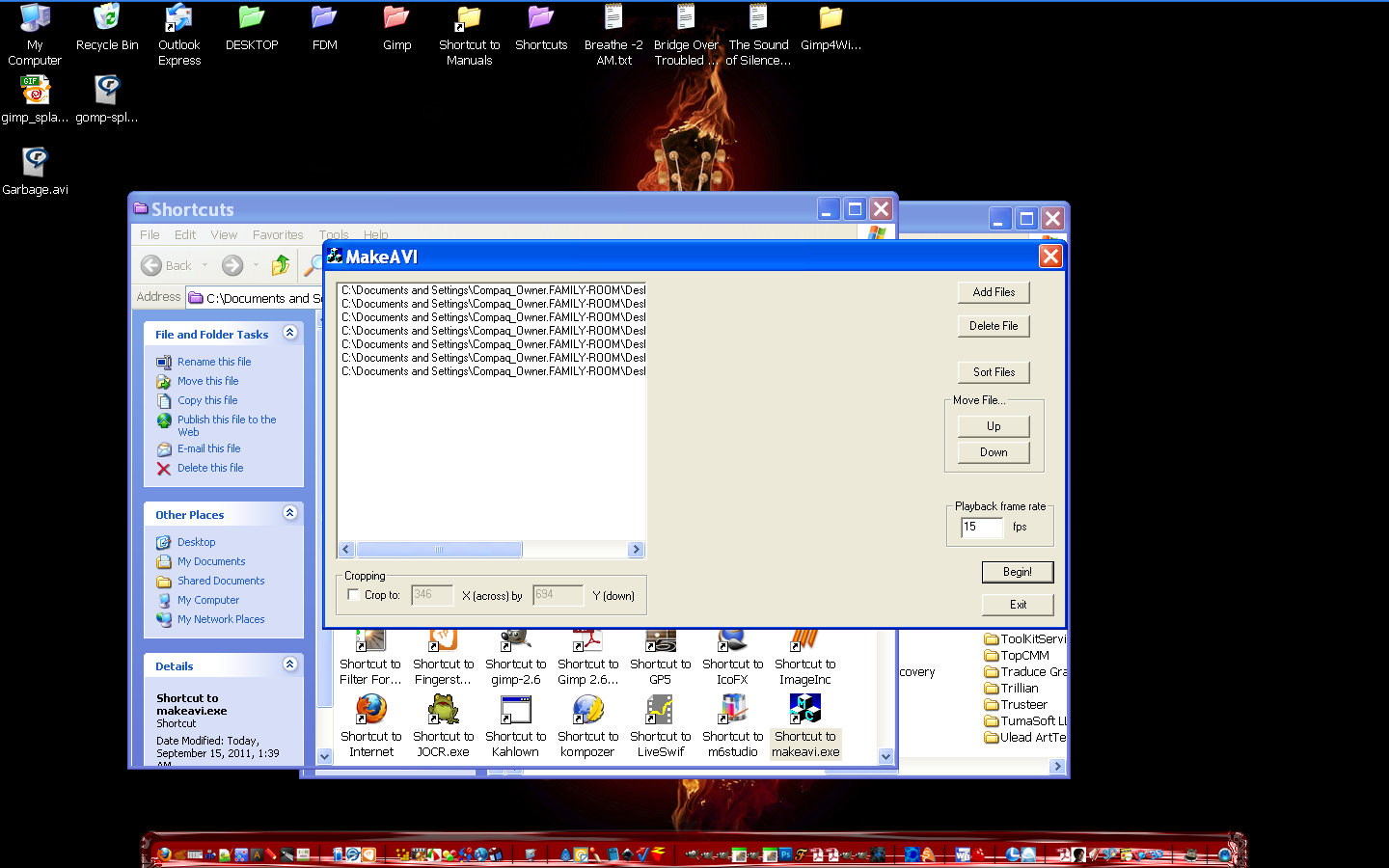
Yes i recommend Makeavi - http://sourceforge.net/projects/makeavi/files/
It takes PNG, JPG, or most other image formats (except GIF), and creates an AVI from them.
GIF is patent burdened so it is hard to find a free convertor.
Image

Instructions for use -
If you will be continuing to work with the video, perhaps encoding it
to other formats, then you may want to use "Uncompressed" - though
that generates HUGE files. In general time lapse stuff is not that big,
so your file will probably only be a few megabytes, so this is not
a bad choice, but it should NOT be used for the final product; the
data rate is so high that most computers will not be able to play
the video smoothly.

My first file was 6 frames (PNG images), and 1400x900 and was 25mb in size.
You will probably be doing smaller dimensions. :)

If you are going for a final AVI product, Indeo 4.5 or higher is a good
choice, since everyone either has it or can get the codec automatically
when they start to play the video under Windows media player.

_________________
Image


Top
 Post subject: Re: animated gif to avi
PostPosted: Thu Sep 15, 2011 10:21 pm  (#11) 
Offline
GimpChat Member
User avatar

Joined: Oct 07, 2010
Posts: 439
Location: home/Nixnine/.gimp-2.0/scripts/nixnine.scm
I've gotten to where I save animations from gimp and blender which I want to convert to avi or mp4 as pngs and add them as an image sequence to my video editor. Works great and allows me a little more control over the video. I can make corrections or adjustments easier.

_________________
I refuse to be confused, but am often confused at this refusal.


Top
 Post subject: Re: animated gif to avi
PostPosted: Thu Sep 15, 2011 10:32 pm  (#12) 
Offline
Global Moderator
User avatar

Joined: May 16, 2010
Posts: 16173
Makeavi works pretty good except it doesn't handle transparencies well.
How do you do yours?

_________________
Image


Top
 Post subject: Re: animated gif to avi
PostPosted: Fri Sep 16, 2011 9:54 am  (#13) 
Offline
GimpChat Member

Joined: Aug 05, 2011
Posts: 606
Location: limestone,ny
I'll have to try that nixnine..I have "save all layers add-on" which brings me to the question where did i get it, i can't find it in my scripts or plugins folders and it's only on my laptop not the desktop, i want to copy it to the desktop pc

Image
Image


Top
 Post subject: Re: animated gif to avi
PostPosted: Fri Sep 16, 2011 10:27 am  (#14) 
Offline
GimpChat Member

Joined: Mar 04, 2011
Posts: 2615
The same as on my installation, it is one of Saul Goode's scripts

http://flashingtwelve.brickfilms.com/GIMP/Scripts/

towards the end of the page.


Top
 Post subject: Re: animated gif to avi
PostPosted: Fri Sep 16, 2011 10:42 am  (#15) 
Offline
Global Moderator
User avatar

Joined: May 16, 2010
Posts: 16173
In my opinion this doesn't work very well with all GIF files.Transparency still isn't supported either way.
I tried the Image Magic way and got a two over written files and now they are junk.
So i went and bought this piece of software for 20 dollars USD
GIF 2 AVI or SWF convertor.
http://www.armenian-dictionary.com/othe ... viswf.html
Man this software works beautiful!
The file size of my 50 frame AVI file is just under 1mb and the actual GIF was 74.7 kb so that's pretty good.
The image is the one here
Image

I got this in return - transparency over the windows and all.
www.youtube.com Video from : www.youtube.com


I am impressed to say the least.And hey for 20 bucks.That is a steal if you use this all the time. :)

Interface is easy to use too.

Image

Sometimes you just have to pay to get great results.With GIF patents it is very hard to find good FREE GIF to AVI software.In my opinion this has much better quality than using GAP.
I am not talking down GAP either.Just seems better to go with commercial software in this case.

Converting just a few frames i could see that being done in Gimp or GAP but not a full fledged GIF animation. :)

_________________
Image


Top
 Post subject: Re: animated gif to avi
PostPosted: Sun Oct 30, 2016 8:51 am  (#16) 
Offline
GimpChat Member

Joined: Dec 29, 2015
Posts: 223
I never used Gimp for GIF or Animation this much. By 'Hint' and 'Trial' I was able to get not only 'gif' animation but also 'gif to avi' conversion though with error.

Flower
https://drive.google.com/file/d/0BzEczu ... sp=sharing

Text animation after some gimpchat tutorials and links.
https://drive.google.com/file/d/0BzEczu ... sp=sharing

Thanks


Top
 Post subject: Re: animated gif to avi
PostPosted: Sun Oct 30, 2016 11:12 am  (#17) 
Offline
Global Moderator
User avatar

Joined: May 16, 2010
Posts: 16173
Rashid wrote:
I never used Gimp for GIF or Animation this much. By 'Hint' and 'Trial' I was able to get not only 'gif' animation but also 'gif to avi' conversion though with error.

Flower
https://drive.google.com/file/d/0BzEczu ... sp=sharing

Text animation after some gimpchat tutorials and links.
https://drive.google.com/file/d/0BzEczu ... sp=sharing

Thanks

GIMP has changed quite a bit since 2011. :)
Also that program GIF to AVI convertor doesn't work on Windows 7 and above. They never did update it either.

_________________
Image


Top
Post new topic Reply to topic  [ 17 posts ] 

All times are UTC - 5 hours [ DST ]


* Login  


Powered by phpBB3 © phpBB Group