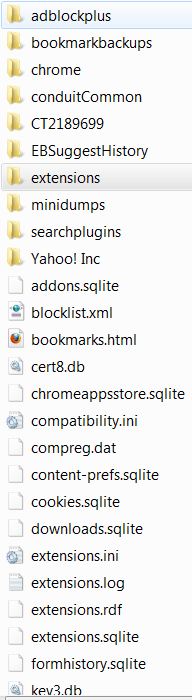
That does appear to be your Firefox profile folder. To restore your profile, copy all the files and folders from your
old profile folder to your
new profile folder.
Below is the procedure I'd use to find/backup my profile and re-install Firefox.
From your Firefox Menu, Click Help/Troubleshooting Information..
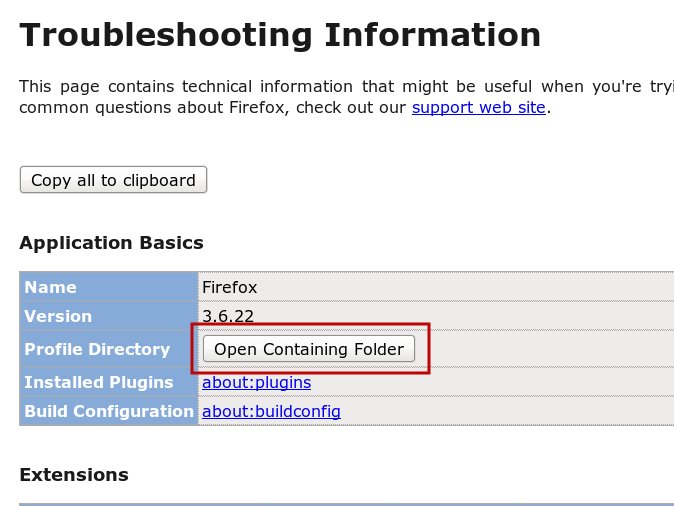
Click on the "Open Containing Folder" beside Profile Directory.
That will take you to your current Firefox profile folder. Make sure you note exactly where it is.
Back that folder up completely. (Actually, I'd back up starting from the Firefox folder, which is a couple of folders up in the directory tree).
After you uninstall Firefox, delete the folder and everything in it. Re-install Firefox and check again under Help/Troubleshooting Information to find where the new profile is located.
Before restoring the your old profile, check to see if you can upload large files to GC. That will tell you if you've fixed the problem by re-installing.
If all is well, you can copy over your old profile and try uploading to GC again.
Personally, I'd just import my bookmarks, install my addons and start over again without restoring the old profile. Sometimes, it's good to just start clean.

 Login
 Register
 Tweets
 FAQ
 Advanced Search














 ...but now you have a new version ,

 "

