It is currently Wed Nov 18, 2026 1:11 pm


All times are UTC - 5 hours [ DST ]


Post new topic Reply to topic  [ 43 posts ]  Go to page Previous  1, 2, 3  Next
Author Message
 Post subject: Re: Having problems uploading my images to Gimp Chat.
PostPosted: Tue Sep 20, 2011 7:37 pm  (#21) 
Offline
GimpChat Member
User avatar

Joined: Oct 07, 2010
Posts: 439
Location: home/Nixnine/.gimp-2.0/scripts/nixnine.scm
My firefox was crashing every time I tried to listen to an audio file. Had to disable one of my browser plug-ins. The mozilla support crew were very fast to respond. Maybe give them a try.

_________________
I refuse to be confused, but am often confused at this refusal.


Top
 Post subject: Re: Having problems uploading my images to Gimp Chat.
PostPosted: Tue Sep 20, 2011 7:41 pm  (#22) 
Offline
GimpChat Member
User avatar

Joined: Apr 07, 2010
Posts: 14182
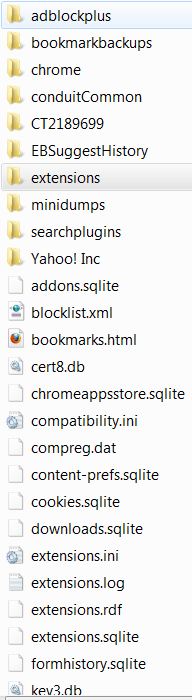
I backed up what I thought was the profile and now I don't know how to put it back in. It has 47 items in it and all the other thangs don't look like anything I know. These are part of them. Do they look like profiles? :oops:
Image

_________________
Image


Top
 Post subject: Re: Having problems uploading my images to Gimp Chat.
PostPosted: Tue Sep 20, 2011 8:39 pm  (#23) 
Offline
GimpChat Founder
User avatar

Joined: May 22, 2008
Posts: 5244
Location: Gimpville
That does appear to be your Firefox profile folder. To restore your profile, copy all the files and folders from your old profile folder to your new profile folder.

Below is the procedure I'd use to find/backup my profile and re-install Firefox.


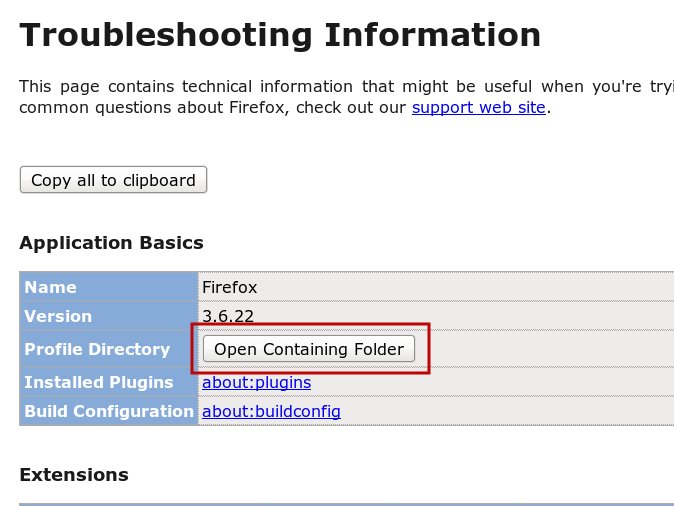
From your Firefox Menu, Click Help/Troubleshooting Information..
Image

Click on the "Open Containing Folder" beside Profile Directory.

That will take you to your current Firefox profile folder. Make sure you note exactly where it is.

Back that folder up completely. (Actually, I'd back up starting from the Firefox folder, which is a couple of folders up in the directory tree).

After you uninstall Firefox, delete the folder and everything in it. Re-install Firefox and check again under Help/Troubleshooting Information to find where the new profile is located.

Before restoring the your old profile, check to see if you can upload large files to GC. That will tell you if you've fixed the problem by re-installing.

If all is well, you can copy over your old profile and try uploading to GC again.

Personally, I'd just import my bookmarks, install my addons and start over again without restoring the old profile. Sometimes, it's good to just start clean. :hehe

_________________
"If Microsoft ever does applications for Linux it means I've won." - Linus Torvalds


Top
 Post subject: Re: Having problems uploading my images to Gimp Chat.
PostPosted: Wed Sep 21, 2011 5:01 am  (#24) 
Offline
GimpChat Member
User avatar

Joined: Apr 07, 2010
Posts: 14182
thanks Tux. I will go the easy route by installing my addons and start over without restoring the old profile. Looks less complicated. :teeth

_________________
Image


Top
 Post subject: Re: Having problems uploading my images to Gimp Chat.
PostPosted: Sat Sep 24, 2011 9:25 am  (#25) 
Offline
GimpChat Member
User avatar

Joined: Apr 07, 2010
Posts: 14182
One more question before I put solved to this problem.
Thanks to the Tux process of elimination plan, it is for sure that the problem is/was FF 6.0. I am now using Chrome which is very fast but I do also want FF. I can upload software up to 150MB in size with Chrome with no problems at all.
Could anyone please recommend a good stable version of FF? I have been keeping up with all the newest versions up until now, which I guess wasn't a good idea.

Thank you, Molly

_________________
Image


Top
 Post subject: Re: Having problems uploading my images to Gimp Chat.
PostPosted: Sat Sep 24, 2011 10:55 am  (#26) 
Offline
GimpChat Member

Joined: Apr 12, 2010
Posts: 5870
Your version was supposed to be stable , i fear only somebody at the FF forum may help you to trace the download link of older version, i did a search but they are well hidden

Anyway i did found the download link for a older portable version
http://portableapps.com/apps/internet/f ... n#legacy35

_________________
My 3D Gallery on Deviantart http://photocomix2.deviantart.com/
Main gallery http://www.flickriver.com/photos/photocomix-mandala/
Mandala and simmetry http://www.flickriver.com/photos/photocomix_mandala/

Image

Mrs Wilbress


Top
 Post subject: Re: Having problems uploading my images to Gimp Chat.
PostPosted: Sat Sep 24, 2011 11:17 am  (#27) 
Offline
GimpChat Member
User avatar

Joined: Apr 07, 2010
Posts: 14182
Thanks PC, I will wait a while cuz I really don't want to go portable unless I have to. I will probably try again taking it all out and find everything there is to find with FF in it and delete...start over and see.

_________________
Image


Top
 Post subject: Re: Having problems uploading my images to Gimp Chat.
PostPosted: Sat Sep 24, 2011 11:20 am  (#28) 
Offline
GimpChat Member

Joined: Apr 12, 2010
Posts: 5870
On the FF side are no trace of older releases, sure there are stored somewhere but only in their help forum you may found somebody knowing where, never see older files so skillfully hidden

_________________
My 3D Gallery on Deviantart http://photocomix2.deviantart.com/
Main gallery http://www.flickriver.com/photos/photocomix-mandala/
Mandala and simmetry http://www.flickriver.com/photos/photocomix_mandala/

Image

Mrs Wilbress


Top
 Post subject: Re: Having problems uploading my images to Gimp Chat.
PostPosted: Sat Sep 24, 2011 1:18 pm  (#29) 
Offline
GimpChat Founder
User avatar

Joined: May 22, 2008
Posts: 5244
Location: Gimpville
Have we confirmed that the issue is with Firefox v6?

Anyone else here using Firefox v6 and having problems uploading large files?

_________________
"If Microsoft ever does applications for Linux it means I've won." - Linus Torvalds


Top
 Post subject: Re: Having problems uploading my images to Gimp Chat.
PostPosted: Sat Sep 24, 2011 1:23 pm  (#30) 
Offline
GimpChat Member
User avatar

Joined: Apr 07, 2010
Posts: 14182
I confirmed it for me, lol. I can't upload anything larger that 4 or 5 kb's. I try chrome and there is no limit.

_________________
Image


Top
 Post subject: Re: Having problems uploading my images to Gimp Chat.
PostPosted: Sat Sep 24, 2011 5:47 pm  (#31) 
Offline
GimpChat Member

Joined: Mar 29, 2011
Posts: 346
Location: Wisconsin
I am running Firefox 6.0.2 under Windows XP. This is a 178 kB file:
Image

p.s. I have Firefox clear cache every time it closes.

_________________
Image


Top
 Post subject: Re: Having problems uploading my images to Gimp Chat.
PostPosted: Sat Sep 24, 2011 6:02 pm  (#32) 
Offline
GimpChat Member

Joined: Mar 29, 2011
Posts: 346
Location: Wisconsin
Same image loaded as an attachment.


Attachments:
Daylilly WP 1.jpg
Daylilly WP 1.jpg [ 177.48 KiB | Viewed 2425 times ]

_________________
Image
Top
 Post subject: Re: Having problems uploading my images to Gimp Chat.
PostPosted: Sat Sep 24, 2011 6:12 pm  (#33) 
Offline
GimpChat Member
User avatar

Joined: Apr 07, 2010
Posts: 14182
I clear the cache twice a week. I don't have a prob with 178 kb, I start having the probs when it gets over 500kb.

_________________
Image


Top
 Post subject: Re: Having problems uploading my images to Gimp Chat.
PostPosted: Sat Sep 24, 2011 6:28 pm  (#34) 
Offline
GimpChat Member

Joined: Mar 29, 2011
Posts: 346
Location: Wisconsin
This one weighs in at 1.2 MB
Image

And a slightly larger picture as an attachment


Attachments:
Flowers 432.jpg
Flowers 432.jpg [ 1.32 MiB | Viewed 2414 times ]

_________________
Image
Top
 Post subject: Re: Having problems uploading my images to Gimp Chat.
PostPosted: Sat Sep 24, 2011 6:41 pm  (#35) 
Offline
GimpChat Member
User avatar

Joined: Apr 07, 2010
Posts: 14182
I have windows 7, I have FF 6.0.2.
For the past 3 weeks I haven't been able to upload ANYTHING LARGER than 400 to 500 kb's to GC. I downloaded Google Chrome and I can upload up to 150MB to my software site. The problem is MY version of FF.

_________________
Image


Top
 Post subject: Re: Having problems uploading my images to Gimp Chat.
PostPosted: Sat Sep 24, 2011 7:56 pm  (#36) 
Offline
GimpChat Member

Joined: Apr 12, 2010
Posts: 5870
Molly why not the portable i linked ?
At least you can try

_________________
My 3D Gallery on Deviantart http://photocomix2.deviantart.com/
Main gallery http://www.flickriver.com/photos/photocomix-mandala/
Mandala and simmetry http://www.flickriver.com/photos/photocomix_mandala/

Image

Mrs Wilbress


Top
 Post subject: Re: Having problems uploading my images to Gimp Chat.
PostPosted: Sat Sep 24, 2011 8:03 pm  (#37) 
Offline
Global Moderator
User avatar

Joined: May 16, 2010
Posts: 16275
FF 6.02 gave me a lot of problems when i added the new download to tab addon.(many crashes and freeze ups)
After i set the options in downloads to auto close after download it ran perfect.

_________________
Image


Top
 Post subject: Re: Having problems uploading my images to Gimp Chat.
PostPosted: Sat Sep 24, 2011 9:21 pm  (#38) 
Offline
GimpChat Member

Joined: Apr 12, 2010
Posts: 5870
i Always forgot to block FF automatic update...
i hate open FF just to see that message

"hello we are updating FF...checking now the compatibility of your extensions...OHH, what a pity all your favorite extension will not work anymore :gaah ...but now you have a new version ,
No new features but we fixed a few bugs that almost nobody noticed causing a lot of new bugs that almost everybody will notice :bawl

good luck! :evilgrin "


well the FF message don't say exactly that, but that is what happened with last FF upgrades

_________________
My 3D Gallery on Deviantart http://photocomix2.deviantart.com/
Main gallery http://www.flickriver.com/photos/photocomix-mandala/
Mandala and simmetry http://www.flickriver.com/photos/photocomix_mandala/

Image

Mrs Wilbress


Top
 Post subject: Re: Having problems uploading my images to Gimp Chat.
PostPosted: Sun Sep 25, 2011 9:45 am  (#39) 
Offline
GimpChat Member
User avatar

Joined: Apr 07, 2010
Posts: 14182
lol :teeth :rofl

_________________
Image


Top
 Post subject: Re: Having problems uploading my images to Gimp Chat.
PostPosted: Sun Sep 25, 2011 11:59 am  (#40) 
Offline
GimpChat Member

Joined: Jun 04, 2011
Posts: 84
too true :clap


Top
Post new topic Reply to topic  [ 43 posts ]  Go to page Previous  1, 2, 3  Next

All times are UTC - 5 hours [ DST ]


cron

* Login  


Powered by phpBB3 © phpBB Group