It is currently Sun Aug 23, 2026 9:27 am


All times are UTC - 5 hours [ DST ]


Post new topic Reply to topic  [ 52 posts ]  Go to page Previous  1, 2, 3  Next
Author Message
 Post subject: Re: Can't get GURM to work
PostPosted: Sat Dec 03, 2011 8:45 am  (#21) 
Offline
Script Coder
User avatar

Joined: Jul 14, 2010
Posts: 697
Here is my GURM ini at the moment:

[Brush Manager]
useManager = yes
gimpPath = D:\Gimp Resources\Gimp Brushes\ACTIVE_DIR
userPath = D:\Gimp Resources\Gimp Brushes\INSTALL_DIR
extensions = .gbr,.vbr,.gih,.abr,
installedOptions = Gidde,Istarlome overland,Obsidian Dawn,Star Raven Calligraphic Map,mountains,overland,

[Gradient Manager]
useManager = yes
gimpPath = D:\Gimp Resources\Gimp Gradients\ACTIVE_DIR
userPath = D:\Gimp Resources\Gimp Gradients\INSTALL_DIR
extensions = .ggr,.svg,
installedOptions =

[Palette Manager]
useManager = yes
gimpPath = D:\Gimp Resources\Gimp Palettes\ACTIVE_DIR
userPath = D:\Gimp Resources\Gimp Palettes\INSTALL_DIR
extensions = .gpl,
installedOptions =

[Pattern Manager]
useManager = yes
gimpPath = D:\Gimp Resources\Gimp Patterns\ACTIVE_DIR
userPath = D:\Gimp Resources\Gimp Patterns\INSTALL_DIR
extensions = .pat,.jpg,.png,.tiff,.bmp,.gif,
installedOptions =

[Script Manager]
useManager = yes
gimpPath = D:\Gimp Resources\Gimp Scripts\ACTIVE_DIR
userPath = D:\Gimp Resources\Gimp Scripts\INSTALL_DIR
extensions = .scm,
installedOptions =

[Read this]
; Please do not edit anything manually in here except for "gimpPath" and "userPath"
; which have to be set manuall and the useManager field if you want to use the
; manager.
; For more details please read the readme file.


The only thing that looks different is that I did not use the original \<user>\.gimp-2.6\ paths, I added new folders to my folder configuration.

...


-Rob A>

_________________
Image
Fantasy Cartography and Mapping by RobA


Top
 Post subject: Re: Can't get GURM to work
PostPosted: Sat Dec 03, 2011 2:29 pm  (#22) 
Offline
GimpChat Member
User avatar

Joined: Aug 24, 2011
Posts: 1785
Location: Dallas, TX
It appears that GURM is not loading any of the resources at all now. The only things that show up in my dialogs are whatever is left in the 2.6 and 2.0 folders. I don't understand the gimp path part. In the readme it has 2.6 identified and in yours you use something different. How exactly does that work and are there any changes necessary to the preferences folders inside gimp? I'm missing something.

_________________
Image


Top
 Post subject: Re: Can't get GURM to work
PostPosted: Sat Dec 03, 2011 8:19 pm  (#23) 
Offline
Global Moderator
User avatar

Joined: May 16, 2010
Posts: 16167
Here is my brush setup

[Brush Manager]
useManager = yes
gimpPath = C:\Documents and Settings\Compaq_Owner.FAMILY-ROOM\.gimp-2.6\brushes
userPath = C:\GIMP\Brushes
extensions = .gbr,.vbr,.gih,.abr,
installedOptions = Tattooheart_brushes,

_________________
Image


Top
 Post subject: Re: Can't get GURM to work
PostPosted: Sat Dec 03, 2011 8:37 pm  (#24) 
Offline
GimpChat Member

Joined: Apr 12, 2010
Posts: 5870
Draconian

RobA paths looks different because he didn't use the .gimp folder, i mean the gimp user folder

the folders with brushes ,plugins,etc, may be everywhere you like,not only inside gimp

_________________
My 3D Gallery on Deviantart http://photocomix2.deviantart.com/
Main gallery http://www.flickriver.com/photos/photocomix-mandala/
Mandala and simmetry http://www.flickriver.com/photos/photocomix_mandala/

Image

Mrs Wilbress


Top
 Post subject: Re: Can't get GURM to work
PostPosted: Sat Dec 03, 2011 8:47 pm  (#25) 
Offline
GimpChat Member
User avatar

Joined: Oct 06, 2010
Posts: 4050
Drac: the installed options portion is handled by the script as an indicator of what brushes, patterns, etc. are actually selected for displaying. You don't need to do anything for that part.

_________________
"In order to attain the impossible, one must attempt the absurd."
~ Miguel de Cervantes


Top
 Post subject: Re: Can't get GURM to work
PostPosted: Sun Dec 04, 2011 1:20 am  (#26) 
Offline
GimpChat Member
User avatar

Joined: Jul 04, 2011
Posts: 395
Location: Indianapolis, IN
Quick question!

In Rob's GURM ini he has

installedOptions = Gidde,Istarlome overland,Obsidian Dawn,Star Raven Calligraphic Map,mountains,overland,


What does the 'installedOptions' do or represent??

Never mind .. It's actually the brush(s) that are installed at that moment. Got it! :)

_________________
"That which does not kill us makes us stronger." ~ Friedrich Nietzsche


Top
 Post subject: Re: Can't get GURM to work
PostPosted: Mon Dec 05, 2011 1:34 pm  (#27) 
Offline
GimpChat Member
User avatar

Joined: Aug 24, 2011
Posts: 1785
Location: Dallas, TX
I understand about the Installed options (suspected that) but in RobA's ini both the gimp path and the user path are on the same drive and both seem to be pointing to the same folders outside of gimp.

In Rod's ini, both the gimp and the user path are on the same drive but the User path points to a folder outside of gimp.

My ini, however is split between two drives with the gimp path pointing to the .gimp-2.6 folder on C drive and the user path points to a folder outside of gimp on F drive.

Since I can't get mathmap to work either, I have to assume it has something to do with my having two drives to deal with. Don't know why but it seems to now be a recurring theme with plug-ins. GMIC works and GAP butnot the other two. Any ideas where to go from here? Please review my post where I show all the screenshots after I made the changes and my folder configuration showing my "Resources" folder and all my brushes in separate folders within.

_________________
Image


Top
 Post subject: Re: Can't get GURM to work
PostPosted: Mon Dec 05, 2011 2:00 pm  (#28) 
Offline
GimpChat Member
User avatar

Joined: Jul 04, 2011
Posts: 395
Location: Indianapolis, IN
Draconian wrote:
I understand about the Installed options (suspected that) but in RobA's ini both the gimp path and the user path are on the same drive and both seem to be pointing to the same folders outside of gimp.

In Rod's ini, both the gimp and the user path are on the same drive but the User path points to a folder outside of gimp.

My ini, however is split between two drives with the gimp path pointing to the .gimp-2.6 folder on C drive and the user path points to a folder outside of gimp on F drive.

Since I can't get mathmap to work either, I have to assume it has something to do with my having two drives to deal with. Don't know why but it seems to now be a recurring theme with plug-ins. GMIC works and GAP butnot the other two. Any ideas where to go from here? Please review my post where I show all the screenshots after I made the changes and my folder configuration showing my "Resources" folder and all my brushes in separate folders within.


Drac ..

Sorry you're having so much trouble with this! :( Don't know if will help you or not but I have my GURM stuff on my D drive outside of Gimp and it works fine. The only thing I have turned on at the moment is the brushes.

Here's my ini file:
[Brush Manager]
useManager = yes
gimpPath = C:\Users\Dave\.gimp-2.6\brushes
userPath = D:\GURM\brushes
extensions = .gbr,.vbr,.gih,.abr,
installedOptions = Acrylic,Brilliance,Burst,

[Gradient Manager]
useManager = no
gimpPath = C:\Users\Dave\.gimp-2.6\gradients
userPath = D:\GURM\gradients
extensions = .ggr,.svg,
installedOptions =

[Palette Manager]
useManager = no
gimpPath = C:\Users\Dave\.gimp-2.6\palettes
userPath = D:\GURM\palettes
extensions = .gpl,
installedOptions =

[Pattern Manager]
useManager = no
gimpPath = C:\Users\Dave\.gimp-2.6\patterns
userPath = D:\GURM\patterns
extensions = .pat,.jpg,.png,.tiff,.bmp,.gif,
installedOptions =

[Script Manager]
useManager = no
gimpPath = C:\Users\Dave\.gimp-2.6\scripts
userPath = D:\GURM\scripts
extensions = .scm,
installedOptions =


Just checking .. but you haven't changed anything in Gimp's preferences (Edit->Preferences->Folders). You wouldn't need to change anything there.

Side note: Patterns how do you guys break down your patterns? Do you just leave them in a folder named from the source that they came from? Or .. some other scheme! I guess gradients too! :)

_________________
"That which does not kill us makes us stronger." ~ Friedrich Nietzsche


Top
 Post subject: Re: Can't get GURM to work
PostPosted: Mon Dec 05, 2011 2:18 pm  (#29) 
Offline
Global Moderator
User avatar

Joined: May 16, 2010
Posts: 16167
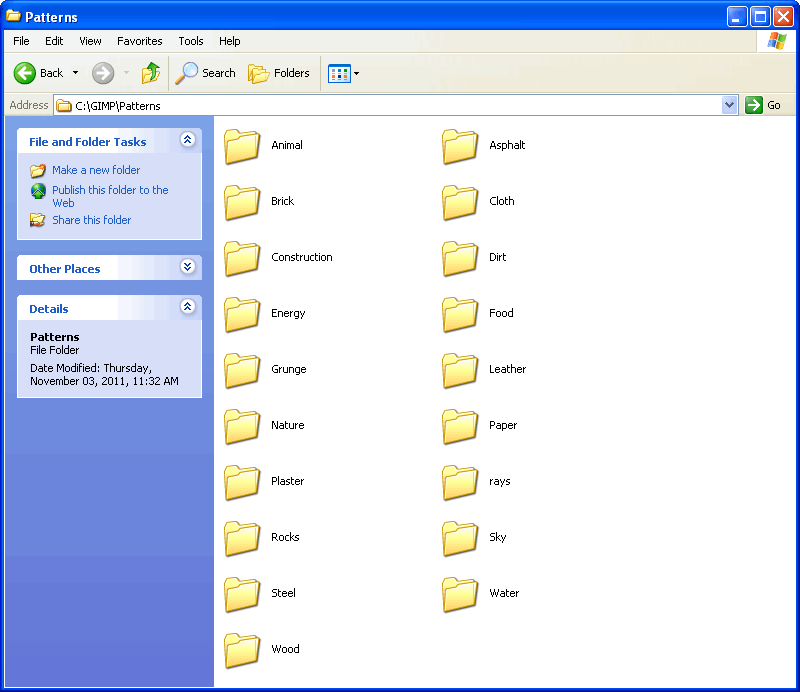
Here are my pattern folders -

Image

_________________
Image


Top
 Post subject: Re: Can't get GURM to work
PostPosted: Mon Dec 05, 2011 2:20 pm  (#30) 
Offline
GimpChat Member
User avatar

Joined: Jan 13, 2011
Posts: 2648
Location: Poland
When is a bug:
There is yet another possible confusion:
Do not change the directory names (which were active) in if Gimp is running.
Just compare the *. ini file with the data.

_________________
Image


Top
 Post subject: Re: Can't get GURM to work
PostPosted: Mon Dec 05, 2011 2:47 pm  (#31) 
Offline
GimpChat Member
User avatar

Joined: Aug 24, 2011
Posts: 1785
Location: Dallas, TX
MareroQ wrote:
When is a bug:
There is yet another possible confusion:
Do not change the directory names (which were active) in if Gimp is running.
Just compare the *. ini file with the data.


Gimp was not active when I installed GURM, created folders, or rearranged resources.

What"data" are you referring to that I need to compare the .ini to

Mr. Biggz - Looks like it's definitely NOT a case of using different drives from looking at your ini file. Looks like exactly the same sort of set up I have configured at the moment.

_________________
Image


Top
 Post subject: Re: Can't get GURM to work
PostPosted: Mon Dec 05, 2011 2:54 pm  (#32) 
Offline
GimpChat Member
User avatar

Joined: Jul 04, 2011
Posts: 395
Location: Indianapolis, IN
Draconian wrote:
MareroQ wrote:
When is a bug:
There is yet another possible confusion:
Do not change the directory names (which were active) in if Gimp is running.
Just compare the *. ini file with the data.


Gimp was not active when I installed GURM, created folders, or rearranged resources.

What"data" are you referring to that I need to compare the .ini to


I think he meant that don't change the location in preference of were the folders are.

AND

Track what's in the ini file to were the data actually is.

Example: My brushes from above in my Gimp preferences still point to C:\Users\Dave\.gimp-2.6\brushes BUT I moved the entire contents of that location to D:\GURM\brushes

Better yet .. post your GURM.ini file and we'll take a looky! I wish I had more time to look right. I have to head of to work in a few minutes! :gaah :( :cry

_________________
"That which does not kill us makes us stronger." ~ Friedrich Nietzsche


Top
 Post subject: Re: Can't get GURM to work
PostPosted: Mon Dec 05, 2011 3:01 pm  (#33) 
Offline
GimpChat Member
User avatar

Joined: Aug 24, 2011
Posts: 1785
Location: Dallas, TX
MrBiggz wrote:
Draconian wrote:
MareroQ wrote:
When is a bug:
There is yet another possible confusion:
Do not change the directory names (which were active) in if Gimp is running.
Just compare the *. ini file with the data.


Gimp was not active when I installed GURM, created folders, or rearranged resources.

What"data" are you referring to that I need to compare the .ini to


I think he meant that don't change the location in preference of were the folders are.

AND

Track what's in the ini file to were the data actually is.

Example: My brushes from above in my Gimp preferences still point to C:\Users\Dave\.gimp-2.6\brushes BUT I moved the entire contents of that location to D:\GURM\brushes

Better yet .. post your GURM.ini file and we'll take a looky! I wish I had more time to look right. I have to head of to work in a few minutes! :gaah :( :cry


I never touched my preferences in gimp, my ini file was posted earlier in this thread, and I still don't know what you're talking about tracking the ini and to what data? I'm lost. I did the same thing you did. I moved all my brushes from the user folder (C:\Document and Settings\Dave\.gimp-2.6\brushes to my new folder on F:\GIMP Resources\Brushes. Gurm comes up when I click on it, All the folders show up in gurm, I check a few and nothing shows up in the brush dialog. go figure.

_________________
Image


Top
 Post subject: Re: Can't get GURM to work
PostPosted: Mon Dec 05, 2011 3:41 pm  (#34) 
Offline
Global Moderator
User avatar

Joined: May 16, 2010
Posts: 16167
I wonder if it is a conflict between the .gimp resource folder and your F drive resource folder.
Where exactly is your GIMP_2 Directory? ie..... the (.gimp-2.6/7) folder. It may have to be in the same directory to work.

_________________
Image


Top
 Post subject: Re: Can't get GURM to work
PostPosted: Mon Dec 05, 2011 4:03 pm  (#35) 
Offline
GimpChat Member

Joined: Apr 12, 2010
Posts: 5870
I did !!
I just installed Gurm i didn't start yet to prepare the folders and edit the ini file because i want finish first to write a "Graffiti on Black" filter but is the next

So maybe i will success to manage my (tons) of add on with Gurm and then i could others
or maybe i will do something goofy and then i would be back to ask for help,,

who know

_________________
My 3D Gallery on Deviantart http://photocomix2.deviantart.com/
Main gallery http://www.flickriver.com/photos/photocomix-mandala/
Mandala and simmetry http://www.flickriver.com/photos/photocomix_mandala/

Image

Mrs Wilbress


Top
 Post subject: Re: Can't get GURM to work
PostPosted: Mon Dec 05, 2011 4:13 pm  (#36) 
Offline
GimpChat Member
User avatar

Joined: Aug 24, 2011
Posts: 1785
Location: Dallas, TX
Rod wrote:
I wonder if it is a conflict between the .gimp resource folder and your F drive resource folder.
Where exactly is your GIMP_2 Directory? ie..... the (.gimp-2.6/7) folder. It may have to be in the same directory to work.


If you mean my user folder it's like I said above...C:\Documents and Settings\Dave\.gimp-2.6\brushes (for instance) Gimp is on my F drive with the new "GIMP Resources" folder outside of gimp that contains 4 folders...Brushes, Gradients, Patterns and Scripts.

You can see the path at the top of each of these screenshots and the contents of each.


Attachments:
F drive.jpg
F drive.jpg [ 141.11 KiB | Viewed 2146 times ]
2.6 folder.jpg
2.6 folder.jpg [ 117.56 KiB | Viewed 2146 times ]
plug-ins folder.jpg
plug-ins folder.jpg [ 144.23 KiB | Viewed 2146 times ]

_________________
Image
Top
 Post subject: Re: Can't get GURM to work
PostPosted: Mon Dec 05, 2011 5:10 pm  (#37) 
Offline
GimpChat Member

Joined: Apr 12, 2010
Posts: 5870
@RobA

Gurm may be used on portable gimp ? :?:

I know you Saulgoode and Oftnuts and Paynjikj did the best to explain about relative and absolute paths
...but i never get it

Luckily i had a vision on how to solve for me and others:

i prepare all folders and subfolder and relative content, ...i do everything except set up the paths
...then i will zip , upload, and post here the link

Then i do not ask you (or who wish to help ) to fix all the paths, i just need to see 1 max 2 example..
let say the set up for Patterns/Semitransparent_BW and Patterns/Semitransparent_Color...

And then zip , upload let say on Megaupload and post the link
(again i do not need all the set up done but a few examples i may do the rest )

i hope to not ask too much but the zip will remain online as before/after example
and i believe would be the most effective way to clear how to set up Gurm on Portable GIMP

BTW
I believe Gurm pre-installed in Partha Gimp_2.7.4 Windows build , both portable and standard but then would be nice if could work out of the box

well... i will be back with a link (may take a while i can't upload from this connection large files)


That before/after exa even if limited

_________________
My 3D Gallery on Deviantart http://photocomix2.deviantart.com/
Main gallery http://www.flickriver.com/photos/photocomix-mandala/
Mandala and simmetry http://www.flickriver.com/photos/photocomix_mandala/

Image

Mrs Wilbress


Top
 Post subject: Re: Can't get GURM to work
PostPosted: Mon Dec 05, 2011 8:04 pm  (#38) 
Offline
Script Coder
User avatar

Joined: Jul 14, 2010
Posts: 697
No idea if it works on portable gimp - it might if relative paths can all be used.

@all the reason I don't use C:\Users\RobA\.gimp-2.6\brushes as my GURM active folder is that it is the only one set to read only in my gimp folder preferences, so when I create a brush, pattern or gradient, that is where it gets saved. That way I know it will not get mixed up with files moved in by GURM.

-Rob A>

_________________
Image
Fantasy Cartography and Mapping by RobA


Top
 Post subject: Re: Can't get GURM to work
PostPosted: Tue Dec 06, 2011 12:36 am  (#39) 
Offline
GimpChat Member
User avatar

Joined: Jul 04, 2011
Posts: 395
Location: Indianapolis, IN
There's no portable python. :( I've looked, endlessly! I'm guessing that if the PC you're jacking into has Python install it should in theory work. I could be wrong of course!

I do use GURM on partha's 2.7.4 version and it works flawlessly!

_________________
"That which does not kill us makes us stronger." ~ Friedrich Nietzsche


Top
 Post subject: Re: Can't get GURM to work
PostPosted: Tue Dec 06, 2011 1:06 pm  (#40) 
Offline
GimpChat Member

Joined: Apr 12, 2010
Posts: 5870
MrBiggz wrote:
There's no portable python. :( I've looked, endlessly! I'm guessing that if the PC you're jacking into has Python install it should in theory work. I could be wrong of course!


The partha portable version has Python included

MrBiggz wrote:
I do use GURM on partha's 2.7.4 version and it works flawlessly!


Does still works if you move your gimp on a different drive ?

_________________
My 3D Gallery on Deviantart http://photocomix2.deviantart.com/
Main gallery http://www.flickriver.com/photos/photocomix-mandala/
Mandala and simmetry http://www.flickriver.com/photos/photocomix_mandala/

Image

Mrs Wilbress


Top
Post new topic Reply to topic  [ 52 posts ]  Go to page Previous  1, 2, 3  Next

All times are UTC - 5 hours [ DST ]


* Login  


Powered by phpBB3 © phpBB Group