It is currently Mon Sep 21, 2026 11:21 am


All times are UTC - 5 hours [ DST ]


Post new topic Reply to topic  [ 26 posts ]  Go to page 1, 2  Next
Author Message
 Post subject: installing GAP into Gimp using Fedora 16 [SOLVED] thanx Tux
PostPosted: Sat Mar 10, 2012 9:30 am  (#1) 
Offline
GimpChat Member
User avatar

Joined: Apr 07, 2010
Posts: 14182
GIMP Version: 2.6.11
Operating System: Linux
OS Version: Linux Fedora & Windows 7 (64-bit)
GIMP Experience: Basic Level


:pengy I am using Fedora 16 now as my main OS. I am still trying to figure out how and if I can install GAP into my Linux-Gimp 2.6.11. I tried the yum install and also add and remove programs and I don't see it.
Every time I want to do a tute that requires GAP, I have to go out of Fedora and into Windows.

Help would be appreciated, thanx :teeth

_________________
Image


Share on Facebook Share on Twitter Share on Orkut Share on Digg Share on MySpace Share on Delicious Share on Technorati
Top
 Post subject: Re: installing GAP into Gimp using Fedora 16
PostPosted: Sat Mar 10, 2012 4:07 pm  (#2) 
Offline
GimpChat Founder
User avatar

Joined: May 22, 2008
Posts: 5241
Location: Gimpville
Note: The instructions for installing GIMP GAP in Fedora 17 is located here. It is also applicable for installing the latest development version of GAP from a current git snapshot in Fedora 16.

No one has stepped up to the plate to maintain GIMP Gap for Fedora in a long time. There may be a few compiled binaries for the latest versions of Fedora out there somewhere though. You do have to be careful when installing binaries from the web, unless you really trust the source, no matter which OS platform you use.

Both O and I ended up compiling GIMP Gap. It was not difficult to compile. You just have to enter a couple of commands in terminal. Installing all the development files needed to compile GAP is the first task and we made a list for future reference. Once the development files are installed, compiling and installing GAP was a simple 3 step process. I have not yet compiled GAP for F16 so there may be some other tweaks required but it should be a straight forward process.

Here are the notes I made from the last compile I did. There is a list of apps you need before you can compile.

Quote:
You'll need to install a few things before you're can compile gimp-gap. Here is a list of what you need to install before you begin..

nasm
make
automake
gcc
gdb
gettext
intltool
pkgconfig
x264
x264-devel
ffmpeg
ffmpeg-devel
lame
lame-devel
lame-mp3x
twolame-libs

Compile Instructions (3 steps)

Gimp Source
ftp://ftp.gimp.org/pub/gimp/plug-ins/v2.6/gap/

I downloaded and extracted the above source into the default folder: gimp-gap-2.6.0 and entered that folder from terminal.
Step 1) ./configure <enter>

There may be other apps you need to install as well. During the ./configure & make commands, you'll get a stop error if there are other apps you need but don't have installed.

Step 2) make <enter>

As root (su -) (had to change back into the gimp-gap-2.6.0 folder)
Step 3) make install <enter>

Done!!

_________________
“If you reach for the stars, you just might land on a decently sized hill.” - Stuart Hill


Top
 Post subject: Re: installing GAP into Gimp using Fedora 16
PostPosted: Sat Mar 10, 2012 5:01 pm  (#3) 
Offline
GimpChat Member
User avatar

Joined: Apr 07, 2010
Posts: 14182
I installed all the list. I downloaded gimp-gap-2.6.0 and extracted into a folder with same name. I don't know how to enter that folder from terminal. I think I am going to be stuck big time with this compiling stuff. The files below are what I have in a folder but stuck on the next step.

Image

_________________
Image


Top
 Post subject: Re: installing GAP into Gimp using Fedora 16
PostPosted: Sat Mar 10, 2012 6:12 pm  (#4) 
Offline
GimpChat Founder
User avatar

Joined: May 22, 2008
Posts: 5241
Location: Gimpville
Yes. Just open a terminal and login as superuser (su -).

From there, you can install each app/lib listed one at a time via yum. From example..
yum install nasm <enter>

Allow to complete, then on to next..

You can also install a core list of development tools with one command.
yum groupinstall "Development Tools" <enter>

That won't install all of the development libs you need but it will install many of the development tools (nasm, gcc).

You'll also need the gimp devel packages

gimp-devel
gimp-devel-tools

Once you get all the necessary development tools and libs installed, compiling plug-ins for GIMP (or compiling in general) is a relatively simple task.

What happens here is that the ./configure command in Step (1) checks to see if you have all the necessary apps and libs installed to be able to compile GAP. If you're missing something, it will throw an error and point you in the direction of what you might be missing. That list was some of the development tools that were missing in a default install of Fedora.

Once ./configure completes without error, you can move on to the make command, which actually compiles and links the binary. When that completes without error, you can run make install, which actually installs the binaries you just compiled.

On a related note: you can run ./configure and make command under your regular user account. You only need to login as superuser when installing or running the make install command.

_________________
“If you reach for the stars, you just might land on a decently sized hill.” - Stuart Hill


Top
 Post subject: Re: installing GAP into Gimp using Fedora 16
PostPosted: Sat Mar 10, 2012 6:33 pm  (#5) 
Offline
GimpChat Founder
User avatar

Joined: May 22, 2008
Posts: 5241
Location: Gimpville
molly wrote:
I don't know how to enter that folder from terminal. I think I am going to be stuck big time with this compiling stuff. The files below are what I have in a folder but stuck on the next step.

You can change folders in Linux using the cd command

For example, to change into user folder molly, you would enter..
cd /home/molly <enter>

You can move backward one folder (parent directory) using the following..
cd .. <enter>
http://www.linfo.org/cd.html
http://linux.about.com/od/commands/a/Ex ... and-Cd.htm

The command ls allows you display a directory listing of the current folder.

http://linux.about.com/od/commands/l/blcmdl1_ls.htm

_________________
“If you reach for the stars, you just might land on a decently sized hill.” - Stuart Hill


Top
 Post subject: Re: installing GAP into Gimp using Fedora 16
PostPosted: Sat Mar 10, 2012 7:14 pm  (#6) 
Offline
GimpChat Member
User avatar

Joined: Apr 07, 2010
Posts: 14182
I don't know where to type cd. This is the step below where I am stuck. I typed every command I can think of in the terminal and none of them work.

I downloaded and extracted the above source into the default folder: gimp-gap-2.6.0 and entered that folder from terminal.
Step 1) ./configure <enter>


I have the source gimp-gap-2.6.0 but can't get that ./configure to work in the terminal. I used the su - and tried there but nothing works. I typed in cd .. nothing there either.

I used to use DOS away back when and I used those cd commands but I have no clue where to use them now. Do I use the terminal, if so nothing I do is working. I am so frustrated.

_________________
Image


Top
 Post subject: Re: installing GAP into Gimp using Fedora 16
PostPosted: Sun Mar 11, 2012 1:31 am  (#7) 
Offline
GimpChat Founder
User avatar

Joined: May 22, 2008
Posts: 5241
Location: Gimpville
molly wrote:
I don't know where to type cd.

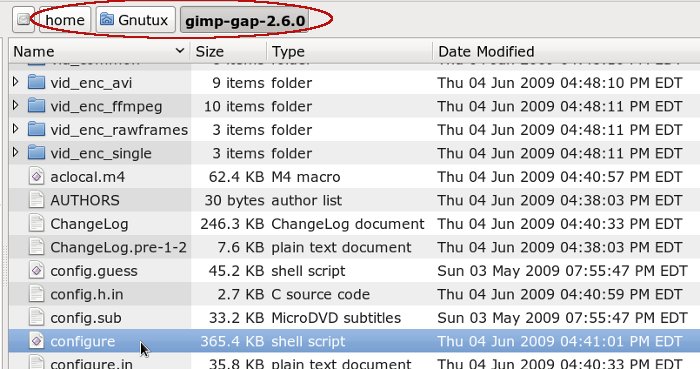
You change directories from within the terminal. You must change directories into the gimp-gap-2.6.0 folder and execute the ./configure command from there.

For example, my gimp-gap-2.6.0 folder is located in my user folder (Gnutux). You will need to change into the proper folder location on your system (wherever you extracted it).

Image

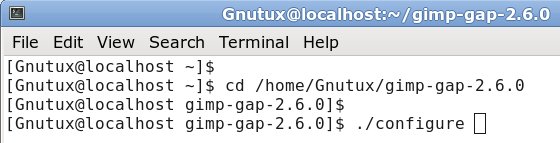
I can change into that folder by entering the following cd command in terminal..
cd /home/Gnutux/gimp-gap-2.6.0 <enter>

Image

You'll notice the terminal prompt now displays the current folder: [Gnutux@localhost gimp-gap-2.6.0]$

Execute your ./configure command from there (after you'll installed all the tools and libs I listed).

Make sure Step (1) & Step (2) complete clean (without error) before installing with Step (3). I do seem to remember a few warning messages regarding sound support in GAP but those warnings can be ignored. I've never seen GAP compiled with sound support in Linux and I doubt that it would be very useful to do so.

_________________
“If you reach for the stars, you just might land on a decently sized hill.” - Stuart Hill


Top
 Post subject: Re: installing GAP into Gimp using Fedora 16
PostPosted: Sun Mar 11, 2012 5:48 am  (#8) 
Offline
GimpChat Member
User avatar

Joined: Apr 07, 2010
Posts: 14182
Here is what I got.

Image

Image

_________________
Image


Top
 Post subject: Re: installing GAP into Gimp using Fedora 16
PostPosted: Sun Mar 11, 2012 8:25 am  (#9) 
Offline
GimpChat Founder
User avatar

Joined: May 22, 2008
Posts: 5241
Location: Gimpville
Oddly enough, it appears that your home folder begins with a capital H. All files and folders in Linux are case sensitive.
cd /Home/Molly/gimp-gap-2.6.0 <enter>

_________________
“If you reach for the stars, you just might land on a decently sized hill.” - Stuart Hill


Top
 Post subject: Re: installing GAP into Gimp using Fedora 16
PostPosted: Sun Mar 11, 2012 8:48 am  (#10) 
Offline
GimpChat Member
User avatar

Joined: Apr 07, 2010
Posts: 14182
Doesn't look like I can change it. I did change the Molly to molly I just found I have a Home and a home folder.

Image

_________________
Image


Top
 Post subject: Re: installing GAP into Gimp using Fedora 16
PostPosted: Sun Mar 11, 2012 8:55 am  (#11) 
Offline
GimpChat Founder
User avatar

Joined: May 22, 2008
Posts: 5241
Location: Gimpville
molly wrote:
I wonder if I should change it. I did change Molly to molly. I will see what happens.

I wouldn't change any system defined folder names. I can see potential problems doing that.

_________________
“If you reach for the stars, you just might land on a decently sized hill.” - Stuart Hill


Top
 Post subject: Re: installing GAP into Gimp using Fedora 16
PostPosted: Sun Mar 11, 2012 9:32 am  (#12) 
Offline
GimpChat Member
User avatar

Joined: Apr 07, 2010
Posts: 14182
okay, I noticed a lot of them start with capitals. Home, Desktop, Documents etc.

I finally got it to go a bit further then says package not found. drats. file zipped below


Attachments:
package not found.tar.gz [1.02 KiB]
Downloaded 73 times

_________________
Image
Top
 Post subject: Re: installing GAP into Gimp using Fedora 16
PostPosted: Sun Mar 11, 2012 10:08 am  (#13) 
Offline
GimpChat Founder
User avatar

Joined: May 22, 2008
Posts: 5241
Location: Gimpville
molly wrote:
okay, I noticed a lot of them start with capitals. Home, Desktop, Documents etc.

Yes, Desktop, Downloads, Documents and so on are created by default for each user. Each user will have their separate folders under "home" (which is a system folder).

It's OK to create a user folder called "Home" under the system folder "home" but it's quite a bit confusing to do that. For one, a normal user can't even create any folders under the system folder "home" (that requires superuser privileges). The only folders one would expect to see under "home" would be a folder for each user (and lost+found). In my case, only one user has been created (/home/Gnutux).

Anyway, for the last example you posted, the cd command would be..

cd /home/Home/gimp-gap-2.6.0 <enter>

What happened to the "Molly" folder that was under "Home" in your previous example? You really should be working under the "Molly" folder. I see that you are in your attachment. You're getting there. :)

molly wrote:
I finally got it to go a bit further then says package not found. drats.

Looks like you didn't install the gimp-development files I listed in this post?

gimp-devel
gimp-devel-tools

_________________
“If you reach for the stars, you just might land on a decently sized hill.” - Stuart Hill


Top
 Post subject: Re: installing GAP into Gimp using Fedora 16
PostPosted: Sun Mar 11, 2012 11:47 am  (#14) 
Offline
GimpChat Member
User avatar

Joined: Apr 07, 2010
Posts: 14182
As far as I know I have all the packages installed that are posted, including gimp-devel and gimp-devel-tools.
This is where I am at now. attachment below


Attachments:
Where I am at.tar.gz [4.72 KiB]
Downloaded 143 times
completed installs.tar.gz [271 Bytes]
Downloaded 90 times

_________________
Image
Top
 Post subject: Re: installing GAP into Gimp using Fedora 16
PostPosted: Sun Mar 11, 2012 12:31 pm  (#15) 
Offline
GimpChat Founder
User avatar

Joined: May 22, 2008
Posts: 5241
Location: Gimpville
Ok, cool. Now that the gimp-devel stuff is installed, make sure the following packages are installed as well..

x264-libs
x264-devel
libx264
libx264-devel
libjpeg-devel
xvidcore
xvidcore-devel
bzip2
bzp2-devel
faac
faac-devel
faad2
faad2-devel

Once those are installed, run ./configure and post the results back.

_________________
“If you reach for the stars, you just might land on a decently sized hill.” - Stuart Hill


Top
 Post subject: Re: installing GAP into Gimp using Fedora 16
PostPosted: Sun Mar 11, 2012 12:52 pm  (#16) 
Offline
GimpChat Member
User avatar

Joined: Apr 07, 2010
Posts: 14182
All installed except this: bzp2-devel no package available
attachment below


Attachments:
More stuff.tar.gz [4.7 KiB]
Downloaded 83 times

_________________
Image
Top
 Post subject: Re: installing GAP into Gimp using Fedora 16
PostPosted: Sun Mar 11, 2012 1:03 pm  (#17) 
Offline
GimpChat Founder
User avatar

Joined: May 22, 2008
Posts: 5241
Location: Gimpville
Ok, I see I had a typo in there.

Try installing the following again..

bzip2-devel
libx264
libx264-devel
libjpeg-devel

Post the results from ./configure back here. Looks like you're almost ready to try Step(2).

_________________
“If you reach for the stars, you just might land on a decently sized hill.” - Stuart Hill


Top
 Post subject: Re: installing GAP into Gimp using Fedora 16
PostPosted: Sun Mar 11, 2012 1:18 pm  (#18) 
Offline
GimpChat Member
User avatar

Joined: Apr 07, 2010
Posts: 14182
libx264 no package available
libx264-devel no package available


Attachments:
More-More.tar.gz [4.68 KiB]
Downloaded 125 times

_________________
Image
Top
 Post subject: Re: installing GAP into Gimp using Fedora 16
PostPosted: Sun Mar 11, 2012 1:41 pm  (#19) 
Offline
GimpChat Founder
User avatar

Joined: May 22, 2008
Posts: 5241
Location: Gimpville
OK, that's about as good as you're gonna get. :bigthup

I wouldn't worry too much about x264 codec support. Looks like there are some files over on ATRPMS but I don't think it's worth bothering with.

Go ahead and move on to Step (2) and see if you can compile with the make command. It will take a few minutes to complete. Post the output results back here.

_________________
“If you reach for the stars, you just might land on a decently sized hill.” - Stuart Hill


Top
 Post subject: Re: installing GAP into Gimp using Fedora 16
PostPosted: Sun Mar 11, 2012 1:51 pm  (#20) 
Offline
GimpChat Member
User avatar

Joined: Apr 07, 2010
Posts: 14182
looks like a lot of garble to me. but what do I know. :geek

I don't understand this one. As root (su -) (had to change back into the gimp-gap-2.6.0 folder)
Step 3) make install <enter>

Do I go back to " su -" for this and type yum install make OR make install?

attachment below


Attachments:
make-2.tar.gz [3.19 KiB]
Downloaded 94 times

_________________
Image
Top
Post new topic Reply to topic  [ 26 posts ]  Go to page 1, 2  Next

All times are UTC - 5 hours [ DST ]


* Login  


Powered by phpBB3 © phpBB Group