It is currently Mon Sep 28, 2026 8:59 am


All times are UTC - 5 hours [ DST ]


Post new topic Reply to topic  [ 69 posts ]  Go to page Previous  1, 2, 3, 4  Next
Author Message
 Post subject: Re: Can't find extra plug-ins for Mathmap
PostPosted: Thu Jun 21, 2012 2:10 pm  (#41) 
Offline
GimpChat Member

Joined: Apr 12, 2010
Posts: 5870
Molly there are many ways to skins a cat,...and several place where the MM expression folder may be
But not sure for the actual place, i never put there,you may well try to move it where expected (and BTW where should be usually in windows ) in your .gimp folder, on the path you have (oh well just inside your .gimp folder)

you may simply do from graphic interface and nautilus, just start Nautilus as sudo (or as root not sure if you use Ubuntu Fedora or what else ) and use it to drag and drop
(you must do as Sudo or will not allow to do it ...just type in the terminal " sudo nautilus"

Not sure why that folder doesn't show up, another thing you may do is explore it, also opening the file with a text editor

They should open as normal text files with readable letters and numbers if not was some encoding problem, or some files went corrupted during download

Well i may imagine other ways to fix but first you may try this i belive the most simple

_________________
My 3D Gallery on Deviantart http://photocomix2.deviantart.com/
Main gallery http://www.flickriver.com/photos/photocomix-mandala/
Mandala and simmetry http://www.flickriver.com/photos/photocomix_mandala/

Image

Mrs Wilbress


Top
 Post subject: Re: Can't find extra plug-ins for Mathmap
PostPosted: Thu Jun 21, 2012 2:13 pm  (#42) 
Offline
Global Moderator
User avatar

Joined: May 16, 2010
Posts: 16175
I don't see any errors with mathmap. Most of those errors are from miss placed files.
xcf, and scm files in the patterns folder for instance.
Some of the .pat files could be PS only patterns and Gimp doesn't recognize some of those.

The libgimpbase error probably stems from a faulty path which is probably the resynth path.
Failed to execute child process "/home/molly/.gimp-2.8/plug-ins/resynthesizer" (No such file or directory)


There is no error for MathMap.exe because it is initializing just fine, and works.
The path is wrong or Gimp is looking for the wrong path for the extra folder.
I see no other reason why the MathMap extra folder would not be listed.


Top
 Post subject: Re: Can't find extra plug-ins for Mathmap
PostPosted: Thu Jun 21, 2012 2:17 pm  (#43) 
Offline
GimpChat Member
User avatar

Joined: Apr 07, 2010
Posts: 14182
Thank you pc, I will look it all over again after supper and post back. I have to address all these errors first. I can't understand why so many but anyway, I will keep working on it.

@Rod, I will try to get rid of those errors later tonight. thanks

_________________
Image


Top
 Post subject: Re: Can't find extra plug-ins for Mathmap
PostPosted: Thu Jun 21, 2012 2:33 pm  (#44) 
Offline
Global Moderator
User avatar

Joined: May 16, 2010
Posts: 16175
molly wrote:
Thank you pc, I will look it all over again after supper and post back. I have to address all these errors first. I can't understand why so many but anyway, I will keep working on it.

@Rod, I will try to get rid of those errors later tonight. thanks


You are welcome Molly. I hope you get it straightened out.
To fix Resynth i would do as PC recommends and try and re install it first.
If it still throws the path error, try installing it in a different folder and point Edit>Preferences>plug-ins to it.

Good luck with it all in any case.


Top
 Post subject: Re: Can't find extra plug-ins for Mathmap
PostPosted: Thu Jun 21, 2012 2:39 pm  (#45) 
Offline
GimpChat Member
User avatar

Joined: Apr 07, 2010
Posts: 14182
Yes I have been thinking about that. I have a gui extention on one of my resynthsize and I don't know if that should be there but I know I can't use .exe files in plug-ins. in Fedora.

_________________
Image


Top
 Post subject: Re: Can't find extra plug-ins for Mathmap
PostPosted: Thu Jun 21, 2012 2:46 pm  (#46) 
Offline
GimpChat Member

Joined: Apr 12, 2010
Posts: 5870
Rod wrote:
I don't see any errors with mathmap. Most of those errors are from miss placed files.
xcf, and scm files in the patterns folder for instance.
Some of the .pat files could be PS only patterns and Gimp doesn't recognize some of those.

The libgimpbase error probably stems from a faulty path which is probably the resynth path.
Failed to execute child process "/home/molly/.gimp-2.8/plug-ins/resynthesizer" (No such file or directory)


There is no error for MathMap.exe because it is initializing just fine, and works.
The path is wrong or Gimp is looking for the wrong path for the extra folder.
I see no other reason why the MathMap extra folder would not be listed.


more or less the same i wrote, there is 1 error that related to a Gtk module and to mathmap but the error seems caused by a wrong path fixing the path everything should work

So i agree that is better fix also all other errors too:
displaced files , incompatible and or duplicated script and plugin, the faulty installation of Resynthesizer and so on

_________________
My 3D Gallery on Deviantart http://photocomix2.deviantart.com/
Main gallery http://www.flickriver.com/photos/photocomix-mandala/
Mandala and simmetry http://www.flickriver.com/photos/photocomix_mandala/

Image

Mrs Wilbress


Top
 Post subject: Re: Can't find extra plug-ins for Mathmap
PostPosted: Thu Jun 21, 2012 2:48 pm  (#47) 
Offline
GimpChat Member
User avatar

Joined: Nov 09, 2011
Posts: 726
Hello, I have a question.
I've seen that in .rpm packages for fedora extra plugins are not included:
http://pkgs.org/fedora-16/fedora-x86_64 ... html#files

I have also compiled MathMap from git in Kubuntu and extra plugins are not included.

From where I can download extra plugins?
Thank you.

_________________
Image
Be patient, English is not my language.


Top
 Post subject: Re: Can't find extra plug-ins for Mathmap
PostPosted: Thu Jun 21, 2012 4:06 pm  (#48) 
Offline
GimpChat Founder
User avatar

Joined: May 22, 2008
Posts: 5241
Location: Gimpville
I concur with Rod. I don't see any errors related to mathmap, Molly. You should probably remove the invalid pattern files and the scm scripts that are generating errors, as well as the issue with the resynthesizer plug-in. I see the 32-bit version resynthesizer plug-in is located in the repositories. Did you install that?

YAFU wrote:
From where I can download extra plugins?

There are several zip files in this thread but I think it would be a great idea to create a thread putting all the mathmap extras in one place. I don't have many so maybe Rod and PC can get that one started.

_________________
“If you reach for the stars, you just might land on a decently sized hill.” - Stuart Hill


Top
 Post subject: Re: Can't find extra plug-ins for Mathmap
PostPosted: Thu Jun 21, 2012 4:44 pm  (#49) 
Offline
GimpChat Member
User avatar

Joined: Apr 07, 2010
Posts: 14182
No I didn't Tux. In fact a lot of the scripts I have are carried over from my 2.6 version of Gimp and before I changed to 64-bit. I will look after trying to straighten all those folders starting right now.
Yes you are correct about all the different zip files with mathmap extras. Actually it is quite confusing and should be all categorized and kept in one place eg 32-bit, 64-bit etc.

_________________
Image


Top
 Post subject: Re: Can't find extra plug-ins for Mathmap
PostPosted: Thu Jun 21, 2012 6:04 pm  (#50) 
Offline
GimpChat Member
User avatar

Joined: Apr 07, 2010
Posts: 14182
I think I have just given up on this extra folder showing up in my Mathmap. I have done everything right as far as I know. I took the folder out, downloaded it again fresh, put it back in. Same thing.
I went through all the errors that I know how to fix in the gradient patterns and plug-ins and removed the ones that showed up in the error console.

There are some left that I have no idea what they are and I never heard of them so I will leave them there for a while.

_________________
Image


Top
 Post subject: Re: Can't find extra plug-ins for Mathmap
PostPosted: Thu Jun 21, 2012 9:25 pm  (#51) 
Offline
GimpChat Founder
User avatar

Joined: May 22, 2008
Posts: 5241
Location: Gimpville
Have you tried removing the "extra" folder and just placing one of the .mm files in an existing folder? Does that expression show on the menu when you do that?

_________________
“If you reach for the stars, you just might land on a decently sized hill.” - Stuart Hill


Top
 Post subject: Re: Can't find extra plug-ins for Mathmap
PostPosted: Fri Jun 22, 2012 4:23 am  (#52) 
Offline
GimpChat Member
User avatar

Joined: Apr 07, 2010
Posts: 14182
Ok, here is what I did. I went to terminal/root/Nautilus. I then went to my mathmap/expressions folder. I tried to take out the "Extra" folder and received this error.

Image

I then rebooted and tried again and received the same error. I proceeded to open the extra folder and removed the "mm" files from inside and placed them into the "Map" Folder.
I then opened Gimp/Generic/Mathmap/Mathmap/Filters/Map, and all the files from the Extra folder are there and they work. (The empty "Extra" folder still resides within the expression folder).

So now I have the plug-ins I want and a terminal that is throwing errors. :roll:

_________________
Image


Top
 Post subject: Re: Can't find extra plug-ins for Mathmap
PostPosted: Fri Jun 22, 2012 4:39 am  (#53) 
Offline
GimpChat Member

Joined: Mar 04, 2011
Posts: 2615
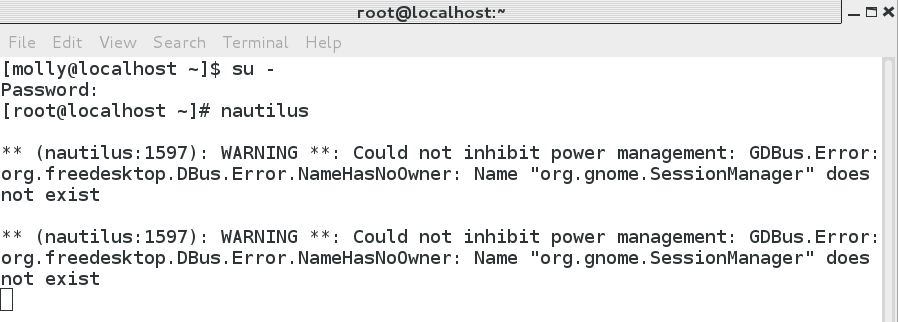
Really pleased you have something working. Your nautilus error message - well I put Fedora17 on an old laptop to give it a try and some bug there with power management. More lock-ups in a few hours than 6 years of Mepis/PCLOS.

edit: try in a terminal
su - -c nautilus

Back to Mathmap. Look at the error messages. examples from my machine.
----------------------
The filter in the file
`/home/rich/.gimp-2.6/mathmap/expressions/Only_Linux/kaleidoscope-original.mm'
cannot be parsed.

That one - an old file and the MathMap syntax has changed, needs a re-write.
-----------------------
The filters in the files
`/home/rich/.gimp-2.6/mathmap/expressions/Extra_Time/time zoom.mm'
and
`/home/rich/.gimp-2.6/mathmap/expressions/Geometry/Zoomin.mm'
have the same name `time_zoom'.
Only the former can be used from the composer.

Files are duplicated, solution delete one of them.


Top
 Post subject: Re: Can't find extra plug-ins for Mathmap
PostPosted: Fri Jun 22, 2012 6:09 am  (#54) 
Offline
GimpChat Member

Joined: Mar 04, 2011
Posts: 2615
Maybe we are looking at different menus, YAFU in that other post mentioned it.

There is the Gimp mathmap menu which does not show 'extras' and there is the MathMap filters menu which (here) does show them. I had assumed the latter.

Image


Top
 Post subject: Re: Can't find extra plug-ins for Mathmap
PostPosted: Fri Jun 22, 2012 8:47 am  (#55) 
Offline
GimpChat Founder
User avatar

Joined: May 22, 2008
Posts: 5241
Location: Gimpville
molly wrote:
So now I have the plug-ins I want and a terminal that is throwing errors. :roll:

Glad to hear you are able to access the extras. You can use the zip file in PC's thread and copy the .mm & .mmc files directly into your existing folders. The only "new" folder there is the animation folder so you'll need to deal with the files in there if mathmap doesn't see the new animation folder. You might have to copy those into an existing folder as well.

You can ignore those nautilus warnings when running as root. It's normal to see warnings when running apps from the terminal, especially as root.

_________________
“If you reach for the stars, you just might land on a decently sized hill.” - Stuart Hill


Top
 Post subject: Re: Can't find extra plug-ins for Mathmap
PostPosted: Fri Jun 22, 2012 8:54 am  (#56) 
Offline
GimpChat Member
User avatar

Joined: Apr 07, 2010
Posts: 14182
ok, thanks,
I wanted to ignore those errors but it wouldn't let me move that extra folder and it told me I wasn't the owner, so you might guess what I told them back. *%#@*$

_________________
Image


Top
 Post subject: Re: Can't find extra plug-ins for Mathmap
PostPosted: Fri Jun 22, 2012 9:16 am  (#57) 
Offline
GimpChat Founder
User avatar

Joined: May 22, 2008
Posts: 5241
Location: Gimpville
You couldn't move or delete the folder in nautilus, as root?

You should be able to move or delete anything as root, unless the permissions/ownership are really screwed up on that folder and SELinux is getting in your way. That might explain why mathmap couldn't see the folder.

_________________
“If you reach for the stars, you just might land on a decently sized hill.” - Stuart Hill


Top
 Post subject: Re: Can't find extra plug-ins for Mathmap
PostPosted: Fri Jun 22, 2012 9:50 am  (#58) 
Offline
GimpChat Member
User avatar

Joined: Apr 07, 2010
Posts: 14182
I think you may be right.
I was getting SELinux errors a couple of weeks ago but I didn't know what they were.
I was able to open the extra folder and take things out of it but it wouldn't let me move the folder. I went back into again later and I was able to remove the empty extra folder. I pulled it on to my desktop and deleted it from there.

I just looked SELinux up and this is what it is saying. I don't know if this affects me or not.
http://www.server-world.info/en/note?os ... l_conf&f=2

_________________
Image


Top
 Post subject: Re: Can't find extra plug-ins for Mathmap
PostPosted: Fri Jun 22, 2012 10:20 am  (#59) 
Offline
GimpChat Member
User avatar

Joined: Oct 29, 2010
Posts: 711
Location: Netherlands
Selinux only makes sense for servers.
If you just run a desktop it's not needed.
Do you get a choice when installing Fedora to selinux or to not selinux?
I've been using various flavours of Linux for many years never used selinux and never had any intrusion/malware/virus.
Gerard.

_________________
Gentoo Linux always up-to-date.
Kernel-3.17.4 Python-2.7.8/3.3.5
Gimp-2.8.14

I use Linux only.
And Virtualbox with Win 7


Top
 Post subject: Re: Can't find extra plug-ins for Mathmap
PostPosted: Fri Jun 22, 2012 10:28 am  (#60) 
Offline
GimpChat Founder
User avatar

Joined: May 22, 2008
Posts: 5241
Location: Gimpville
Fedora is a distro that includes and enables Security Enhanced Linux as the default config. Fedora is designed to work seamlessly with SELinux. If it were me, I'd leave it enabled as an extra layer of security. I've never had any problems with SELinux that weren't easily corrected.

_________________
“If you reach for the stars, you just might land on a decently sized hill.” - Stuart Hill


Top
Post new topic Reply to topic  [ 69 posts ]  Go to page Previous  1, 2, 3, 4  Next

All times are UTC - 5 hours [ DST ]


* Login  


Powered by phpBB3 © phpBB Group