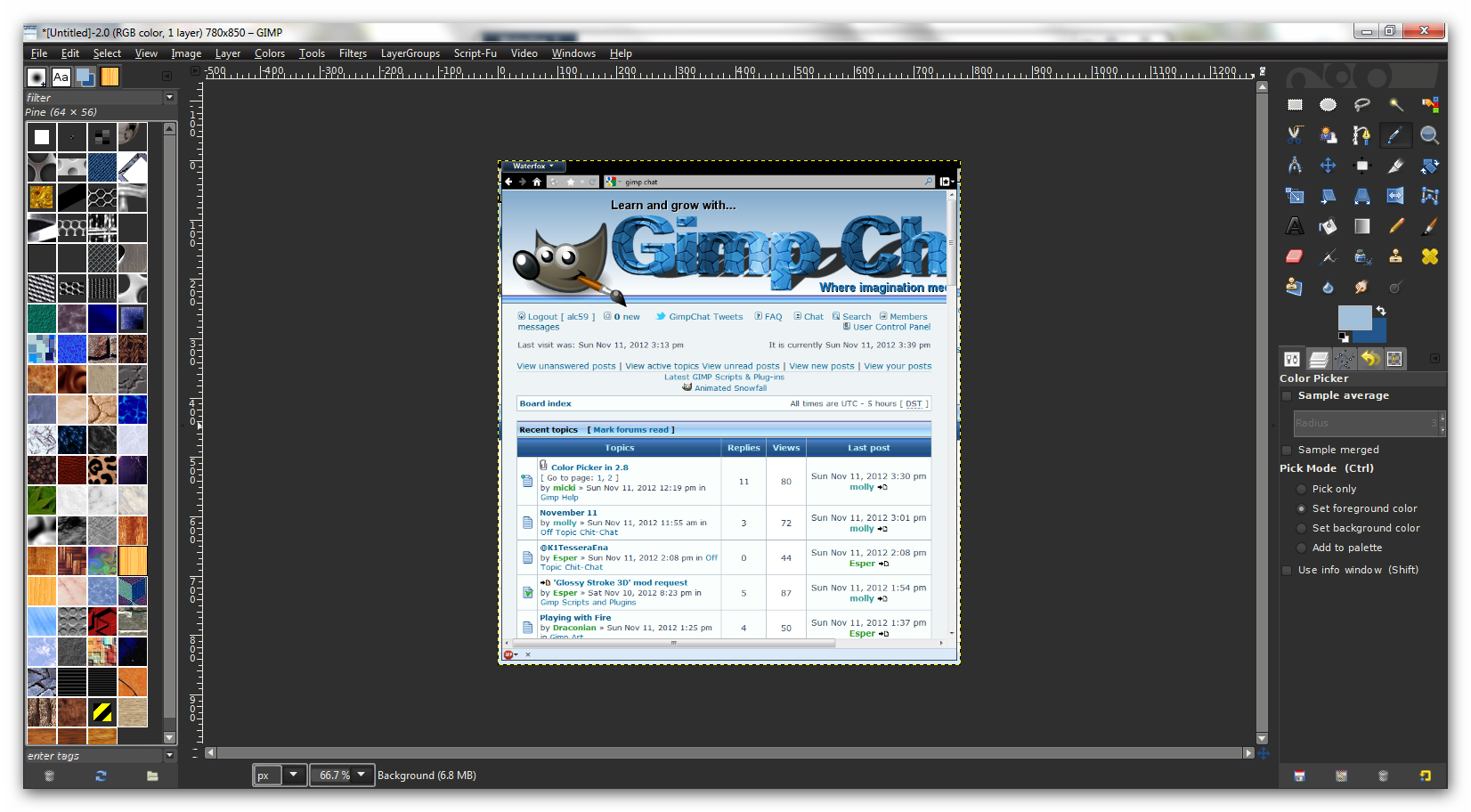
It is currently Sun Sep 20, 2026 8:15 am


All times are UTC - 5 hours [ DST ]


Post new topic Reply to topic  [ 23 posts ]  Go to page 1, 2  Next
Author Message
 Post subject: Color Picker in 2.8
PostPosted: Sun Nov 11, 2012 11:19 am  (#1) 
Offline
GimpChat Member

Joined: Oct 28, 2010
Posts: 166
GIMP Version: 2.6.11
Operating System: Windows
OS Version: XP - SP3
GIMP Experience: Basic Level


I downloaded the newest version, love it except the color picker does not work...I do alot of image sheets and right now I'm doing alot of nfl teams...no not theirs..my version but I do like to use the color pick and put up the teams logo to grab the colors...with the 2.8 version...it stays black.

any suggestions?

m


Share on Facebook Share on Twitter Share on Orkut Share on Digg Share on MySpace Share on Delicious Share on Technorati
Top
 Post subject: Re: Color Picker in 2.8
PostPosted: Sun Nov 11, 2012 12:21 pm  (#2) 
Offline
GimpChat Member
User avatar

Joined: Apr 07, 2010
Posts: 14182
Do you click the two green lights that shows in this screen shot before you pic your color? [ sample merge and sample average]

Image

_________________
Image


Top
 Post subject: Re: Color Picker in 2.8
PostPosted: Sun Nov 11, 2012 1:00 pm  (#3) 
Offline
GimpChat Member

Joined: Oct 28, 2010
Posts: 166
where would I find that box at?


Top
 Post subject: Re: Color Picker in 2.8
PostPosted: Sun Nov 11, 2012 1:05 pm  (#4) 
Offline
GimpChat Member
User avatar

Joined: Apr 07, 2010
Posts: 14182
When you click your color picker, down below will see the dialogue. You will see where your color selector is selected and down below is your dialogue for that tool you will see the 3 light green lights that have been selected.

Image

_________________
Image


Top
 Post subject: Re: Color Picker in 2.8
PostPosted: Sun Nov 11, 2012 1:08 pm  (#5) 
Offline
GimpChat Member

Joined: Oct 28, 2010
Posts: 166
Oh Molly I think we need to call each other...I don't have the color picker in tool box..so no don't have that window...oh I have the version of gimp 2.8 that is portable if that makes a difference. maybe you can help me set my tool box up right.

M


Top
 Post subject: Re: Color Picker in 2.8
PostPosted: Sun Nov 11, 2012 1:16 pm  (#6) 
Offline
GimpChat Member
User avatar

Joined: Apr 07, 2010
Posts: 14182
I don't think I have seen that happen before. One of the many techies here might be able to set you on the correct path, that one is beyond me.
Are you able to send a screen shot of your toolbox?

_________________
Image


Top
 Post subject: Re: Color Picker in 2.8
PostPosted: Sun Nov 11, 2012 1:23 pm  (#7) 
Offline
GimpChat Member

Joined: Oct 28, 2010
Posts: 166
Here you go!


Attachments:
ToolBox.JPG
ToolBox.JPG [ 86.75 KiB | Viewed 3995 times ]
Top
 Post subject: Re: Color Picker in 2.8
PostPosted: Sun Nov 11, 2012 1:25 pm  (#8) 
Offline
GimpChat Member

Joined: Oct 28, 2010
Posts: 166
I found the color picker going thur tools/color picker but I can't figure out how to get it into toolbox and get it to work.


Top
 Post subject: Re: Color Picker in 2.8
PostPosted: Sun Nov 11, 2012 2:03 pm  (#9) 
Offline
Retired Staff
User avatar

Joined: May 22, 2008
Posts: 6946
Location: Somewhere in GIMP
That is really strange. Does the color picker work with out the icon in the toolbox? You can bring up those options in you press the letter "o" when your image window is active.

_________________
Image
World War IV will be fought with sticks and stones. - Albert Einstein


Top
 Post subject: Re: Color Picker in 2.8
PostPosted: Sun Nov 11, 2012 2:11 pm  (#10) 
Offline
GimpChat Member

Joined: Aug 05, 2011
Posts: 606
Location: limestone,ny
Is it selected under preferences/toolbox

Image


Top
 Post subject: Re: Color Picker in 2.8
PostPosted: Sun Nov 11, 2012 2:20 pm  (#11) 
Offline
GimpChat Member

Joined: Oct 28, 2010
Posts: 166
ok found it and added it..now how to I get it to work to pull a color off a website or picture from a website? mainly pulling colors for football teams to match the order I receive for them


Top
 Post subject: Re: Color Picker in 2.8
PostPosted: Sun Nov 11, 2012 2:30 pm  (#12) 
Offline
GimpChat Member
User avatar

Joined: Apr 07, 2010
Posts: 14182
I don't know if you can do that, unless you save the picture from the website and open it with Gimp. Maybe I am wrong but if it can be done I would like to know too.

_________________
Image


Top
 Post subject: Re: Color Picker in 2.8
PostPosted: Sun Nov 11, 2012 2:44 pm  (#13) 
Offline
GimpChat Member

Joined: Aug 05, 2011
Posts: 606
Location: limestone,ny
I use the file/create/screenshot, I adjust the website window so i can see it and gimp too, drag the + onto the website, then use the eye dropper

Image

Image

( I'm not sure the eye dropper and color picker work the same way do they?)


Top
 Post subject: Re: Color Picker in 2.8
PostPosted: Sun Nov 11, 2012 10:42 pm  (#14) 
Offline
Retired Staff
User avatar

Joined: May 22, 2008
Posts: 6946
Location: Somewhere in GIMP
I don't know what browser you have, but Firefox has a Colorzilla add-on which is a web color picker. Looks like it can also be used in Chrome.

http://www.colorzilla.com/

_________________
Image
World War IV will be fought with sticks and stones. - Albert Einstein


Top
 Post subject: Re: Color Picker in 2.8
PostPosted: Sun Nov 11, 2012 11:52 pm  (#15) 
Offline
Script Coder
User avatar

Joined: Feb 18, 2011
Posts: 4826
Location: Bendigo Vic. Australia
I would love to know how the GimpChat text was done

Image

_________________
Image
No matter how much you push the envelope, it'll still be stationery.


Top
 Post subject: Re: Color Picker in 2.8
PostPosted: Mon Nov 12, 2012 4:10 am  (#16) 
Offline
GimpChat Member
User avatar

Joined: Apr 07, 2010
Posts: 14182
That was one of Rod's Graechan.

_________________
Image


Top
 Post subject: Re: Color Picker in 2.8
PostPosted: Mon Nov 12, 2012 4:16 am  (#17) 
Offline
Script Coder
User avatar

Joined: Apr 23, 2010
Posts: 1553
Location: not from Guildford after all
micki wrote:
ok found it and added it..now how to I get it to work to pull a color off a website or picture from a website? mainly pulling colors for football teams to match the order I receive for them

Instead of using the Color Picker, you might try using the eyedropper in the Color Selector dialog. This will allow you to pick your color from anywhere on your display.

There are two ways to access this "full-screen eyedropper":

you can explicitly open the FG/BG Color Selector dialog using "Windows->Dockable Dialogs->Colors" (this dialog can be permanently added to one of your docks if you wisht)
Attachment:
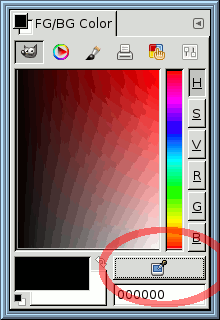
fg-bg-dialog.png
fg-bg-dialog.png [ 7.51 KiB | Viewed 2080 times ]


or you can use the Color Selector dialog that opens whenever you click on any one of the "color swatches" strewn about the GIMP's interface (e.g., the main FG/BG chooser in you Toolbox, the color selector for text, ...)
Attachment:
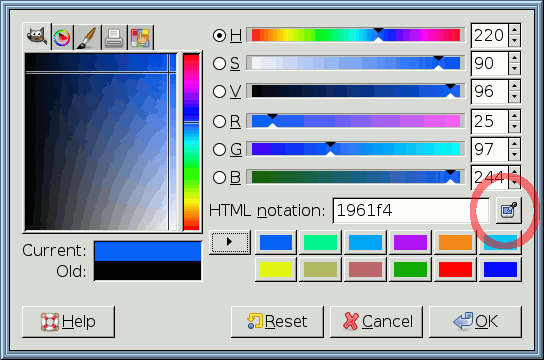
color-selector.png
color-selector.png [ 12.92 KiB | Viewed 2080 times ]


In either case, the "full-screen eyedropper" is accessed with the button that I circled in red in the above screenshot. After clicking on that button, GIMP will wait for you to click somewhere on the screen, and then your foreground color will be set to the color under the cursor. After picking your color, the cursor returns to its normal mode.

_________________
Any sufficiently primitive technology is indistinguishable from a rock.


Top
 Post subject: Re: Color Picker in 2.8
PostPosted: Mon Nov 12, 2012 4:31 am  (#18) 
Offline
GimpChat Member
User avatar

Joined: Apr 07, 2010
Posts: 14182
Works great Saul...I think it is more accurate than the color picker.

_________________
Image


Top
 Post subject: Re: Color Picker in 2.8
PostPosted: Mon Nov 12, 2012 5:32 am  (#19) 
Offline
Script Coder
User avatar

Joined: Jun 22, 2010
Posts: 1171
Location: Here and there
saulgoode wrote:
Instead of using the Color Picker, you might try using the eyedropper in the Color Selector dialog. This will allow you to pick your color from anywhere on your display.


Unfortunately this seems to be broken on (some ?) Windows operating systems and will always return black, so the Color Picker tool is the only way to go, and as it will only pick colours from within GIMP image windows, you will have to do screen grabs.

Kevin


Top
 Post subject: Re: Color Picker in 2.8
PostPosted: Mon Nov 12, 2012 9:16 am  (#20) 
Offline
GimpChat Member

Joined: Oct 28, 2010
Posts: 166
ok cool guys...thanks so much...i'm bookmarking this thread so I can reread it...:)

M


Top
Post new topic Reply to topic  [ 23 posts ]  Go to page 1, 2  Next

All times are UTC - 5 hours [ DST ]


* Login  


Powered by phpBB3 © phpBB Group