It is currently Fri Jul 10, 2026 6:13 am


All times are UTC - 5 hours [ DST ]


Post new topic Reply to topic  [ 19 posts ] 
Author Message
 Post subject: Grassy Text
PostPosted: Sun Apr 28, 2013 12:44 pm  (#1) 
Offline
Global Moderator
User avatar

Joined: May 16, 2010
Posts: 16098
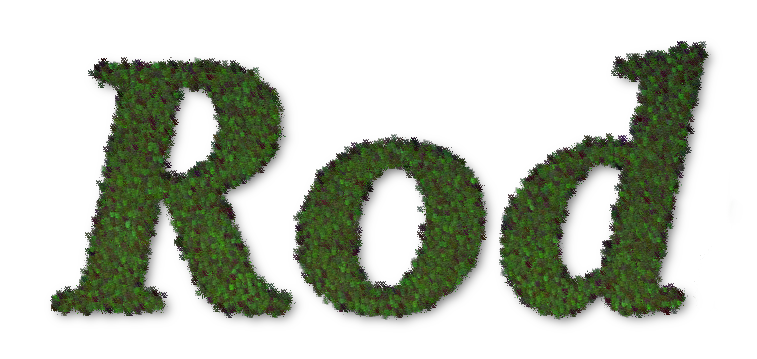
Almost time to mow that lawn! :hehe

Image

_________________
Image


Share on Facebook Share on Twitter Share on Orkut Share on Digg Share on MySpace Share on Delicious Share on Technorati
Top
 Post subject: Re: Grassy Text
PostPosted: Sun Apr 28, 2013 12:47 pm  (#2) 
Offline
Retired Staff
User avatar

Joined: May 22, 2008
Posts: 6946
Location: Somewhere in GIMP
Pretty cool, Rod. Do I detect clover leaves or is it just my imagination?

_________________
Image
World War IV will be fought with sticks and stones. - Albert Einstein


Top
 Post subject: Re: Grassy Text
PostPosted: Sun Apr 28, 2013 1:00 pm  (#3) 
Offline
Global Moderator
User avatar

Joined: May 16, 2010
Posts: 16098
Oregonian wrote:
Pretty cool, Rod. Do I detect clover leaves or is it just my imagination?

Actually its the ~"coughpotleafcough"~ in gimpressionist. :rofl

Image

_________________
Image


Top
 Post subject: Re: Grassy Text
PostPosted: Sun Apr 28, 2013 1:11 pm  (#4) 
Offline
GimpChat Member
User avatar

Joined: Nov 15, 2012
Posts: 949
Location: Mesa, AZ
And I lit that for you...

Image

_________________
Image

I now have a Tumblr, check it out!


Top
 Post subject: Re: Grassy Text
PostPosted: Sun Apr 28, 2013 7:03 pm  (#5) 
Offline
Global Moderator
User avatar

Joined: May 16, 2010
Posts: 16098
ek22 wrote:
And I lit that for you...

[ Image ]

:rofl

_________________
Image


Top
 Post subject: Re: Grassy Text
PostPosted: Sun Apr 28, 2013 9:12 pm  (#6) 
Offline
GimpChat Member
User avatar

Joined: Apr 08, 2010
Posts: 5420
Location: Northwest Ohio
what is that I smell. hahahahahaha.....where is the candy?


Top
 Post subject: Re: Grassy Text
PostPosted: Sun Apr 28, 2013 9:51 pm  (#7) 
Offline
Script Coder
User avatar

Joined: Feb 18, 2011
Posts: 4826
Location: Bendigo Vic. Australia
Rod if you save the settings as a preset then you could script it

_________________
Image
No matter how much you push the envelope, it'll still be stationery.


Top
 Post subject: Re: Grassy Text
PostPosted: Sun Apr 28, 2013 10:07 pm  (#8) 
Offline
Retired Staff
User avatar

Joined: May 22, 2008
Posts: 6946
Location: Somewhere in GIMP
2-ton wrote:
what is that I smell. hahahahahaha.....where is the candy?
I got the munchies!

_________________
Image
World War IV will be fought with sticks and stones. - Albert Einstein


Top
 Post subject: Re: Grassy Text
PostPosted: Sun Apr 28, 2013 10:55 pm  (#9) 
Offline
GimpChat Founder
User avatar

Joined: May 22, 2008
Posts: 5241
Location: Gimpville
Image

_________________
“If you reach for the stars, you just might land on a decently sized hill.” - Stuart Hill


Top
 Post subject: Re: Grassy Text
PostPosted: Sun Apr 28, 2013 11:45 pm  (#10) 
Offline
GimpChat Member
User avatar

Joined: Nov 15, 2012
Posts: 949
Location: Mesa, AZ
lol, what have I started. You guys crack me up.

_________________
Image

I now have a Tumblr, check it out!


Top
 Post subject: Re: Grassy Text
PostPosted: Mon Apr 29, 2013 1:23 am  (#11) 
Offline
Global Moderator
User avatar

Joined: Apr 01, 2012
Posts: 8418
Location: On the other side of your screen
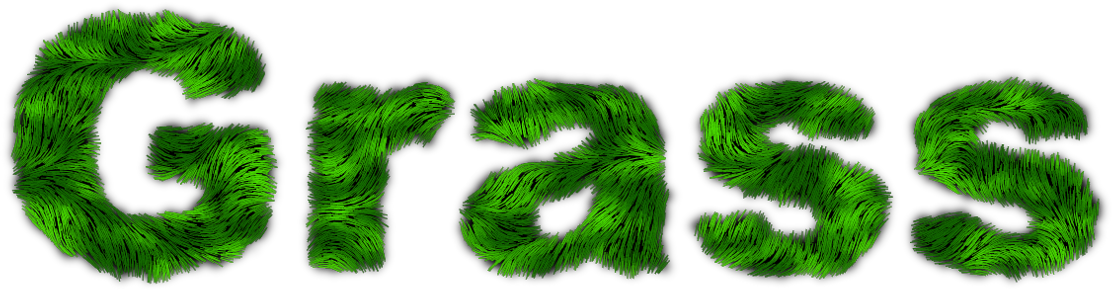
Made in Furry Script with Maple leaves pattern
Image

As soon as I saw the picture I thought 'Furry Script' Rod

_________________
Image
Free Fun Photo Editing & resources
Poems from the Lord
Gimp Newby
Gimp version 3.2.0 and GMIC-Qt 3.7.5 OS :- Windows 10 Home 64


Top
 Post subject: Re: Grassy Text
PostPosted: Mon Apr 29, 2013 1:41 am  (#12) 
Offline
GimpChat Member
User avatar

Joined: Nov 15, 2012
Posts: 949
Location: Mesa, AZ
Plushiest grass ever. Perfect for picnic grass.

_________________
Image

I now have a Tumblr, check it out!


Top
 Post subject: Re: Grassy Text
PostPosted: Mon Apr 29, 2013 2:44 am  (#13) 
Offline
Global Moderator
User avatar

Joined: Apr 01, 2012
Posts: 8418
Location: On the other side of your screen
Thank you ek22. Tried it with another green pattern and it turned out the same. Unless the 'fur' was only made from the two colours I picked.

_________________
Image
Free Fun Photo Editing & resources
Poems from the Lord
Gimp Newby
Gimp version 3.2.0 and GMIC-Qt 3.7.5 OS :- Windows 10 Home 64


Top
 Post subject: Re: Grassy Text
PostPosted: Mon Apr 29, 2013 5:34 am  (#14) 
Offline
GimpChat Member
User avatar

Joined: Mar 23, 2012
Posts: 7388
Location: Göteborg at last!
sallyanne - Isn't there a box you need to check to enable the script to use patterns rather than gradients?


Top
 Post subject: Re: Grassy Text
PostPosted: Mon Apr 29, 2013 6:50 am  (#15) 
Offline
Global Moderator
User avatar

Joined: Apr 01, 2012
Posts: 8418
Location: On the other side of your screen
Erisian wrote:
sallyanne - Isn't there a box you need to check to enable the script to use patterns rather than gradients?

Only thing I can see is the ability to make the background 'pattern, colour, gradient or none'. Nothing to check. The text color and mottling colour can also be changed.

EDIT: except - keep the layers.

_________________
Image
Free Fun Photo Editing & resources
Poems from the Lord
Gimp Newby
Gimp version 3.2.0 and GMIC-Qt 3.7.5 OS :- Windows 10 Home 64


Top
 Post subject: Re: Grassy Text
PostPosted: Mon Apr 29, 2013 8:20 am  (#16) 
Offline
Global Moderator
User avatar

Joined: May 16, 2010
Posts: 16098
Graechan wrote:
Rod if you save the settings as a preset then you could script it


Now we need a "passing out candy" emoticon. :lol
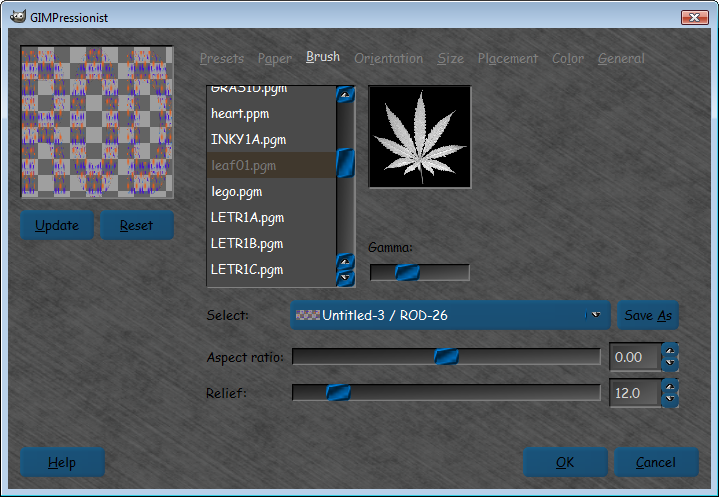
Graechan here are the settings and the brush (not sure if this brush is default in gimp lol).
UHOH! - The extension pgm is not allowed.

I attached a zip. :bigthup

settings
Preset
desc=Makes a grass effect
name=Grass-Text
orientnum=4
orientfirst=0.000000
orientlast=60.000000
orienttype=0
sizenum=7
sizefirst=7.000000
sizelast=10.000000
sizetype=2
brushrelief=12.000000
brushdensity=20.000000
brushgamma=1.000000
brushaspect=0.000000
generalbgtype=1
generaldarkedge=0.100000
generalpaintedges=1
generaltileable=0
generaldropshadow=0
generalshadowdarkness=20.000000
generalshadowdepth=10
generalshadowblur=4
devthresh=0.100000
paperrelief=0.000000
paperscale=30.000000
paperinvert=0
paperoverlay=0
selectedbrush=Brushes\leaf01.pgm
selectedpaper=Paper\defaultpaper.pgm
color=000000
placetype=0
placecenter=0
numorientvector=1
orientvector=0,0.500000,0.500000,0.000000,0.000000,1.000000,1.000000,0
orientangoff=0.000000
orientstrexp=1.000000
orientvoronoi=0
numsizevector=1
sizevector=0,0.500000,0.500000,50.000000,1.000000
sizestrexp=1.000000
sizevoronoi=0
colortype=0
colornoise=0.000000


You need to use a linear gradient top to bottom.
Then run Gimpressionist
Then use noise/spread-10
Then run the Gimpressionist filter again. :bigthup
Then noise>RGB noise - independent RGB - 0.20 for all color values - alpha 0
Drop shadow - 4, 4, 15
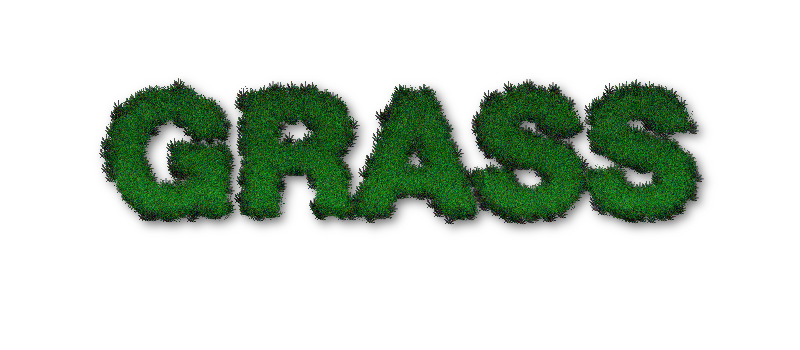
Results -
Image

I may have the size too small for the brush , and noise RGB noise can be tweaked.You can experiment though. :tyspin


Attachments:
leaf01.zip [18.04 KiB]
Downloaded 48 times

_________________
Image
Top
 Post subject: Re: Grassy Text
PostPosted: Mon Apr 29, 2013 9:08 am  (#17) 
Offline
GimpChat Member
User avatar

Joined: Nov 16, 2011
Posts: 5127
Location: Metro Vancouver, BC
sallyanne wrote:
Made in Furry Script with Maple leaves pattern
As soon as I saw the picture I thought 'Furry Script' Rod
That look lovely, time for a picnic!

_________________
Image
Gimp 2.8.18, Linux, median user
Gimp Chat Tutorials Index
Spirit Bear (Kermode)


Top
 Post subject: Re: Grassy Text
PostPosted: Mon Apr 29, 2013 9:30 am  (#18) 
Offline
Global Moderator
User avatar

Joined: Apr 01, 2012
Posts: 8418
Location: On the other side of your screen
Thank you Odinbc. It did turn out well.
I didn't use GIMPressionist like Rod originally did so I doubt it was from the leaves though. The script I used only has pattern for the background. I also picked two different greens for the text I guess that and the Furry Script did it.

_________________
Image
Free Fun Photo Editing & resources
Poems from the Lord
Gimp Newby
Gimp version 3.2.0 and GMIC-Qt 3.7.5 OS :- Windows 10 Home 64


Top
 Post subject: Re: Grassy Text
PostPosted: Mon Apr 29, 2013 9:52 am  (#19) 
Offline
Retired Staff
User avatar

Joined: May 22, 2008
Posts: 6946
Location: Somewhere in GIMP
sallyanne wrote:
Made in Furry Script with Maple leaves pattern

As soon as I saw the picture I thought 'Furry Script' Rod
That looks really good, sallyanne. Almost time to mow it. :mrgreen:

_________________
Image
World War IV will be fought with sticks and stones. - Albert Einstein


Top
Post new topic Reply to topic  [ 19 posts ] 

All times are UTC - 5 hours [ DST ]


* Login  


Powered by phpBB3 © phpBB Group